
Strategy Tester Report vs. Live Account: Trade-by-Trade Analysis
Info
The Strategy Tester Report vs. Live Account: Trade-by-Trade Analysis is a Indicator for MetaTrader 4 that is your backtest performing as expected in live trading. Discrepancies can arise from slippage, missed signals, restarts, manual interventions, or simply an overly optimistic backtest.
Usage
This tool is typically used for enhancing chart analysis and decision making.
Platform
This Indicator works exclusively on MetaTrader 4 (both build 600+ and newer versions).
Setup
Place the downloaded file in MQL4/Indicators folder via File ? Open Data Folder in MetaTrader 4.
How to Install and Use Strategy Tester Report vs. Live Account: Trade-by-Trade Analysis
1. Installation: Place your file in the MQL/Indicators folder via "Open Data Folder" and restart your terminal.
2. Loading: Find the indicator in the Navigator, drag it onto your chart, and configure the input parameters in the popup window.
3. Customization: Press Ctrl+I to open the indicator list, select your tool, and click "Properties" to change colors, levels, or visual styles.
4. Updating: Replace the old file in the Indicators folder with the new version and restart the platform to apply changes.
Frequently Asked Questions
Q: Why is my indicator not showing? A: Verify the file is in the MQL/Indicators folder, or try right-clicking the "Indicators" tree in the Navigator and clicking "Refresh."
Q: Do custom indicators slow down the platform? A: Too many complex indicators can impact performance; remove unused ones via the "Indicator List" (Ctrl+I).
Q: Can I use MT4 indicators on MT5? A: No, MQL4 and MQL5 are distinct languages; ensure the indicator is compiled specifically for your platform version.
What this tool does
Is your backtest performing as expected in live trading.
Typical Use Case
This Indicator excels in automated trading and technical analysis on MetaTrader 4.
Compatible Platform & Setup
This Indicator works on MetaTrader 4. Place the file in the MQL4/Indicators folder and restart the terminal.
Description & Settings
Related: Pin-Point Trend Following Strategy - another powerful indicator for MetaTrader 4 traders.
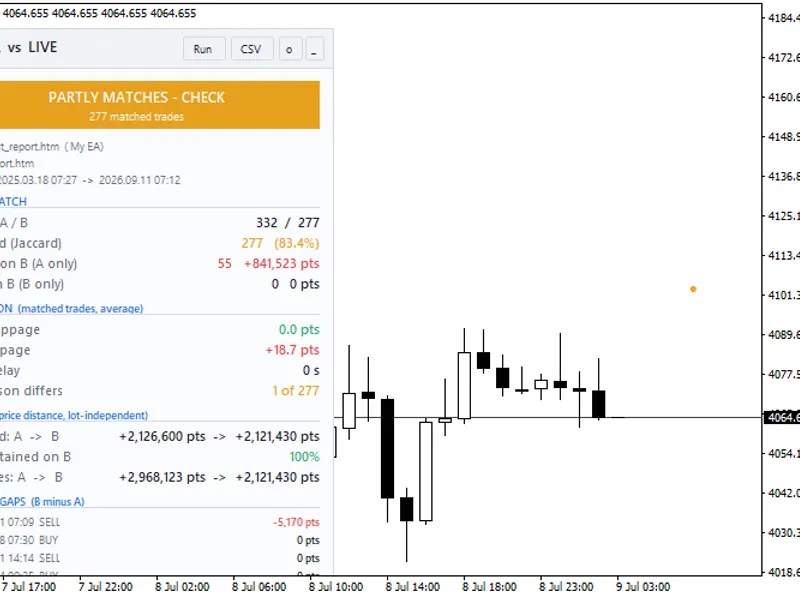
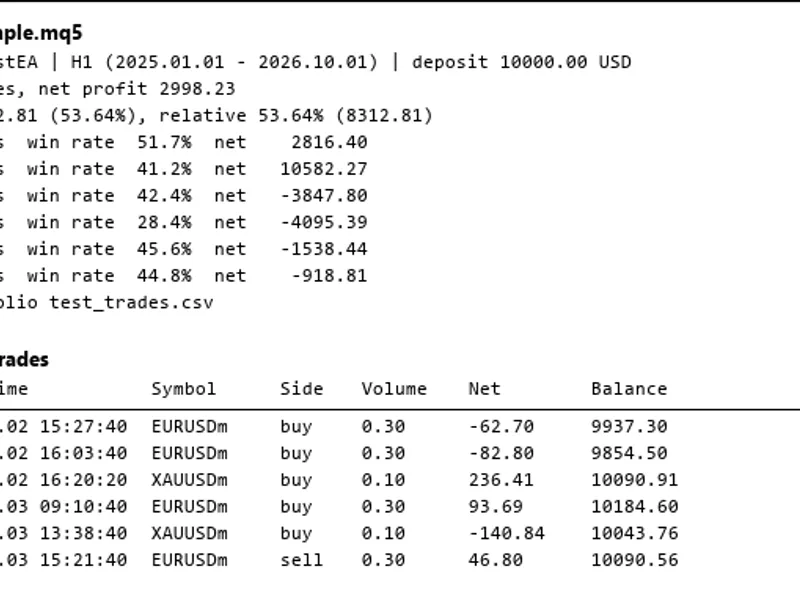
Is your backtest performing as expected in live trading? Discrepancies can arise from slippage, missed signals, restarts, manual interventions, or simply an overly optimistic backtest. TesterVsLive provides a detailed, trade-by-trade comparison to identify these differences.Also recommended: the little whore trading strategy - similar indicator with strong performance on MetaTrader 4.
TesterVsLive operates by analyzing existing reports and account history; it does not open, modify, or close any trades.
Analysis Provided:
Overall Verdict:
A clear indicator: green (live closely matches backtest), amber (partial match), or red (significant differences).
Trade Matching Details:
Comparison of trades executed on both the backtest and live accounts, including the match rate (Jaccard index).
Identification of trades present in the backtest but missed in the live account, with their associated profitability.
Listing of trades executed on the live account that were not in the backtest.
Execution Analysis:
Average slippage (entry and exit), average entry delay, and identification of trades where stop-loss or take-profit levels differed between backtest and live execution.
Performance Metrics:
Price capture comparison between backtest and live for matched trades (independent of lot size).
Percentage of backtest profitability edge retained in live trading.
Actual commission and swap costs recorded in live trading.
Significant Discrepancies:
Highlights the 5 matched trades with the largest negative deviation of live performance compared to the backtest.
Visual Chart Indicators:
Blue markers indicate backtest entry points; orange markers show live entry points. A dotted line connects matched trade pairs.
Red 'x' denotes trades missed by the live account; magenta 'x' indicates extra trades on the live account.
Each marker includes a tooltip with specific details.
CSV Export:
Full trade-by-trade data is available for export in CSV format.
Operational Modes:
Backtest Report vs. Live Account History:
The primary function for comparing EA performance.
Backtest Report vs. Another Backtest Report:
Useful for comparing different brokers, data sources, or EA versions.
Quick Setup Guide:
In the Strategy Tester, right-click on the report and select 'Save as Report'.
Place the saved .htm file into your MQL4/Files directory.
In the 'Account History' tab, ensure 'All History' is selected.
Attach TesterVsLive to the relevant symbol. Input the report file name and the EA's magic number.
Matching Methodology:
The analysis considers only closed trades within a common timeframe.
Backtest trades are processed sequentially. Each backtest trade is matched with the closest available live trade in the same direction within a specified tolerance (default: 180 seconds).
The match rate is calculated as: matched trades / (total backtest trades + total live trades - matched trades).
Slippage is calculated as the difference in price, with positive values indicating a worse execution price on the live account.
Known Limitations:
MT4 Strategy Tester reports do not include commission data (Commission = 0). Therefore, commission costs are presented based on live account data only.
Partial closure remainder tickets are excluded from the analysis.
For Expert Advisors employing grid or basket trading strategies, adjusting the match tolerance may yield more accurate results.
The verdict thresholds are practical guidelines and not strict statistical measures:
Green: Match rate ≥ 90% and Edge Retained ≥ 80%
Amber: Match rate ≥ 70% and Edge Retained ≥ 50%
This tool is freely available for use, modification, and distribution under the MIT license. It comes with no warranty and should not be considered trading advice. Copyright 2026.
You may also like: double zig zag trading strategy - excellent alternative for indicator users on MetaTrader 4.
Source Code
яю
#property copyright "RobotFX"
#property link "https://robotfx.org"
#property version   "1.01"
#property description "This code is educational. Feel free to use, modify and upgrade as you wish. Visit ROBOTFX.ORG for professional trading tools"
#property strict
#property indicator_chart_window
#property indicator_buffers 0
#property indicator_plots   0
#define PFX "TVL_"
.......
⚠ Limitations & Risk Warning
- This tool is provided for educational and testing purposes only.
- Past performance does not guarantee future results.
- Trading involves substantial risk of loss. Use on a demo account first.
- Results may vary depending on market conditions, broker, and settings.
- We recommend thorough backtesting and forward testing before using with real funds.