






XAUUSD MTF Liquidity and Order Block Reversal Strategy for MT5
Info
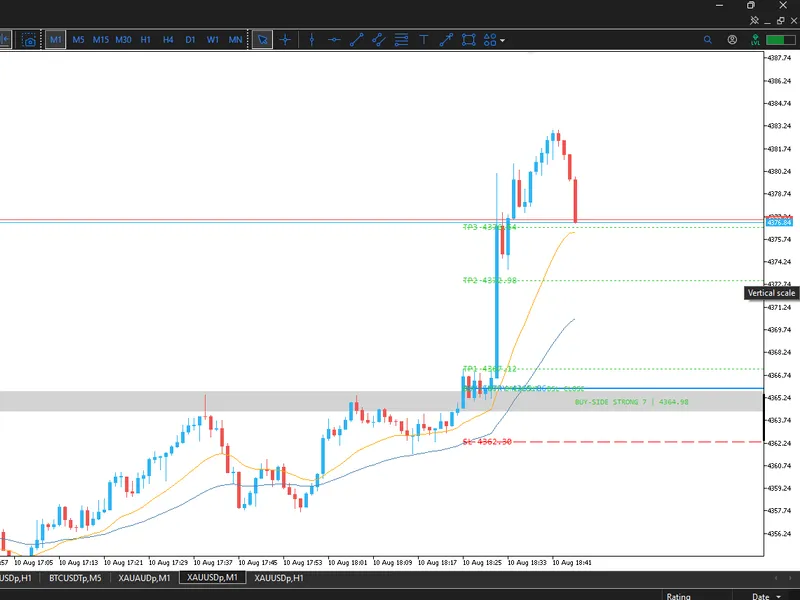
The XAUUSD MTF Liquidity and Order Block Reversal Strategy for MT5 is a Indicator for MetaTrader 5 that xauusd mtf liquidity & order block reversal strategy a professional smart money concepts (smc) based mt5 indicator designed primarily for xauusd (gold). The strategy combines multi-timeframe liquidity, order blocks, liquidity sweeps, breakout/reversal confirmation, and M1 swing-based risk management to identify high-probability BUY and SELL opportunities.
Usage
This tool is typically used for enhancing chart analysis and decision making.
Platform
This Indicator works exclusively on MetaTrader 5 (both build 600+ and newer versions).
Setup
Place the downloaded file in MQL5/Indicators folder via File ? Open Data Folder in MetaTrader 5.
How to Install and Use XAUUSD MTF Liquidity and Order Block Reversal Strategy for MT5
1. Installation: Place your file in the MQL/Indicators folder via "Open Data Folder" and restart your terminal.
2. Loading: Find the indicator in the Navigator, drag it onto your chart, and configure the input parameters in the popup window.
3. Customization: Press Ctrl+I to open the indicator list, select your tool, and click "Properties" to change colors, levels, or visual styles.
4. Updating: Replace the old file in the Indicators folder with the new version and restart the platform to apply changes.
Frequently Asked Questions
Q: Why is my indicator not showing? A: Verify the file is in the MQL/Indicators folder, or try right-clicking the "Indicators" tree in the Navigator and clicking "Refresh."
Q: Do custom indicators slow down the platform? A: Too many complex indicators can impact performance; remove unused ones via the "Indicator List" (Ctrl+I).
Q: Can I use MT4 indicators on MT5? A: No, MQL4 and MQL5 are distinct languages; ensure the indicator is compiled specifically for your platform version.
What this tool does
XAUUSD MTF Liquidity & Order Block Reversal Strategy A professional Smart Money Concepts (SMC) based MT5 indicator designed primarily for XAUUSD (Gold).
Typical Use Case
This Indicator excels in automated trading and technical analysis on MetaTrader 5.
Compatible Platform & Setup
This Indicator works on MetaTrader 5. Place the file in the MQL5/Indicators folder and restart the terminal.
Description & Settings
Related: GDS Renko Liquidity Sweep Lab: Price Action Analysis - another powerful indicator for MetaTrader 5 traders.
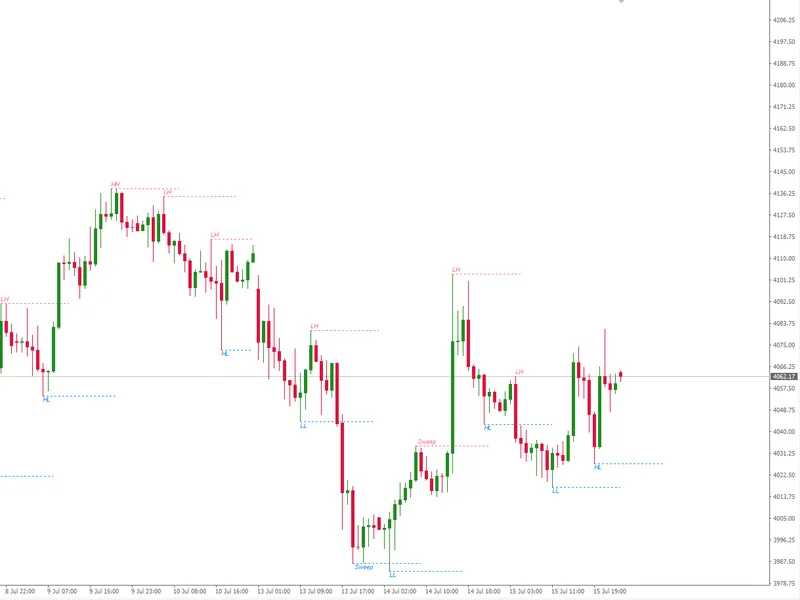
XAUUSD MTF Liquidity & Order Block Reversal Strategy A professional Smart Money Concepts (SMC) based MT5 indicator designed primarily for XAUUSD (Gold). The strategy combines multi-timeframe liquidity, order blocks, liquidity sweeps, breakout/reversal confirmation, and M1 swing-based risk management to identify high-probability BUY and SELL opportunities. Strategy Features 1. Multi-Timeframe Liquidity Detection The indicator identifies important liquidity and order-block levels from: Best Day-wise Liquidity H4 Liquidity & Order Blocks M30 Liquidity & Order Blocks M15 Liquidity & Order Blocks M5 Liquidity & Order Blocks The strongest day-wise liquidity replaces simple Previous Day High/Low logic and searches historical daily candles for significant liquidity concentrations. 2. Liquidity Confluence Liquidity levels from higher timeframes are compared with M5 levels. When multiple timeframes identify liquidity around the same price area, the level is classified as Strong Liquidity. These strong areas are displayed as BUY-side and SELL-side zones on the M5 chart. 3. Order Block Detection The indicator identifies bullish and bearish order blocks around important liquidity areas and uses multi-timeframe confluence to improve signal quality. 4. Liquidity Sweep Detection The strategy detects when price sweeps a liquidity level before looking for a reversal or breakout. Liquidity sweep levels are drawn directly on the chart for reference. 5. Candle Close Confirmation A trade signal is not confirmed simply because price touches a liquidity level. The strategy waits for the appropriate M5 candle close confirmation before generating the setup. This helps reduce false intrabar signals. 6. Reversal & Breakout Strategy The indicator supports two primary setups: Liquidity Reversal Liquidity ↓ Sweep ↓ M5 rejection ↓ Candle close confirmation ↓ BUY / SELL Liquidity Breakout Liquidity / OB ↓ Price breaks level ↓ M5 candle closes beyond level ↓ Confirmation ↓ BUY / SELL 7. M1 Swing-Based Stop Loss After a valid M5 setup is confirmed, the stop loss is calculated using the relevant M1 swing high or swing low. BUY → SL below the relevant M1 swing low SELL → SL above the relevant M1 swing high 8. Multi-Level Take Profit Each trade setup contains: Entry SL TP1 TP2 TP3 All levels are drawn directly on the chart with their corresponding prices. 9. TradingView-Style Position Tool The position tool displays a visual risk/reward area similar to TradingView: Red zone → Risk / SL Green zone → Profit / TP3 Entry line TP1 TP2 TP3 Exact price labels Risk/Reward information The position tool has a short configurable width to keep the chart clean. 10. Same-Side Trade Protection The strategy prevents repeated signals in the same direction while a trade is active. For example: BUY running: BUY #1 ↓ TP1 → Continue ↓ TP2 → Continue ↓ TP3 → Trade completed ↓ Next BUY allowed If SL is hit: BUY #1 ↓ SL HIT ↓ Next BUY allowed The same rule applies to SELL trades. 11. Opposite-Side Opportunities An opposite-direction setup can still be detected while another direction is running. For example: BUY running ↓ Valid SELL setup ↓ SELL position tool drawn The BUY position tool remains on the chart. 12. Five-Minute Recalculation The liquidity and order-block analysis is recalculated every 5 minutes. The current liquidity/OB levels are refreshed while historical position tools and trade setups remain available for analysis. 13. Clean Chart Design The indicator is designed without a dashboard so the chart remains focused on: Liquidity Order blocks Sweeps Entry SL TP1 TP2 TP3 Position tools Recommended Usage Primary instrument: XAUUSD Recommended execution timeframe: M5 Stop-loss reference: M1 swing high/low Higher-timeframe analysis: Best Day ↓ H4 ↓ M30 ↓ M15 ↓ M5 ↓ M1 execution levels The indicator is intended as a decision-support and market-structure tool, not a guarantee of profitable trades. Results should be validated with historical testing and forward testing on your broker's XAUUSD feed before using real capital in 2026.Also recommended: ICT Structure Visualizer: Liquidity, MSS, FVG, and Statistics - similar indicator with strong performance on MetaTrader 5.
You may also like: Session Sweep Boxes: Detecting Liquidity Sweeps - excellent alternative for indicator users on MetaTrader 5.
Source Code
#property strict
#property indicator_chart_window
#property indicator_plots 0
#property version   "1.00"
input ENUM_TIMEFRAMES InpExecutionTF = PERIOD_M5;
input ENUM_TIMEFRAMES InpSwingTF     = PERIOD_M1;
input int      InpLookbackPD         = 20;
input int      InpLookbackH4         = 80;
input int      InpLookbackM30        = 100;
input int      InpLookbackM15        = 120;
.......
⚠ Limitations & Risk Warning
- This tool is provided for educational and testing purposes only.
- Past performance does not guarantee future results.
- Trading involves substantial risk of loss. Use on a demo account first.
- Results may vary depending on market conditions, broker, and settings.
- We recommend thorough backtesting and forward testing before using with real funds.