



ICT Structure Visualizer: Liquidity, MSS, FVG, and Statistics
Info
The ICT Structure Visualizer: Liquidity, MSS, FVG, and Statistics is a Indicator for MetaTrader 5 that what it isa chart tool for traders who study the ict / smart money sequence and want to see, on their own symbol and timeframe, what it actually produces. It does not open trades and it does not promise a result.
Usage
This tool is typically used for enhancing chart analysis and decision making.
Platform
This Indicator works exclusively on MetaTrader 5 (both build 600+ and newer versions).
Setup
Place the downloaded file in MQL5/Indicators folder via File ? Open Data Folder in MetaTrader 5.
How to Install and Use ICT Structure Visualizer: Liquidity, MSS, FVG, and Statistics
1. Installation: Place your file in the MQL/Indicators folder via "Open Data Folder" and restart your terminal.
2. Loading: Find the indicator in the Navigator, drag it onto your chart, and configure the input parameters in the popup window.
3. Customization: Press Ctrl+I to open the indicator list, select your tool, and click "Properties" to change colors, levels, or visual styles.
4. Updating: Replace the old file in the Indicators folder with the new version and restart the platform to apply changes.
Frequently Asked Questions
Q: Why is my indicator not showing? A: Verify the file is in the MQL/Indicators folder, or try right-clicking the "Indicators" tree in the Navigator and clicking "Refresh."
Q: Do custom indicators slow down the platform? A: Too many complex indicators can impact performance; remove unused ones via the "Indicator List" (Ctrl+I).
Q: Can I use MT4 indicators on MT5? A: No, MQL4 and MQL5 are distinct languages; ensure the indicator is compiled specifically for your platform version.
What this tool does
What it isA chart tool for traders who study the ICT / Smart Money sequence and want to see, on their own symbol and timeframe, what it actually produces.
Typical Use Case
This Indicator excels in automated trading and technical analysis on MetaTrader 5.
Compatible Platform & Setup
This Indicator works on MetaTrader 5. Place the file in the MQL5/Indicators folder and restart the terminal.
Description & Settings
Related: Smart Money Concepts: Break of Structure and Change of Character Analysis - another powerful indicator for MetaTrader 5 traders.
What it isAlso recommended: Market Structure BOS and CHoCH Indicator: Swing Points, No Repaint, Alerts - similar indicator with strong performance on MetaTrader 5.
A chart tool for traders who study the ICT / Smart Money sequence and want to see, on their own symbol and timeframe, what it actually produces. It does not open trades and it does not promise a result.
What it draws
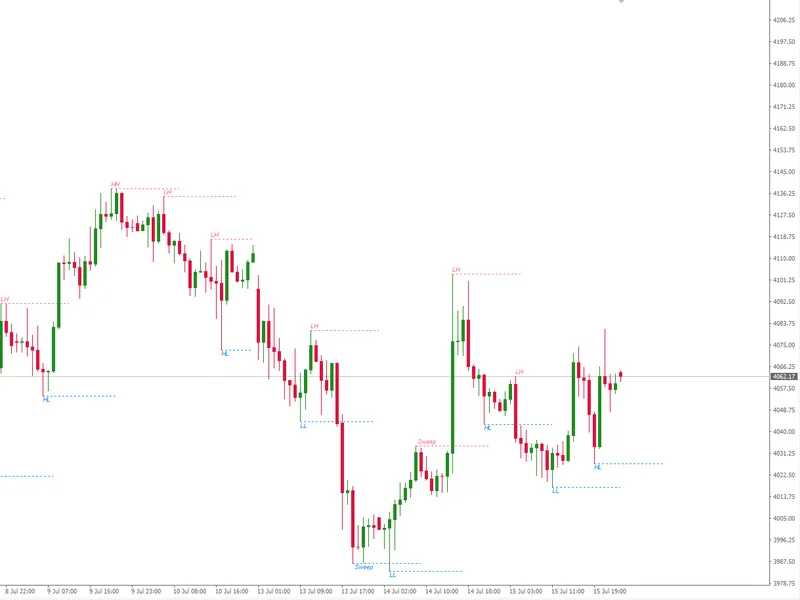
- Liquidity pools: previous day high / low and Asia session high / low
- Liquidity sweep: a pool is taken and the candle closes back inside
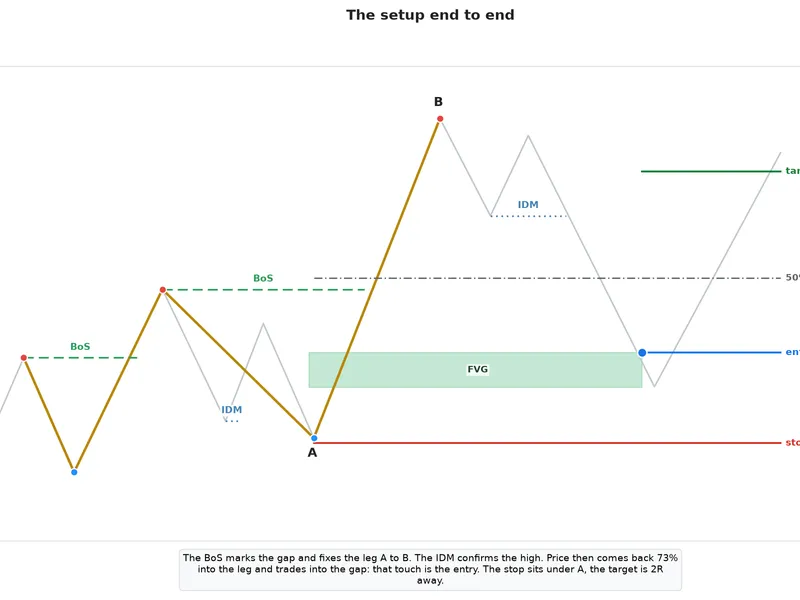
- MSS: opposite structure broken by a displacement candle (size in ATR)
- FVG left by the displacement, as a soft-tinted rectangle
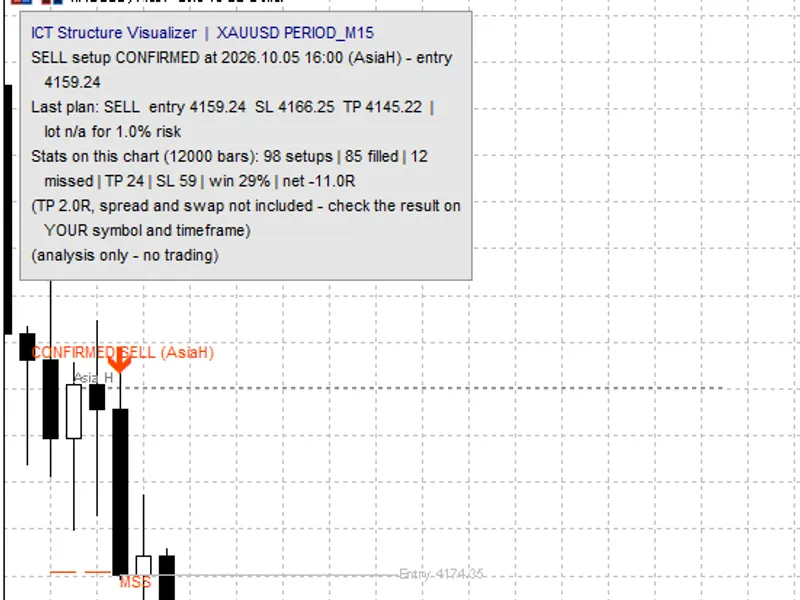
- Entry arrow with status WATCHING / CONFIRMED
No repainting
Every object is created from closed bars only and is never moved afterwards. When the chart is fully recalculated (new settings, history reload) all objects are removed and rebuilt from the same closed bars, so they come back identical. With "Log signals" enabled, every signal is written to a CSV file at the moment it appears, so you can check this yourself.
Trade plan and statistics
For every confirmed setup the indicator draws entry (middle of the FVG), stop loss (beyond the sweep extreme) and take profit (x times the risk), and shows the lot size for your risk %. Each plan is then followed bar by bar: TP, SL, or "missed" if price never reached the entry. When TP and SL are touched in the same bar it is counted as SL.
The panel shows the result of all setups on the current chart: setups, filled, missed, TP, SL, win rate and net R. Spread, commission and swap are not included.
Volume context
At every sweep the indicator shows relative volume (vs. the average of the last N bars) and tick delta, plus the previous day POC. Important: CFD brokers provide tick volume, not exchange contracts, and most do not mark ticks as buy or sell. The indicator labels this as "tick volume" / "tick delta" and never presents it as real order flow.
Export
"Write every setup + outcome" saves every setup and its result to a CSV file in MQL5/Files, so you can analyse the setups in Excel. The file is written on a normal chart; in the Strategy Tester it is not written.
Our own test – published as it is
We ran the indicator on IC Markets data, M15, with default settings except "Bars to process" = 100000:
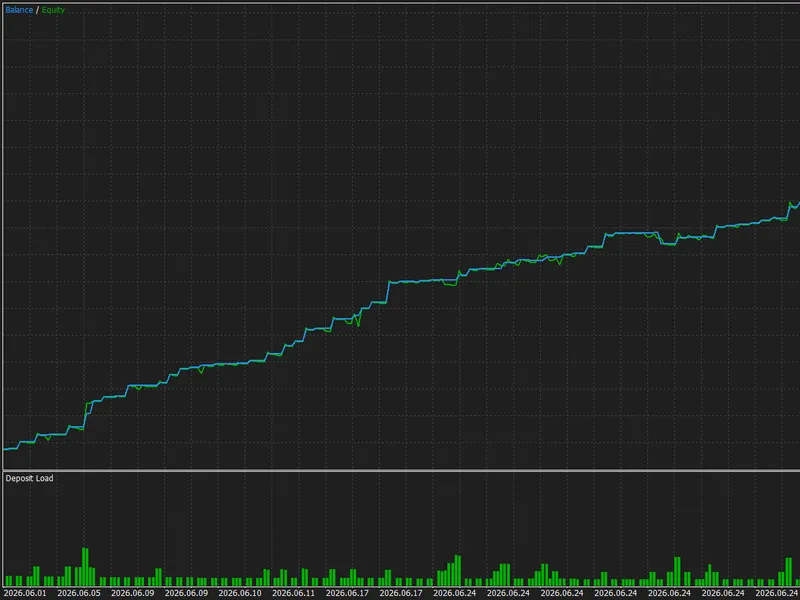
XAUUSD (Jul 2022 – Oct 2026): 1220 closed setups, win rate 33.9%, net +22R before costs, about 0R after spread + commission
EURUSD (Sep 2022 – Oct 2026): 1397 closed setups, win rate 33.7%, net +16R before costs, -75R after spread + commission
Costs: commission 7 USD per lot round trip; spread taken from the broker's bar history, where it is often recorded as 0 – so the real cost is probably higher than shown.
With TP = 2R the break-even win rate is 33.3%. On this data the sequence sweep → MSS → FVG, used mechanically, did not give an edge after costs, and the winning direction changed from year to year with the trend.
Volume filter (only tested on 6 months, April – October 2026, M15): with "minimum sweep volume" = 1.5, XAUUSD went from -15R to -7R (fewer setups, still negative) and EURUSD from +26R to +7R. No consistent improvement.
That is why this is a free study tool, not a signal product. Use it to see the structure clearly, to test your own filters and rules on your own symbol and timeframe, and to keep a record of what really happens – before you risk money on it.
Recommended use
- Chart: M5 or M15
- Set "Bars to process" higher (for example 12000 or more) for a statistic with enough setups
- Read the panel together with your costs: spread and commission matter a lot when the stop is small
Main inputs
- Liquidity pools: previous day high/low, Asia session hours (server time)
- Sweep and structure: swing length, max bars to MSS, displacement size in ATR
- Display: pool lines, FVG fill strength, labels, panel (position and font size), alerts (popup / push / e-mail)
- Volume context: relative volume, tick delta, minimum sweep volume (0 = off), POC
- Trade plan and statistics: RR, risk %, SL buffer, entry expiry, statistics on/off
- Proof / documentation: CSV export
Version history
- 1.24 – the panel is a box with its own background, readable on any colour scheme; it can be placed in any chart corner, with adjustable font size
- 1.23 – a plan is created only when the stop loss is on the correct side of the entry
- 1.22 – CSV export works on a normal chart (no Strategy Tester needed)
- 1.21 – CSV export (plus an experimental screenshot option, off by default)
- 1.20 – volume context: relative volume, tick delta, previous day POC
- 1.10 – trade plan, statistics panel, push / e-mail alerts
- 1.01 – soft FVG fill, text labels, signal log
- 1.00 – first version
You may also like: Market Structure from Pullback Swings -- BOS, CHoCH, IDM - excellent alternative for indicator users on MetaTrader 5.
Source Code
#property copyright "RobotFX"
#property link "https://robotfx.org"
#property version   "1.24"
#property description "This code is educational. Feel free to use, modify and upgrade as you wish. Visit ROBOTFX.ORG for professional trading tools"
#property indicator_chart_window
#property indicator_buffers 2
#property indicator_plots   2
#property indicator_label1  "Buy setup"
#property indicator_type1   DRAW_ARROW
#property indicator_color1  clrDodgerBlue
.......
⚠ Limitations & Risk Warning
- This tool is provided for educational and testing purposes only.
- Past performance does not guarantee future results.
- Trading involves substantial risk of loss. Use on a demo account first.
- Results may vary depending on market conditions, broker, and settings.
- We recommend thorough backtesting and forward testing before using with real funds.