



Session Sweep Boxes: Detecting Liquidity Sweeps
Info
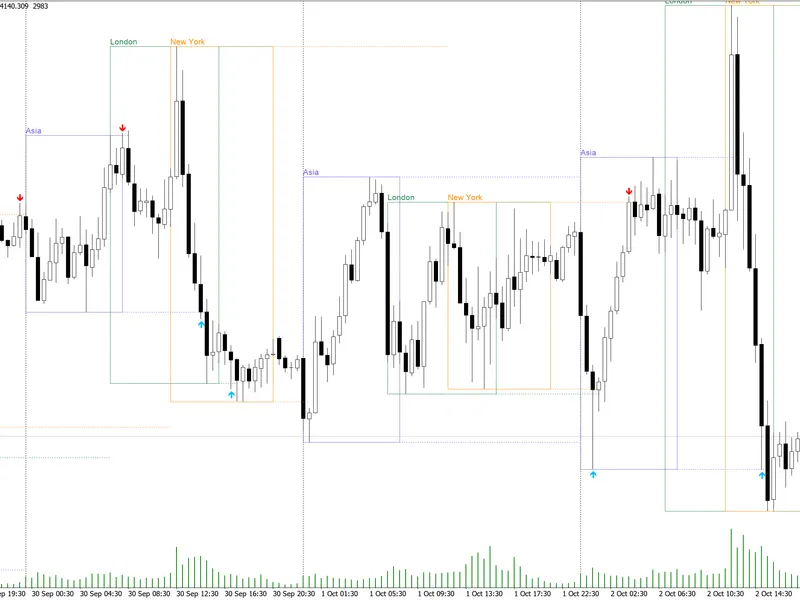
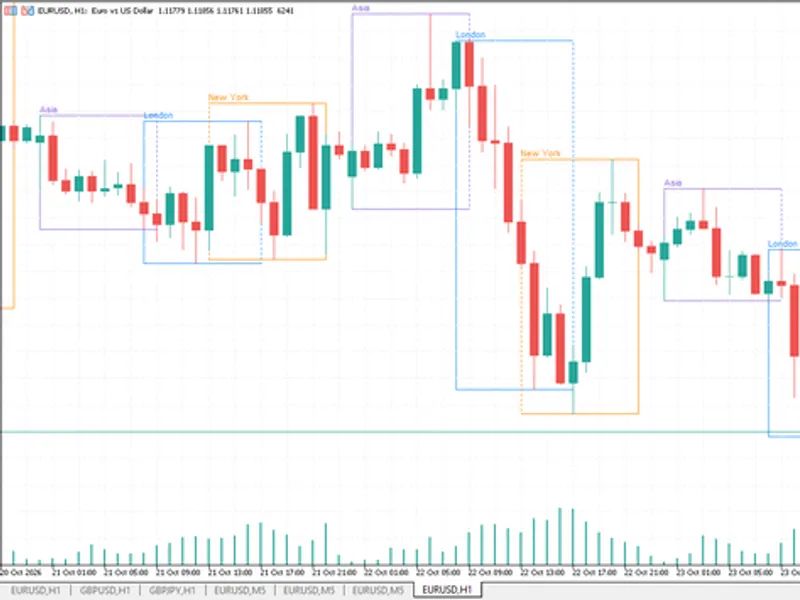
The Session Sweep Boxes: Detecting Liquidity Sweeps is a Indicator for MetaTrader 5 that session sweep boxes visually represents the asian, london, and new york trading sessions as range boxes on your chart, while also identifying liquidity sweeps within these ranges. A liquidity sweep occurs when the price moves beyond the high or low of a completed session and then closes back within that session's boundaries.
Usage
This tool is typically used for enhancing chart analysis and decision making.
Platform
This Indicator works exclusively on MetaTrader 5 (both build 600+ and newer versions).
Setup
Place the downloaded file in MQL5/Indicators folder via File ? Open Data Folder in MetaTrader 5.
How to Install and Use Session Sweep Boxes: Detecting Liquidity Sweeps
1. Installation: Place your file in the MQL/Indicators folder via "Open Data Folder" and restart your terminal.
2. Loading: Find the indicator in the Navigator, drag it onto your chart, and configure the input parameters in the popup window.
3. Customization: Press Ctrl+I to open the indicator list, select your tool, and click "Properties" to change colors, levels, or visual styles.
4. Updating: Replace the old file in the Indicators folder with the new version and restart the platform to apply changes.
Frequently Asked Questions
Q: Why is my indicator not showing? A: Verify the file is in the MQL/Indicators folder, or try right-clicking the "Indicators" tree in the Navigator and clicking "Refresh."
Q: Do custom indicators slow down the platform? A: Too many complex indicators can impact performance; remove unused ones via the "Indicator List" (Ctrl+I).
Q: Can I use MT4 indicators on MT5? A: No, MQL4 and MQL5 are distinct languages; ensure the indicator is compiled specifically for your platform version.
What this tool does
Session Sweep Boxes visually represents the Asian, London, and New York trading sessions as range boxes on your chart, while also identifying liquidity sweeps within these ranges.
Typical Use Case
This Indicator excels in automated trading and technical analysis on MetaTrader 5.
Compatible Platform & Setup
This Indicator works on MetaTrader 5. Place the file in the MQL5/Indicators folder and restart the terminal.
Description & Settings
Related: Trading Session Boxes Indicator for MT4/MT5 - another powerful indicator for MetaTrader 5 traders.
Session Sweep Boxes visually represents the Asian, London, and New York trading sessions as range boxes on your chart, while also identifying liquidity sweeps within these ranges.Also recommended: Accurate Broker Time Zones and Session Lines for MT4/MT5 - similar indicator with strong performance on MetaTrader 5.
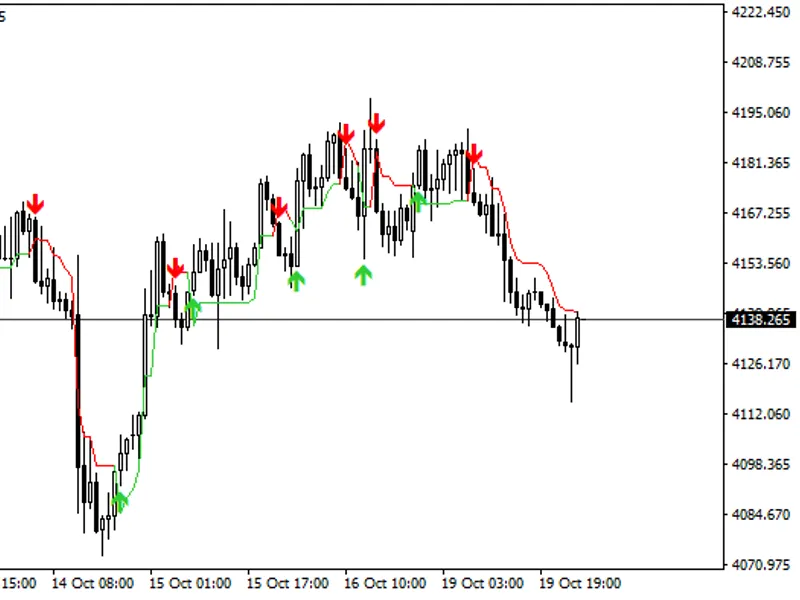
A liquidity sweep occurs when the price moves beyond the high or low of a completed session and then closes back within that session's boundaries. This pattern often signifies the triggering of stop orders placed above or below the session range, preceding a price reversal.
A red arrow positioned above a price bar indicates a sweep of a session high, serving as a bearish signal. Conversely, a blue arrow below a price bar signals a sweep of a session low, acting as a bullish indicator.
Signals are confirmed only on completed bars, ensuring they do not repaint. Once a session concludes, its high and low levels are extended as dotted lines. These lines persist until they are swept, a bar closes beyond them, or the same session commences on the following day.
The indicator utilizes GMT for session times, ensuring compatibility across all brokers. The server's GMT offset can be automatically detected or manually configured. Automatic detection requires a live connection; for the Strategy Tester, a manual offset is necessary. If session boxes appear to be shifted by an hour, possibly due to daylight saving time changes, manually set the offset to your broker's specific GMT value.
Input Parameters
Server GMT offset mode: Choose between automatically detecting the broker's GMT offset or using a manually entered value.
Manual server GMT offset: Specify your broker's server offset from GMT in hours (e.g., 2 or 3).
Days of history to draw: Determine the number of past sessions to display on the chart.
Show / start / end / color (per session): Enable individual sessions, define their start and end times in GMT (HH:MM format), and select their display color. Default settings are: Asia 00:00-08:00, London 07:00-16:00, New York 12:00-21:00.
Fill session boxes: Opt to display filled session boxes instead of just outlines.
Show session name labels: Display the name of each session above its corresponding box.
Extend completed session high/low lines: Draw dotted lines extending from the high and low points of completed sessions.
Arrow distance from bar: Adjust the spacing between the signal arrow and the price bar.
Mark only the first sweep of each level: When enabled, only the initial sweep of a session's high or low level is marked. If disabled, all subsequent sweeps of that level will be indicated.
Cancel a level after a bar closes beyond it: Treat a bar close beyond a session level as a breakout, disabling further sweep monitoring for that level.
Pop-up / push / sound alerts: Receive notifications when a sweep is confirmed on a newly closed bar.
Expert Advisor Integration
The indicator provides two buffers accessible by Expert Advisors via iCustom: buffer 0 for high sweeps and buffer 1 for low sweeps. Any value other than EMPTY_VALUE signifies that a sweep has occurred on that particular bar.
Recommended Timeframes
This indicator is most effective on H1 and lower timeframes. Timeframes such as M5 to M30 offer the clearest visualization of session ranges and sweep dynamics. This tool was last updated in 2026.
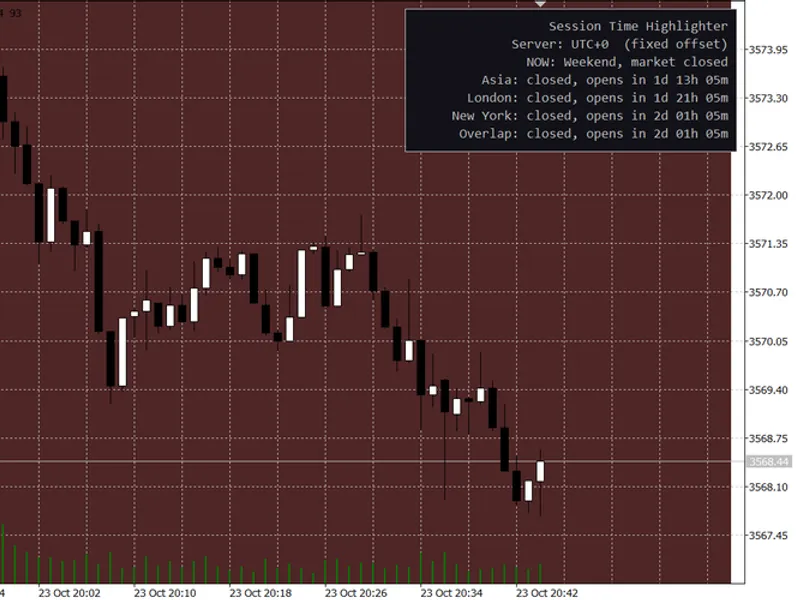
You may also like: Session Time Highlighter for MT4/MT5 - excellent alternative for indicator users on MetaTrader 5.
Source Code
#property copyright "RobotFX"
#property link "https://robotfx.org"
#property version     "1.00"
#property description "This code is educational. Feel free to use, modify and upgrade as you wish. Visit ROBOTFX.ORG for professional trading tools"
#property indicator_chart_window
#property indicator_buffers 2
#property indicator_plots   2
#property indicator_label1  "Session High Sweep"
#property indicator_type1   DRAW_ARROW
#property indicator_color1  clrRed
.......
⚠ Limitations & Risk Warning
- This tool is provided for educational and testing purposes only.
- Past performance does not guarantee future results.
- Trading involves substantial risk of loss. Use on a demo account first.
- Results may vary depending on market conditions, broker, and settings.
- We recommend thorough backtesting and forward testing before using with real funds.