



equity tester
Info
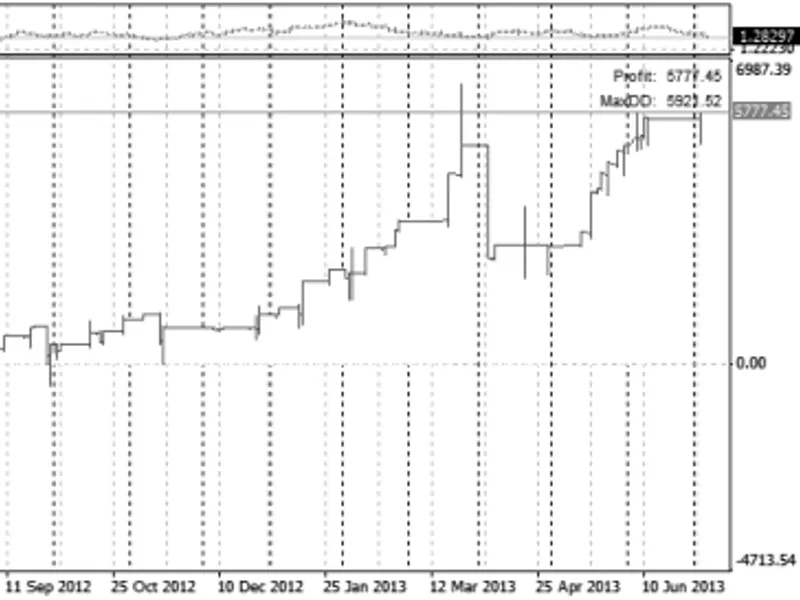
The equity tester is a Expert Advisor for MetaTrader 4 that this indicator reads information from the last backtest and plots an equity curve. it can also save values to a file.
Usage
This tool is typically used for automated trading on major forex pairs and gold.
Platform
This Expert Advisor works exclusively on MetaTrader 4 (both build 600+ and newer versions).
Setup
Place the downloaded file in MQL4/Experts folder via File ? Open Data Folder in MetaTrader 4.
How to Install and Use equity tester
1. Installation: Open the "File" menu, select "Open Data Folder," navigate to MQL/Experts, paste your file, and restart the terminal.
2. Activation: Drag the EA from the Navigator onto a chart, ensure "Allow live trading" is checked in the Common tab, and verify the AutoTrading button is green.
3. Optimization: Right-click your chart, choose "Expert List," click "Properties" to adjust inputs, and save your preferred setup as a set file for future use.
4. Maintenance: Regularly check the "Experts" tab in the terminal window to monitor trade logs and potential execution errors.
Frequently Asked Questions
Q: Why is my EA not opening trades? A: Check the "AutoTrading" button, ensure "Allow live trading" is enabled, and verify your broker allows automated trading on your account type.
Q: Can I run multiple EAs on one chart? A: No, each chart can only host one active EA; however, you can open multiple charts for different currency pairs to run several EAs.
Q: What does the "smiley face" icon mean? A: A smiley face in the top-right corner of the chart indicates the EA is successfully running; a frowny face means it is disabled.
What this tool does
this indicator reads information from the last backtest and plots an equity curve.
Typical Use Case
This Expert Advisor excels in automated trading and technical analysis on MetaTrader 4.
Compatible Platform & Setup
This Expert Advisor works on MetaTrader 4. Place the file in the MQL4/Experts folder and restart the terminal.
Description & Settings
Related: equity data exporter - another powerful expert for MetaTrader 4 traders.
this indicator reads information from the last backtest and plots an equity curve. it can also save values to a file. the indicator only recalculates when the chart is reinitialized or manually updated.Also recommended: equity recorder for synthetic instrument research - similar expert with strong performance on MetaTrader 4.
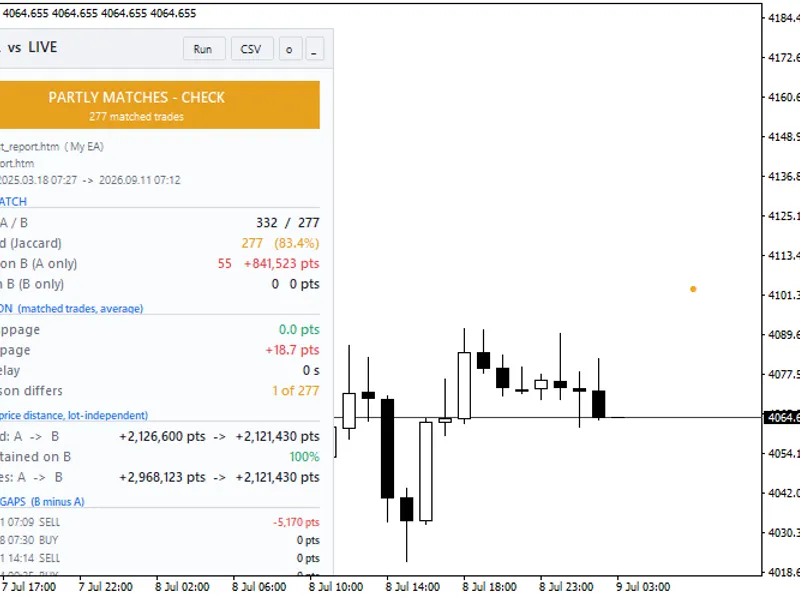
on the chart, maximum drawdowns are marked with dots. the absolute drawdown is shown in red, and the relative drawdown in orange. the top right corner displays profit and absolute drawdown values.
the indicator's settings allow for custom spread, commission, and swap values, which are then reflected in the chart. there's also an option to create an inverted chart, useful for those who believe that reversing a losing strategy might yield a winning one.
indicator parameters:
- chartmode_profit (bool): determines the chart type. if true, a profit chart is displayed; otherwise, an equity chart is shown. essentially, only the scale values change.
- spread (string): custom spread value. leave blank to use the default spread. multiple symbols can be specified with their respective spreads, e.g., eurusd 2 gbpusd 3 nzdusd 4.
- commission (string): custom commission value, similar to spread.
- swap (string): custom swap value for long positions (short positions will have the opposite sign). can be set in the same way as spread.
- reversetrades (bool): reverses trades, i.e., buy at ask becomes sell at bid, and vice versa.
- realtickvalue (bool): if true, uses real tick values for profit and swap calculations. this is especially relevant for cross-currency pairs, as the tester converts the quote currency to the deposit currency using a fixed rate from the 'market watch' (from the future), which is inaccurate. with this option enabled, the indicator calculates profits and swaps based on historical quotes (if available). this may slow down calculations slightly. it's generally insignificant but can be useful for precise results.
- addskippedticks (bool): if true, includes skipped ticks during testing. the tester may discard some ticks or bars from the equity calculation (though these ticks are still stored in the fxt file). enabling this option ensures all tester ticks are considered.
- chartcolor (color): chart color.
- textcolor (color): font color.
- savetofile (bool): save to file.
- filename (string): file name. special variables %expert%, %symbol%, and %period% can be used and will be replaced with the expert name, symbol, and period, respectively.
- filetype_binary (bool): file type. if true, the file is binary {int,double,double,double,double}; otherwise, it's text.
- filedelimiter (string): text file delimiter. if left blank, a tab character is used.
image:
You may also like: strategy tester expert advisor - excellent alternative for expert users on MetaTrader 4.
Source Code
#property copyright "robotfx"
#property link "https://robotfx.org"
#property indicator_separate_window
#property indicator_buffers 7
#import "user32.dll"
  int getparent (int hwnd);
  int getancestor (int hwnd, int gaflags);
  int getdlgitem (int hdlg, int niddlgitem);
#import "kernel32.dll"
  int lstrcpyn (string a, string b, int count);       //
.......
⚠ Limitations & Risk Warning
- This tool is provided for educational and testing purposes only.
- Past performance does not guarantee future results.
- Trading involves substantial risk of loss. Use on a demo account first.
- Results may vary depending on market conditions, broker, and settings.
- We recommend thorough backtesting and forward testing before using with real funds.