

CME Equity Index Futures Holiday Calendar and Trading Halt Automation
Info
The CME Equity Index Futures Holiday Calendar and Trading Halt Automation is a Expert Advisor for MetaTrader 5 that expert advisors that need to close positions before daily market halts or avoid trading during shortened sessions require accurate knowledge of trading schedules. Typically, CME Globex equity index futures halt trading at 17:00 New York time.
Usage
This tool is typically used for automated trading on major forex pairs and gold.
Platform
This Expert Advisor works exclusively on MetaTrader 5 (both build 600+ and newer versions).
Setup
Place the downloaded file in MQL5/Experts folder via File ? Open Data Folder in MetaTrader 5.
How to Install and Use CME Equity Index Futures Holiday Calendar and Trading Halt Automation
1. Installation: Open the "File" menu, select "Open Data Folder," navigate to MQL/Experts, paste your file, and restart the terminal.
2. Activation: Drag the EA from the Navigator onto a chart, ensure "Allow live trading" is checked in the Common tab, and verify the AutoTrading button is green.
3. Optimization: Right-click your chart, choose "Expert List," click "Properties" to adjust inputs, and save your preferred setup as a set file for future use.
4. Maintenance: Regularly check the "Experts" tab in the terminal window to monitor trade logs and potential execution errors.
Frequently Asked Questions
Q: Why is my EA not opening trades? A: Check the "AutoTrading" button, ensure "Allow live trading" is enabled, and verify your broker allows automated trading on your account type.
Q: Can I run multiple EAs on one chart? A: No, each chart can only host one active EA; however, you can open multiple charts for different currency pairs to run several EAs.
Q: What does the "smiley face" icon mean? A: A smiley face in the top-right corner of the chart indicates the EA is successfully running; a frowny face means it is disabled.
What this tool does
Expert Advisors that need to close positions before daily market halts or avoid trading during shortened sessions require accurate knowledge of trading schedules.
Typical Use Case
This Expert Advisor excels in automated trading and technical analysis on MetaTrader 5.
Compatible Platform & Setup
This Expert Advisor works on MetaTrader 5. Place the file in the MQL5/Experts folder and restart the terminal.
Description & Settings
Related: Equity Guard: Daily Loss, Max Drawdown, and Profit Target Protection for MT5 - another powerful expert for MetaTrader 5 traders.
Expert Advisors that need to close positions before daily market halts or avoid trading during shortened sessions require accurate knowledge of trading schedules. Typically, CME Globex equity index futures halt trading at 17:00 New York time. However, on approximately twelve days each year, the halt occurs earlier, or the market remains closed. A program relying on a standard 16:55 closing time might find itself holding positions through these unscheduled halts.Also recommended: USDX Trader EA: Trade the US Dollar Index with Any Broker - similar expert with strong performance on MetaTrader 5.
The CMECalendar.mqh library computes these specific trading days based on defined rules for any given year, eliminating the need for manual list updates annually.
Trading Day Schedules (New York Time)
New Year's Day, Good Friday, Christmas Day
Market Closed
Martin Luther King Jr. Day, Presidents' Day, Memorial Day, Juneteenth (starting 2026), Independence Day, Labor Day, Thanksgiving Day
Halts trading at 13:00
The day after Thanksgiving, July 3rd, December 24th (on weekdays that are not observed holidays)
Halts trading at 13:15
Good Friday, if the US jobs report is released on the same day (first Friday of April)
Halts trading at 09:15
All other weekdays
Halts trading at 17:00
Holidays falling on a Saturday are observed on the preceding Friday, and holidays falling on a Sunday are observed on the following Monday. An exception is New Year's Day, which, if it falls on a Saturday, is not moved. Easter and Good Friday are calculated using the Gregorian algorithm.
Unforeseen schedule changes, such as the 09:30 halt on the national day of mourning on January 9, 2025, are accommodated in a concise string variable, CME_SPECIAL_DAYS, which can be extended as needed.
All functions operate using New York dates and times. To integrate these into an Expert Advisor, it is necessary to convert your broker's server time to New York time using the provided offset.
Example Usage:
#include <CMECalendar.mqh>
// ny represents the current New York time (server time converted using your broker's offset)
void CheckHalt(datetime ny)
{
int halt;
ENUM_CME_DAY kind = CMEEquityDayOf(ny, halt);
if(kind == CME_DAY_CLOSED)
return; // No trading session today
MqlDateTime t;
TimeToStruct(ny, t);
int minuteNY = t.hour * 60 + t.min;
if(minuteNY >= halt - 5 && minuteNY < 18 * 60)
{
// Within 5 minutes of today's halt: close position and wait for the next session
// (Normal halt at 18:00, or Sunday 18:00 following a Friday halt)
}
}
The CMECalendarScan.mq5 script verifies the calendar against actual trading data. It analyzes M1 bars for specified symbols, identifying the last trade before 17:00 New York time for each day and comparing it against the computed calendar.
Script Inputs:
Input Parameter
Default Value
Description
InpSymbols
chart symbol
Comma-separated list of symbols to analyze. For futures, include all contracts for the relevant period.
InpFrom, InpTo
2019.06.01, 2030.01.01
Date range for the scan. Analysis is limited to the available history data.
InpGmtBase
0
Server's winter time offset from GMT (e.g., 0 for UTC, 2 for GMT+2/+3 servers).
InpDstRule
fixed all year
Specifies whether the server clock observes US or European daylight saving time rules.
InpMinBars
60
Minimum number of trade bars required for a day to be considered a valid trading session.
InpTolerance
10
Acceptable minutes without trades before the halt for thinly traded contracts.
InpPrintAll
false
If true, prints all matching holidays and early halts, not just discrepancies.
The script accounts for potential stray bars on weekends or after early halts by requiring price movement for a bar to be considered a trade and a minimum of 60 trade bars for a session. Thinly traded contracts can have brief periods without trades, so a tolerance of up to 10 minutes before the halt is permitted.
Verification Results:
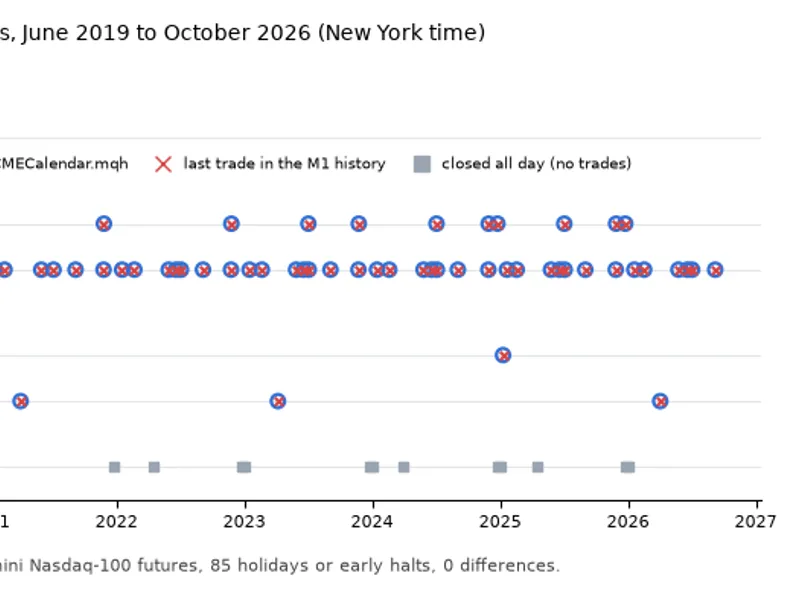
A comprehensive scan was conducted on Micro E-mini Nasdaq-100 contracts from June 2019 to October 2026, using a UTC server clock. Out of 1,911 weekdays, 85 were identified as holidays or early halts, aligning perfectly with the calendar, including special cases like Good Fridays with jobs reports and a national day of mourning. Testing with different server time offsets (UTC, GMT+2/+3) yielded identical results, confirming the accuracy across various clock configurations.
Calendar Halt and Last Trade Comparison (2019-2026)
Limitations:
The provided rules reflect the current CME holiday schedule for equity index futures. Other CME products may have different holiday trading hours.
The jobs report schedule adheres to the US Bureau of Labor Statistics calendar. Any deviations or announced changes by CME should be added to CME_SPECIAL_DAYS.
CME typically publishes its holiday schedule a few weeks before each holiday. Running the scan annually ensures awareness of any potential changes.
Both the CMECalendar.mqh library and CMECalendarScan.mq5 script are provided freely for use and modification.
You may also like: Monday Dip EA - Index Mean Reversion D1 - excellent alternative for expert users on MetaTrader 5.
Source Code
#property copyright "RobotFX"
#property version   "1.00"
#property script_show_inputs
#include <CMECalendar.mqh>
enum ENUM_DST_RULE
{
   DST_NONE = 0,
   DST_US   = 1,
   DST_EU   = 2
};
.......
⚠ Limitations & Risk Warning
- This tool is provided for educational and testing purposes only.
- Past performance does not guarantee future results.
- Trading involves substantial risk of loss. Use on a demo account first.
- Results may vary depending on market conditions, broker, and settings.
- We recommend thorough backtesting and forward testing before using with real funds.