
Fractal Dimension Trend Strength Index
Info
The Fractal Dimension Trend Strength Index is a Indicator for MetaTrader 5 that the idea behind itmost trend/range filters (adx, choppiness index, efficiency ratio) look at how far price has traveled relative to how much ground it covered. This indicator takes a different angle borrowed from fractal geometry: a price curve that moves cleanly in one direction has a low fractal dimension, close to that of a straight line (1.
Usage
This tool is typically used for trend following strategies across multiple currency pairs.
Platform
This Indicator works exclusively on MetaTrader 5 (both build 600+ and newer versions).
Setup
Place the downloaded file in MQL5/Indicators folder via File ? Open Data Folder in MetaTrader 5.
How to Install and Use Fractal Dimension Trend Strength Index
1. Installation: Place your file in the MQL/Indicators folder via "Open Data Folder" and restart your terminal.
2. Loading: Find the indicator in the Navigator, drag it onto your chart, and configure the input parameters in the popup window.
3. Customization: Press Ctrl+I to open the indicator list, select your tool, and click "Properties" to change colors, levels, or visual styles.
4. Updating: Replace the old file in the Indicators folder with the new version and restart the platform to apply changes.
Frequently Asked Questions
Q: Why is my indicator not showing? A: Verify the file is in the MQL/Indicators folder, or try right-clicking the "Indicators" tree in the Navigator and clicking "Refresh."
Q: Do custom indicators slow down the platform? A: Too many complex indicators can impact performance; remove unused ones via the "Indicator List" (Ctrl+I).
Q: Can I use MT4 indicators on MT5? A: No, MQL4 and MQL5 are distinct languages; ensure the indicator is compiled specifically for your platform version.
What this tool does
The idea behind itMost trend/range filters (ADX, choppiness index, efficiency ratio) look at how far price has traveled relative to how much ground it covered.
Typical Use Case
This Indicator excels in trend following on MetaTrader 5.
Compatible Platform & Setup
This Indicator works on MetaTrader 5. Place the file in the MQL5/Indicators folder and restart the terminal.
Description & Settings
Related: institutional fractal dimension index (regime detector) - another powerful indicator for MetaTrader 5 traders.
The idea behind itAlso recommended: fractal adaptive moving average (frama) - similar indicator with strong performance on MetaTrader 5.
Most trend/range filters (ADX, choppiness index, efficiency ratio) look at how far price has traveled relative to how much ground it covered. This indicator takes a different angle borrowed from fractal geometry: a price curve that moves cleanly in one direction has a low fractal dimension, close to that of a straight line (1.0), while a curve that whipsaws back and forth fills more "space" and has a higher fractal dimension, approaching 2.0. The calculation is a simplified version of Katz's fractal dimension method: over a rolling window of InpFractalPeriod bars, it sums the total path length walked by price (the sum of bar-to-bar absolute changes) and compares that to the maximum displacement from the window's starting price. A tight ratio between those two numbers (the price traveled far with little backtracking) produces a dimension near 1.0; a loose ratio (price traveled a long path but ended up close to where it started) pushes the dimension toward 2.0.
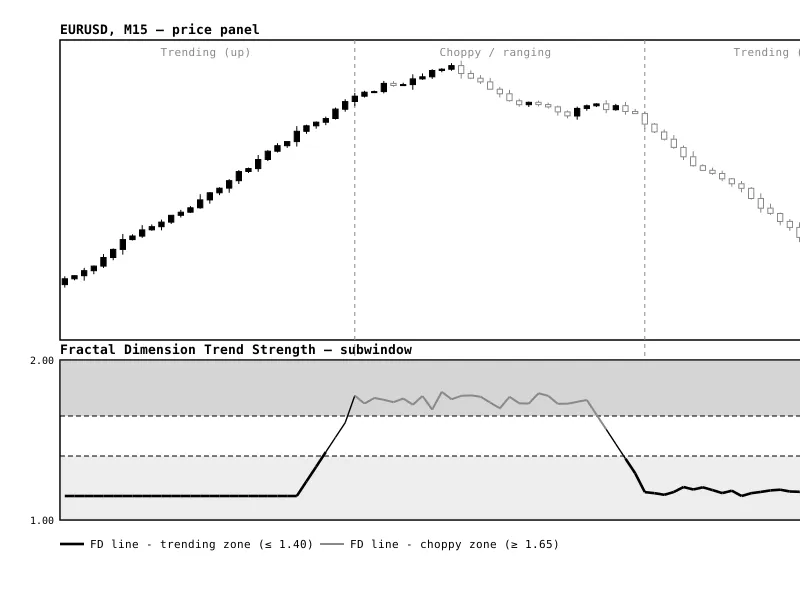
The raw per-bar value is noisy, so it is smoothed with an EMA (InpSmoothPeriod) before being plotted. The indicator is designed to sit in a separate subwindow, with the line colored against two configurable thresholds: below InpTrendThreshold the market is classified as trending, above InpChopThreshold it is classified as choppy. It works on any symbol and timeframe, but behaves most consistently on liquid instruments and intraday timeframes such as EURUSD on an M15 chart, where enough bars accumulate inside a session to make the rolling window meaningful.
How to interpret it
Fractal Dimension line
— the single plotted line, bounded between 1.0 and 2.0. Falling values mean price is moving more efficiently in one direction; rising values mean price is covering ground without making net progress.
Katz-style calculation
— for each bar, the indicator measures the total absolute price path over the lookback window and the maximum distance from the window's first price, then derives the dimension from the logarithmic ratio of those two quantities. EMA smoothing (InpSmoothPeriod) removes bar-to-bar jitter without materially lagging genuine regime changes.
Color / zone logic
— the line is drawn in one of three states: trending (value at or below InpTrendThreshold), choppy (value at or above InpChopThreshold), or neutral/transition (between the two). Crossing from the choppy zone down through the neutral band into the trending zone is the earliest signal that a directional move is taking hold.
Practical usage
— use the trending zone as a filter to enable trend-following entries (breakouts, moving-average crosses, momentum signals) and suppress them in the choppy zone, where mean-reversion or range-trading approaches tend to perform better. It is a regime filter, not a standalone entry signal, and works best paired with a directional tool that tells you which way to trade once the regime is confirmed trending.
External variables (inputs)
Input
Default
Purpose
InpFractalPeriod
30
Rolling lookback window (in bars) used to compute the Katz-style fractal dimension for each bar.
InpSmoothPeriod
5
EMA smoothing period applied to the raw fractal dimension values to reduce bar-to-bar noise.
InpTrendThreshold
1.40
Smoothed FD value at or below this level is classified as a trending market and colored accordingly.
InpChopThreshold
1.65
Smoothed FD value at or above this level is classified as a choppy/ranging market and colored accordingly.
InpAppliedPrice
PRICE_CLOSE
Price series used in the fractal dimension calculation (close, open, high, low, median, typical, or weighted).
Recommended use
Add the indicator to its own subwindow and leave the two threshold levels (1.40 / 1.65) visible as dotted reference lines so the current regime is obvious at a glance. On intraday charts, pair it with a directional trend tool (moving average slope, MACD, or a breakout system) and only act on that tool's signals while the Fractal Dimension line is in or crossing into the trending zone; stand aside or switch to a range-trading approach while it sits in the choppy zone. Because the calculation depends on the lookback window, avoid very short InpFractalPeriod values (below 15-20) on noisy symbols, since the dimension estimate becomes unstable with too few points; widen the window on faster timeframes and narrow it on slower ones to keep the signal responsive without being erratic.
Fig. 1. Price panel (top) moving through a trending-up phase, a choppy/ranging phase, and a trending-down phase, against the Fractal Dimension Trend Strength subwindow (bottom). The line runs low and dark through both trending phases, rises above the 1.65 threshold and turns light gray through the choppy phase, and the two dashed levels mark the 1.40 trend and 1.65 chop boundaries.
You may also like: fractals period indicator - excellent alternative for indicator users on MetaTrader 5.
Source Code
#property copyright "RobotFX"
#property link "https://robotfx.org"
#property version   "1.00"
#property description "This code is educational. Feel free to use, modify and upgrade as you wish. Visit ROBOTFX.ORG for professional trading tools"
#property indicator_separate_window
#property indicator_buffers 3
#property indicator_plots   1
#property indicator_minimum 1.0
#property indicator_maximum 2.0
#property indicator_level1  1.40
.......
⚠ Limitations & Risk Warning
- This tool is provided for educational and testing purposes only.
- Past performance does not guarantee future results.
- Trading involves substantial risk of loss. Use on a demo account first.
- Results may vary depending on market conditions, broker, and settings.
- We recommend thorough backtesting and forward testing before using with real funds.