
Alert Kit: Advanced Alert Management for MetaTrader
Info
The Alert Kit: Advanced Alert Management for MetaTrader is a Indicator for MetaTrader 5 that an indicator is recalculated on every tick. If it simply checks that price is above a level and shows a popup, the popup comes back on every tick for as long as the condition holds.
Usage
This tool is typically used for enhancing chart analysis and decision making.
Platform
This Indicator works exclusively on MetaTrader 5 (both build 600+ and newer versions).
Setup
Place the downloaded file in MQL5/Indicators folder via File ? Open Data Folder in MetaTrader 5.
How to Install and Use Alert Kit: Advanced Alert Management for MetaTrader
1. Installation: Place your file in the MQL/Indicators folder via "Open Data Folder" and restart your terminal.
2. Loading: Find the indicator in the Navigator, drag it onto your chart, and configure the input parameters in the popup window.
3. Customization: Press Ctrl+I to open the indicator list, select your tool, and click "Properties" to change colors, levels, or visual styles.
4. Updating: Replace the old file in the Indicators folder with the new version and restart the platform to apply changes.
Frequently Asked Questions
Q: Why is my indicator not showing? A: Verify the file is in the MQL/Indicators folder, or try right-clicking the "Indicators" tree in the Navigator and clicking "Refresh."
Q: Do custom indicators slow down the platform? A: Too many complex indicators can impact performance; remove unused ones via the "Indicator List" (Ctrl+I).
Q: Can I use MT4 indicators on MT5? A: No, MQL4 and MQL5 are distinct languages; ensure the indicator is compiled specifically for your platform version.
What this tool does
An indicator is recalculated on every tick.
Typical Use Case
This Indicator excels in automated trading and technical analysis on MetaTrader 5.
Compatible Platform & Setup
This Indicator works on MetaTrader 5. Place the file in the MQL5/Indicators folder and restart the terminal.
Description & Settings
Related: Session High Low Alerts: Track and React to Trading Session Extremes - another powerful indicator for MetaTrader 5 traders.
An indicator is recalculated on every tick. If it simply checks that price is above a level and shows a popup, the popup comes back on every tick for as long as the condition holds. That is why people complain that an indicator buries them in alerts, and why attaching one to a chart can throw dozens of windows at once for bars that closed long ago.Also recommended: Opening Gap Tracker: Daily, Weekend Gaps with Fill Tracking and Alerts - similar indicator with strong performance on MetaTrader 5.
AlertKit is a small class that decides whether an alert goes out or not. You include it, call one method when your condition is met on a closed bar, and it does the rest. It sends one alert per event and bar, keeps a separate memory for every event name so a buy alert never blocks a sell alert, and stays silent about everything older than the bar it started on. It can show a popup, send a push notification or an email, or play a sound, and it can keep a pause between alerts if you want one.
Why it keeps a log
Alerts do not fire in the strategy tester at all, so the usual way of checking an indicator does not work here, and in practice alert logic is shipped without any check. To fix that, AlertKit can write every decision it makes to a CSV file, including the alerts it refused and the reason for each. You can open that file and see exactly what happened on every bar.
What it changed on a real chart
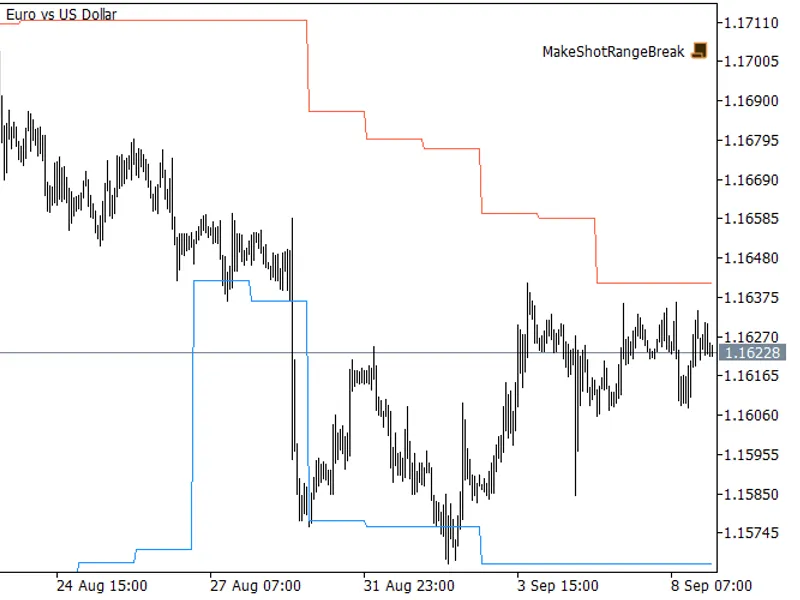
I ran the example indicator on EURUSD H1 from June to August 2026. During those three months it asked the module 6 419 times whether to alert. The module sent 27 alerts, one for each real break of the range, and held back the other 6 392 calls. Without it the same indicator would have shown about 238 popups for every break.
Those repeats come from two places. Some are ticks inside one bar, and the module removes them by itself. The rest are bars on which price just keeps sitting beyond the level. A break is a crossing, not a place, so the example indicator calls the module only on the bar where the crossing happens. You need both parts, and if you skip either one the flood comes back.
How to use it in your own indicator
Include AlertKit.mqh
extern CAlertKit alerts;
int OnInit()
{
alerts.Channels(true, false, false, false, "alert.wav");
alerts.Init(_Symbol, iTime(_Symbol, _Period, 1), "");
return(INIT_SUCCEEDED);
}
// then, on a closed bar
alerts.Fire("break_up", time[closed], "closed above the level");
The four switches in Channels turn on the popup, push, email and sound. The event name is any text you like, and each name has its own memory. If you call Fire again for the same event on the same bar, it returns false and writes the reason to the log.
Files
AlertKit.mqh is the module itself and goes to MQL5\Include. RangeBreakAlert.mq5 is a working indicator built on it. It draws the highest high and the lowest low of the last N completed days and alerts when a closed bar breaks one of them. To get the log, type a file name such as alerts.csv in the last input of the indicator, attach it to a chart or run it in the strategy tester, and open the file in the MQL5\Files folder.
The indicator only draws two lines and never places orders. Nothing here is about profit, the code is only about how alerts behave.
You may also like: Order Blocks and Breaker Blocks (SMC) - No Repaint, with Mitigation and Alerts - excellent alternative for indicator users on MetaTrader 5.
Source Code
#property copyright "RobotFX"
#property link "https://robotfx.org"
#property version   "1.01"
#property description "This code is educational. Feel free to use, modify and upgrade as you wish. Visit ROBOTFX.ORG for professional trading tools"
#property indicator_chart_window
#property indicator_buffers 2
#property indicator_plots   2
#property indicator_label1  "Upper"
#property indicator_type1   DRAW_LINE
#property indicator_color1  clrTomato
.......
⚠ Limitations & Risk Warning
- This tool is provided for educational and testing purposes only.
- Past performance does not guarantee future results.
- Trading involves substantial risk of loss. Use on a demo account first.
- Results may vary depending on market conditions, broker, and settings.
- We recommend thorough backtesting and forward testing before using with real funds.