




Order Blocks and Breaker Blocks (SMC) - No Repaint, with Mitigation and Alerts
Info
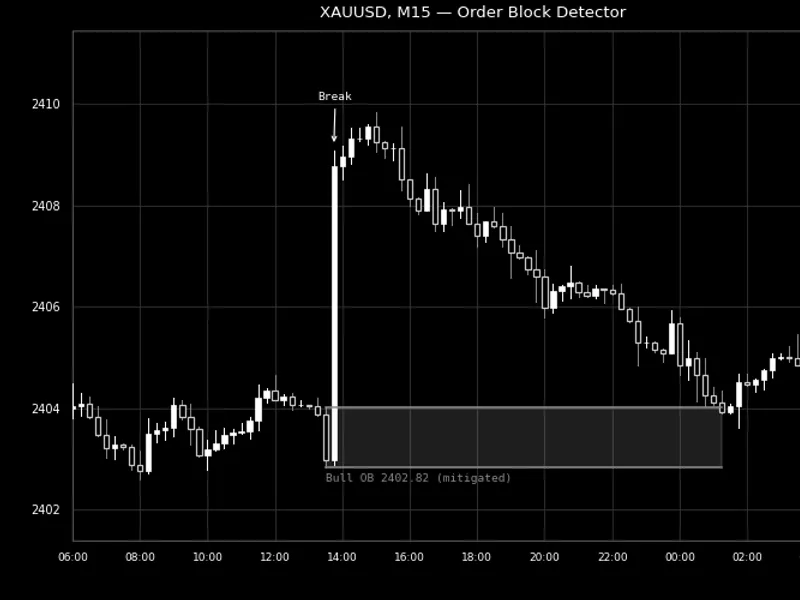
The Order Blocks and Breaker Blocks (SMC) - No Repaint, with Mitigation and Alerts is a Indicator for MetaTrader 5 that order blocks and breaker blocks explainedan order block (ob) is defined as the last candle of the opposite color immediately preceding a significant price movement that breaks market structure. Traders utilizing Smart Money Concepts (SMC) and ICT methodologies closely monitor these candles, as price often revisits them before continuing its trend.
Usage
This tool is typically used for enhancing chart analysis and decision making.
Platform
This Indicator works exclusively on MetaTrader 5 (both build 600+ and newer versions).
Setup
Place the downloaded file in MQL5/Indicators folder via File ? Open Data Folder in MetaTrader 5.
How to Install and Use Order Blocks and Breaker Blocks (SMC) - No Repaint, with Mitigation and Alerts
1. Installation: Place your file in the MQL/Indicators folder via "Open Data Folder" and restart your terminal.
2. Loading: Find the indicator in the Navigator, drag it onto your chart, and configure the input parameters in the popup window.
3. Customization: Press Ctrl+I to open the indicator list, select your tool, and click "Properties" to change colors, levels, or visual styles.
4. Updating: Replace the old file in the Indicators folder with the new version and restart the platform to apply changes.
Frequently Asked Questions
Q: Why is my indicator not showing? A: Verify the file is in the MQL/Indicators folder, or try right-clicking the "Indicators" tree in the Navigator and clicking "Refresh."
Q: Do custom indicators slow down the platform? A: Too many complex indicators can impact performance; remove unused ones via the "Indicator List" (Ctrl+I).
Q: Can I use MT4 indicators on MT5? A: No, MQL4 and MQL5 are distinct languages; ensure the indicator is compiled specifically for your platform version.
What this tool does
Order Blocks and Breaker Blocks ExplainedAn order block (OB) is defined as the last candle of the opposite color immediately preceding a significant price movement that breaks market structure.
Typical Use Case
This Indicator excels in automated trading and technical analysis on MetaTrader 5.
Compatible Platform & Setup
This Indicator works on MetaTrader 5. Place the file in the MQL5/Indicators folder and restart the terminal.
Description & Settings
Related: Price Action Volumetric Order Blocks MT5 - another powerful indicator for MetaTrader 5 traders.
Order Blocks and Breaker Blocks ExplainedAn order block (OB) is defined as the last candle of the opposite color immediately preceding a significant price movement that breaks market structure. Traders utilizing Smart Money Concepts (SMC) and ICT methodologies closely monitor these candles, as price often revisits them before continuing its trend.
Also recommended: Pending Order Inspector MT5: Pre-Trade Analysis Tool - similar indicator with strong performance on MetaTrader 5.
Bullish Order Block: A bullish order block forms when a candle closes above a preceding swing high. Within the price leg leading to this break, the final down candle at or just before the lowest point is considered the bullish order block, acting as a support zone.
Bearish Order Block: A bearish order block is identified when a candle closes below a preceding swing low. The final up candle at or just before the highest point of that leg is the bearish order block, functioning as a resistance zone.
A swing high is characterized by a high point exceeding the highs of N candles on either side, where N represents the swing strength (default is 10). A swing low is the inverse of this definition.
Indicator Features
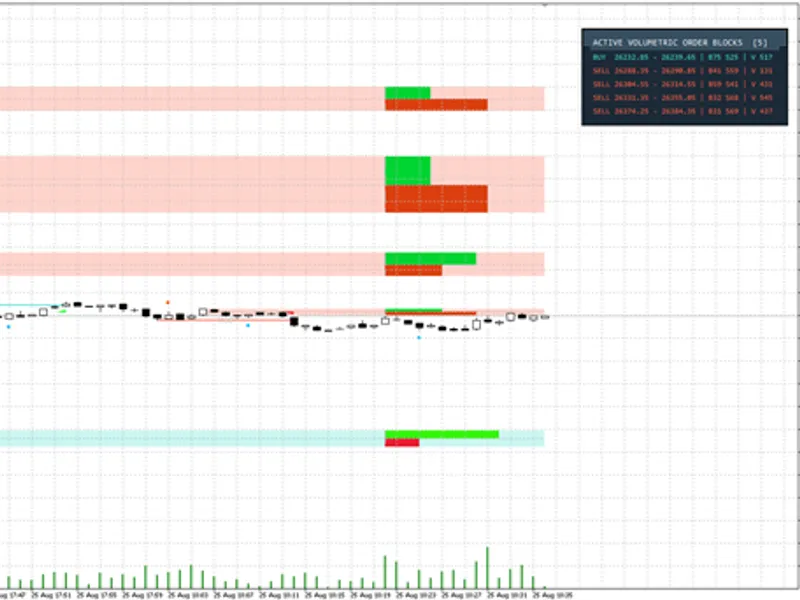
Active order blocks are displayed as colored boxes to the right of the chart: green for bullish blocks and red for bearish blocks. By default, the three most recent blocks in each direction are shown.
Breaker blocks are depicted in blue. When a candle's close extends beyond the far side of an order block, that order block is considered to have failed. A failed bullish block transforms into a resistance level (bullish breaker), and a failed bearish block becomes a support level (bearish breaker), remaining in effect until price closes back through it.
Utilized and broken blocks are shown as grey boxes that terminate at the candle that either used or broke them, providing visual reference of price reaction to these zones.
Hovering over any box reveals its specific type and price range.
Block Utilization Criteria (Configurable Input)
Touch: A block is considered utilized as soon as price re-enters its zone. This setting ensures only fresh, unmitigated blocks remain active.
Half: A block is considered utilized when price reaches the 50% mark of its range.
Break: A block remains active until a candle closes decisively through its zone.
Indicator Mechanics
Confirmation of a swing requires N closed candles on each side, and a structure break necessitates a closed candle. Consequently, an order block never appears prematurely and does not repaint.
Zone Definition: The indicator can consider either the entire candle range (high to low) or only its body (open to close) for block identification.
Optional Size Filter: An optional filter requires the move from the order block to the breaking candle's close to be at least X times the Average True Range (ATR) of the past 14 periods (0 disables this filter).
The calculation process is incremental; after the initial scan, only new candles are processed, enhancing efficiency. The indicator has been tested on M1 to D1 timeframes for EURUSD, GBPUSD, and XAUUSD.
User Adjustable Inputs
Swing strength (default 10), Block zone definition (whole candle / body), Block utilization criteria.
Minimum breaking move size multiplier based on ATR(14).
Bars to scan (default 2000).
Display settings for active blocks per direction, utilized and broken blocks (on/off and quantity), and breaker blocks (on/off and quantity).
Options to display names on active blocks and customize colors.
Alerts: Configure alerts for new block formation and when price returns to a block. Supports push notifications and email alerts.
Expert Advisor Integration (iCustom Buffers)
The indicator provides buffers for Expert Advisors (EAs) for programmatic access, without visual drawing:
Buffer 0 / 1: Top / Bottom of the newest active bullish order block.
Buffer 2 / 3: Top / Bottom of the newest active bearish order block.
EMPTY_VALUE is returned when no corresponding block is found.
Example Usage: double top[]; CopyBuffer(handle, 0, 1, 1, top); This command retrieves the top price level of the newest active bullish order block on the last closed candle.
Additional Information
Utilizing a smaller swing strength value (e.g., 5) will reveal more numerous and smaller blocks, often indicating internal market structure. Conversely, a larger value (e.g., 20) will identify fewer, larger blocks.
The indicator is compatible with any trading symbol and timeframe.
This indicator is designed solely for drawing and calculation purposes; it does not execute trades.
You may also like: Order Block Detector for MT4/MT5 - excellent alternative for indicator users on MetaTrader 5.
Source Code
#property copyright "RobotFX"
#property link "https://robotfx.org"
#property version     "1.00"
#property description "This code is educational. Feel free to use, modify and upgrade as you wish. Visit ROBOTFX.ORG for professional trading tools"
#property indicator_chart_window
#property indicator_buffers 4
#property indicator_plots   4
#property indicator_type1   DRAW_NONE
#property indicator_label1  "Bullish OB top"
#property indicator_type2   DRAW_NONE
.......
⚠ Limitations & Risk Warning
- This tool is provided for educational and testing purposes only.
- Past performance does not guarantee future results.
- Trading involves substantial risk of loss. Use on a demo account first.
- Results may vary depending on market conditions, broker, and settings.
- We recommend thorough backtesting and forward testing before using with real funds.