


Order Block Detector for MT4/MT5
Info
The Order Block Detector for MT4/MT5 is a Indicator for MetaTrader 5 that order block detectorthe idea behind itbefore a strong impulsive move, there is usually one last candle going the "wrong" way — the final sell candle before price rips higher, or the final buy candle before price collapses. That candle is read as the footprint of the order flow that fueled the move: the zone it occupies is where a large position was likely built before the breakout.
Usage
This tool is typically used for enhancing chart analysis and decision making.
Platform
This Indicator works exclusively on MetaTrader 5 (both build 600+ and newer versions).
Setup
Place the downloaded file in MQL5/Indicators folder via File ? Open Data Folder in MetaTrader 5.
How to Install and Use Order Block Detector for MT4/MT5
1. Installation: Place your file in the MQL/Indicators folder via "Open Data Folder" and restart your terminal.
2. Loading: Find the indicator in the Navigator, drag it onto your chart, and configure the input parameters in the popup window.
3. Customization: Press Ctrl+I to open the indicator list, select your tool, and click "Properties" to change colors, levels, or visual styles.
4. Updating: Replace the old file in the Indicators folder with the new version and restart the platform to apply changes.
Frequently Asked Questions
Q: Why is my indicator not showing? A: Verify the file is in the MQL/Indicators folder, or try right-clicking the "Indicators" tree in the Navigator and clicking "Refresh."
Q: Do custom indicators slow down the platform? A: Too many complex indicators can impact performance; remove unused ones via the "Indicator List" (Ctrl+I).
Q: Can I use MT4 indicators on MT5? A: No, MQL4 and MQL5 are distinct languages; ensure the indicator is compiled specifically for your platform version.
What this tool does
Order Block DetectorThe idea behind itBefore a strong impulsive move, there is usually one last candle going the "wrong" way — the final sell candle before price rips higher, or the final buy candle before price collapses.
Typical Use Case
This Indicator excels in automated trading and technical analysis on MetaTrader 5.
Compatible Platform & Setup
This Indicator works on MetaTrader 5. Place the file in the MQL5/Indicators folder and restart the terminal.
Description & Settings
Related: Order Blocks and Breaker Blocks (SMC) - No Repaint, with Mitigation and Alerts - another powerful indicator for MetaTrader 5 traders.
Order Block DetectorAlso recommended: Price Action Volumetric Order Blocks MT5 - similar indicator with strong performance on MetaTrader 5.
The idea behind it
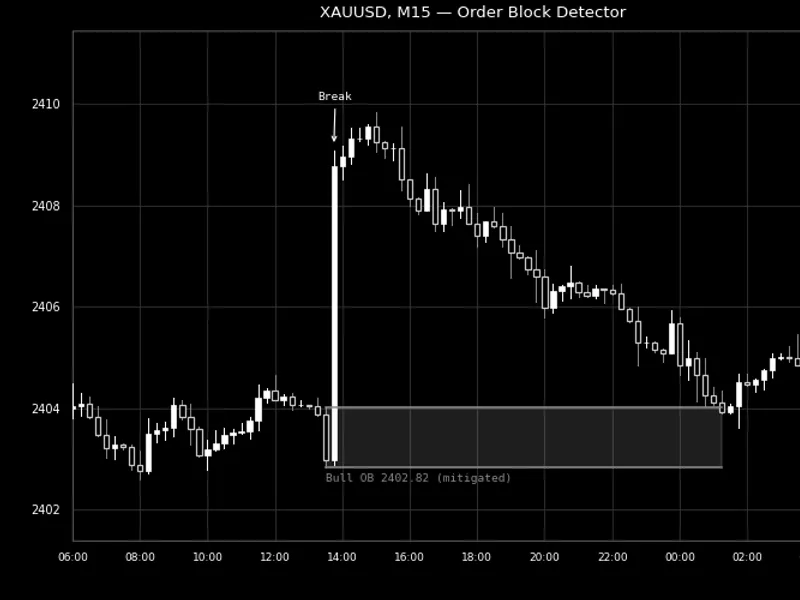
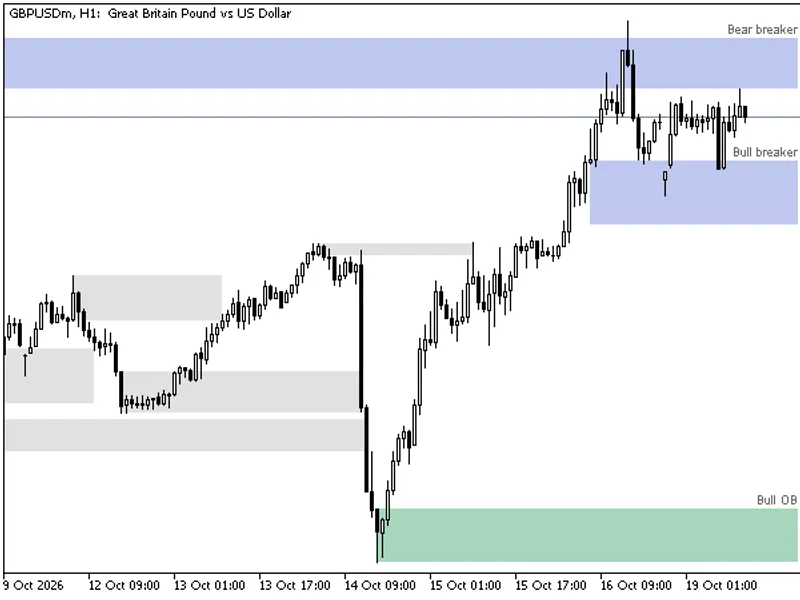
Before a strong impulsive move, there is usually one last candle going the "wrong" way — the final sell candle before price rips higher, or the final buy candle before price collapses. That candle is read as the footprint of the order flow that fueled the move: the zone it occupies is where a large position was likely built before the breakout. This indicator formalizes the detection in three steps: confirm genuine fractal swing points, watch for a close that breaks decisively past one of them with a real-bodied impulse candle (not a weak doji push), and then look backward from that break for the last opposing candle — that candle's range becomes the order block.
Like the gap and liquidity-sweep detectors in this series, a zone here is genuinely live: while unmitigated it keeps stretching forward to the current bar, and the instant price trades back into it, the box freezes exactly at that bar and (by default) turns gray — so at a glance you can tell which zones are still "untested" and which have already been revisited.
How to interpret it
Bullish order block
(default green/white) — the last down-closing candle before an impulsive close above a recent swing high. Untested supply-turned-demand; often watched as potential support on a pullback.
Bearish order block
(default red) — the last up-closing candle before an impulsive close below a recent swing low. Untested demand-turned-supply; often watched as potential resistance on a bounce.
An extending (colored) zone
— still unmitigated; its right edge keeps moving forward live with InpExtendUntilMitigated enabled (default), or stops after a fixed InpExtendBars bars if disabled.
A frozen, gray zone
— price has traded back into it — the block is mitigated, and its box stopped exactly at that bar. Set InpHideMitigatedOBs to delete mitigated zones instead of graying them out.
"Break" candle vs. the order block itself
— the order block is the opposing candle, not the impulsive one; the impulsive candle is only used to confirm the structure break and is never drawn as a zone itself.
External variables (inputs)
Input
Default
Purpose
InpSwingLookback
5
Bars required on each side of a candidate bar for it to be confirmed as a swing high/low.
InpMinBreakPoints
30
Minimum distance, in points, a close must push beyond a swing level to count as a genuine structure break.
InpMinImpulseBodyPercent
50.0
Minimum body-to-range percentage the breaking candle must have — filters out weak, wick-heavy "breaks."
InpMaxSearchBarsForOB
10
How many bars back from the break candle to search for the opposing order-block candle.
InpUseBodyOnly
false
Uses the order-block candle's body only, instead of its full high-low wick range, for the zone.
InpMinZoneSizePoints
30
Minimum zone size, in points, for a detected order block to be drawn.
InpMaxOBsToTrack
30
Maximum number of order blocks kept on the chart at once; the single oldest tracked block is dropped whenever a new one exceeds this cap.
InpExtendUntilMitigated
true
When true, an unmitigated block's zone keeps extending live to the current bar; when false, it stops after a fixed number of bars.
InpExtendBars
40
Fixed extension length (in bars), used only when InpExtendUntilMitigated is false.
InpRequireFullCloseForMitigation
false
When true, a candle must close inside the zone to mitigate it; when false, any wick touching the zone is enough.
InpHideMitigatedOBs
false
When true, a block's zone is deleted the moment it's mitigated instead of being grayed out and kept.
InpBullishOBColor / InpBearishOBColor
Lime / Red
Colors for unmitigated bullish and bearish order-block zones.
InpMitigatedColor
Dim Gray
Color a zone changes to once mitigated (when not hidden).
InpFillBox
true
Whether order-block zones are filled or drawn as outlines only.
InpBoxStyle / InpBoxWidth
Solid / 1
Border style and width of every zone.
InpShowLabels
true
Shows a text label with the zone's price next to each order block.
Recommended use
Works on any symbol and any timeframe; structure-break and order-block concepts are pure price action with no symbol-specific assumptions, though — like any fractal-pivot method — InpSwingLookback trades off level significance against detection frequency the same way it does in this series' Liquidity Sweep Detector. Structure breaks and mitigation are both evaluated only on fully closed bars by design, so a block will not appear or disappear mid-candle while the current bar's high/low/close are still changing.
InpMinImpulseBodyPercent exists specifically to avoid tagging a barely-there close as a "break" — a candle that only just pokes past a swing level with a large wick and a small body is excluded, since that is closer to noise than genuine displacement. On very long chart histories, InpMaxOBsToTrack keeps the object count bounded rather than letting every historical order block accumulate indefinitely. This indicator only reads price data and never places, modifies, or closes any order, so it is safe to run on any account type.
All chart objects are created under a single internal name prefix and are fully removed via ObjectsDeleteAll() in OnDeinit() when the indicator is detached, so it leaves nothing behind on the chart.
Fig. 1. A bullish order block confirmed by the impulsive break candle, later mitigated, on XAUUSD M15. Rendered in black and white per the Code Base image guidelines (750x500 px) from 2026.
You may also like: Pending Order Inspector MT5: Pre-Trade Analysis Tool - excellent alternative for indicator users on MetaTrader 5.
Source Code
#property copyright "RobotFX"
#property link "https://robotfx.org"
#property version   "1.00"
#property description "This code is educational. Feel free to use, modify and upgrade as you wish. Visit ROBOTFX.ORG for professional trading tools"
#property indicator_chart_window
#property indicator_buffers 0
#property indicator_plots   0
#property strict
input group "=== Structure Detection ==="
input int    InpSwingLookback          = 5;
.......
⚠ Limitations & Risk Warning
- This tool is provided for educational and testing purposes only.
- Past performance does not guarantee future results.
- Trading involves substantial risk of loss. Use on a demo account first.
- Results may vary depending on market conditions, broker, and settings.
- We recommend thorough backtesting and forward testing before using with real funds.