


Session High Low Alerts: Track and React to Trading Session Extremes
Info
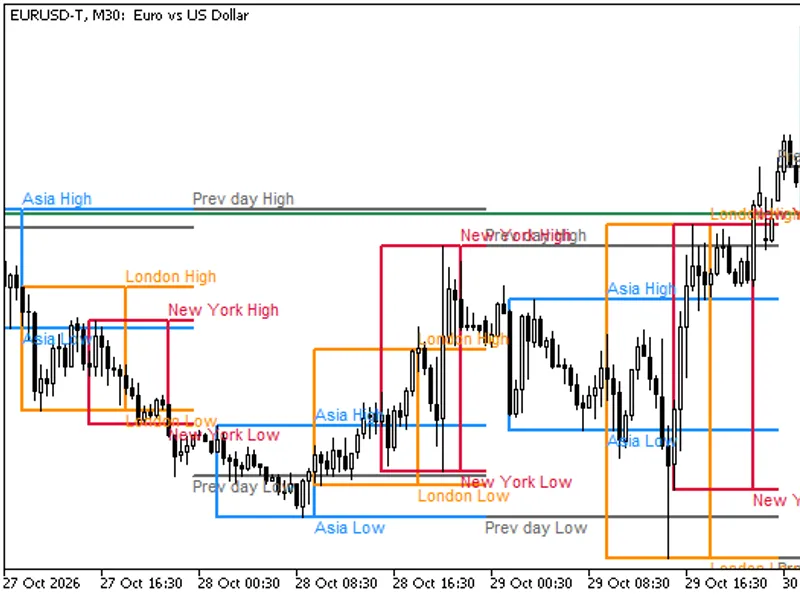
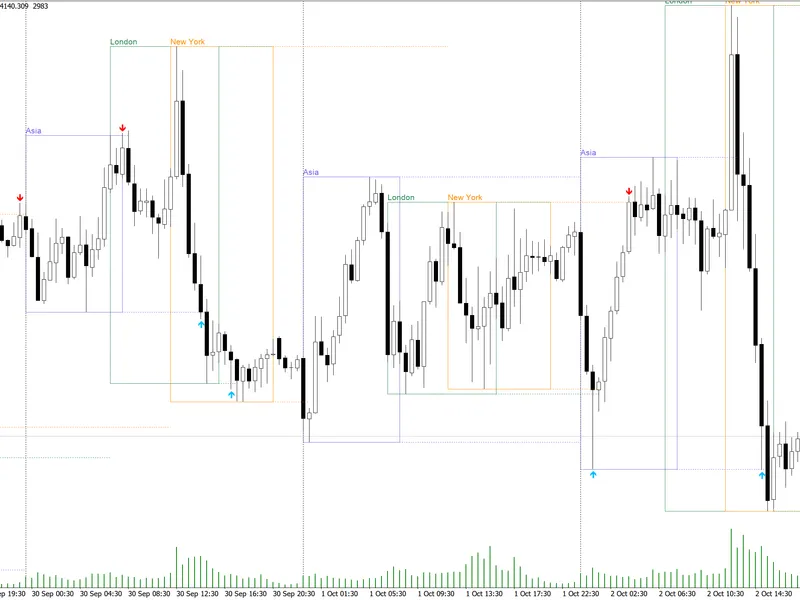
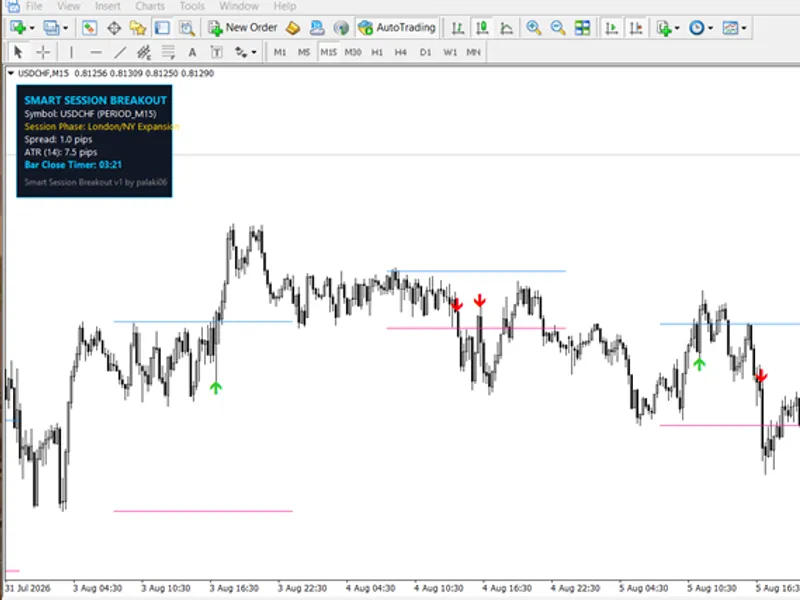
The Session High Low Alerts: Track and React to Trading Session Extremes is a Indicator for MetaTrader 5 that what it doesthis indicator tracks the highest high and lowest low within each enabled trading session (asia, london, new york) from the session's start to its end. During the session, the indicator dynamically adjusts the high and low range.
Usage
This tool is typically used for enhancing chart analysis and decision making.
Platform
This Indicator works exclusively on MetaTrader 5 (both build 600+ and newer versions).
Setup
Place the downloaded file in MQL5/Indicators folder via File ? Open Data Folder in MetaTrader 5.
How to Install and Use Session High Low Alerts: Track and React to Trading Session Extremes
1. Installation: Place your file in the MQL/Indicators folder via "Open Data Folder" and restart your terminal.
2. Loading: Find the indicator in the Navigator, drag it onto your chart, and configure the input parameters in the popup window.
3. Customization: Press Ctrl+I to open the indicator list, select your tool, and click "Properties" to change colors, levels, or visual styles.
4. Updating: Replace the old file in the Indicators folder with the new version and restart the platform to apply changes.
Frequently Asked Questions
Q: Why is my indicator not showing? A: Verify the file is in the MQL/Indicators folder, or try right-clicking the "Indicators" tree in the Navigator and clicking "Refresh."
Q: Do custom indicators slow down the platform? A: Too many complex indicators can impact performance; remove unused ones via the "Indicator List" (Ctrl+I).
Q: Can I use MT4 indicators on MT5? A: No, MQL4 and MQL5 are distinct languages; ensure the indicator is compiled specifically for your platform version.
What this tool does
What it doesThis indicator tracks the highest high and lowest low within each enabled trading session (Asia, London, New York) from the session's start to its end.
Typical Use Case
This Indicator excels in automated trading and technical analysis on MetaTrader 5.
Compatible Platform & Setup
This Indicator works on MetaTrader 5. Place the file in the MQL5/Indicators folder and restart the terminal.
Description & Settings
Related: Session Range Breakout Indicator for MT5 - another powerful indicator for MetaTrader 5 traders.
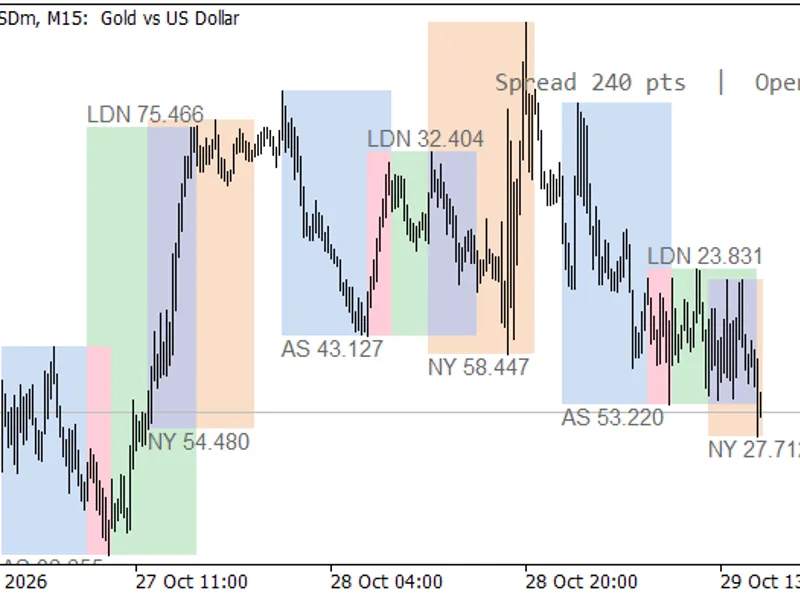
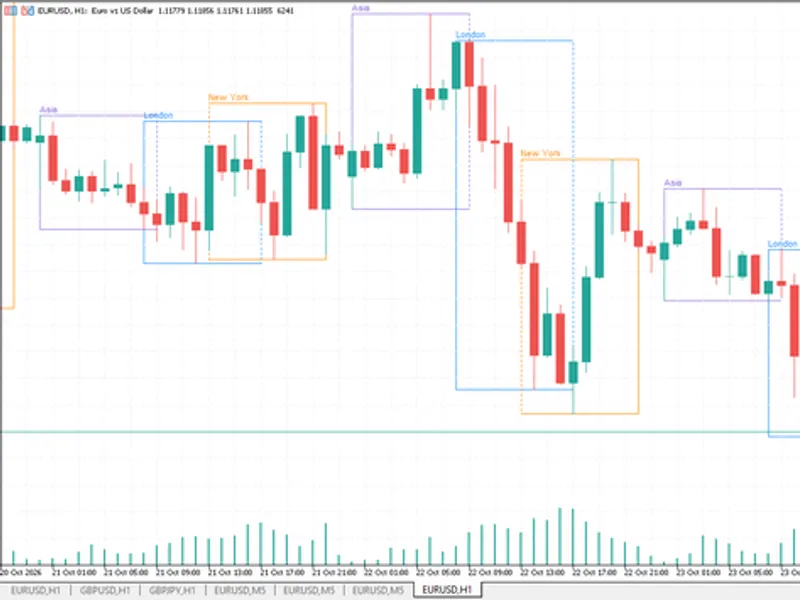
What it doesThis indicator tracks the highest high and lowest low within each enabled trading session (Asia, London, New York) from the session's start to its end. During the session, the indicator dynamically adjusts the high and low range. Once a session concludes, these levels are fixed and extended to the end of the server day.
Also recommended: Session Range and Spread Indicator - similar indicator with strong performance on MetaTrader 5.
Key Features:
- Three customizable sessions: Asia, London, and New York.
- Each session can be individually enabled or disabled, with customizable colors and start/end times in HH:MM format.
- Supports sessions that span across midnight.
- Session hours are entered in GMT and can be adjusted by a server time offset (Server time = GMT + N hours). Set the offset to 0 to use server time directly.
- Drawing options: display sessions as boxes with lines extending to the end of the day, or as lines only. Optional fill colors and text labels are available.
- Objects are drawn for a specified number of recent days (default is 10).
- Optional display of previous day and previous week high/low levels (based on server days, with weeks starting on Monday).
Alerts (No Repainting)
Receive alerts when a closed bar's close price is above a session's high ("broken up") or below a session's low ("broken down"), but only after the respective session has concluded. Alerts are triggered only on closed bars, ensuring stability (an alert will not appear and then disappear). One alert is generated per level per day. Alerts are not triggered for historical data when the indicator is attached or reloaded.
Alert Channels:
- Popup alerts within the terminal.
- Push notifications to your mobile device.
- Sound alerts with customizable sound files.
- Alerts for previous day/week levels are available if enabled.
Expert Advisor (EA) Integration via iCustom Buffers
Buffer Mapping:
- Buffer 0: Asia high
- Buffer 1: Asia low
- Buffer 2: London high
- Buffer 3: London low
- Buffer 4: New York high
- Buffer 5: New York low
- Buffer 6: Previous day high
- Buffer 7: Previous day low
- Buffer 8: Previous week high
- Buffer 9: Previous week low
Buffer Behavior:
Session buffers (0-5) are set to EMPTY_VALUE while the session is active or before it begins. From the first bar that opens at or after the session end time until the end of the server day, these buffers hold the session's high/low values. Reading shift 1 provides the level valid for the last closed bar. Buffers 6-9 hold the previous day/week extremes during the current day/week. All buffers are populated even if their corresponding visual display is turned off. Plots are set to DRAW_NONE, meaning buffers do not draw on the chart but their values are accessible in the Data Window.
Example EA Code for Reading London High:
int h = iCustom(_Symbol, PERIOD_M15, "SessionHighLow");
double v[1];
if(CopyBuffer(h, 2, 1, 1, v) == 1 && v[0] != EMPTY_VALUE)
Print("London high: ", v[0]);
Passing only the indicator name to iCustom uses default input settings.
Input Parameters
- Server Time Offset: Hours to add to GMT to get server time (default is 2).
- Session Settings (for each session): Enable/Disable, Start Time (GMT), End Time (GMT), Color.
- Defaults: Asia 00:00-08:00, London 08:00-16:30, New York 13:30-20:00.
- Previous Day/Week: Show/Hide, Colors.
- Visual Style: Style (box + lines / lines only), Fill, Labels, Number of days to draw, Line width.
- Alerts: Enable/Disable Popup, Push, Sound notifications. Specify sound file name. Option to enable alerts for previous day/week levels.
Notes
- Timeframes above H1 are not supported and will generate an error message in the Experts tab.
- A bar is considered part of a session if its open time falls within the session's defined hours.
- The server offset is user-defined. If your broker adjusts their offset due to daylight saving time, you must manually update the input setting or the session hours accordingly. Historical bars are not automatically adjusted.
- Day and week calculations are based on the broker's server time.
- This indicator is a tool for marking levels and reporting past breaks; it does not constitute financial advice.
Testing Verification (September 2026)
The indicator was rigorously tested in the Strategy Tester using EURUSD on M15 timeframe with September 2026 broker data. Comparisons were made against independent calculations from raw tick data. Results confirmed:
- Exact matches for session levels and previous day/week high/low on every compared bar.
- Live buffer values on closed bars were identical to final values, confirming no repainting.
- Session break alerts generated by the indicator precisely matched expectations derived from raw data.
You may also like: Trading Session Boxes Indicator for MT4/MT5 - excellent alternative for indicator users on MetaTrader 5.
Source Code
#property copyright "RobotFX"
#property version   "1.00"
#property description "This code is educational. Feel free to use, modify and upgrade as you wish. Visit ROBOTFX.ORG for professional trading tools"
#property indicator_chart_window
#property indicator_buffers 10
#property indicator_plots   10
#property indicator_label1  "Asia High"
#property indicator_label2  "Asia Low"
#property indicator_label3  "London High"
#property indicator_label4  "London Low"
.......
⚠ Limitations & Risk Warning
- This tool is provided for educational and testing purposes only.
- Past performance does not guarantee future results.
- Trading involves substantial risk of loss. Use on a demo account first.
- Results may vary depending on market conditions, broker, and settings.
- We recommend thorough backtesting and forward testing before using with real funds.