Download ALL MT5 experts (1748)

Similar MetaTrader Tools








Bot Watchdog: Mobile Alerts for EA Malfunctions
Info
The Bot Watchdog: Mobile Alerts for EA Malfunctions is a Expert Advisor for MetaTrader 5 that automated trading systems can fail silently. Common issues include PC sleep mode, terminal connection loss, profile changes disabling algo trading, or an Expert Advisor (EA) being removed from its chart.
Usage
This tool is typically used for automated trading on major forex pairs and gold.
Platform
This Expert Advisor works exclusively on MetaTrader 5 (both build 600+ and newer versions).
Setup
Place the downloaded file in MQL5/Experts folder via File ? Open Data Folder in MetaTrader 5.
How to Install and Use Bot Watchdog: Mobile Alerts for EA Malfunctions
1. Installation: Open the "File" menu, select "Open Data Folder," navigate to MQL/Experts, paste your file, and restart the terminal.
2. Activation: Drag the EA from the Navigator onto a chart, ensure "Allow live trading" is checked in the Common tab, and verify the AutoTrading button is green.
3. Optimization: Right-click your chart, choose "Expert List," click "Properties" to adjust inputs, and save your preferred setup as a set file for future use.
4. Maintenance: Regularly check the "Experts" tab in the terminal window to monitor trade logs and potential execution errors.
Frequently Asked Questions
Q: Why is my EA not opening trades? A: Check the "AutoTrading" button, ensure "Allow live trading" is enabled, and verify your broker allows automated trading on your account type.
Q: Can I run multiple EAs on one chart? A: No, each chart can only host one active EA; however, you can open multiple charts for different currency pairs to run several EAs.
Q: What does the "smiley face" icon mean? A: A smiley face in the top-right corner of the chart indicates the EA is successfully running; a frowny face means it is disabled.
What this tool does
Automated trading systems can fail silently.
Typical Use Case
This Expert Advisor excels in automated trading and technical analysis on MetaTrader 5.
Compatible Platform & Setup
This Expert Advisor works on MetaTrader 5. Place the file in the MQL5/Experts folder and restart the terminal.
Description & Settings
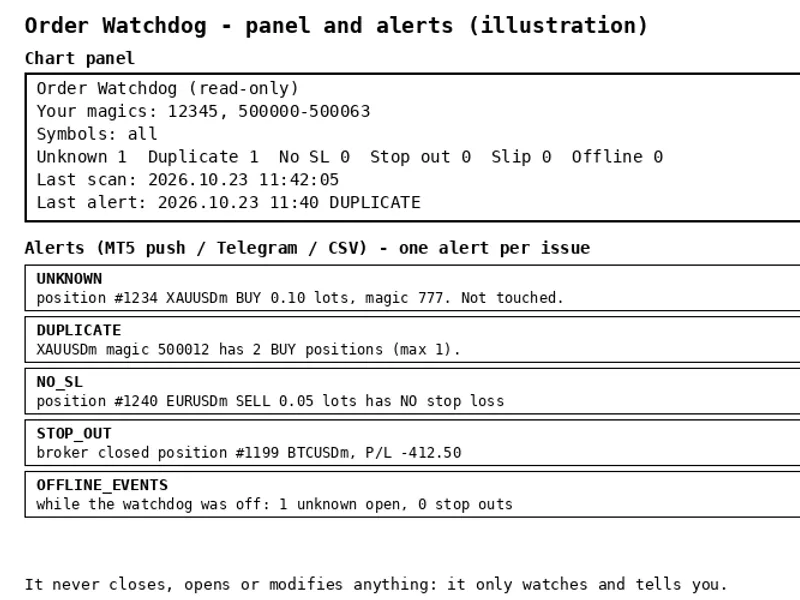
Related: Order Watchdog: Account Anomaly Alerts for MT5 - another powerful expert for MetaTrader 5 traders.
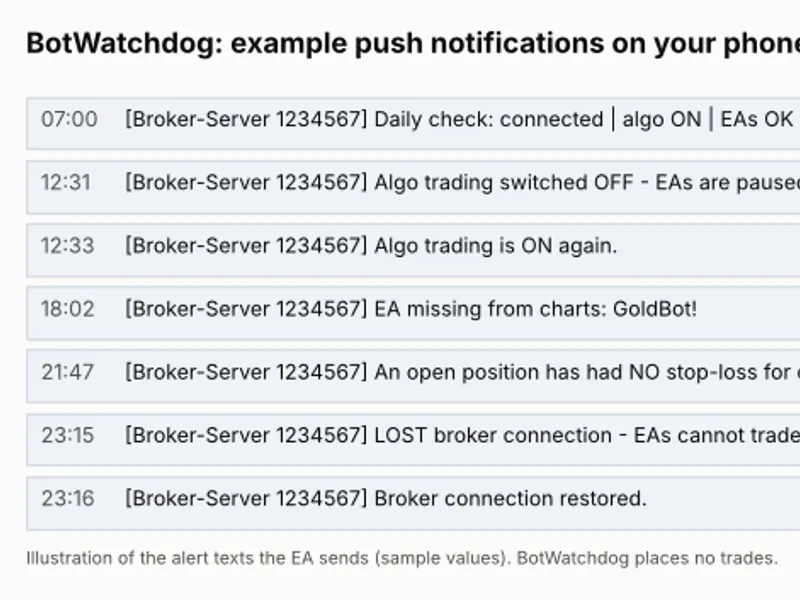
Automated trading systems can fail silently. Common issues include PC sleep mode, terminal connection loss, profile changes disabling algo trading, or an Expert Advisor (EA) being removed from its chart. Bot Watchdog monitors for these events and sends a push notification to your phone. This tool does not execute trades.Also recommended: Decision Watchdog: Safeguarding Against Stale Trading Decisions - similar expert with strong performance on MetaTrader 5.
Alerts Provided:
- Broker connection lost / restored
- Algo trading switched off / on
- A specified EA is not present on any chart (supports a comma-separated list of EA names)
- Terminal is logged into a different trading account
- An open position has lacked a stop-loss for a defined number of minutes
- Equity drops below a set percentage of the daily starting balance
- Margin level falls below a specified percentage
- Daily confirmation signal at a set hour: failure to receive this indicates the PC or terminal is unresponsive
- A final alert if Bot Watchdog itself is disabled or removed
Setup Instructions:
1. Navigate to Tools > Options > Notifications in your MetaTrader terminal.
2. Enable push notifications and input the MetaQuotes ID found in your MetaTrader mobile application.
3. Attach the Bot Watchdog indicator to any single chart within the terminal where your EAs are running.
Configuration Inputs:
WatchBots, ExpectedLogin, HeartbeatHour, CheckSeconds, NoStopMinutes, DailyLossPct, MinMarginLevel, AlsoPopupAlert.
You may also like: EXP Color Bulls Gap Expert Advisor - excellent alternative for expert users on MetaTrader 5.
Source Code
#property copyright "RobotFX"
#property link "https://robotfx.org"
#property version   "1.10"
#property description "This code is educational. Feel free to use, modify and upgrade as you wish. Visit ROBOTFX.ORG for professional trading tools"
input string WatchBots       = "";
input long   ExpectedLogin   = 0;
input int    HeartbeatHour   = 7;
input int    CheckSeconds    = 60;
input int    NoStopMinutes   = 5;
input double DailyLossPct    = 4.0;
.......
⚠ Limitations & Risk Warning
- This tool is provided for educational and testing purposes only.
- Past performance does not guarantee future results.
- Trading involves substantial risk of loss. Use on a demo account first.
- Results may vary depending on market conditions, broker, and settings.
- We recommend thorough backtesting and forward testing before using with real funds.