



Account Guard: EA Account Locking for MT5
Info
The Account Guard: EA Account Locking for MT5 is a Expert Advisor for MetaTrader 5 that account guard is a single-header utility for mt5 expert advisors that restricts ea usage to specific licensed account numbers. It includes optional allowances for demo accounts, an expiry date, and a Strategy Tester bypass, enabling continued backtesting.
Usage
This tool is typically used for automated trading on major forex pairs and gold.
Platform
This Expert Advisor works exclusively on MetaTrader 5 (both build 600+ and newer versions).
Setup
Place the downloaded file in MQL5/Experts folder via File ? Open Data Folder in MetaTrader 5.
How to Install and Use Account Guard: EA Account Locking for MT5
1. Installation: Open the "File" menu, select "Open Data Folder," navigate to MQL/Experts, paste your file, and restart the terminal.
2. Activation: Drag the EA from the Navigator onto a chart, ensure "Allow live trading" is checked in the Common tab, and verify the AutoTrading button is green.
3. Optimization: Right-click your chart, choose "Expert List," click "Properties" to adjust inputs, and save your preferred setup as a set file for future use.
4. Maintenance: Regularly check the "Experts" tab in the terminal window to monitor trade logs and potential execution errors.
Frequently Asked Questions
Q: Why is my EA not opening trades? A: Check the "AutoTrading" button, ensure "Allow live trading" is enabled, and verify your broker allows automated trading on your account type.
Q: Can I run multiple EAs on one chart? A: No, each chart can only host one active EA; however, you can open multiple charts for different currency pairs to run several EAs.
Q: What does the "smiley face" icon mean? A: A smiley face in the top-right corner of the chart indicates the EA is successfully running; a frowny face means it is disabled.
What this tool does
Account Guard is a single-header utility for MT5 Expert Advisors that restricts EA usage to specific licensed account numbers.
Typical Use Case
This Expert Advisor excels in automated trading and technical analysis on MetaTrader 5.
Compatible Platform & Setup
This Expert Advisor works on MetaTrader 5. Place the file in the MQL5/Experts folder and restart the terminal.
Description & Settings
Related: Order Watchdog: Account Anomaly Alerts for MT5 - another powerful expert for MetaTrader 5 traders.
Account Guard is a single-header utility for MT5 Expert Advisors that restricts EA usage to specific licensed account numbers.Also recommended: Prop Guard Lite: Daily and Max Loss Protection for Prop Firm Accounts - similar expert with strong performance on MetaTrader 5.
It includes optional allowances for demo accounts, an expiry date, and a Strategy Tester bypass, enabling continued backtesting.
The license is integrated directly into the compiled .ex5 file using #define statements, preventing end-users from altering it via the Inputs tab.
Usage:
Place the following #define statements before the #include directive:
#define AG_ALLOWED_LOGINS "12345678, Broker-Real8:5012345678"
#define AG_ALLOW_DEMO true // Allows any demo account to use the EA
#define AG_EXPIRY D'2026.12.31 23:59' // Set to 0 for no expiry
#include "AccountGuard.mqh"
Call AG_Init() once in OnInit().
In OnTick() or other relevant functions, use the AG_Allowed() function before opening any NEW trades. It returns false if the EA is locked, preventing new orders. Existing positions and trailing stops remain unaffected.
Configuration Options (#define, before #include):
AG_ALLOWED_LOGINS: Specifies the licensed account numbers. Entries can be just the login (any server) or "server:login" for a specific server. Commas, semicolons, spaces, or new lines can be used as separators.
AG_ALLOW_DEMO: Set to true to permit any demo account to use the EA, useful for trial periods.
AG_EXPIRY: Defines the license end date and time. Set to 0 to disable expiry. This allows for flexible licensing terms like 30-day rentals or 7-day trials.
AG_ALLOW_TESTER: Defaults to true, ensuring the EA is always allowed in the Strategy Tester for backtesting purposes.
Core Functions:
AG_Init(): Execute this function once within OnInit().
AG_Allowed(): Call this function before initiating any NEW order. It returns false when the license restrictions are active, preventing trade placement. Trades opened prior to the lock remain active.
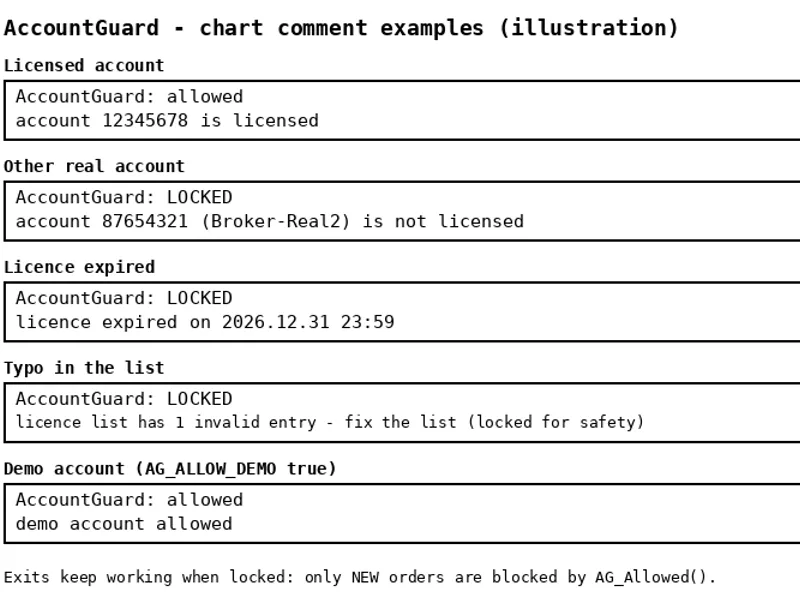
AG_Reason(): Provides a text description of the lock reason, suitable for display on a panel or for debugging. Example: "account 87654321 (Broker-Real2) is not licensed".
Input Parameters:
InpAGMessage: Customizable text displayed in an alert when the EA is locked.
InpAGSelfTest: Enables a built-in self-test performing 32 checks, including scenarios that should remain locked.
Security Features:
The system is secure by default. An empty license list, a typo in the list, an expired license, or missing account details (during VPS startup or reconnection) will result in the EA being locked. Automatic re-checking is implemented.
The expiry check uses the later of the server tick time and the trade-server time, preventing circumvention by adjusting the PC clock.
The lock reason is reported only once to avoid excessive logging.
This utility does not use DLLs, WebRequest, or file operations, ensuring compatibility with the Strategy Tester and any VPS environment.
The library itself does not place any orders.
Example EA (AccountGuard_Demo.mq5):
The accompanying demo EA displays "AccountGuard: allowed" or "AccountGuard: LOCKED" along with the specific reason on the chart. On live or demo charts, it will not execute any trades. Within the Strategy Tester only (controlled by InpTesterDemo), it will open one minimum-lot trade per day, passing through the AG_Allowed() gate.
Limitations:
This tool provides a robust defense against casual copying of compiled .ex5 files but is not an unbreakable Digital Rights Management (DRM) solution.
To update the license (e.g., add a new account or change the expiry date), you must recompile and distribute a new .ex5 file.
You may also like: Automated Live Testing for Expert Advisors on Demo Accounts - excellent alternative for expert users on MetaTrader 5.
Source Code
#property copyright "RobotFX"
#property link "https://robotfx.org"
#property version   "1.01"
#property description "This code is educational. Feel free to use, modify and upgrade as you wish. Visit ROBOTFX.ORG for professional trading tools"
#define AG_ALLOWED_LOGINS "12345678"
#define AG_ALLOW_DEMO     true
#define AG_EXPIRY         0
#include "AccountGuard.mqh"
#include <Trade\Trade.mqh>
input group "Demo (tester only)"
.......
⚠ Limitations & Risk Warning
- This tool is provided for educational and testing purposes only.
- Past performance does not guarantee future results.
- Trading involves substantial risk of loss. Use on a demo account first.
- Results may vary depending on market conditions, broker, and settings.
- We recommend thorough backtesting and forward testing before using with real funds.