



Automated Live Testing for Expert Advisors on Demo Accounts
Info
The Automated Live Testing for Expert Advisors on Demo Accounts is a Expert Advisor for MetaTrader 5 that the standard strategy tester in metatrader cannot fully simulate live trading conditions such as terminal restarts, expert advisors (eas) initiating before account connection, multiple instances of the same ea on different charts, or server-side account history. It also cannot detect interactions like clicking chart buttons.
Usage
This tool is typically used for automated trading on major forex pairs and gold.
Platform
This Expert Advisor works exclusively on MetaTrader 5 (both build 600+ and newer versions).
Setup
Place the downloaded file in MQL5/Experts folder via File ? Open Data Folder in MetaTrader 5.
How to Install and Use Automated Live Testing for Expert Advisors on Demo Accounts
1. Installation: Open the "File" menu, select "Open Data Folder," navigate to MQL/Experts, paste your file, and restart the terminal.
2. Activation: Drag the EA from the Navigator onto a chart, ensure "Allow live trading" is checked in the Common tab, and verify the AutoTrading button is green.
3. Optimization: Right-click your chart, choose "Expert List," click "Properties" to adjust inputs, and save your preferred setup as a set file for future use.
4. Maintenance: Regularly check the "Experts" tab in the terminal window to monitor trade logs and potential execution errors.
Frequently Asked Questions
Q: Why is my EA not opening trades? A: Check the "AutoTrading" button, ensure "Allow live trading" is enabled, and verify your broker allows automated trading on your account type.
Q: Can I run multiple EAs on one chart? A: No, each chart can only host one active EA; however, you can open multiple charts for different currency pairs to run several EAs.
Q: What does the "smiley face" icon mean? A: A smiley face in the top-right corner of the chart indicates the EA is successfully running; a frowny face means it is disabled.
What this tool does
The standard Strategy Tester in MetaTrader cannot fully simulate live trading conditions such as terminal restarts, Expert Advisors (EAs) initiating before account connection, multiple instances of the same EA on different charts, or server-side account history.
Typical Use Case
This Expert Advisor excels in automated trading and technical analysis on MetaTrader 5.
Compatible Platform & Setup
This Expert Advisor works on MetaTrader 5. Place the file in the MQL5/Experts folder and restart the terminal.
Description & Settings
Related: CLiveTradeInfo - CHistoryTradeInfo - another powerful expert for MetaTrader 5 traders.
The standard Strategy Tester in MetaTrader cannot fully simulate live trading conditions such as terminal restarts, Expert Advisors (EAs) initiating before account connection, multiple instances of the same EA on different charts, or server-side account history. It also cannot detect interactions like clicking chart buttons. This testing framework automates these checks on a demo account and generates a PASS/FAIL report.Also recommended: WaveMaster Pro EA: Automated Execution for WaveMaster Oscilloscope - similar expert with strong performance on MetaTrader 5.
Included Files
LiveTestDriver.mq5: This is the main test driver. It reads the current test phase (A, B, or C) from the file MQL5\Files\LiveTestBench\phase.txt. It then executes the checks specific to that phase and initiates a terminal shutdown using TerminalClose(). This driver is designed to run exclusively on demo accounts.
ExampleDailyLock.mq5: An example EA that implements a daily loss limit. It maintains its state using global variables, restricts its usage to one instance per account via GlobalVariableSetOnCondition, and includes an 'Unlock' button for manual intervention.
ExampleDailyLock_DemoTest.mq5: A specialized demo-only build of the example EA. It utilizes the DEMO_ONLY define and includes the main EA source code, ensuring the original EA source remains unchanged.
run_live_test.ps1: A PowerShell script provided in the zip archive. This script prepares the startup configuration, launches a portable terminal instance for a specific phase, and displays the final report.
Testing Phases
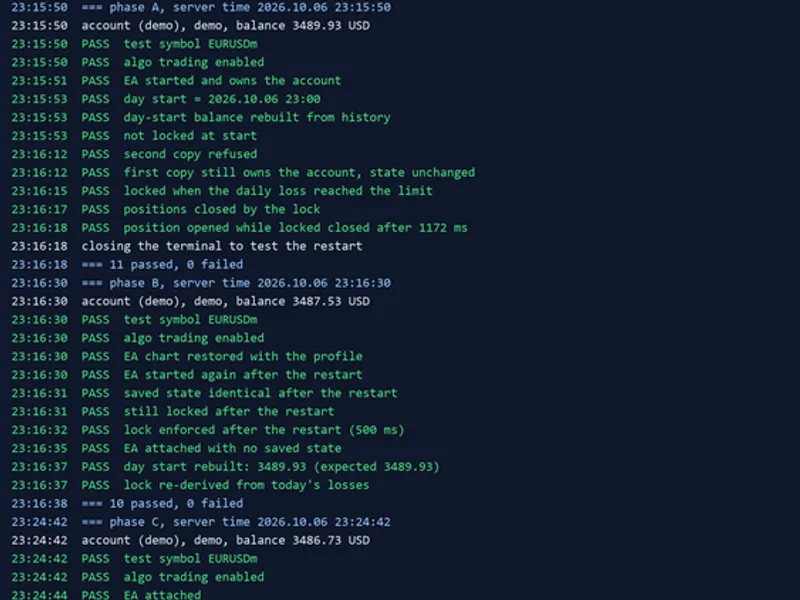
Phase A: Initial setup, verifying single EA instance per account, testing the loss lock functionality, and measuring the speed at which a locked EA closes a newly opened position. This phase concludes with a terminal closure.
Phase B: Post-restart testing. It verifies that the chart profile is correctly restored, the saved EA state is identical, the loss lock remains active, and the starting balance for the day is accurately reconstructed from the account history.
Phase C: Manual interaction phase where a user clicks the 'Unlock' button on the chart. Since chart objects do not directly process posted mouse messages, this step requires a simulated or actual click. The driver will display instructions and wait for up to 10 minutes for this action.
Usage Instructions
1. Copy terminal64.exe to a new, dedicated folder. Launch it using the /portable key and log in to a demo account, ensuring the password is saved.
2. Place the three .mq5 files into the MQL5\Experts\LiveTestBench directory of the portable terminal and compile them.
3. Close the terminal. Then, execute the following commands in sequence:
- To run Phase A: .\run_live_test.ps1 -Terminal "D:\MT5_demo" -Phase A
- To run Phase B: .\run_live_test.ps1 -Terminal "D:\MT5_demo" -Phase B
- To run Phase C: .\run_live_test.ps1 -Terminal "D:\MT5_demo" -Phase C
To test your own EA, integrate the demo-only check into its OnInit() function. Create a separate file using #define DEMO_ONLY and #include. Modify the EA_NAME, EA_PATH, inputs set by Attach(), and the checks within the driver script accordingly.
During a practical execution on a demo account, the framework successfully passed 26 checks across the three phases. Phase C identified a critical bug in the initial version of the example EA: the loss limit was re-engaged within the same second after unlocking, due to the daily loss still exceeding the threshold. This testing framework was developed in 2026.
You may also like: SMC Liquidity Sweep Scalper (Order Block EA with Live Win-Rate Tracking) - excellent alternative for expert users on MetaTrader 5.
Source Code
#property copyright "RobotFX"
#property version   "1.00"
#property description "This code is educational. Feel free to use, modify and upgrade as you wish. Visit ROBOTFX.ORG for professional trading tools"
#include <Trade\Trade.mqh>
#define DIR        "LiveTestBench\\"
#define EA_NAME    "ExampleDailyLock_DemoTest"
#define EA_PATH    "Experts\\LiveTestBench\\ExampleDailyLock_DemoTest.ex5"
#define MY_MAGIC   770077
#define LOSS_LIMIT 1.0
CTrade   g_trade;
.......
⚠ Limitations & Risk Warning
- This tool is provided for educational and testing purposes only.
- Past performance does not guarantee future results.
- Trading involves substantial risk of loss. Use on a demo account first.
- Results may vary depending on market conditions, broker, and settings.
- We recommend thorough backtesting and forward testing before using with real funds.