

New Bar Alerts Indicator for MT4
Info
The New Bar Alerts Indicator for MT4 is a Indicator for MetaTrader 4 that indicator: alerts on new baralert options:popup alertsound alertemail alertpush notificationnote: if popup alert and sound alert are both set to true, only the popup alert will function. For the sound alert to work, the popup alert must be set to false.
Usage
This tool is typically used for enhancing chart analysis and decision making.
Platform
This Indicator works exclusively on MetaTrader 4 (both build 600+ and newer versions).
Setup
Place the downloaded file in MQL4/Indicators folder via File ? Open Data Folder in MetaTrader 4.
How to Install and Use New Bar Alerts Indicator for MT4
1. Installation: Place your file in the MQL/Indicators folder via "Open Data Folder" and restart your terminal.
2. Loading: Find the indicator in the Navigator, drag it onto your chart, and configure the input parameters in the popup window.
3. Customization: Press Ctrl+I to open the indicator list, select your tool, and click "Properties" to change colors, levels, or visual styles.
4. Updating: Replace the old file in the Indicators folder with the new version and restart the platform to apply changes.
Frequently Asked Questions
Q: Why is my indicator not showing? A: Verify the file is in the MQL/Indicators folder, or try right-clicking the "Indicators" tree in the Navigator and clicking "Refresh."
Q: Do custom indicators slow down the platform? A: Too many complex indicators can impact performance; remove unused ones via the "Indicator List" (Ctrl+I).
Q: Can I use MT4 indicators on MT5? A: No, MQL4 and MQL5 are distinct languages; ensure the indicator is compiled specifically for your platform version.
What this tool does
indicator: alerts on new baralert options:popup alertsound alertemail alertpush notificationNote: If popup alert and sound alert are both set to true, only the popup alert will function.
Typical Use Case
This Indicator excels in automated trading and technical analysis on MetaTrader 4.
Compatible Platform & Setup
This Indicator works on MetaTrader 4. Place the file in the MQL4/Indicators folder and restart the terminal.
Description & Settings
Related: Range Filter Buy and Sell Indicator for MT4 with Signal Statistics - another powerful indicator for MetaTrader 4 traders.
indicator: alerts on new barAlso recommended: UT Bot Alerts for MT4: Signal Statistics and Session Filtering - similar indicator with strong performance on MetaTrader 4.
alert options:
popup alert
sound alert
email alert
push notification
Note: If popup alert and sound alert are both set to true, only the popup alert will function. For the sound alert to work, the popup alert must be set to false. This is an MT4 limitation.
Alert Triggering:
All alerts will trigger if the chart period (timeframe) is changed or if MT4 is loaded with alerts set to true. These issues are known and not resolved.
All alerts will display the broker time and date.
New bar alerts can also function with most Renko and Constant Range (synthetic) candles.
Sound Alerts:
The indicator's default sound alert is "alert.wav", corresponding to option 1 of the sound_bite parameter. "alert.wav" is an MT4 default sound file. This sound file cannot be changed without recoding.
Additional sound options (2 through 8) are available, but require the user to add the corresponding sound files to the MT4/sounds folder.
To use these additional options, place custom .wav files named sb2.wav, sb3.wav, etc., in the MT4/sounds folder. These will correspond to options 2, 3, 4, 5, 6, 7, and 8 of the sound_bite parameter. Files for options not in use are not required.
Sound files not in .wav format must be converted to .wav and renamed as specified above.
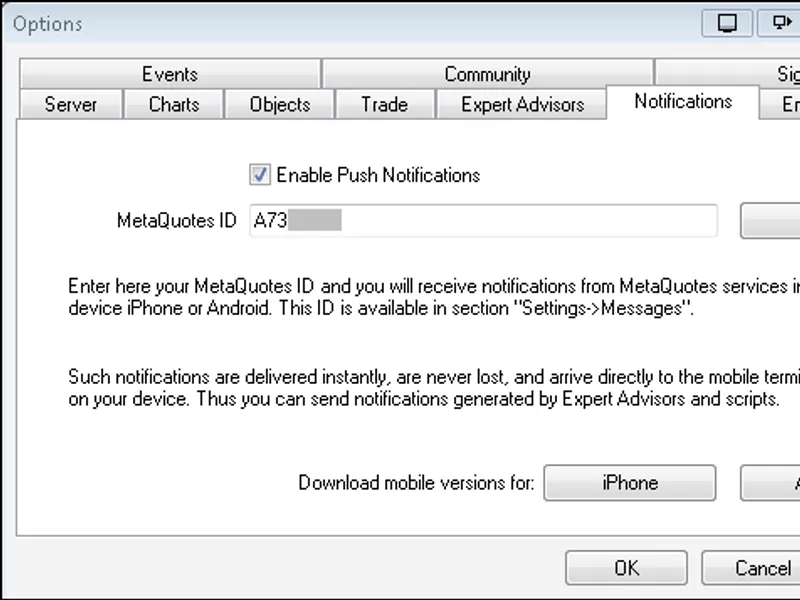
Push Notifications (iOS and Android):
Push notifications are fast, reliable, and easy to set up.
Setup:
1. Install MT4 on your mobile device.
2. Locate your MetaQuotes ID in the mobile app (Messages or Settings).
3. Enter the MetaQuotes ID into the MT4 client terminal on your computer (Tools -> Options -> Notifications).
4. Click the 'Test' button.
5. Check the 'Journal' tab in your MT4 terminal for a successful test message.
6. Once the test is successful, enable push notification alerts in the indicator.
Important: Ensure sound is turned on for notifications on your mobile device.
For further clarification, search Google and YouTube for "MT4 push notification setup".
Email Alerts:
There are various methods to set up MT4 email alerts; research the internet for specific instructions.
The use of stunnel and hmailserver (both free) is recommended for setup.
Setup with Stunnel (Example):
1. Download and install stunnel.
2. Follow forum instructions to configure the stunnel.conf file. A sample file (stunnel.conf) from December 2013 is available for reference.
3. Enter your server and email information in the MT4 terminal (Tools -> Options -> Email).
Note: Stunnel must be running for email alerts to function. Ensure the stunnel icon is visible on the taskbar. To automate startup, create a shortcut for stunnel and place it in the Windows startup folder.
4. Click the 'Test' button in MT4's email settings.
5. Check the 'Journal' tab for a successful test message.
6. Once the test is successful, enable email alerts in the indicator.
Note on Email Server: Using "127.0.0.1:25" as the SMTP server is suggested if "smtp.gmail.com:25" does not work. The SMTP login, 'From', and 'To' email addresses can be the same. It is recommended that 'SMTP login' and 'From' addresses be identical, though this has not been definitively tested.
New Bar Alert Label:
The indicator displays a label indicating which alerts are set to true. This label's font can be adjusted (font_bold, show_font parameters).
Alert Truth Table:
The indicator supports 16 possible alert combinations (2^4). However, due to the popup/sound alert conflict, 12 unique combinations are practically available:
amp, am, ap, a, smp, sm, sp, s, mp, m, p, and no alerts.
Key:
t: true
f: false
a: popup alert
s: sound alert
m: email alert
p: push notification
Parameters:
popup_alert - false
sound_alert - false
email_alert - false
push_notification - false
sound_bite - 1
new_bar_label - "nb alert"
font_color - dodgerblue
font_size - 11
font_bold - true
show_font - true
left_right - 25
up_down - 100
corner - 1
You may also like: Quantum Apex Color Indicator - excellent alternative for indicator users on MetaTrader 4.
Source Code
#.......
⚠ Limitations & Risk Warning
- This tool is provided for educational and testing purposes only.
- Past performance does not guarantee future results.
- Trading involves substantial risk of loss. Use on a demo account first.
- Results may vary depending on market conditions, broker, and settings.
- We recommend thorough backtesting and forward testing before using with real funds.