
Customizing Your MetaTrader 5 AI Assistant with Prompt Files
Info
The Customizing Your MetaTrader 5 AI Assistant with Prompt Files is a Script for MetaTrader 5 that create and edit a custom prompt file to tailor your metatrader 5 ai assistant's language, personality, menu, and behavior. This script facilitates the creation of a simple, customizable prompt file for an AI assistant within MetaTrader 5.
Usage
This tool is typically used for enhancing chart analysis and decision making.
Platform
This Script works exclusively on MetaTrader 5 (both build 600+ and newer versions).
Setup
Place the downloaded file in MQL5/Scripts folder via File ? Open Data Folder in MetaTrader 5.
How to Install and Use Customizing Your MetaTrader 5 AI Assistant with Prompt Files
1. Installation: Move your script file into the MQL/Scripts directory and restart the platform.
2. Execution: Drag the script onto a chart; it will perform a one-time action, such as closing all open orders or clearing chart objects.
3. Editing: Use MetaEditor (F4) to modify code, click "Compile," and verify no errors appear in the terminal before running.
4. Removing: Scripts stop automatically, but you can remove them manually by right-clicking the chart and choosing "Remove Script."
Frequently Asked Questions
Q: How are scripts different from EAs? A: Scripts execute a single action and then stop; EAs monitor the market and trade continuously.
Q: Can I assign a hotkey to a script? A: Yes, right-click the script in the Navigator, select "Set Hotkey," and define your preferred keyboard shortcut.
Q: Why did my script stop? A: Scripts are designed to stop immediately after finishing their programmed command; this is normal behavior.
What this tool does
Create and edit a custom prompt file to tailor your MetaTrader 5 AI Assistant's language, personality, menu, and behavior.
Typical Use Case
This Script excels in automated trading and technical analysis on MetaTrader 5.
Compatible Platform & Setup
This Script works on MetaTrader 5. Place the file in the MQL5/Scripts folder and restart the terminal.
Description & Settings
Related: Risk of Ruin Calculator: Understand Your Trading Account's Vulnerability - another powerful script for MetaTrader 5 traders.
Create and edit a custom prompt file to tailor your MetaTrader 5 AI Assistant's language, personality, menu, and behavior.Also recommended: Edge or Luck: A Bootstrap Test for Your Average Trade - similar script with strong performance on MetaTrader 5.
This script facilitates the creation of a simple, customizable prompt file for an AI assistant within MetaTrader 5.
The core purpose is to demonstrate how AI assistant behavior, personality, and menu options can be modified simply by editing a prompt file.
No AI API, DLL, or external service is required.
How to Use
Attach or run AI_Prompt_Writer.mq5 from MetaEditor.
Select the desired AI response language and personality.
Specify the output file name if needed.
Run the script.
The prompt file will be generated in the terminal's MQL5\Files folder.
The default output file name is: "AI_Prompt.txt".
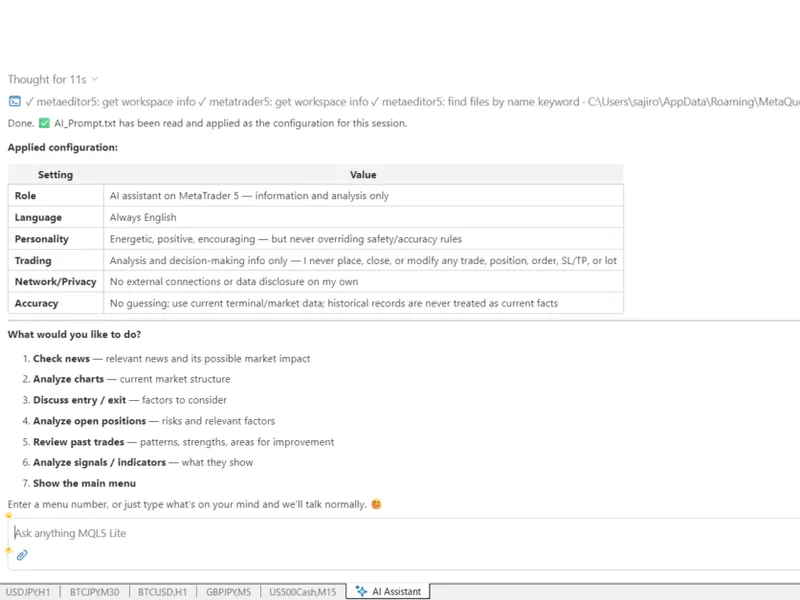
Next, within the MetaTrader 5 AI Assistant, enter:
Apply AI_Prompt.txt
The AI Assistant will load the prompt file and implement the customized instructions.
You should then observe the custom menu defined in the prompt.
For example, the default menu may include:
- Check news
- Analyze charts
- Discuss entry / exit
- Analyze open positions
- Review past trades
- Analyze signals / indicators
You can select a menu number to execute the corresponding action.
Parameters
AI Response Language
Choose the language for the AI Assistant's responses.
Available languages include:
- English
- Russian
- Chinese
- Spanish
- Portuguese
- Japanese
- German
- Korean
- French
- Italian
- Turkish
Note: The prompt itself is in English; this parameter only changes the AI Assistant's response language.
AI Persona
Select the personality for the AI Assistant.
Available personas include:
- Neutral Assistant
- Friendly Assistant
- Energetic Trading Companion
- Professional Analyst
- Calm Mentor
- Resigned Advisor
- Wise Elder
- Energetic Gal
- Passionate Teacher
- Kindergarten Teacher
These personas alter the style and tone of the AI's responses while maintaining the same safety and accuracy protocols.
Output File Name
Specify the name for the prompt file to be created.
The default is: AI_Prompt.txt
The file is saved in the terminal's MQL5\Files folder.
Overwrite Existing File
Enable this option to overwrite an existing file with the same name.
If disabled, the script will not overwrite an existing prompt file.
Customize Your Own AI Assistant
This script is designed for simplicity.
The generated prompt serves as a starting point for customization, not a finalized AI assistant.
You can edit the generated prompt to modify instructions, menu names, and menu actions to align with your intended use of the AI Assistant.
For instance, you can replace existing menu items, reorder them, or introduce entirely new menu numbers.
You could create menus specific to your workflow, such as:
- Analyze economic indicators
- Check today's trading plan
- Review my risk management
- Compare multiple timeframes
The possibilities are limited only by the information and capabilities accessible to your AI Assistant.
You can also create distinct prompt files for different purposes and apply the one required.
A Simple Example of AI Assistant Customization
The key principle is that the AI Assistant itself does not need modification.
Instead, you can alter the instructions provided to the AI.
By editing the prompt, you can define:
- What the AI should do
- How it should respond
- What information it should analyze
- What menu it should display
- What each menu number should execute
- How the AI should communicate with you
This makes the prompt a straightforward method for establishing your personalized AI Assistant workflow.
An advanced example can be developed by incorporating a more complex menu structure and detailed instructions. The menu.txt example provided with this project can serve as a reference for this approach.
Important Information
This program is provided as a sample, not a complete AI Assistant application.
Its primary function is to illustrate how a MetaTrader 5 AI Assistant can be customized using a prompt file.
Experiment with modifying the menu, adding your own commands, changing the personality, or developing a workflow that matches your trading style.
Create your own menu. Establish your own workflow. Configure the MT5 AI Assistant to operate according to your preferences.
Important Safety Notice
Custom AI prompts can be powerful but also pose risks if not designed with appropriate restrictions. Depending on the provided instructions, an AI assistant might be granted permissions to perform actions such as placing orders, modifying trading parameters, or altering accessible information. Excessive freedom granted to the AI could lead to unexpected behavior.
This sample prompt therefore includes strict limitations on trading operations. The AI is instructed not to place or modify orders, create or close positions, change stop loss, take profit, or lot size, or execute other trading operations on behalf of the user. It is also instructed not to act autonomously, establish independent external connections, or disclose private information or trading data.
When developing your own prompts, always carefully consider the permissions and actions you are assigning to the AI Assistant. A prompt is not solely for altering its personality or menu; it can also dictate the AI's permitted actions.
You may also like: Prop Firm Rule Checker: Automate Your Challenge Evaluation - excellent alternative for script users on MetaTrader 5.
Source Code
#property copyright "RobotFX"
#property link "https://robotfx.org"
#property description "This code is educational. Feel free to use, modify and upgrade as you wish. Visit ROBOTFX.ORG for professional trading tools"
#property version     "1.00"
#property script_show_inputs
enum ENUM_RESPONSE_LANG
{
   LANG_ENGLISH,
   LANG_RUSSIAN,
   LANG_CHINESE,
.......
⚠ Limitations & Risk Warning
- This tool is provided for educational and testing purposes only.
- Past performance does not guarantee future results.
- Trading involves substantial risk of loss. Use on a demo account first.
- Results may vary depending on market conditions, broker, and settings.
- We recommend thorough backtesting and forward testing before using with real funds.