
auto sl tp by risk reward ratio
Info
The auto sl tp by risk reward ratio is a Script for MetaTrader 5 that key features flexible risk:reward ratio: set any r:r ratio (1:1, 1:2, 1:3, etc. )pip-based calculation: define stop loss in pips, tp calculated automaticallymulti-symbol support: can modify all positions or only current symbolbroker compatibility: works with both 3-digit and 5-digit brokerssafety checks: validates stop levels and freeze levelserror handling: complete error checking with detailed logssmart skip: avoids unnecessary modifications if sl/tp already correct input parameters riskrewardratio(default: 2.
Usage
This tool is typically used for enhancing chart analysis and decision making.
Platform
This Script works exclusively on MetaTrader 5 (both build 600+ and newer versions).
Setup
Place the downloaded file in MQL5/Scripts folder via File ? Open Data Folder in MetaTrader 5.
How to Install and Use auto sl tp by risk reward ratio
1. Installation: Move your script file into the MQL/Scripts directory and restart the platform.
2. Execution: Drag the script onto a chart; it will perform a one-time action, such as closing all open orders or clearing chart objects.
3. Editing: Use MetaEditor (F4) to modify code, click "Compile," and verify no errors appear in the terminal before running.
4. Removing: Scripts stop automatically, but you can remove them manually by right-clicking the chart and choosing "Remove Script."
Frequently Asked Questions
Q: How are scripts different from EAs? A: Scripts execute a single action and then stop; EAs monitor the market and trade continuously.
Q: Can I assign a hotkey to a script? A: Yes, right-click the script in the Navigator, select "Set Hotkey," and define your preferred keyboard shortcut.
Q: Why did my script stop? A: Scripts are designed to stop immediately after finishing their programmed command; this is normal behavior.
What this tool does
key features flexible risk:reward ratio: set any r:r ratio (1:1, 1:2, 1:3, etc.
Typical Use Case
This Script excels in automated trading and technical analysis on MetaTrader 5.
Compatible Platform & Setup
This Script works on MetaTrader 5. Place the file in the MQL5/Scripts folder and restart the terminal.
Description & Settings
Related: Risk of Ruin Auditor for Trading Strategies - another powerful script for MetaTrader 5 traders.
key featuresflexible risk:reward ratio
Also recommended: Position Size Calculator for Risk-Based Lot Sizing - similar script with strong performance on MetaTrader 5.
: set any r:r ratio (1:1, 1:2, 1:3, etc.)pip-based calculation
: define stop loss in pips, tp calculated automatically
multi-symbol support
: can modify all positions or only current symbol
broker compatibility
: works with both 3-digit and 5-digit brokers
safety checks
: validates stop levels and freeze levels
error handling
: complete error checking with detailed logs
smart skip
: avoids unnecessary modifications if sl/tp already correct input parameters
riskrewardratio
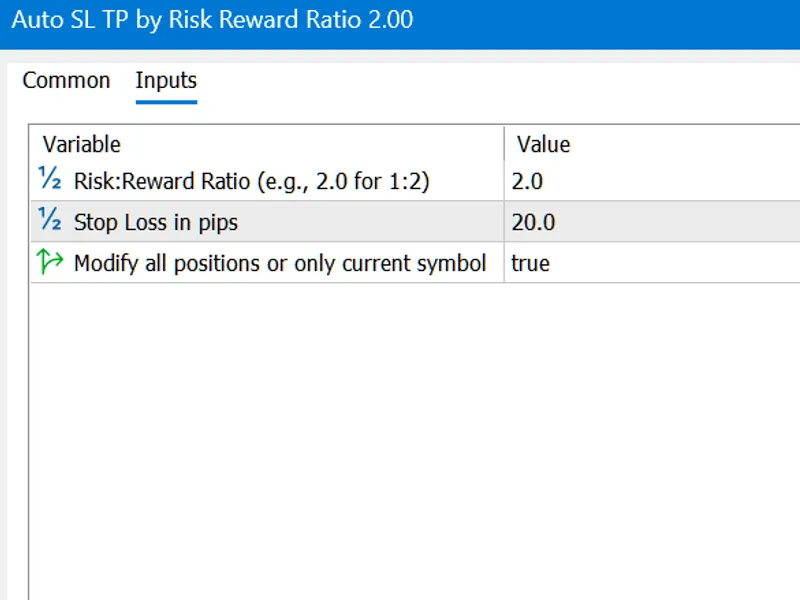
(default: 2.0) - your desired risk-reward ratio
stoplosspips
(default: 20) - stop loss distance in pips
modifyallpositions
(default: true) - modify all positions or only current symbol how to use
open one or more positions
attach the script to any chart
configure the parameters if needed
click ok - the script will automatically set sl/tp for all positions calculation example
if you set:
stop loss: 20 pips
risk:reward ratio: 2.0
the script will set:
sl: 20 pips from entry
tp: 40 pips from entry (20 × 2.0) benefits
✓ saves time - no manual sl/tp calculation ✓ ensures consistent risk management ✓ prevents human error in calculations ✓ works on all forex pairs, metals, and indices ✓ professional-grade error handling
perfect for scalpers, day traders, and swing traders who want to automate their risk management workflow!
You may also like: percentage risk lot calculator - excellent alternative for script users on MetaTrader 5.
Source Code
#.......
⚠ Limitations & Risk Warning
- This tool is provided for educational and testing purposes only.
- Past performance does not guarantee future results.
- Trading involves substantial risk of loss. Use on a demo account first.
- Results may vary depending on market conditions, broker, and settings.
- We recommend thorough backtesting and forward testing before using with real funds.