







clatency monitor - inter-tick latency tracker with atr volatility gate and global variable ipc for mt5 eas
Info
The clatency monitor - inter-tick latency tracker with atr volatility gate and global variable ipc for mt5 eas is a Library for MetaTrader 5 that clatencymonitor is a versatile mql5 include-file library designed to address a critical issue in execution-sensitive expert advisors (eas): silent fill degradation or risk miscalculation due to tick feed lag. this library offers a comprehensive solution with three key features:real-time inter-tick delta measurement: utilizes gettickcount64() to accurately measure the time elapsed between consecutive ticks, identifying abnormally large gaps.
Usage
This tool is typically used for enhancing chart analysis and decision making.
Platform
This Library works exclusively on MetaTrader 5 (both build 600+ and newer versions).
Setup
Place the downloaded file in MQL5/Libraries folder via File ? Open Data Folder in MetaTrader 5.
How to Install and Use clatency monitor - inter-tick latency tracker with atr volatility gate and global variable ipc for mt5 eas
1. Storage: Place library files in the MQL/Libraries directory to ensure they are accessible to your projects.
2. Implementation: Include the library in your code using the #import directive, ensuring you match the exact function names and parameters.
3. Compilation: Ensure the library is present in the directory before you compile your main EA or script, as the compiler links them during this phase.
4. Management: Keep libraries organized in sub-folders if you manage many custom functions to maintain a clean project structure.
Frequently Asked Questions
Q: What is a library file used for? A: Libraries store reusable code modules, allowing you to centralize common logic used by multiple EAs or indicators.
Q: Is a library executable? A: No, libraries are non-executable files containing functions; they must be imported into an EA, indicator, or script to function.
Q: Can I update a library while the platform is running? A: You should compile your EA or script after updating a library to ensure the latest code changes are integrated.
What this tool does
clatencymonitor is a versatile mql5 include-file library designed to address a critical issue in execution-sensitive expert advisors (eas): silent fill degradation or risk miscalculation due to tick feed lag.
Typical Use Case
This Library excels in automated trading and technical analysis on MetaTrader 5.
Compatible Platform & Setup
This Library works on MetaTrader 5. Place the file in the MQL5/Libraries folder and restart the terminal.
Description & Settings
Related: On Balance Volume (OBV) Indicator Class - another powerful library for MetaTrader 5 traders.
clatencymonitor is a versatile mql5 include-file library designed to address a critical issue in execution-sensitive expert advisors (eas): silent fill degradation or risk miscalculation due to tick feed lag.Also recommended: maximum percentage of equity risk - similar library with strong performance on MetaTrader 5.
this library offers a comprehensive solution with three key features:
real-time inter-tick delta measurement: utilizes gettickcount64() to accurately measure the time elapsed between consecutive ticks, identifying abnormally large gaps.
atr volatility gate: employs a self-normalizing average true range (atr) volatility gate to differentiate genuine feed lag from natural tick spacing during high-volatility periods, ensuring alerts are not triggered by normal market behavior.
cross-ea inter-process communication (ipc): utilizes a named globalvariable flag, "terminal_lag_detected", to enable communication between eas running on the same terminal. this allows coordinated responses to confirmed lag events, such as pausing, hedging, or alerting the trader.
the library is easy to integrate, requiring only a single #include statement in any ea or service that requires latency awareness. it is a lightweight and dependency-free solution, ensuring efficient performance.
how it works
inter-tick delta: on each ontick() call, the class measures the time elapsed since the previous tick, seeding the timer on the first tick to avoid false alerts.
atr volatility gate: the class compares the current atr value with a self-normalizing threshold, calculated as atrsmamultiplier × sma(atr, atrperiod). this ensures that the lag detection is instrument-agnostic and adapts to varying market conditions across different pairs and timeframes.
persistence and globalvariable ipc: a repeating timer triggers checkpersistence(), which monitors the duration of lag conditions. if a lag persists beyond persistencesec seconds, the class sets the globalvariable flag, allowing other eas to respond accordingly. the flag is reset when the lag clears, ensuring efficient resource management.
clean lifecycle: init() and deinit() methods ensure proper resource management, initializing and releasing the atr indicator handle, and managing the globalvariable flag ownership. the destructor is intentionally empty, adhering to mql5 standards.
integration example: other eas on the same terminal can independently monitor the globalvariable flag to detect and respond to lag events.
parameters and accessors
init() parameters:
- lagthresholdms: millisecond threshold for inter-tick delta to trigger a lag candidate (default: 500).
- persistencesec: seconds of lag persistence before setting the globalvariable flag (default: 3).
- atrperiod: lookback period for atr and its sma (default: 14).
- atrsmamultiplier: multiplier for atr sma to set the high-volatility threshold (default: 1.5).
- symbol: chart symbol for iatr() (typically _symbol).
- tf: timeframe for iatr() (typically _period).
public methods:
- bool init(...): initializes atr handle and resets state, returning true even if atr handle fails (non-fatal).
- bool ontick(): called from ontick(), returns true when a new lag condition is triggered.
- bool checkpersistence(): called from ontimer(), returns true when lag exceeds persistence threshold, managing the globalvariable flag.
- void deinit(): releases atr handle and clears globalvariable if owned, called from ondeinit().
read-only accessors:
- ulong lastdeltams(): elapsed milliseconds since the last tick (returns 0 before the first tick).
- bool islagactive(): indicates if a lag condition is active.
- bool isatrvalid(): confirms atr handle creation and volatility gate operation.
globalvariable ipc:
- flag name: "terminal_lag_detected" (defined as gv_lag_flag).
- set to 1.0 for persistent lag, reset to 0.0 or deleted when lag clears.
- read-before-write mechanism prevents flag overwrite by multiple eas.
changelog:
v1.0 - initial release.
v1.1 - code optimizations: removed unused members, improved cross-compiler compatibility.
v1.2 - lifecycle enhancements: destructor cleared, init() improved for ea reinitialization.
You may also like: ea to math - excellent alternative for library users on MetaTrader 5.
Source Code
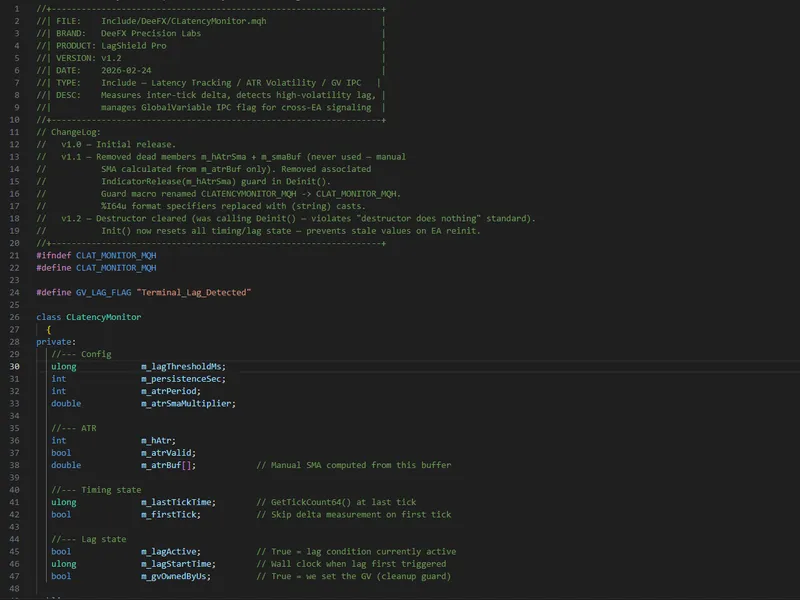
#ifndef clat_monitor_mqh
#define clat_monitor_mqh
#define gv_lag_flag "terminal_lag_detected"
class clatencymonitor
{
private:
ulong             m_lagthresholdms;
int               m_persistencesec;
int               m_atrperiod;
double            m_atrsmamultiplier;
.......
⚠ Limitations & Risk Warning
- This tool is provided for educational and testing purposes only.
- Past performance does not guarantee future results.
- Trading involves substantial risk of loss. Use on a demo account first.
- Results may vary depending on market conditions, broker, and settings.
- We recommend thorough backtesting and forward testing before using with real funds.