

ATR Monitor — Daily, Weekly, and Monthly Range
Info
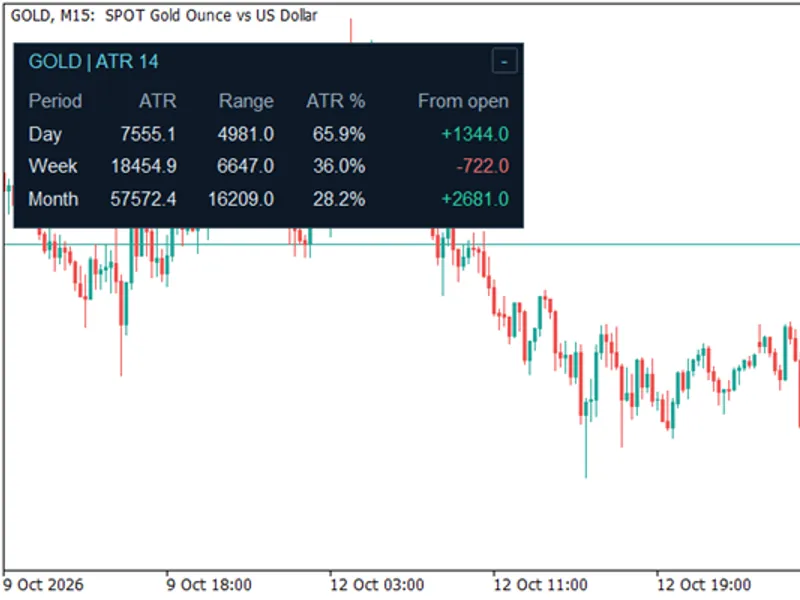
The ATR Monitor — Daily, Weekly, and Monthly Range is a Indicator for MetaTrader 5 that when a chart already has indicators and drawings, the last thing it needs is another large dashboard. ATR Monitor keeps the information in three small rows: daily, weekly, and monthly.
Usage
This tool is typically used for enhancing chart analysis and decision making.
Platform
This Indicator works exclusively on MetaTrader 5 (both build 600+ and newer versions).
Setup
Place the downloaded file in MQL5/Indicators folder via File ? Open Data Folder in MetaTrader 5.
How to Install and Use ATR Monitor — Daily, Weekly, and Monthly Range
1. Installation: Place your file in the MQL/Indicators folder via "Open Data Folder" and restart your terminal.
2. Loading: Find the indicator in the Navigator, drag it onto your chart, and configure the input parameters in the popup window.
3. Customization: Press Ctrl+I to open the indicator list, select your tool, and click "Properties" to change colors, levels, or visual styles.
4. Updating: Replace the old file in the Indicators folder with the new version and restart the platform to apply changes.
Frequently Asked Questions
Q: Why is my indicator not showing? A: Verify the file is in the MQL/Indicators folder, or try right-clicking the "Indicators" tree in the Navigator and clicking "Refresh."
Q: Do custom indicators slow down the platform? A: Too many complex indicators can impact performance; remove unused ones via the "Indicator List" (Ctrl+I).
Q: Can I use MT4 indicators on MT5? A: No, MQL4 and MQL5 are distinct languages; ensure the indicator is compiled specifically for your platform version.
What this tool does
When a chart already has indicators and drawings, the last thing it needs is another large dashboard.
Typical Use Case
This Indicator excels in automated trading and technical analysis on MetaTrader 5.
Compatible Platform & Setup
This Indicator works on MetaTrader 5. Place the file in the MQL5/Indicators folder and restart the terminal.
Description & Settings
Related: Opening Gap Tracker: Daily, Weekend Gaps with Fill Tracking and Alerts - another powerful indicator for MetaTrader 5 traders.
When a chart already has indicators and drawings, the last thing it needs is another large dashboard. ATR Monitor keeps the information in three small rows: daily, weekly, and monthly.Also recommended: Spread Monitor Indicator for MetaTrader 5 - similar indicator with strong performance on MetaTrader 5.
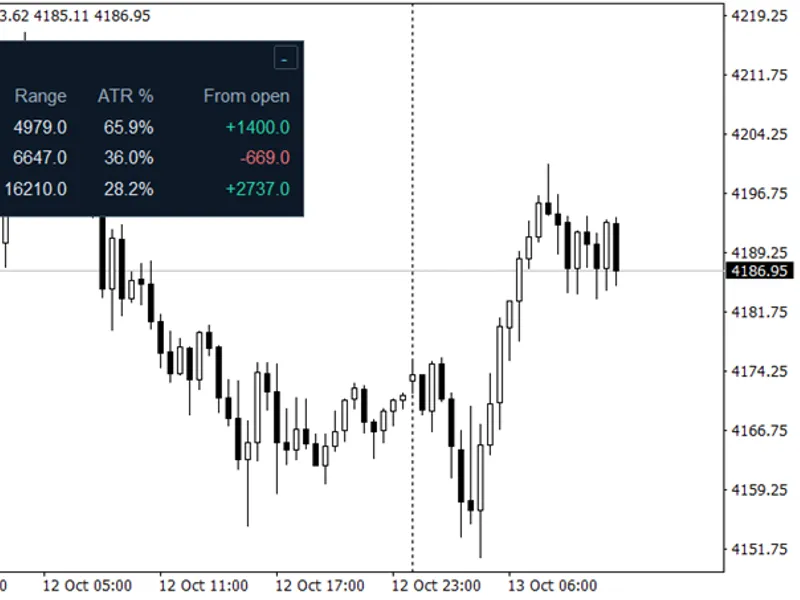
The concept is straightforward: monitor how much the price has moved within each period, compare that range with ATR, and check whether the price is above or below the period's open without switching charts.
Column
What it shows
Period
Day, Week, or Month.
ATR
Current ATR for that timeframe, in pips.
Range
Current candle high minus low, in pips.
ATR %
Range divided by ATR, multiplied by 100.
From open
Current candle close minus open, in pips. Green indicates positive; red indicates negative.
For instance, a 66-pip daily range against a 60-pip ATR results in an ATR % reading of 110%. A weekly range of 144 pips against a 240-pip ATR yields 60%. The percentage provides context for the move, while the 'From open' column reveals its direction relative to the opening price.
MaxATRPercent controls the amber highlight in the ATR % column. With the default setting of 100, readings at or above 100% are highlighted. The percentage is never capped, and this setting does not alter the ATR calculation.
Inputs
Input
Default
Purpose
ATRPeriod
14
ATR period, applied independently to D1, W1, and MN1.
MaxATRPercent
100
ATR % percentage at which amber highlighting begins.
PanelX
12
Left position in pixels, measured from the chart's upper-left corner.
PanelY
24
Top position in pixels.
PanelXSize
360
Panel width before scaling.
PanelYSize
126
Panel height before scaling.
PanelScale
1.0
Multiplies the panel dimensions and font size; accepts 0.5 to 3.0. X/Y remain unchanged.
Colors
Dark theme
Background, border, text, direction, and threshold colors.
Use PanelScale to adjust the panel size. XSize and YSize modify its proportions and the space between labels. Ensure sufficient space for the values you trade; long symbol names or large numbers may require a wider panel.
Click the minus button to minimize the table and the plus button to restore it. Restoring immediately refreshes available values. Hover over the title or headings for pip-unit explanations. Values do not refresh while minimized.
How it updates
Both prices and ATR utilize candle 0 on D1, W1, and MN1. The indicator attempts to load immediately, then refreshes on ticks. Missing data is retried on later ticks; there is no timer. Without ticks, loading data cannot automatically trigger another attempt.
Since ATR uses the current candle, its value can change as that candle progresses. Range is high minus low, while ATR employs true range and accounts for gaps. ATR % compares these measurements; it is not a fixed distance that price cannot surpass.
Period boundaries adhere to the broker's candles. The pip conversion uses ten points per pip for three- and five-digit quotes and one point otherwise. This is a conventional Forex conversion; other instruments may have different pip terminology. Values display one decimal place.
Unavailable history shows "--" and is retried on later ticks. Zero ATR displays "N/A" for ATR %.
This indicator offers range and direction context. It does not execute trades or generate buy/sell signals, and a reading above 100% does not inherently imply a reversal.
You may also like: Enhanced Spread Monitor for MetaTrader 5 - excellent alternative for indicator users on MetaTrader 5.
Source Code
#property version "1.22"
#property copyright "RobotFX"
#property description "This code is educational. Feel free to use, modify and upgrade as you wish. Visit ROBOTFX.ORG for professional trading tools"
#property indicator_chart_window
#property indicator_buffers 0
#property indicator_plots   0
input group "Calculation"
input int    ATRPeriod       = 14;
input double MaxATRPercent   = 100.0;
input group "Panel"
.......
⚠ Limitations & Risk Warning
- This tool is provided for educational and testing purposes only.
- Past performance does not guarantee future results.
- Trading involves substantial risk of loss. Use on a demo account first.
- Results may vary depending on market conditions, broker, and settings.
- We recommend thorough backtesting and forward testing before using with real funds.