




Session TWAP: Time-Weighted Average Price with Deviation Bands
Info
The Session TWAP: Time-Weighted Average Price with Deviation Bands is a Indicator for MetaTrader 5 that a time-weighted average price (twap) indicator that calculates the average price over a session, giving equal weight to each second. This differs from Volume-Weighted Average Price (VWAP), which is weighted by tick volume, a measure of price updates rather than actual traded contracts.
Usage
This tool is typically used for enhancing chart analysis and decision making.
Platform
This Indicator works exclusively on MetaTrader 5 (both build 600+ and newer versions).
Setup
Place the downloaded file in MQL5/Indicators folder via File ? Open Data Folder in MetaTrader 5.
How to Install and Use Session TWAP: Time-Weighted Average Price with Deviation Bands
1. Installation: Place your file in the MQL/Indicators folder via "Open Data Folder" and restart your terminal.
2. Loading: Find the indicator in the Navigator, drag it onto your chart, and configure the input parameters in the popup window.
3. Customization: Press Ctrl+I to open the indicator list, select your tool, and click "Properties" to change colors, levels, or visual styles.
4. Updating: Replace the old file in the Indicators folder with the new version and restart the platform to apply changes.
Frequently Asked Questions
Q: Why is my indicator not showing? A: Verify the file is in the MQL/Indicators folder, or try right-clicking the "Indicators" tree in the Navigator and clicking "Refresh."
Q: Do custom indicators slow down the platform? A: Too many complex indicators can impact performance; remove unused ones via the "Indicator List" (Ctrl+I).
Q: Can I use MT4 indicators on MT5? A: No, MQL4 and MQL5 are distinct languages; ensure the indicator is compiled specifically for your platform version.
What this tool does
A Time-Weighted Average Price (TWAP) indicator that calculates the average price over a session, giving equal weight to each second.
Typical Use Case
This Indicator excels in automated trading and technical analysis on MetaTrader 5.
Compatible Platform & Setup
This Indicator works on MetaTrader 5. Place the file in the MQL5/Indicators folder and restart the terminal.
Description & Settings
Related: Trading Session Boxes Indicator for MT4/MT5 - another powerful indicator for MetaTrader 5 traders.
A Time-Weighted Average Price (TWAP) indicator that calculates the average price over a session, giving equal weight to each second. This differs from Volume-Weighted Average Price (VWAP), which is weighted by tick volume, a measure of price updates rather than actual traded contracts. The TWAP indicator avoids the influence of high-frequency quote bursts by treating every second of the session equally.Also recommended: Accurate Broker Time Zones and Session Lines for MT4/MT5 - similar indicator with strong performance on MetaTrader 5.
This indicator draws the TWAP from the cash open of a selected session and resets it at the next session's open. It is designed to address a limitation in standard bar data where a minute with no ticks might be skipped. The TWAP indicator accounts for this by holding the price of a bar for its duration and filling gaps between bars of the same session with the last known price for the duration of the gap. The forming bar is weighted only by the seconds it has been active.
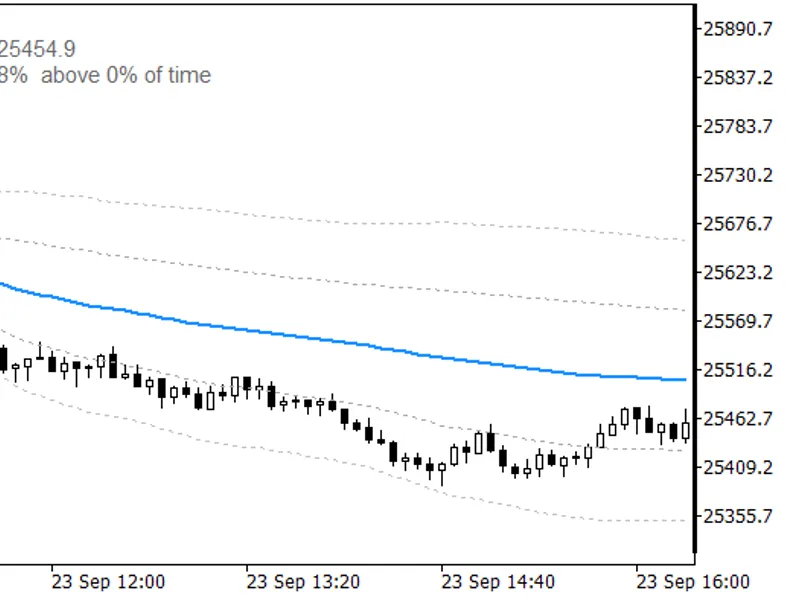
Example on GER40 M5: TWAP calculated from the Frankfurt cash open, with 1 and 2 sigma deviation bands.
Indicator Features:
The TWAP line is displayed from the first candle at or after the session open until the end of the server day. Candles preceding the open are excluded to prevent the overnight session from influencing the average.
Two pairs of dotted bands are provided at 1 and 2 standard deviations around the TWAP. These bands can be individually switched off by setting their width to zero.
An informational label displays key data: the TWAP value, the current session, the distance of the last close in points and percentage, the position of the last close within the session's price range (0% at the low, 100% at the high), and the percentage of session time the last close spent above the TWAP.
Before the current day's open, the label displays information for the last completed session, including its date, providing context for the upcoming open.
Session Anchor Functionality:
The session anchor operates similarly to the Session Candle Counter. The session open time is converted from the exchange's local time to UTC, and then to the broker's server time. Time zone adjustments for daylight saving are handled for Frankfurt, London, and New York. The broker's time offset is read directly from the terminal. By default, the symbol name determines the session. A manual mode allows for specifying a fixed server time for all calculations.
Example on US30 M5: Anchored at the New York open, the label shows data from the last completed session before the next open.
Input Parameters:
Parameter: InpSession
Default: Auto
Meaning: Session anchor. Options include Auto, Frankfurt 09:00, London 08:00, New York 09:30, Tokyo 09:00, or Manual.
Parameter: InpManualOpen
Default: 09:00
Meaning: Open time in server time (HH:MM format), used when the session is set to Manual.
Parameter: InpPrice
Default: Typical
Meaning: Price calculation method for each bar. Options: Typical (H+L+C)/3, Close, Median (H+L)/2, Weighted (H+L+2C)/4.
Parameter: InpBand1
Default: 1.0
Meaning: Width of the inner deviation band in standard deviations. Set to 0 to disable.
Parameter: InpBand2
Default: 2.0
Meaning: Width of the outer deviation band in standard deviations. Set to 0 to disable.
Parameter: InpShowInfo
Default: true
Meaning: Toggles the display of the informational label.
Parameter: InpInfoCorner
Default: left upper
Meaning: Position of the info label on the chart.
Parameter: InpInfoX
Default: 10
Meaning: Horizontal offset of the info label in pixels.
Parameter: InpInfoY
Default: 20
Meaning: Vertical offset of the info label in pixels.
Parameter: InpInfoColor
Default: DimGray
Meaning: Color of the info label text.
Parameter: InpInfoSize
Default: 9
Meaning: Font size of the info label.
Symbol and Timeframe Compatibility:
This indicator is optimized for index CFDs and other instruments with a defined cash open, such as GER40, UK100, US30, NAS100, US500, and JP225. It supports timeframes from M1 to H1. Timeframes higher than H1 may result in empty buffers due to bars covering too large a portion of the session. M1 provides the most precise time weighting, while M5 offers a balanced approach. For Forex instruments, manual mode with a relevant custom time is recommended.
Verification and Testing:
The indicator's calculations were verified against an independent recomputation of bar data, including gap filling, for complete sessions on GER40, US30, and UK100 across M5 and M1 timeframes. Testing also included night sessions for GER40, UK100, USDZAR, XPTUSD, and EURNOK on M1, specifically focusing on periods with infrequent ticks. In all test cases, the maximum difference observed was zero, and bars preceding the session open remained empty.
Limitations:
The indicator defines a session from its open until the end of the server day. There is no specific input for session close, meaning evening hours for CFDs are included in the same average.
The calculated TWAP value can vary slightly depending on the selected timeframe, as each bar is represented by a single price point. For instance, on the GER40 session of September 23, 2026, the final TWAP was 25454.85 on M5 and 25454.77 on M1.
The indicator does not account for exchange holidays. If an exchange is closed but the CFD continues to trade, the average will still commence at the standard time.
In the Strategy Tester, the simulated server time is reported as GMT. This causes session anchors to be treated as UTC. While the TWAP calculation remains consistent, the time reference shifts.
Session detection relies on symbol name matching. Symbols not recognized by the indicator default to Frankfurt session settings, which are indicated as "auto" in the info label.
This indicator is for display purposes only; it does not write files or send trading orders.
Quick Start Guide:
Attach the indicator to an index chart on M1 or M5 timeframe and use the default input settings. The TWAP line will appear from the start of the current session.
Verify the detected session in the info label. If your symbol is not automatically recognized, manually select the session via the 'InpSession' input.
Utilize the info label displayed before the market open to view the previous session's TWAP, and during the trading session to track price position relative to the TWAP.
This indicator is provided as a complementary tool to the Prop firm utilities available in the Market (PropGuardian, PropMirror, PropSizer, PropCorrelation). It functions independently and requires no other tools to operate.
You may also like: Session Time Highlighter for MT4/MT5 - excellent alternative for indicator users on MetaTrader 5.
Source Code
#property copyright "RobotFX"
#property link "https://robotfx.org"
#property version "1.00"
#property description "This code is educational. Feel free to use, modify and upgrade as you wish. Visit ROBOTFX.ORG for professional trading tools"
#property indicator_chart_window
#property indicator_buffers 5
#property indicator_plots 5
#property indicator_label1 "Session TWAP"
#property indicator_type1 DRAW_LINE
#property indicator_color1 clrDodgerBlue
.......
⚠ Limitations & Risk Warning
- This tool is provided for educational and testing purposes only.
- Past performance does not guarantee future results.
- Trading involves substantial risk of loss. Use on a demo account first.
- Results may vary depending on market conditions, broker, and settings.
- We recommend thorough backtesting and forward testing before using with real funds.