




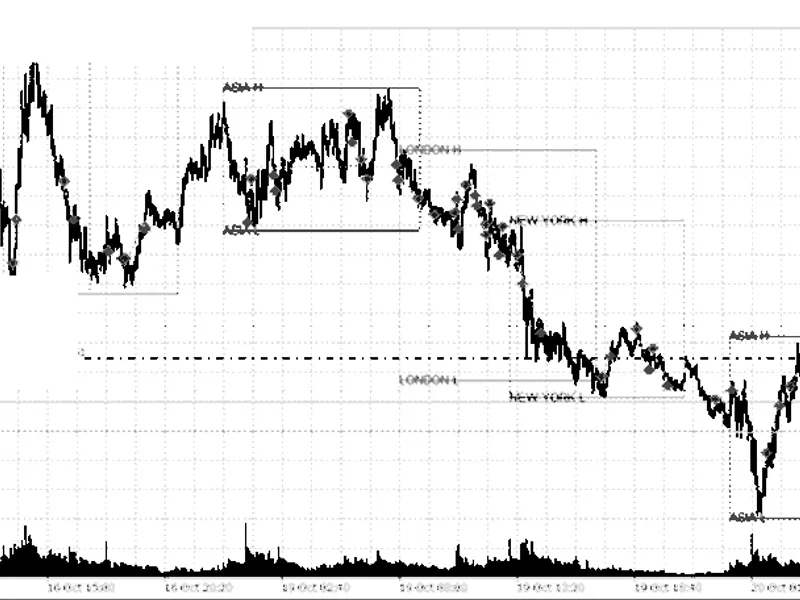
Session Manipulation and Algorithmic Reaction Tracker (S.M.A.R.T.) - ICT/SMC Analysis Tool
Info
The Session Manipulation and Algorithmic Reaction Tracker (S.M.A.R.T.) - ICT/SMC Analysis Tool is a Indicator for MetaTrader 5 that s. M.
Usage
This tool is typically used for enhancing chart analysis and decision making.
Platform
This Indicator works exclusively on MetaTrader 5 (both build 600+ and newer versions).
Setup
Place the downloaded file in MQL5/Indicators folder via File ? Open Data Folder in MetaTrader 5.
How to Install and Use Session Manipulation and Algorithmic Reaction Tracker (S.M.A.R.T.) - ICT/SMC Analysis Tool
1. Installation: Place your file in the MQL/Indicators folder via "Open Data Folder" and restart your terminal.
2. Loading: Find the indicator in the Navigator, drag it onto your chart, and configure the input parameters in the popup window.
3. Customization: Press Ctrl+I to open the indicator list, select your tool, and click "Properties" to change colors, levels, or visual styles.
4. Updating: Replace the old file in the Indicators folder with the new version and restart the platform to apply changes.
Frequently Asked Questions
Q: Why is my indicator not showing? A: Verify the file is in the MQL/Indicators folder, or try right-clicking the "Indicators" tree in the Navigator and clicking "Refresh."
Q: Do custom indicators slow down the platform? A: Too many complex indicators can impact performance; remove unused ones via the "Indicator List" (Ctrl+I).
Q: Can I use MT4 indicators on MT5? A: No, MQL4 and MQL5 are distinct languages; ensure the indicator is compiled specifically for your platform version.
What this tool does
S.
Typical Use Case
This Indicator excels in automated trading and technical analysis on MetaTrader 5.
Compatible Platform & Setup
This Indicator works on MetaTrader 5. Place the file in the MQL5/Indicators folder and restart the terminal.
Description & Settings
Related: Accurate Broker Time Zones and Session Lines for MT4/MT5 - another powerful indicator for MetaTrader 5 traders.
S.M.A.R.T. ICT/SMC V3.0Also recommended: Session Time Highlighter for MT4/MT5 - similar indicator with strong performance on MetaTrader 5.
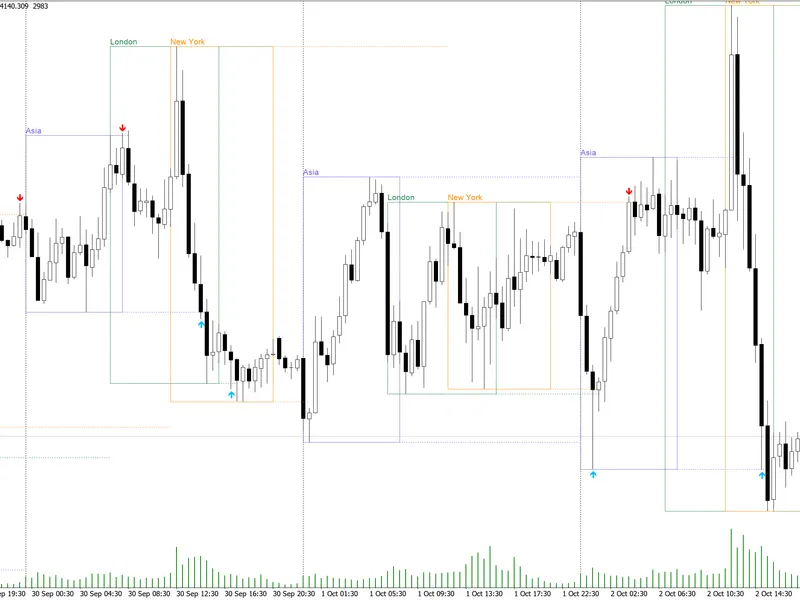
Session Manipulation & Algorithmic Reaction Tracker is a free, non-trading MT5 indicator. It monitors three configurable symbols and identifies ICT/SMC reactions around completed Asian and London session ranges.
Recommended Use
- Default analysis timeframe: M5.
- Default symbols: EURUSD, GBPUSD, and USDJPY.
- Can be attached to any chart timeframe while maintaining M5 for internal analysis.
- All signals use closed bars. The indicator does not open, modify, or close positions.
Setup Confirmation Steps
A session sweep alone is not a signal. A projection forms only when these events occur sequentially:
1. Price sweeps the high or low of a completed Asian or London session range.
2. Price closes through a confirmed pre-sweep swing, indicating a Market Structure Shift (MSS).
3. The MSS candle exhibits sufficient directional displacement.
4. A strict three-candle Fair Value Gap (FVG) forms in the same direction.
5. A subsequent closed bar retests the FVG and closes beyond its midpoint.
The FVG candle cannot confirm its own retest. If price breaches the frozen sweep extreme after an MSS, the sequence is invalidated. Failed or expired observations may appear as Watch markers but receive no final score or trade projection.
SMART Quality Score
The score is calculated after the entire sequence is complete:
- Session liquidity context: 15 points;
- Sweep depth: 10 or 15 points;
- Confirmed MSS: 20 points;
- Displacement strength: 5 or 10 points;
- FVG quality: 15 or 20 points;
- Later FVG retest: 15 points;
- Tick-volume bonus: 0 or 5 points.
Validated scores range from 80 to 100. The score reflects confluence within this model and is not a win probability. Tick volume is a minor bonus and cannot solely create or reject a setup.
Trade Projection Parameters
- Entry: Close of the valid FVG-retest bar.
- Stop Loss: Beyond the frozen sweep extreme plus an ATR buffer.
- TP1: Exactly 1.20R.
- TP2: Opposing session liquidity, capped at 2.00R.
- Minimum room required for TP2: 1.50R.
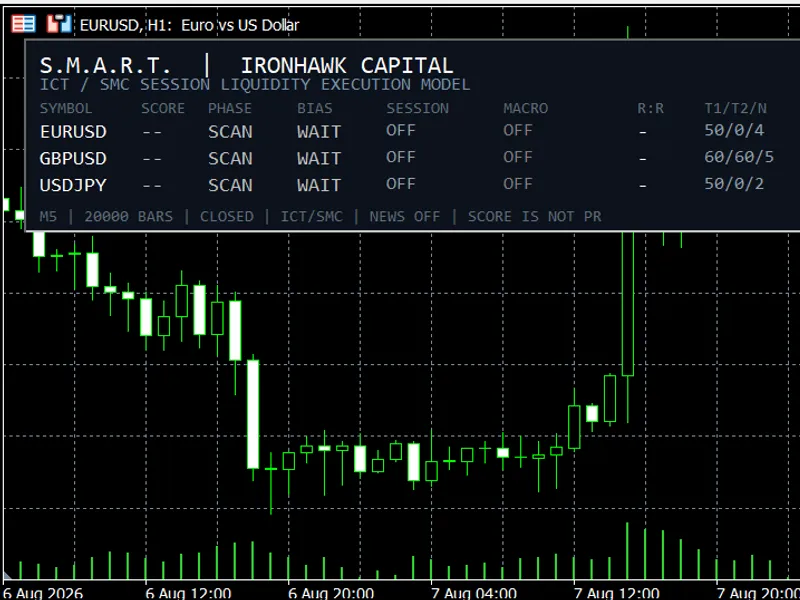
The chart displays the sweep marker, MSS level, FVG zone, red risk rectangle, and green reward rectangle. The dark dashboard presents the current ICT phase, directional bias, source session, macro context, projected R:R, and historical T1/T2/N audit.
Main External Inputs
Symbols and Engine
- InpSymbol1, InpSymbol2, InpSymbol3: Instruments scanned by the dashboard.
- InpAnalysisTimeframe: Internal analysis timeframe (M5 by default).
- InpHistoryBars: Number of closed bars loaded (20,000 by default).
- InpServerUTCOffsetMinutes: Automatic or manual broker-server UTC conversion.
UTC Sessions
- Asia inputs define the range preceding London.
- London inputs define its range and the Asian-liquidity scan window.
- New York inputs define the London-liquidity scan window.
ICT/SMC Model Parameters
- InpSwingStrength and InpSwingLookback: Confirmed pivot detection.
- InpMSSBars: Maximum wait for structure shift post-sweep.
- InpFVGFormationBars: Maximum wait for a directional FVG post-MSS.
- InpRetestBars: Maximum wait for a later FVG retest.
- ATR inputs control minimum sweep, displacement, FVG size, retest tolerance, stop buffer, and accepted structural risk.
- Risk-multiple inputs control TP1, minimum projection R:R, and TP2 cap.
Economic Calendar
- InpUseEconomicCalendar: False by default.
- Importance and before/after inputs select native MQL5 events shown in the Macro column.
The economic calendar is for informational purposes only. It does not alter the score, direction, signal validation, entry, stop, or targets. Price analysis continues normally if calendar data is unavailable.
Display and Alerts
Display inputs manage session boxes, projections, Watch markers, dashboard placement, colors, and the number of retained objects. Alert inputs independently enable terminal, push, and email notifications.
Technical Characteristics
- Three-symbol scan with broker suffix resolution.
- Deterministic closed-bar state machine.
- No repainting of historical setup levels.
- Bounded history and object retention.
- Time-sliced multi-symbol processing.
- Conservative audit counting same-bar stop and target ambiguity as stop first.
- No trade execution, DLL, WebRequest, Python, or external service.
S.M.A.R.T. is an analytical indicator and does not guarantee future performance. Verify session times and symbol availability with your broker before interpreting its output.
You may also like: Session Range Breakout: Asia, London, and New York High/Low Levels - excellent alternative for indicator users on MetaTrader 5.
Source Code
#property copyright "RobotFX"
#property version   "3.00"
#property strict
#property indicator_chart_window
#property indicator_buffers 0
#property indicator_plots   0
#property description "This code is educational. Feel free to use, modify and upgrade as you wish. Visit ROBOTFX.ORG for professional trading tools"
enum SMART_PHASE
  {
   SMART_PHASE_NONE=0,
.......
⚠ Limitations & Risk Warning
- This tool is provided for educational and testing purposes only.
- Past performance does not guarantee future results.
- Trading involves substantial risk of loss. Use on a demo account first.
- Results may vary depending on market conditions, broker, and settings.
- We recommend thorough backtesting and forward testing before using with real funds.