



Prior Bar Break Odds with Level Bars and Rolling Hit Rate
Info
The Prior Bar Break Odds with Level Bars and Rolling Hit Rate is a Indicator for MetaTrader 5 that every new bar brings up two questions: will the price trade above the high of the previous bar, and will it trade below the previous bar's low. This indicator provides numerical answers based on the chart data.
Usage
This tool is typically used for enhancing chart analysis and decision making.
Platform
This Indicator works exclusively on MetaTrader 5 (both build 600+ and newer versions).
Setup
Place the downloaded file in MQL5/Indicators folder via File ? Open Data Folder in MetaTrader 5.
How to Install and Use Prior Bar Break Odds with Level Bars and Rolling Hit Rate
1. Installation: Place your file in the MQL/Indicators folder via "Open Data Folder" and restart your terminal.
2. Loading: Find the indicator in the Navigator, drag it onto your chart, and configure the input parameters in the popup window.
3. Customization: Press Ctrl+I to open the indicator list, select your tool, and click "Properties" to change colors, levels, or visual styles.
4. Updating: Replace the old file in the Indicators folder with the new version and restart the platform to apply changes.
Frequently Asked Questions
Q: Why is my indicator not showing? A: Verify the file is in the MQL/Indicators folder, or try right-clicking the "Indicators" tree in the Navigator and clicking "Refresh."
Q: Do custom indicators slow down the platform? A: Too many complex indicators can impact performance; remove unused ones via the "Indicator List" (Ctrl+I).
Q: Can I use MT4 indicators on MT5? A: No, MQL4 and MQL5 are distinct languages; ensure the indicator is compiled specifically for your platform version.
What this tool does
Every new bar brings up two questions: will the price trade above the high of the previous bar, and will it trade below the previous bar's low.
Typical Use Case
This Indicator excels in automated trading and technical analysis on MetaTrader 5.
Compatible Platform & Setup
This Indicator works on MetaTrader 5. Place the file in the MQL5/Indicators folder and restart the terminal.
Description & Settings
Related: Smart Money Concepts: Break of Structure and Change of Character Analysis - another powerful indicator for MetaTrader 5 traders.
Every new bar brings up two questions: will the price trade above the high of the previous bar, and will it trade below the previous bar's low? This indicator provides numerical answers based on the chart data.Also recommended: Session Range Breakout: Asia, London, and New York High/Low Levels - similar indicator with strong performance on MetaTrader 5.
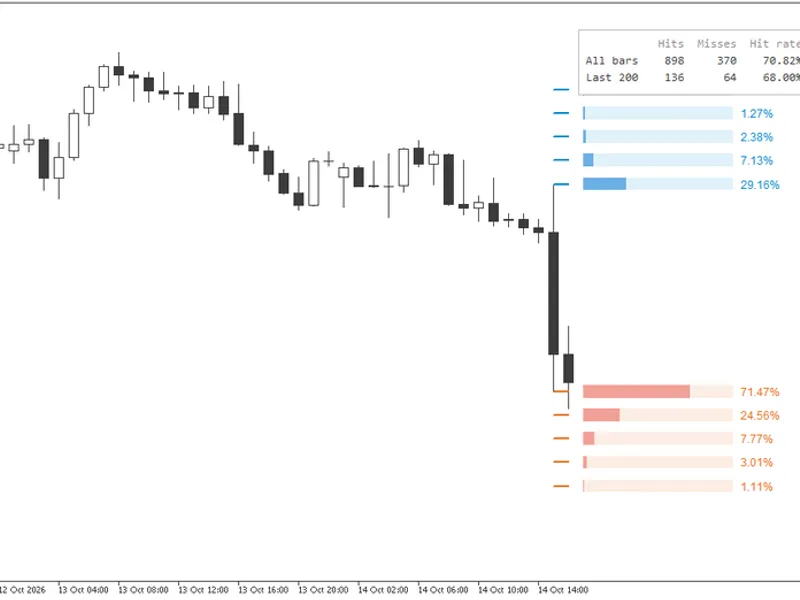
It analyzes historical data, categorizing each bar by the color of the preceding bar. It then quantifies how far the price extended beyond the prior high and low. For the current bar, it displays these probabilities as five levels on each side. Each level is represented by a bar whose length corresponds to its probability, making the most likely price movement visually apparent before reading any numbers.
Understanding the Levels
The first level, colored blue, is positioned at the prior high. The first orange level is at the prior low. Each subsequent level is one increment further out, with a maximum of five levels on each side. To the right of the current bar, each level features a track and a filled portion. A full track indicates 100%, with the filled length representing the percentage of comparable bars that reached that price. The exact percentage is displayed at the end of the bar.
Comparability is based on the preceding bar's type: after a bar that closed above its open (bullish), only bars that followed a bullish bar are considered. After a bar that closed below its open (bearish), only bars that followed a bearish bar are counted. Doji bars are not counted in either category. When the prior bar is a doji, the levels display odds measured after bearish bars.
Reading the levels from the inside out reveals how quickly probabilities diminish with distance. In the first example, following a large bearish hourly candle on gold, the prior low was breached 71.47% of the time. One step lower had a 24.56% probability, and two steps lower was 7.77%. The prior high was reached only 29.16% of the time.
Continuously Updated Odds
Each percentage is recalculated for every bar based on two counts: the number of comparable bars that reached the level, and the total number of comparable bars. A level that has not been reached for an extended period will see its probability decrease as new bars form, rather than retaining its last recorded value. The bars always reflect the ratio for the entire history up to the current moment.
Levels Spaced by Average Range
By default, the distance between levels is set to half the average true range of the last 14 closed bars. This spacing adapts to the volatility of the symbol and timeframe, making the same setting effective across different instruments (gold, indices, currencies) and timeframes (M5, daily) without the need for manual adjustment of step size. Since it only uses closed bars, the levels remain static while the current bar is forming. In both examples, the step size is approximately 8 dollars. A fixed distance can be used by switching the measurement to a percentage of the price.
Favored Side and Hit Rate
The percentages for the two first levels determine the favored side: it's the prior high if the odds of a higher high are equal to or greater than the odds of a lower low; otherwise, it's the prior low. This prediction is scored on every historical bar, and the table in the top right corner summarizes the results in two rows. 'All bars' covers the entire chart history. 'Last 200' covers the most recent bars, including the one in progress, and indicates if the current edge is holding. Hovering over a row provides details on what is being counted.
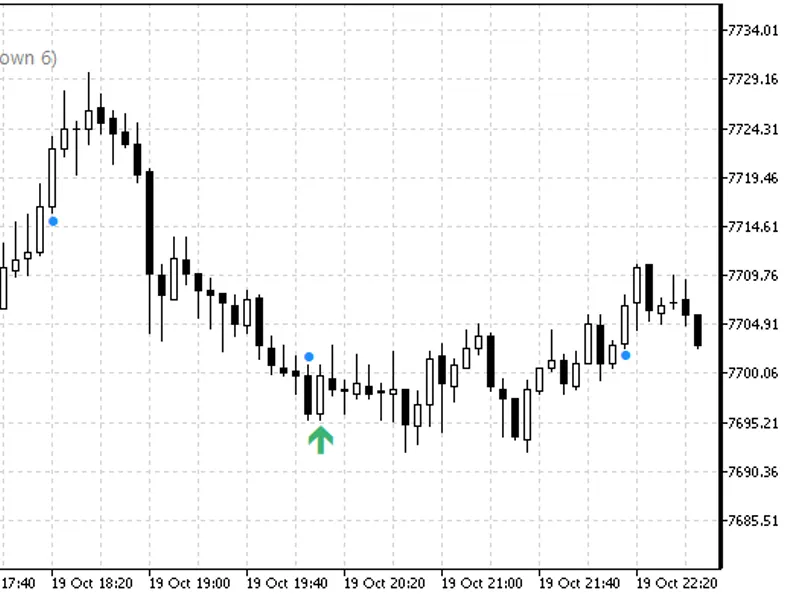
On the XAUUSD H1 history shown, the favored side was reached 898 times out of 1268 total bars, resulting in a 70.82% hit rate. Over the last 200 bars, the hit rate was 68.00%. Following a bullish bar, the scenario reverses: in the second screenshot, a higher high occurred 70.09% of the time, compared to 28.19% for a lower low. The overall hit rate was 70.51% across all bars and 65.50% over the last 200 bars.
For Expert Advisors and Alerts
Two buffers provide the first-level odds for every bar: buffer 0 for the odds of a higher high, and buffer 1 for the odds of a lower low. Each closed bar retains the values it displayed at its close. The bar in progress updates on every tick. These buffers do not draw any graphical elements but are accessible in the Data Window and can be read using iCustom and CopyBuffer, allowing Expert Advisors to utilize the same data displayed on the chart.
An optional alert can be configured to trigger once when a new bar opens. It will not activate when the indicator is first attached. The alert message includes the symbol, timeframe, prior high and low, the bias, and both first-level odds.
Inputs
Levels:
- Level distance measured as a multiple of the average range or as a percentage of price.
- The multiple (default 0.5).
- The percentage (default 1.0).
- Number of levels on each side, from 1 to 5 (default 5).
- Option to hide levels that have never been reached (default true).
Look:
- Hit rate panel visibility (default true).
- Recent window size for the panel in bars, 0 to hide the row (default 200).
- Colors for the levels above the prior high (default blue) and below the prior low (default orange). Probability bars and percentages use these same colors.
Alerts:
- Alert on each new bar (default false).
This indicator operates on any symbol and timeframe, analyzing every bar on the chart. Closed bars are counted once. The bar in progress is recalculated on every tick using a copy of the historical tally, ensuring that a forming candle does not alter past data. The probability bars are drawn in the space to the right of the last bar; ensure chart shift is enabled. Removing the indicator will erase all its graphical elements.
Educational content, not financial advice. Trading involves risk of loss. © 2026.
You may also like: Failed Breakout Detector: Identifying Trapped Traders - excellent alternative for indicator users on MetaTrader 5.
Source Code
#property copyright "RobotFX"
#property link "https://robotfx.org"
#property version   "1.04"
#property description "This code is educational. Feel free to use, modify and upgrade as you wish. Visit ROBOTFX.ORG for professional trading tools"
#property indicator_chart_window
#property indicator_buffers 2
#property indicator_plots   2
#property indicator_type1   DRAW_NONE
#property indicator_label1  "Odds of a higher high"
#property indicator_type2   DRAW_NONE
.......
⚠ Limitations & Risk Warning
- This tool is provided for educational and testing purposes only.
- Past performance does not guarantee future results.
- Trading involves substantial risk of loss. Use on a demo account first.
- Results may vary depending on market conditions, broker, and settings.
- We recommend thorough backtesting and forward testing before using with real funds.