


Market Session Separator Indicator
Info
The Market Session Separator Indicator is a Indicator for MetaTrader 5 that market session separatorknowing which session is active is crucial for almost every intraday trading decision, as volatility, liquidity, and typical market behavior change significantly as trading sessions transition. Most traders mentally calculate this by checking the clock and converting to their server time.
Usage
This tool is typically used for enhancing chart analysis and decision making.
Platform
This Indicator works exclusively on MetaTrader 5 (both build 600+ and newer versions).
Setup
Place the downloaded file in MQL5/Indicators folder via File ? Open Data Folder in MetaTrader 5.
How to Install and Use Market Session Separator Indicator
1. Installation: Place your file in the MQL/Indicators folder via "Open Data Folder" and restart your terminal.
2. Loading: Find the indicator in the Navigator, drag it onto your chart, and configure the input parameters in the popup window.
3. Customization: Press Ctrl+I to open the indicator list, select your tool, and click "Properties" to change colors, levels, or visual styles.
4. Updating: Replace the old file in the Indicators folder with the new version and restart the platform to apply changes.
Frequently Asked Questions
Q: Why is my indicator not showing? A: Verify the file is in the MQL/Indicators folder, or try right-clicking the "Indicators" tree in the Navigator and clicking "Refresh."
Q: Do custom indicators slow down the platform? A: Too many complex indicators can impact performance; remove unused ones via the "Indicator List" (Ctrl+I).
Q: Can I use MT4 indicators on MT5? A: No, MQL4 and MQL5 are distinct languages; ensure the indicator is compiled specifically for your platform version.
What this tool does
Market Session SeparatorKnowing which session is active is crucial for almost every intraday trading decision, as volatility, liquidity, and typical market behavior change significantly as trading sessions transition.
Typical Use Case
This Indicator excels in automated trading and technical analysis on MetaTrader 5.
Compatible Platform & Setup
This Indicator works on MetaTrader 5. Place the file in the MQL5/Indicators folder and restart the terminal.
Description & Settings
Related: Session Boxes Asia London New York - another powerful indicator for MetaTrader 5 traders.
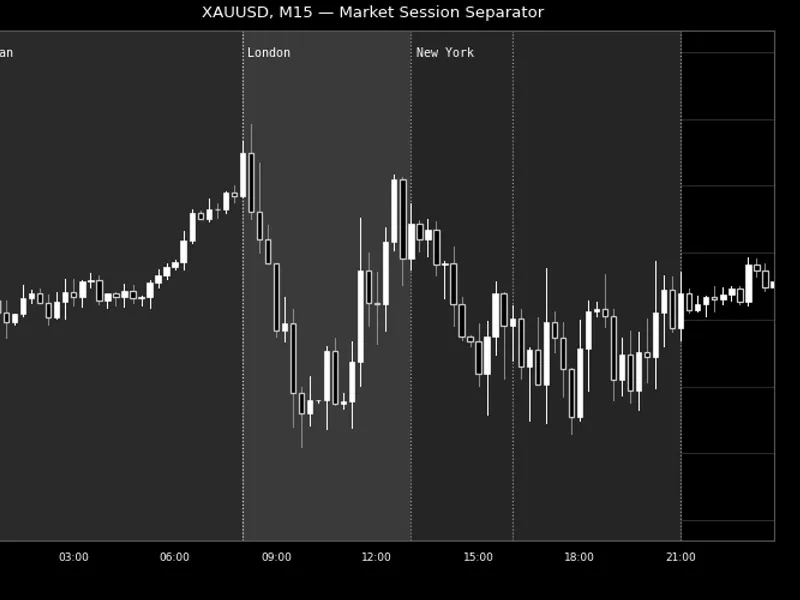
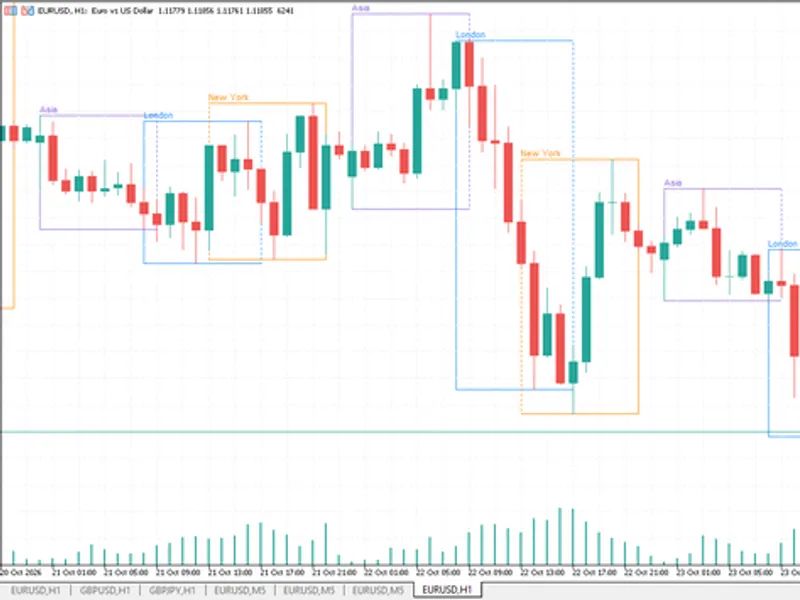
Market Session SeparatorKnowing which session is active is crucial for almost every intraday trading decision, as volatility, liquidity, and typical market behavior change significantly as trading sessions transition. Most traders mentally calculate this by checking the clock and converting to their server time. This indicator automates this process by drawing vertical lines and/or a shaded background tint to visually mark up to three configurable sessions each day. This makes the active session immediately obvious at a glance.
Also recommended: Accurate Broker Time Zones and Session Lines for MT4/MT5 - similar indicator with strong performance on MetaTrader 5.
The indicator focuses solely on visual representation. It does not perform any calculations of highs, lows, or other derived values, ensuring it remains lightweight and dedicated to its primary function: clearly indicating session boundaries. The session boxes dynamically adjust to the chart's zoom and scroll settings, spanning the full visible price range regardless of how the chart is framed.
How to interpret it
Vertical dotted lines mark the exact start and end times of each enabled session, repeating daily within the defined rolling window.
Shaded background bands provide a tinted area that spans the full visible price range for the duration of each session, making the active window apparent without needing to read the axis.
A session label displays the name you assign to the session (e.g., "London") near the top of its band, appearing at its start time.
Three independently configurable sessions are available. By default, they represent the Asian, London, and New York sessions. However, all start/end times, colors, and labels are fully customizable, allowing the indicator to be used for any custom time windows, such as specific news periods or overlap times.
Overnight sessions are handled automatically. If a session's end time is earlier than its start time (e.g., 21:00 to 05:00), it is recognized as spanning across midnight into the next day.
External variables (inputs)
Input
Default
Purpose
InpEnableSession1/2/3
true / true / true
Toggles each of the three sessions independently.
InpSession1/2/3StartHour, StartMin
0:00 / 8:00 / 13:00
Start time of each session, in server time.
InpSession1/2/3EndHour, EndMin
8:00 / 16:00 / 21:00
End time of each session, in server time. Automatically treated as overnight if the end time is earlier than the start time.
InpSession1/2/3Color
SteelBlue / Goldenrod / MediumSeaGreen
Color used for that session's lines, box, and label.
InpSession1/2/3Label
"Asian" / "London" / "New York"
Text displayed on that session's label.
InpDrawMode
Lines + Boxes
Determines whether to draw vertical separator lines only, shaded boxes only, or both.
InpShowLabels
true
Toggles the display of session name labels.
InpLabelFontSize
8
Font size used for the labels.
InpDaysToDraw
10
Defines the rolling window of calendar days (counting back from today) for which separators are drawn. Older days are automatically pruned as time progresses.
InpSkipWeekends
true
Skips drawing separators on Saturdays and Sundays. Disable this for symbols that trade through the weekend (e.g., certain cryptocurrency feeds).
InpLineStyle
Dot
Line style used for the vertical separators.
Recommended use
This indicator is effective on any symbol and any intraday timeframe (M1–H4 are typical). On daily (D1) and higher timeframes, a single candle often spans multiple sessions, diminishing the usefulness of separators.
Always verify your broker's server time against the actual session hours you intend to mark. Server time offsets vary by broker and can shift with daylight saving changes, particularly around the London/New York overlap. Therefore, the default hours serve as a starting point and not a universal standard.
The InpDaysToDraw input ensures a bounded and predictable number of objects, regardless of how long the indicator has been running. Objects for days outside the rolling window are automatically pruned when a new bar closes. This prevents indefinite accumulation of chart objects, even if the indicator is left running for extended periods.
This indicator exclusively draws visual markers and does not place, modify, or close any orders. It is safe to use on all account types.
All chart objects are created under a single internal name prefix. They are fully removed using ObjectsDeleteAll() in OnDeinit() when the indicator is detached, ensuring no residual objects are left on the chart.
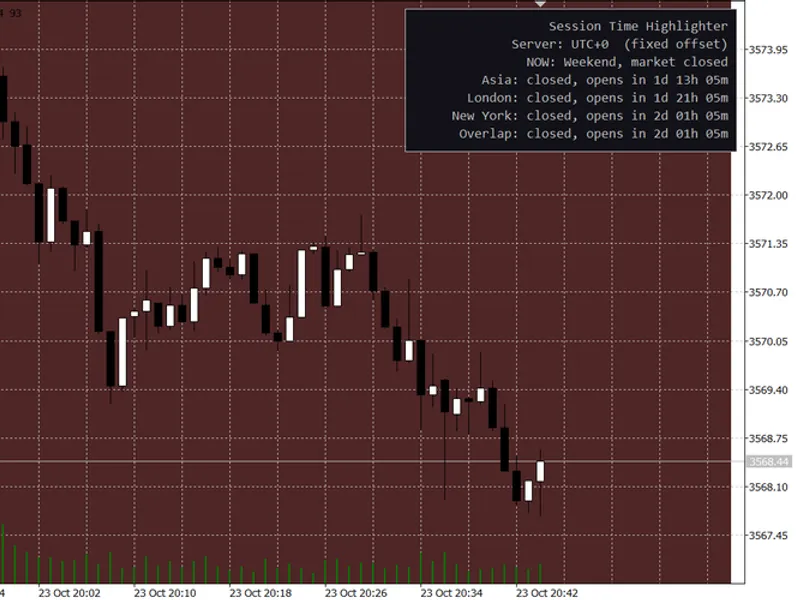
You may also like: Session Time Highlighter for MT4/MT5 - excellent alternative for indicator users on MetaTrader 5.
Source Code
#property copyright "RobotFX"
#property link "https://robotfx.org"
#property version   "1.00"
#property description "This code is educational. Feel free to use, modify and upgrade as you wish. Visit ROBOTFX.ORG for professional trading tools"
#property indicator_chart_window
#property indicator_buffers 0
#property indicator_plots   0
#property strict
enum ENUM_SEP_DRAW_MODE
  {
.......
⚠ Limitations & Risk Warning
- This tool is provided for educational and testing purposes only.
- Past performance does not guarantee future results.
- Trading involves substantial risk of loss. Use on a demo account first.
- Results may vary depending on market conditions, broker, and settings.
- We recommend thorough backtesting and forward testing before using with real funds.