


MA Toolkit: A Comprehensive Moving Average Indicator
Info
The MA Toolkit: A Comprehensive Moving Average Indicator is a Indicator for MetaTrader 5 that ma toolkitthe idea behind itmoving averages are fundamental components in many trading tools. However, most traders utilize built-in functions without understanding the underlying calculations.
Usage
This tool is typically used for enhancing chart analysis and decision making.
Platform
This Indicator works exclusively on MetaTrader 5 (both build 600+ and newer versions).
Setup
Place the downloaded file in MQL5/Indicators folder via File ? Open Data Folder in MetaTrader 5.
How to Install and Use MA Toolkit: A Comprehensive Moving Average Indicator
1. Installation: Place your file in the MQL/Indicators folder via "Open Data Folder" and restart your terminal.
2. Loading: Find the indicator in the Navigator, drag it onto your chart, and configure the input parameters in the popup window.
3. Customization: Press Ctrl+I to open the indicator list, select your tool, and click "Properties" to change colors, levels, or visual styles.
4. Updating: Replace the old file in the Indicators folder with the new version and restart the platform to apply changes.
Frequently Asked Questions
Q: Why is my indicator not showing? A: Verify the file is in the MQL/Indicators folder, or try right-clicking the "Indicators" tree in the Navigator and clicking "Refresh."
Q: Do custom indicators slow down the platform? A: Too many complex indicators can impact performance; remove unused ones via the "Indicator List" (Ctrl+I).
Q: Can I use MT4 indicators on MT5? A: No, MQL4 and MQL5 are distinct languages; ensure the indicator is compiled specifically for your platform version.
What this tool does
MA ToolkitThe Idea Behind ItMoving averages are fundamental components in many trading tools.
Typical Use Case
This Indicator excels in automated trading and technical analysis on MetaTrader 5.
Compatible Platform & Setup
This Indicator works on MetaTrader 5. Place the file in the MQL5/Indicators folder and restart the terminal.
Description & Settings
Related: ATS Prop Rules Monitor: Comprehensive Prop Firm Challenge Scoreboard - another powerful indicator for MetaTrader 5 traders.
MA ToolkitAlso recommended: FX Dashboard: Comprehensive Trading Analysis Tool - similar indicator with strong performance on MetaTrader 5.
The Idea Behind It
Moving averages are fundamental components in many trading tools. However, most traders utilize built-in functions without understanding the underlying calculations. MA Toolkit computes three classic averages manually, providing a clear code example and a foundation for custom indicator development.
SMA (Simple Moving Average)
- Calculates the arithmetic mean of the last N prices.
EMA (Exponential Moving Average)
- A weighted average that responds more rapidly to recent price changes. It uses a smoothing factor of 2 / (N + 1). Similar to the standard MetaTrader indicator, it initializes using the first available price in the historical data.
LWMA (Linear Weighted Moving Average)
- Assigns linearly decreasing weights to prices, with the most recent price having the highest weight (N) and the oldest price having the lowest weight (1).
The indicator displays two moving averages simultaneously: a fast and a slow line, each configurable with its own type and period. To maintain efficiency on charts with extensive history, the indicator recalculates only for new and forming bars.
How to Interpret It
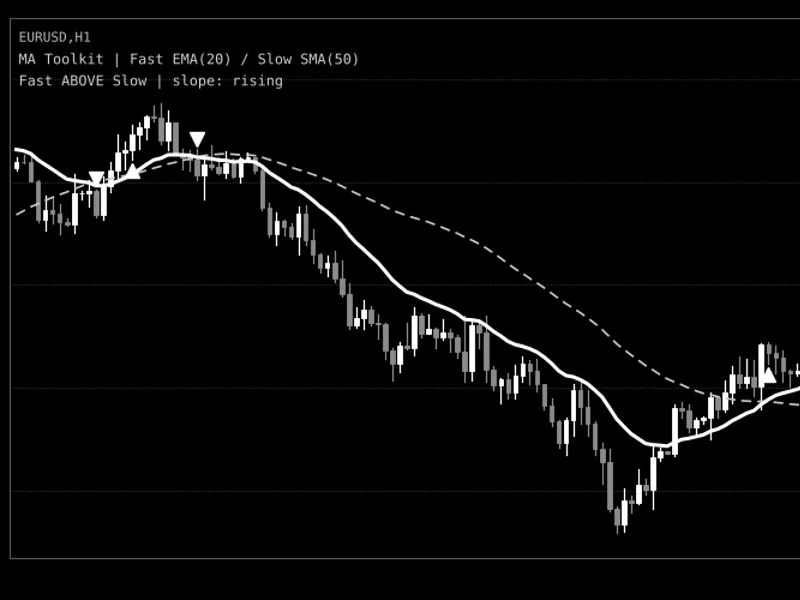
Fast MA (thick solid line)
- Its color indicates the slope: blue when rising, orange-red when falling, and gray when the slope is flat. A flat slope is defined as a change per bar not exceeding the specified flat-slope threshold. In black and white charts, this line may appear as white.
Slow MA (thin dashed line)
- Serves as a longer-term reference. This line can be optionally hidden via the 'Show the slow MA' input parameter.
Up arrow below a bar
- Signifies that the fast MA crossed above the slow MA on that specific bar, indicating a bullish crossover.
Down arrow above a bar
- Indicates that the fast MA crossed below the slow MA on that specific bar, signaling a bearish crossover.
Info Panel (top-left corner)
- The first line displays the selected MA types and periods. The second line indicates the relative position of the fast MA to the slow MA (above or below) and the current slope of the fast MA.
Alerts
- An optional pop-up alert can be configured to trigger once per bar when the last closed bar forms a crossover. Alerts are exclusively generated for closed bars and not for historical data.
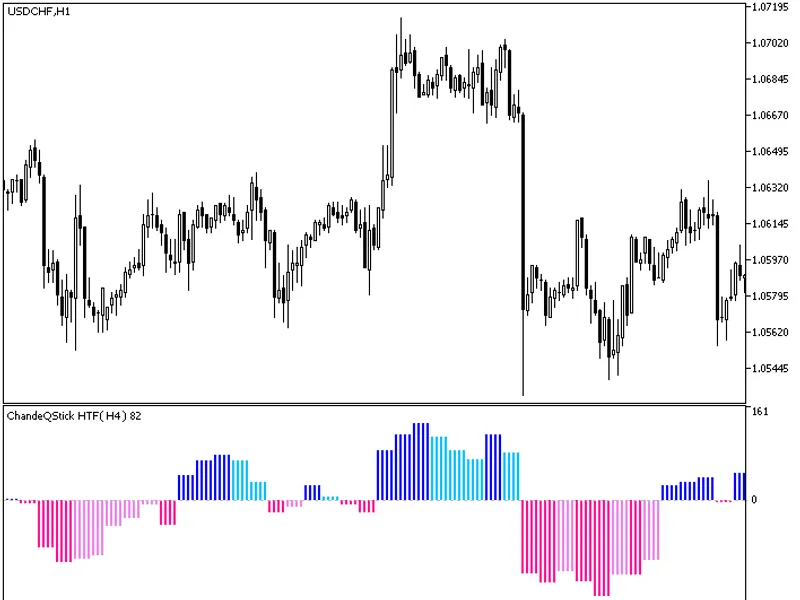
Fig. 1. MA Toolkit displaying a fast EMA(20) and a slow SMA(50) with crossover arrows. (Note: Image may be presented in black and white as per guidelines).
External Variables (Inputs)
Input Name
Default Value
Purpose
Fast MA: type (InpFastType)
EMA
Specifies the averaging method for the fast line: SMA, EMA, or LWMA.
Fast MA: period (InpFastPeriod)
20
Sets the number of bars for the fast line calculation. Must be 2 or greater.
Slow MA: type (InpSlowType)
SMA
Specifies the averaging method for the slow line: SMA, EMA, or LWMA.
Slow MA: period (InpSlowPeriod)
50
Sets the number of bars for the slow line calculation. Must be 2 or greater.
Applied price (InpPrice)
PRICE_CLOSE
Determines the price used in the calculation (e.g., close, open, high, low, median, typical, or weighted).
Flat-slope threshold (InpFlatThreshold)
0.0
Defines the minimum change in the fast MA per bar, in points, required to be considered rising or falling. Changes below this threshold are colored as flat.
Show the slow MA (InpShowSlow)
true
Controls the visibility of the slow line. The slow MA is still calculated for crossover detection even when hidden.
Show crossover arrows (InpShowCross)
true
Enables or disables the display of arrows at crossover points.
Arrow offset from the bar (InpArrowOffset)
20
Sets the distance, in points, between an arrow and the high or low of its corresponding bar.
Show the info panel (InpShowPanel)
true
Toggles the display of two text labels in the top-left corner of the chart.
Info panel text color (InpPanelColor)
Silver
Sets the color for the info panel text.
Pop-up alert on crossover (InpAlertOnCross)
false
Triggers a pop-up alert once per bar when a crossover occurs on the last closed bar.
Recommended Use
This indicator is compatible with any symbol and timeframe. As it does not execute trades, the account type (netting or hedging) is irrelevant.
Suggested starting configurations include a fast EMA period of 10-20 combined with a slow SMA or EMA period of 50-200. Shorter periods generate more signals but may also produce more false signals.
Moving average crossovers are subject to lag and can generate numerous false signals in ranging or sideways markets. Utilize the arrows as indicators of potential trend changes rather than a standalone trading system, and always confirm signals with other analytical tools.
Arrows displayed on the current (forming) bar may change position until the bar's completion. Alerts are exclusively based on the last closed bar.
Due to its reliance on the entire history for initialization, the EMA's initial values might differ slightly on charts with varying amounts of loaded historical data compared to the same indicator on a different chart history.
The indicator requires a minimum of the larger period plus two bars of historical data. All graphical objects created by the indicator, such as the info panel, are automatically removed when the indicator is deleted from the chart.
You may also like: MT5 Trade Report Table: Comprehensive Account Statistics - excellent alternative for indicator users on MetaTrader 5.
Source Code
#property copyright "RobotFX"
#property link "https://robotfx.org"
#property version     "1.00"
#property description "This code is educational. Feel free to use, modify and upgrade as you wish. Visit ROBOTFX.ORG for professional trading tools"
#property indicator_chart_window
#property indicator_buffers 6
#property indicator_plots   4
#property indicator_label1  "Fast MA"
#property indicator_type1   DRAW_COLOR_LINE
#property indicator_color1  clrDodgerBlue,clrOrangeRed,clrGray
.......
⚠ Limitations & Risk Warning
- This tool is provided for educational and testing purposes only.
- Past performance does not guarantee future results.
- Trading involves substantial risk of loss. Use on a demo account first.
- Results may vary depending on market conditions, broker, and settings.
- We recommend thorough backtesting and forward testing before using with real funds.