





ATS Prop Rules Monitor: Comprehensive Prop Firm Challenge Scoreboard
Info
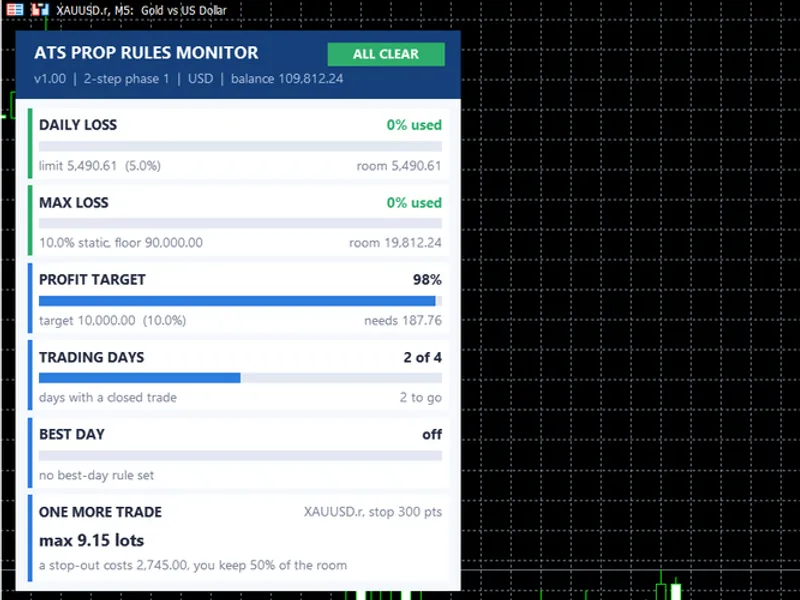
The ATS Prop Rules Monitor: Comprehensive Prop Firm Challenge Scoreboard is a Indicator for MetaTrader 5 that ats prop rules monitor displays all five prop firm challenge rules on a single panel, showing the remaining room for each. The Five Rules- DAILY LOSS: Tracks the percentage of the daily loss limit used and the remaining amount.
Usage
This tool is typically used for enhancing chart analysis and decision making.
Platform
This Indicator works exclusively on MetaTrader 5 (both build 600+ and newer versions).
Setup
Place the downloaded file in MQL5/Indicators folder via File ? Open Data Folder in MetaTrader 5.
How to Install and Use ATS Prop Rules Monitor: Comprehensive Prop Firm Challenge Scoreboard
1. Installation: Place your file in the MQL/Indicators folder via "Open Data Folder" and restart your terminal.
2. Loading: Find the indicator in the Navigator, drag it onto your chart, and configure the input parameters in the popup window.
3. Customization: Press Ctrl+I to open the indicator list, select your tool, and click "Properties" to change colors, levels, or visual styles.
4. Updating: Replace the old file in the Indicators folder with the new version and restart the platform to apply changes.
Frequently Asked Questions
Q: Why is my indicator not showing? A: Verify the file is in the MQL/Indicators folder, or try right-clicking the "Indicators" tree in the Navigator and clicking "Refresh."
Q: Do custom indicators slow down the platform? A: Too many complex indicators can impact performance; remove unused ones via the "Indicator List" (Ctrl+I).
Q: Can I use MT4 indicators on MT5? A: No, MQL4 and MQL5 are distinct languages; ensure the indicator is compiled specifically for your platform version.
What this tool does
ATS Prop Rules Monitor displays all five prop firm challenge rules on a single panel, showing the remaining room for each.
Typical Use Case
This Indicator excels in automated trading and technical analysis on MetaTrader 5.
Compatible Platform & Setup
This Indicator works on MetaTrader 5. Place the file in the MQL5/Indicators folder and restart the terminal.
Description & Settings
Related: Daily Profit/Loss Percentage Overlay for Prop Firm Daily Loss Limits - another powerful indicator for MetaTrader 5 traders.
ATS Prop Rules Monitor displays all five prop firm challenge rules on a single panel, showing the remaining room for each.Also recommended: Prop Firm Daily Loss Limit Indicator - similar indicator with strong performance on MetaTrader 5.
The Five Rules
- DAILY LOSS: Tracks the percentage of the daily loss limit used and the remaining amount. The limit is a percentage of the day-start balance. Open profit/loss is included by default. Users can set the server hour for a new trading day.
- MAX LOSS: Configurable as static (based on initial balance) or trailing on equity or balance. Displays the absolute floor, remaining room, and percentage used.
- PROFIT TARGET: Shows progress towards the profit target and the amount still needed.
- TRADING DAYS: Counts days with at least one closed trade against the minimum required days.
- BEST DAY: Represents the best trading day as a percentage of total profit, compared against consistency rules. This is only active if the challenge rules include it.
Color Indicators: Green signifies compliance, amber indicates a warning (default 70% of a loss limit used), and red denotes a limit breach. The top badge provides an overall status: ALL CLEAR, WARNING, LIMIT BREACHED, or TARGET MET.
ONE MORE TRADE Feature
This feature calculates the maximum lot size for the current chart symbol and a specified stop loss (in points). It ensures that a stop-out remains within a defined percentage (default 50%) of the smaller of the two available rooms. If a limit is already breached, it will indicate this. It adheres to the lot sizing rules of the ATS Risk Library, ensuring lot sizes are never rounded up.
Presets and Customization
Included presets offer configurations for common challenge structures (e.g., 2-step phase 1, 2-step phase 2, 1-step with trailing loss and best-day rule, funded accounts). However, prop firm rules and their exact definitions (daily cut-off, trailing mechanism, trading day criteria) can vary significantly. Always consult your specific challenge rules and configure the indicator using the Custom preset. The initial balance can be manually set if it cannot be automatically detected from the account history.
Inputs
Key inputs include: InpPreset, InpInitialBal (set to 0 to auto-detect from deposit), InpStart (challenge start date, server time), InpTargetPct, InpDailyPct, InpMaxPct, InpMaxMode, InpMinDays, InpBestDayPct, InpDayStartHour, InpFloating, InpStopPoints, InpRoomShare, InpWarn, InpX, InpY.
Files Included
- ATS_Prop_Rules_Monitor.mq5: The main indicator file.
- ATS_RiskLib.mqh: A supporting library file. Ensure this is placed in the same folder as the indicator.
For Programmers
The panel is rendered using CCanvas, with sizes scaled by screen DPI. Font measurements are taken once at startup for consistent text sizing across different displays. The status of the rules is saved in GlobalVariables and is cleared upon indicator removal. Rule calculations utilize the CAtsDayGuard and CAtsDrawdownGuard classes from the library. Other metrics (profit, days, best day) are derived from account history since the specified start date.
Important Note on Accuracy
This indicator serves as a scoreboard and not an automated trading guard. It cannot execute trades and may not perfectly match proprietary firm dashboards due to differences in server time, swap calculations, commissions, and floating profit interpretation. Use this tool to monitor your progress and cross-reference critical numbers with your firm's official dashboard before making trading decisions.
Additional Notes
This is a MetaTrader indicator and does not open, modify, or close trades. It functions on any symbol and timeframe. The 'one more trade' feature dynamically uses the symbol of the active chart. This tool was updated in 2026.
You may also like: Prop Firm Daily Loss Tracker: Monitor Your Risk Limits - excellent alternative for indicator users on MetaTrader 5.
Source Code
#property copyright "RobotFX"
#property link "https://robotfx.org"
#property version     "1.00"
#property description "This code is educational. Feel free to use, modify and upgrade as you wish. Visit ROBOTFX.ORG for professional trading tools"
#property indicator_chart_window
#property indicator_buffers 0
#property indicator_plots   0
#include <Canvas\Canvas.mqh>
#include "ATS_RiskLib.mqh"
enum ENUM_PRM_PRESET
.......
⚠ Limitations & Risk Warning
- This tool is provided for educational and testing purposes only.
- Past performance does not guarantee future results.
- Trading involves substantial risk of loss. Use on a demo account first.
- Results may vary depending on market conditions, broker, and settings.
- We recommend thorough backtesting and forward testing before using with real funds.