





ICT Killzones and Session Pivots for MT5
Info
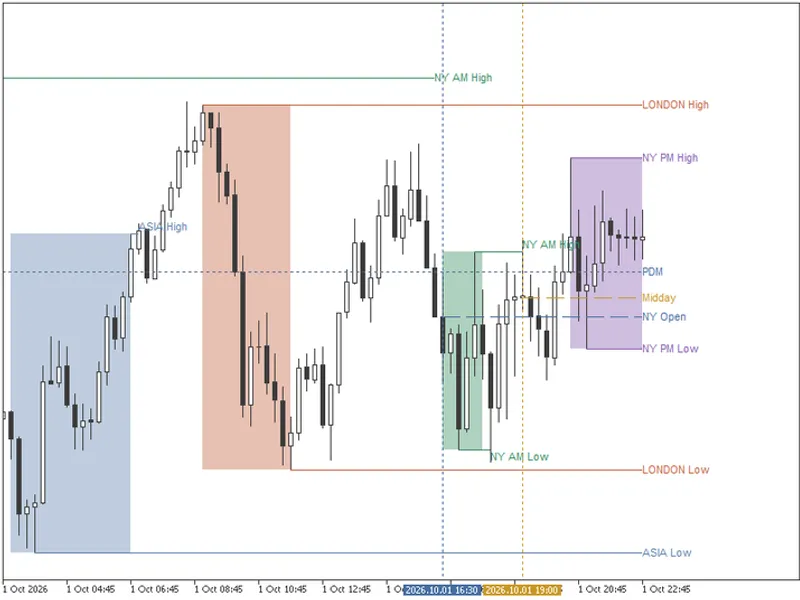
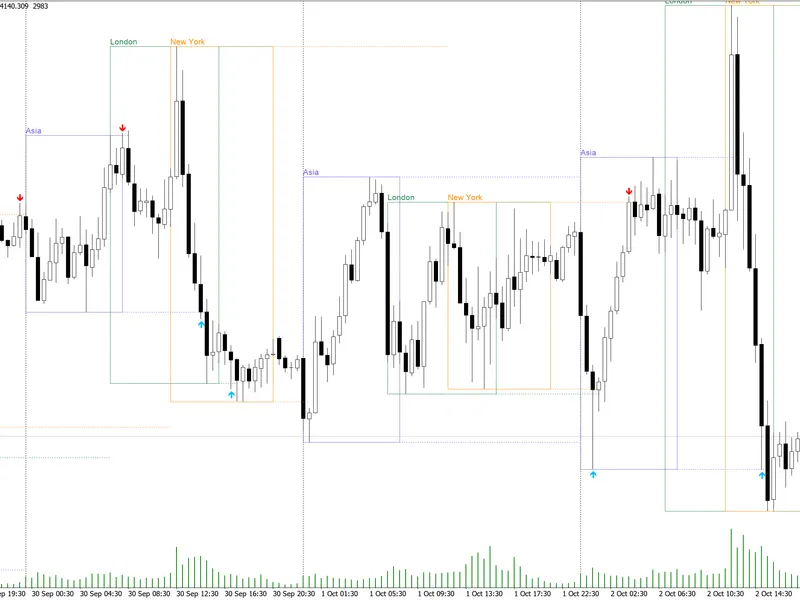
The ICT Killzones and Session Pivots for MT5 is a Indicator for MetaTrader 5 that killzones are specific periods within the trading day that are known for price exhibiting directional movement. These include the Asian session, London open, New York morning, and New York afternoon.
Usage
This tool is typically used for enhancing chart analysis and decision making.
Platform
This Indicator works exclusively on MetaTrader 5 (both build 600+ and newer versions).
Setup
Place the downloaded file in MQL5/Indicators folder via File ? Open Data Folder in MetaTrader 5.
How to Install and Use ICT Killzones and Session Pivots for MT5
1. Installation: Place your file in the MQL/Indicators folder via "Open Data Folder" and restart your terminal.
2. Loading: Find the indicator in the Navigator, drag it onto your chart, and configure the input parameters in the popup window.
3. Customization: Press Ctrl+I to open the indicator list, select your tool, and click "Properties" to change colors, levels, or visual styles.
4. Updating: Replace the old file in the Indicators folder with the new version and restart the platform to apply changes.
Frequently Asked Questions
Q: Why is my indicator not showing? A: Verify the file is in the MQL/Indicators folder, or try right-clicking the "Indicators" tree in the Navigator and clicking "Refresh."
Q: Do custom indicators slow down the platform? A: Too many complex indicators can impact performance; remove unused ones via the "Indicator List" (Ctrl+I).
Q: Can I use MT4 indicators on MT5? A: No, MQL4 and MQL5 are distinct languages; ensure the indicator is compiled specifically for your platform version.
What this tool does
Killzones are specific periods within the trading day that are known for price exhibiting directional movement.
Typical Use Case
This Indicator excels in automated trading and technical analysis on MetaTrader 5.
Compatible Platform & Setup
This Indicator works on MetaTrader 5. Place the file in the MQL5/Indicators folder and restart the terminal.
Description & Settings
Related: Trading Session Boxes Indicator for MT4/MT5 - another powerful indicator for MetaTrader 5 traders.
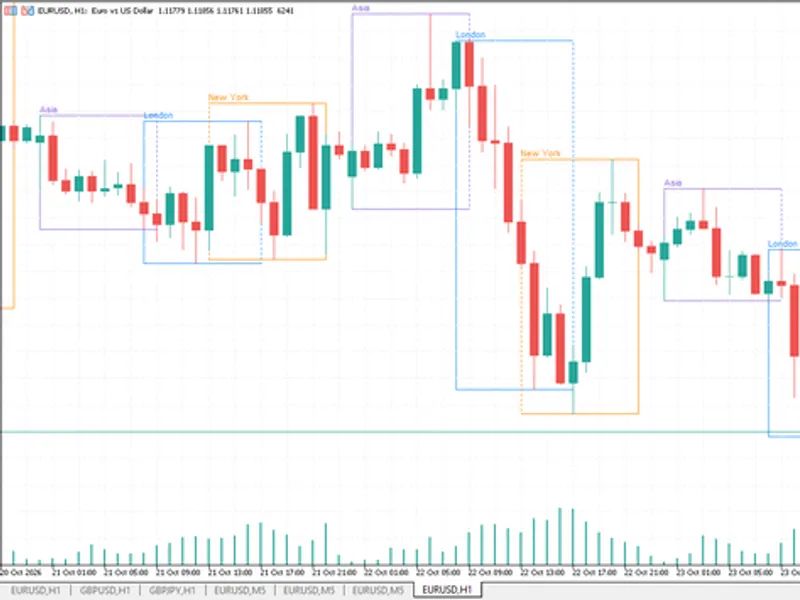
Killzones are specific periods within the trading day that are known for price exhibiting directional movement. These include the Asian session, London open, New York morning, and New York afternoon. This concept originates from the ICT (Inner Circle Trader) methodology developed by Michael J. Huddleston and is widely adopted by gold, index, and forex traders.Also recommended: Accurate Broker Time Zones and Session Lines for MT4/MT5 - similar indicator with strong performance on MetaTrader 5.
This indicator brings killzones to MetaTrader 5, addressing the common issue of timing discrepancies on the platform. Sessions are configured to New York time and automatically convert based on your broker's server time, accurately accounting for daylight-saving adjustments in both the United States and Europe. This ensures precise placement of session boundaries on your charts throughout the year.
Features:
Killzones:
- Five customizable sessions (Asia, London, New York AM, New York Lunch, and New York PM), each with configurable name, color, and time window.
Session Pivots:
- Highs and lows of each session, projected forward until price breaches them.
- Includes optional midpoint and alerts triggered upon pivot breach.
Previous Day, Week, and Month Levels:
- Highs, lows, and midlines for the previous day, week, and month.
- Displays hit-rate statistics in tooltips.
Key Times:
- A horizontal line at the opening price and vertical markers for up to three user-defined times (e.g., 09:30 New York Open).
Configuration for Your Broker:
The default settings are suitable for most brokers with a GMT+2 winter offset that follows the US daylight-saving schedule. If your broker adheres to the European calendar (like MetaQuotes-Demo), select 'EU' for the 'broker daylight-saving calendar'. If the winter offset differs, adjust 'broker server GMT offset in winter'. Once configured, all sessions will automatically align with New York time.
Indicator Inputs:
All settings are organized into five concise groups. All times are entered in New York time format: HHMM-HHMM for sessions, HHMM for key times. Leaving a time field blank disables that session or key time.
Sessions:
- Customize the name, time window, and color for each of the five killzones.
- Default settings follow the standard ICT schedule: Asia 20:00-00:00, London 02:00-05:00, NY AM 09:30-11:00, and NY PM 13:30-16:00. The NY Lunch session can be set, with 12:00-13:00 being a common choice.
- Additional settings control the number of past sessions displayed and the intensity of the session box fill.
Session Pivots:
- Option to draw session highs and lows, add midpoints, and label these levels.
- Pivots can be set to terminate at the bar that breaks them, indicating liquidity sweeps, or continue as reference lines.
- Hovering over a pivot displays its historical breach frequency.
Alerts:
- A single switch enables alerts for price breaching session highs/lows or previous day, week, or month levels.
Previous Day, Week, Month Levels:
- Enable and customize the color for previous day, week, and month levels.
- Each period displays its high, low, and midline, labeled (e.g., PDH, PDL, PDM), with corresponding historical breach statistics.
Key Times:
- Configure up to three key times, each with a custom label and color.
- The indicator marks the opening price with a horizontal line and the specific time with a vertical line; either line can be disabled.
- Default key times: 09:30 NY Open, 12:00 Midday, and 16:00 Close.
Broker Clock Settings:
- Input the server's winter GMT offset and its daylight-saving calendar to ensure accurate session placement.
- Set the highest timeframe for indicator drawing (default is M30 to keep higher timeframes clear).
This indicator functions on any symbol and timeframes up to M30 by default. It is a single file using chart objects only, with no DLL dependencies.
You may also like: Session Time Highlighter for MT4/MT5 - excellent alternative for indicator users on MetaTrader 5.
Source Code
#property copyright "RobotFX"
#property link "https://robotfx.org"
#property version   "1.04"
#property description "This code is educational. Feel free to use, modify and upgrade as you wish. Visit ROBOTFX.ORG for professional trading tools"
#property indicator_chart_window
#property indicator_buffers 0
#property indicator_plots   0
enum ENUM_EXTENSION
  {
   EXTEND_UNTIL_TAKEN,
.......
⚠ Limitations & Risk Warning
- This tool is provided for educational and testing purposes only.
- Past performance does not guarantee future results.
- Trading involves substantial risk of loss. Use on a demo account first.
- Results may vary depending on market conditions, broker, and settings.
- We recommend thorough backtesting and forward testing before using with real funds.