




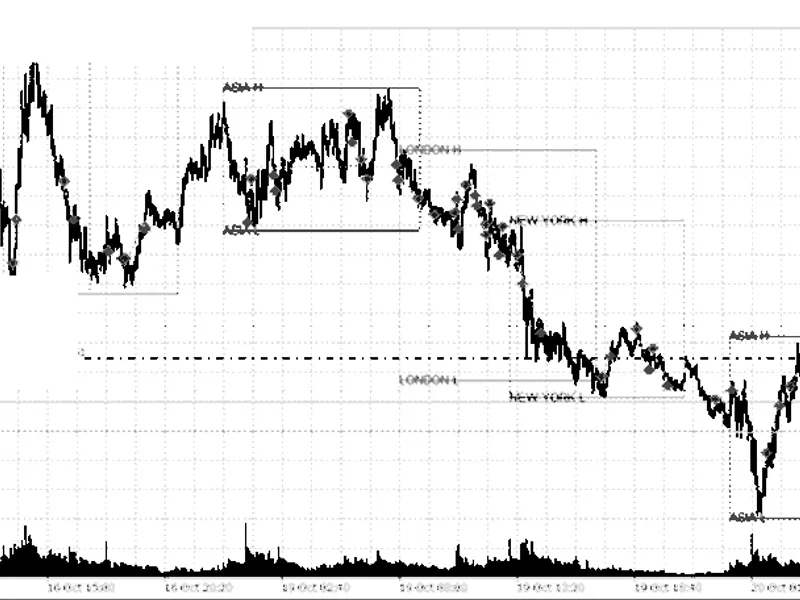
Gold Session Boxes: Visualizing Trading Sessions and Their Overlaps
Info
The Gold Session Boxes: Visualizing Trading Sessions and Their Overlaps is a Indicator for MetaTrader 5 that gold prices exhibit distinct patterns related to trading sessions. The majority of the XAUUSD daily price range is typically established between 13:00 and 16:00 GMT, coinciding with the overlap of the London and New York trading sessions.
Usage
This tool is typically used for enhancing chart analysis and decision making.
Platform
This Indicator works exclusively on MetaTrader 5 (both build 600+ and newer versions).
Setup
Place the downloaded file in MQL5/Indicators folder via File ? Open Data Folder in MetaTrader 5.
How to Install and Use Gold Session Boxes: Visualizing Trading Sessions and Their Overlaps
1. Installation: Place your file in the MQL/Indicators folder via "Open Data Folder" and restart your terminal.
2. Loading: Find the indicator in the Navigator, drag it onto your chart, and configure the input parameters in the popup window.
3. Customization: Press Ctrl+I to open the indicator list, select your tool, and click "Properties" to change colors, levels, or visual styles.
4. Updating: Replace the old file in the Indicators folder with the new version and restart the platform to apply changes.
Frequently Asked Questions
Q: Why is my indicator not showing? A: Verify the file is in the MQL/Indicators folder, or try right-clicking the "Indicators" tree in the Navigator and clicking "Refresh."
Q: Do custom indicators slow down the platform? A: Too many complex indicators can impact performance; remove unused ones via the "Indicator List" (Ctrl+I).
Q: Can I use MT4 indicators on MT5? A: No, MQL4 and MQL5 are distinct languages; ensure the indicator is compiled specifically for your platform version.
What this tool does
Gold prices exhibit distinct patterns related to trading sessions.
Typical Use Case
This Indicator excels in automated trading and technical analysis on MetaTrader 5.
Compatible Platform & Setup
This Indicator works on MetaTrader 5. Place the file in the MQL5/Indicators folder and restart the terminal.
Description & Settings
Related: Accurate Broker Time Zones and Session Lines for MT4/MT5 - another powerful indicator for MetaTrader 5 traders.
Gold prices exhibit distinct patterns related to trading sessions. The majority of the XAUUSD daily price range is typically established between 13:00 and 16:00 GMT, coinciding with the overlap of the London and New York trading sessions. Conversely, the Sydney and Tokyo sessions often see prices moving within a narrower range. The rollover hour around 22:00 GMT is notable for experiencing the widest spreads of the day.Also recommended: Session Time Highlighter for MT4/MT5 - similar indicator with strong performance on MetaTrader 5.
This indicator provides a visual representation of these session dynamics directly on your chart. It allows you to instantly identify the current trading session, assess the price movement within that session, and compare it to historical averages.
Indicator Features:
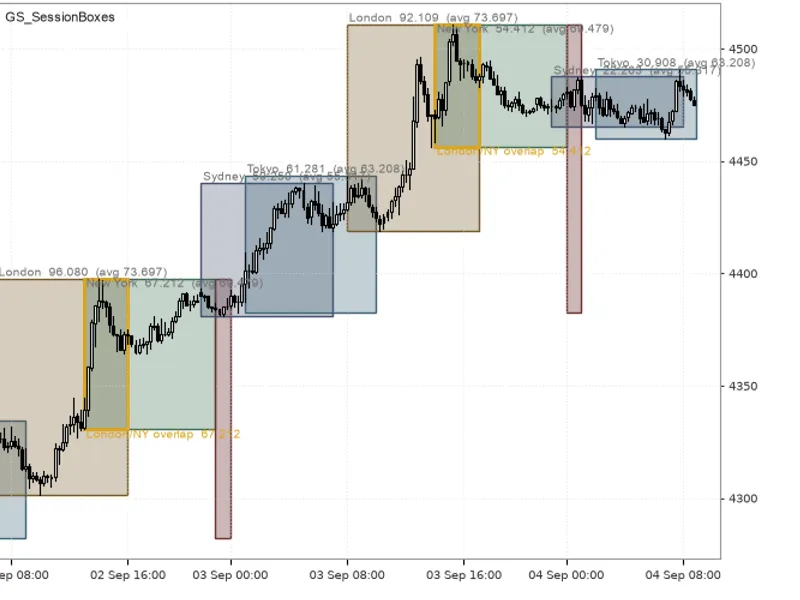
- Daily Session Boxes: Displays a distinct box for each trading session (Sydney, Tokyo, London, New York) on a daily basis. Each box is color-coded for easy identification and can be rendered as filled or as an outline.
- London/New York Overlap: A highlighted box with a thicker outline is drawn over the individual session boxes during the London and New York trading overlap.
- Daily Rollover Hour: A shaded area indicates the rollover hour, highlighting the high and low price range for that period. This serves as a reminder to exercise caution when opening new trades due to potential spread widening.
- Session Range Labels: Each box includes a label showing the session's trading range in price units (for gold and indices) or points (for FX pairs). It also displays the average range from the last N completed sessions. For example: London 92.109 (avg 73.697).
Time Zone Handling:
All session times are configured in GMT, aligning with standard industry practice. The indicator automatically calculates and applies the correct time zone offset based on the difference between the broker's server time and GMT. This offset is adjusted to the nearest 15 minutes and is refreshed with each new bar, ensuring accurate session box placement even through daylight saving time changes without manual input.
User Inputs:
- Sessions: Options to show or hide specific sessions and define their start and end hours in GMT (e.g., Sydney 21-6, Tokyo 0-9, London 7-16, New York 13-22). Sessions that span across midnight, like Sydney, are automatically managed.
- Overlap and Rollover: Customizable settings for the London/New York overlap window (default 13-16) and the rollover hour (default 22).
- Appearance: Settings to control the number of past days to display (default 10), whether to fill session boxes, show labels, the number of sessions used for calculating average ranges (default 10), color schemes, and label font size.
- Alerts: Optional alerts via pop-up, push notification, or sound when a new session begins, with each session triggering an alert once.
How to Utilize the Indicator:
Attach the indicator to charts with timeframes from M1 to H1. On timeframes higher than H1, session durations are shorter than a single bar, and the indicator will not display any visuals.
- Trend Following: Focus on trading opportunities within the London box and the overlap period, as this is where significant price action typically occurs. Exercise caution with breakouts from the Tokyo box, as prices may revert when the London session commences.
- Range Comparison: If the current London session's range already exceeds its average, the potential for further price movement within that session is statistically reduced. A narrow Tokyo range preceding the London session often indicates a wider London range to follow.
- Rollover Caution: The highlighted rollover hour is a period where stop-outs can frequently occur, especially with tight stop-loss orders. Consider widening your stops or avoiding trade entry during this time.
Implementation Details:
- Chart Objects: The indicator utilizes chart objects rather than indicator buffers (indicator_plots 0). All objects are prefixed with GSSB_ and are cleanly removed upon indicator deactivation.
- Exact Range Measurement: Price ranges are precisely calculated using CopyHigh and CopyLow functions between the defined session times, ensuring accuracy regardless of the chart's timeframe.
- Efficient Redrawing: Objects are redrawn only once per new bar, not on every tick. The total number of objects is limited by the number of days multiplied by the number of sessions displayed.
- Background Drawing: All objects are drawn in the background and hidden from the standard object list, preventing them from obstructing chart interactions.
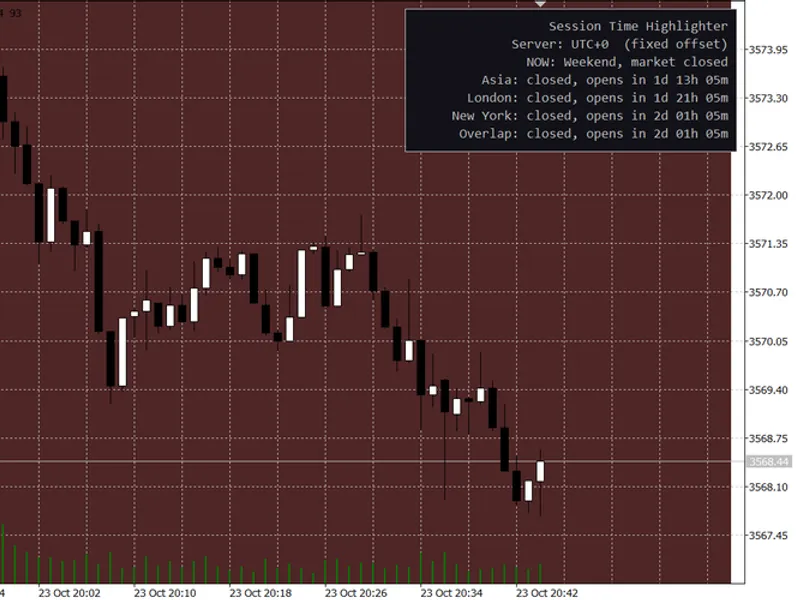
This indicator was developed with XAUUSD in mind but is fully functional on any trading symbol. The provided screenshot demonstrates XAUUSD on an M15 chart with default settings, displayed on a black-on-white chart background.
You may also like: Session Range Breakout: Asia, London, and New York High/Low Levels - excellent alternative for indicator users on MetaTrader 5.
Source Code
#property copyright "RobotFX"
#property link "https://robotfx.org"
#property version     "1.00"
#property description "This code is educational. Feel free to use, modify and upgrade as you wish. Visit ROBOTFX.ORG for professional trading tools"
#property indicator_chart_window
#property indicator_plots 0
struct SessionDef
  {
   string            name;
   bool              enabled;
.......
⚠ Limitations & Risk Warning
- This tool is provided for educational and testing purposes only.
- Past performance does not guarantee future results.
- Trading involves substantial risk of loss. Use on a demo account first.
- Results may vary depending on market conditions, broker, and settings.
- We recommend thorough backtesting and forward testing before using with real funds.