


Ezo Smart Fibo: Intuitive Two-Click Fibonacci Tool with Candle Snap
Info
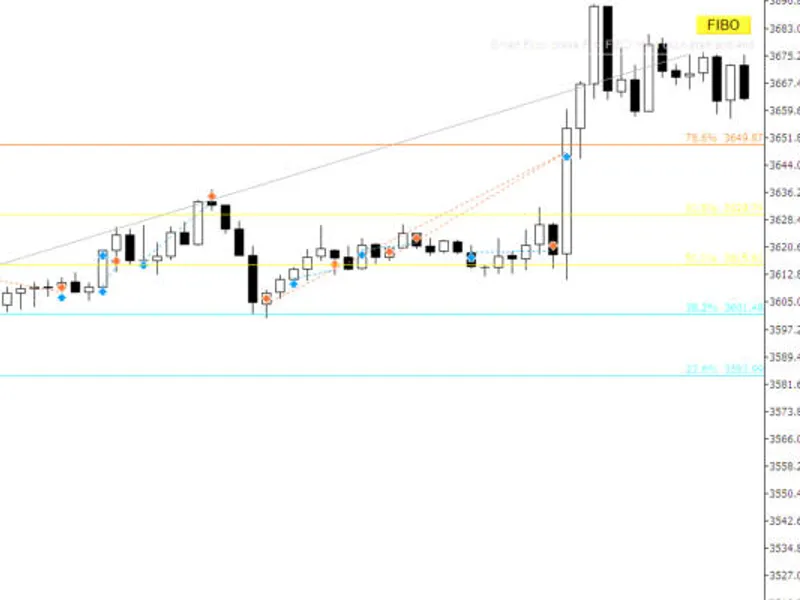
The Ezo Smart Fibo: Intuitive Two-Click Fibonacci Tool with Candle Snap is a Indicator for MetaTrader 5 that ezo smart fibo is an advanced tool designed to draw fibonacci retracement and extension levels with exceptional ease and precision. To initiate drawing, simply press the 'F' key on your keyboard or click the FIBO button located in the top-right corner of your charting window.
Usage
This tool is typically used for enhancing chart analysis and decision making.
Platform
This Indicator works exclusively on MetaTrader 5 (both build 600+ and newer versions).
Setup
Place the downloaded file in MQL5/Indicators folder via File ? Open Data Folder in MetaTrader 5.
How to Install and Use Ezo Smart Fibo: Intuitive Two-Click Fibonacci Tool with Candle Snap
1. Installation: Place your file in the MQL/Indicators folder via "Open Data Folder" and restart your terminal.
2. Loading: Find the indicator in the Navigator, drag it onto your chart, and configure the input parameters in the popup window.
3. Customization: Press Ctrl+I to open the indicator list, select your tool, and click "Properties" to change colors, levels, or visual styles.
4. Updating: Replace the old file in the Indicators folder with the new version and restart the platform to apply changes.
Frequently Asked Questions
Q: Why is my indicator not showing? A: Verify the file is in the MQL/Indicators folder, or try right-clicking the "Indicators" tree in the Navigator and clicking "Refresh."
Q: Do custom indicators slow down the platform? A: Too many complex indicators can impact performance; remove unused ones via the "Indicator List" (Ctrl+I).
Q: Can I use MT4 indicators on MT5? A: No, MQL4 and MQL5 are distinct languages; ensure the indicator is compiled specifically for your platform version.
What this tool does
Ezo Smart Fibo is an advanced tool designed to draw Fibonacci retracement and extension levels with exceptional ease and precision.
Typical Use Case
This Indicator excels in automated trading and technical analysis on MetaTrader 5.
Compatible Platform & Setup
This Indicator works on MetaTrader 5. Place the file in the MQL5/Indicators folder and restart the terminal.
Description & Settings
Related: Smart Liquidity Hunter: MT5 Indicator for Confirmed Swing Sweeps - another powerful indicator for MetaTrader 5 traders.
Ezo Smart Fibo is an advanced tool designed to draw Fibonacci retracement and extension levels with exceptional ease and precision.Also recommended: Order Block Zones for Smart Money Concepts - similar indicator with strong performance on MetaTrader 5.
To initiate drawing, simply press the 'F' key on your keyboard or click the FIBO button located in the top-right corner of your charting window. The process requires two clicks: the first marks the swing start (representing 100%) and the second marks the swing end (representing 0%). When the snap feature is enabled, each click automatically adjusts to the nearest high or low of the candle you select, ensuring that the Fibonacci levels align perfectly with the swing's extreme points.
Each Fibonacci level is presented with a distinct color and a clear label that includes both the percentage value and the exact price. This eliminates the need to open object properties for level information, providing immediate readability. Users can create multiple Fibonacci objects, all of which remain fully editable, similar to standard MetaTrader objects.
Keyboard Shortcuts:
- F: Begin drawing Fibonacci levels.
- D: Delete all Smart Fibo drawings.
- Esc: Cancel the current drawing operation.
Customizable Inputs:
- Levels 1-9 (Percentage and Color): Define the nine standard Fibonacci levels (default values: 0, 23.6, 38.2, 50, 61.8, 78.6, 100, 127.2, 161.8) and assign custom colors to each.
- Snap Clicks to Candle High/Low: This feature is enabled by default, ensuring accurate placement of level anchors.
- Extend Levels to the Right: This option is also enabled by default, extending the Fibonacci lines horizontally.
- Level Line Style and Width: Customize the appearance of the Fibonacci level lines.
- Show Price in Level Labels: Choose whether to display the exact price alongside the percentage on the level labels.
This indicator operates without utilizing buffers and does not involve any trading functionalities. It is compatible with all symbols and timeframes within the MetaTrader platform.
You may also like: Smart Money Concepts: Break of Structure and Change of Character Analysis - excellent alternative for indicator users on MetaTrader 5.
Source Code
#property copyright "RobotFX"
#property version   "1.00"
#property description "This code is educational. Feel free to use, modify and upgrade as you wish. Visit ROBOTFX.ORG for professional trading tools"
#property indicator_chart_window
#property indicator_plots 0
input group "=== Levels (%, colour) ==="
input double InpL1 = 0.0;    input color InpC1 = clrSilver;
input double InpL2 = 23.6;   input color InpC2 = clrDodgerBlue;
input double InpL3 = 38.2;   input color InpC3 = clrDeepSkyBlue;
input double InpL4 = 50.0;   input color InpC4 = clrGold;
.......
⚠ Limitations & Risk Warning
- This tool is provided for educational and testing purposes only.
- Past performance does not guarantee future results.
- Trading involves substantial risk of loss. Use on a demo account first.
- Results may vary depending on market conditions, broker, and settings.
- We recommend thorough backtesting and forward testing before using with real funds.