



daily high low indicator for mq l5
Info
The daily high low indicator for mq l5 is a Indicator for MetaTrader 5 that features and functionality the indicator plots two lines on the chart: one for the high price and one for the low price, calculated based on user-defined inputs. its key features include:customizable timeframe: users can select a timeframe (e.
Usage
This tool is typically used for enhancing chart analysis and decision making.
Platform
This Indicator works exclusively on MetaTrader 5 (both build 600+ and newer versions).
Setup
Place the downloaded file in MQL5/Indicators folder via File ? Open Data Folder in MetaTrader 5.
How to Install and Use daily high low indicator for mq l5
1. Installation: Place your file in the MQL/Indicators folder via "Open Data Folder" and restart your terminal.
2. Loading: Find the indicator in the Navigator, drag it onto your chart, and configure the input parameters in the popup window.
3. Customization: Press Ctrl+I to open the indicator list, select your tool, and click "Properties" to change colors, levels, or visual styles.
4. Updating: Replace the old file in the Indicators folder with the new version and restart the platform to apply changes.
Frequently Asked Questions
Q: Why is my indicator not showing? A: Verify the file is in the MQL/Indicators folder, or try right-clicking the "Indicators" tree in the Navigator and clicking "Refresh."
Q: Do custom indicators slow down the platform? A: Too many complex indicators can impact performance; remove unused ones via the "Indicator List" (Ctrl+I).
Q: Can I use MT4 indicators on MT5? A: No, MQL4 and MQL5 are distinct languages; ensure the indicator is compiled specifically for your platform version.
What this tool does
features and functionality the indicator plots two lines on the chart: one for the high price and one for the low price, calculated based on user-defined inputs.
Typical Use Case
This Indicator excels in automated trading and technical analysis on MetaTrader 5.
Compatible Platform & Setup
This Indicator works on MetaTrader 5. Place the file in the MQL5/Indicators folder and restart the terminal.
Description & Settings
Related: Session Time Highlighter for MT4/MT5 - another powerful indicator for MetaTrader 5 traders.
features and functionalitythe indicator plots two lines on the chart: one for the high price and one for the low price, calculated based on user-defined inputs. its key features include:
Also recommended: Opening Gap Tracker: Daily, Weekend Gaps with Fill Tracking and Alerts - similar indicator with strong performance on MetaTrader 5.
customizable timeframe
: users can select a timeframe (e.g., daily, hourly) using the timeframe input, with a default of period_d1 (daily). the indicator ensures the selected timeframe is not smaller than the chart's current timeframe to maintain data accuracy.
price calculation options
: the price input allows users to choose between three modes:
low/high (dhl_lowhigh)
: plots the highest and lowest prices of the specified timeframe.
open/close (dhl_openclose)
: plots the maximum of open/close prices and the minimum of open/close prices.
close/close (dhl_closeclose)
: plots the highest and lowest closing prices.
previous period option
: the previous input (default: true) allows users to display the high/low of the previous period, aiding in historical analysis.
visual customization
: the indicator uses solid silver lines for both high and low plots, with a width of 1, ensuring clear visibility without cluttering the chart.
how it works
the indicator operates by initializing two buffers (highbuffer and lowbuffer) to store and display the high and low price levels. during initialization (oninit), it sets these buffers and validates the timeframe. the core logic resides in the oncalculate function, which processes price data for each bar:
data preparation
: arrays for time, open, close, high, and low prices are set as series for reverse indexing.
timeframe alignment
: the indicator calculates bar shifts using ibarshift to align data with the selected timeframe.
price calculation
:
for dhl_lowhigh, it directly fetches the high and low prices using ihigh and ilow.
for dhl_openclose and dhl_closeclose, it identifies the highest/lowest open or close prices within the timeframe using ihighest and ilowest.
previous period handling
: if previous is enabled, calculations shift to the prior period, providing historical context.
optimization
: the indicator limits calculations to new or updated bars (limit) to ensure efficiency and avoid redundant processing.
practical applications
the
dailyhighlow
indicator is ideal for traders employing strategies based on key price levels, such as:
support and resistance
: identifying daily or custom timeframe high/low levels for breakout or reversal strategies.
trend analysis
: comparing current price action against previous highs/lows to gauge market direction.
risk management
: setting stop-loss or take-profit levels based on significant price points.
usage instructions
installation
: add the indicator to your metatrader 5 platform by copying the code to the mql5/indicators folder and compiling it.
configuration
:
set the desired timeframe (e.g., period_d1 for daily levels).
choose a price mode (dhl_lowhigh, dhl_openclose, or dhl_closeclose) based on your strategy.
enable or disable the previous option to toggle between current and previous period data.
chart application
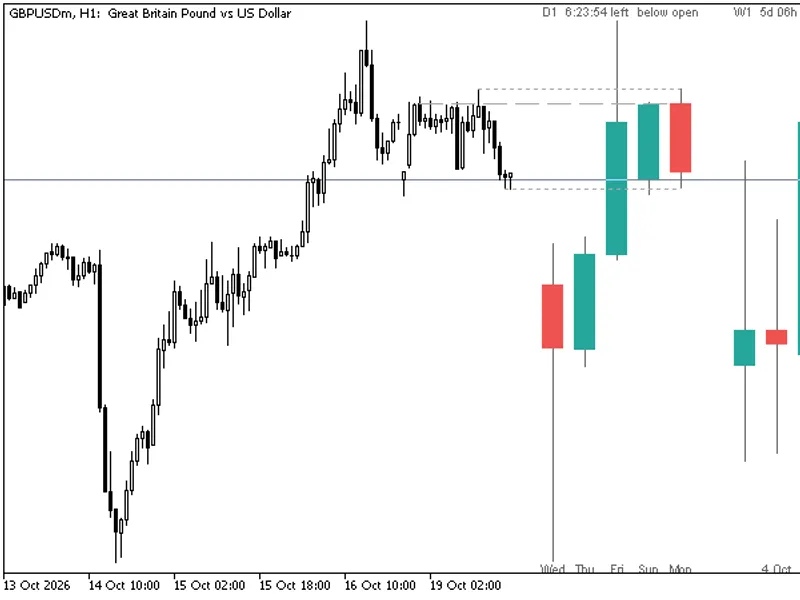
: attach the indicator to any chart. it will display two silver lines representing the high and low levels.
conclusion
the
dailyhighlow
indicator is a simple yet powerful tool for mql5 traders, offering flexibility in timeframe and price calculation methods. its lightweight design and efficient processing make it suitable for both novice and experienced traders looking to enhance their technical analysis.
feedback
if you have suggestions or encounter issues, please leave a comment on the mql5 codebase page or through the mql5 community. your feedback is valuable for improving this tool!contact me:
You may also like: HTF Candles (ICT Power of Three): Higher Timeframe Candles Displayed - excellent alternative for indicator users on MetaTrader 5.
Source Code
#property copyright "robotfx"
#property link "https://robotfx.org"
#property version   "1.3"
#property indicator_chart_window
#property indicator_buffers 2
#property indicator_plots   2
#property indicator_label1  "high"
#property indicator_type1   draw_line
#property indicator_color1  clrsilver
#property indicator_style1  style_solid
.......
⚠ Limitations & Risk Warning
- This tool is provided for educational and testing purposes only.
- Past performance does not guarantee future results.
- Trading involves substantial risk of loss. Use on a demo account first.
- Results may vary depending on market conditions, broker, and settings.
- We recommend thorough backtesting and forward testing before using with real funds.