
Trailing Stop Breakeven Manager for MT5
Info
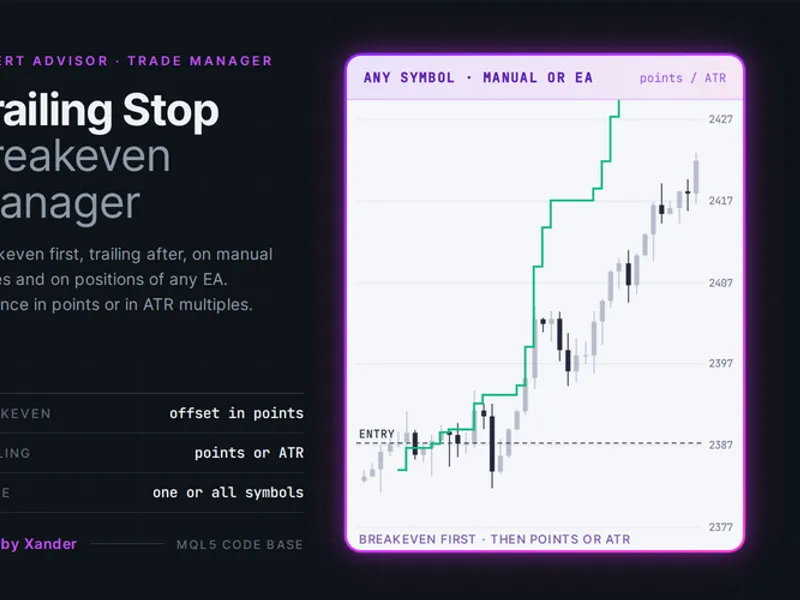
The Trailing Stop Breakeven Manager for MT5 is a Expert Advisor for MetaTrader 5 that trailing stop breakeven manager for metatrader 5this tool is a stop loss manager for metatrader 5. It is designed to move your stop loss to breakeven and then trail it behind the price.
Usage
This tool is typically used for automated trading on major forex pairs and gold.
Platform
This Expert Advisor works exclusively on MetaTrader 5 (both build 600+ and newer versions).
Setup
Place the downloaded file in MQL5/Experts folder via File ? Open Data Folder in MetaTrader 5.
How to Install and Use Trailing Stop Breakeven Manager for MT5
1. Installation: Open the "File" menu, select "Open Data Folder," navigate to MQL/Experts, paste your file, and restart the terminal.
2. Activation: Drag the EA from the Navigator onto a chart, ensure "Allow live trading" is checked in the Common tab, and verify the AutoTrading button is green.
3. Optimization: Right-click your chart, choose "Expert List," click "Properties" to adjust inputs, and save your preferred setup as a set file for future use.
4. Maintenance: Regularly check the "Experts" tab in the terminal window to monitor trade logs and potential execution errors.
Frequently Asked Questions
Q: Why is my EA not opening trades? A: Check the "AutoTrading" button, ensure "Allow live trading" is enabled, and verify your broker allows automated trading on your account type.
Q: Can I run multiple EAs on one chart? A: No, each chart can only host one active EA; however, you can open multiple charts for different currency pairs to run several EAs.
Q: What does the "smiley face" icon mean? A: A smiley face in the top-right corner of the chart indicates the EA is successfully running; a frowny face means it is disabled.
What this tool does
Trailing Stop Breakeven Manager for MetaTrader 5This tool is a stop loss manager for MetaTrader 5.
Typical Use Case
This Expert Advisor excels in automated trading and technical analysis on MetaTrader 5.
Compatible Platform & Setup
This Expert Advisor works on MetaTrader 5. Place the file in the MQL5/Experts folder and restart the terminal.
Description & Settings
Related: EMA Cross EA with ATR Stops for MetaTrader 5 - another powerful expert for MetaTrader 5 traders.
Trailing Stop Breakeven Manager for MetaTrader 5Also recommended: Safe Risk Manager EA - Daily Loss, Break-Even, and Trailing Stop Management - similar expert with strong performance on MetaTrader 5.
This tool is a stop loss manager for MetaTrader 5. It is designed to move your stop loss to breakeven and then trail it behind the price. It can manage both manual trades and positions opened by other Expert Advisors (EAs).
Functionality
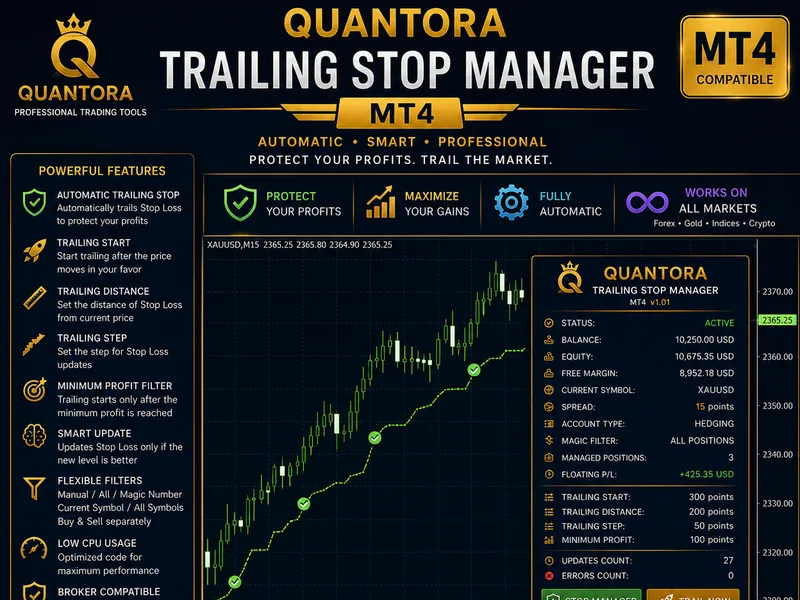
Once a position reaches a specified profit level in points, the stop loss is moved to the entry price plus a small offset. This ensures that a winning trade cannot turn into a loss. Following this, the trailing stop activates, following the price at a defined distance (either a fixed number of points or a multiple of the Average True Range - ATR). The trailing stop only adjusts when the price movement is sufficient to meet a minimum improvement step, preventing excessive server modifications.
You have the option to start trailing only after breakeven is achieved, or to run both breakeven and trailing stop functionalities independently based on their respective levels.
This tool does not open new trades. It operates on existing positions within your account. Management can be filtered by magic number (0 manages all positions, including manual trades), by trade direction (buy or sell), and by the chart symbol or the entire account. If a position does not have a stop loss, the tool can add one at a user-defined distance.
Settings
Strategy Settings
- Trailing Distance Mode: Choose between Fixed distance in points or ATR multiple.
- Trailing Starts at this Profit: The profit in points at which trailing begins.
- Trailing Distance from Price: The fixed distance in points to trail the stop loss from the current price.
- Minimum Stop Improvement to Modify: The minimum price movement required to update the stop loss.
- ATR Period: The period for ATR calculation (default is 14).
- ATR Multiple for Distance: The multiplier for ATR when using ATR mode for trailing distance.
Close / Exit Settings
- Move Stop to Breakeven First: Enable or disable moving the stop loss to breakeven (true/false).
- Breakeven Starts at this Profit: The profit in points at which breakeven is activated.
- Breakeven Offset: The additional profit in points above entry for buys or below entry for sells when moving to breakeven.
- Start Trailing Only After Breakeven is Done: Enable or disable starting trailing only after breakeven is achieved (true/false).
Risk Protection Settings
- Add Stop Loss When Position Has None: Set a distance in points from the entry to add a stop loss if none exists (0 disables this feature).
Filters
- Positions to Manage: Select whether to manage positions on All symbols or only on the Chart symbol.
- Magic Number: Filter positions by magic number (0 manages all positions, including manual trades).
- Manage Buy Positions: Enable or disable managing buy positions (true/false).
- Manage Sell Positions: Enable or disable managing sell positions (true/false).
Expert Settings
- Show Status on Chart: Display management status on the chart (true/false).
- Print Every Change to the Experts Log: Log all stop modifications to the Experts log (true/false).
Requirements
- MetaTrader 5 with Algo Trading enabled.
- Works on both hedging and netting account types.
Important Notes on Points and Stops Level
- Distances are specified in points. Ensure you understand how points translate to price based on your symbol's digits. For example, on a gold quote with 2 decimal places, 200 points equal 2.00 in price; with 3 decimal places, they equal 0.20.
- Every new stop loss order is validated against the broker's stops level (SYMBOL_TRADE_STOPS_LEVEL) before being sent. If the proposed stop is too close to the current price, the tool will wait for the next tick.
- The tool checks positions on every incoming tick and also uses a timer for checks once per second. This ensures it manages positions on symbols not currently displayed on an active chart.
Customization and Usage Tips
- To manage trades opened manually or from your phone, run the EA on its own chart with magic number 0.
- To manage trades from another EA, set the EA's specific magic number in the filter.
- Test the Fixed Distance mode against the ATR mode in the Strategy Tester using symbols like XAUUSD, EURUSD, GBPUSD, US30, NAS100, and BTCUSD. A fixed distance suitable for Gold on M15 might be too wide for EURUSD.
- For managing partial closes with multiple take profit levels, consider using this EA in conjunction with the Partial Close Multi TP Manager.
About This Code
- This is open-source code. You are free to use it as is, adapt it, or build upon it to create your own version.
Changelog
v1.0 - 2026-10-25 - Initial release
You may also like: One-Click Trade Manager: Risk-Based Lot Sizing with Integrated Entry, Stop, and Target - excellent alternative for expert users on MetaTrader 5.
Source Code
#property copyright "RobotFX"
#property link "https://robotfx.org"
#property version     "1.00"
#property description "This code is educational. Feel free to use, modify and upgrade as you wish. Visit ROBOTFX.ORG for professional trading tools"
#include <Trade\Trade.mqh>
enum ENUM_XP_TRAIL_MODE
  {
   XP_TRAIL_POINTS = 0,
   XP_TRAIL_ATR    = 1
  };
.......
⚠ Limitations & Risk Warning
- This tool is provided for educational and testing purposes only.
- Past performance does not guarantee future results.
- Trading involves substantial risk of loss. Use on a demo account first.
- Results may vary depending on market conditions, broker, and settings.
- We recommend thorough backtesting and forward testing before using with real funds.