

Smart Trade Manager for MT5
Info
The Smart Trade Manager for MT5 is a Expert Advisor for MetaTrader 5 that smart trade manager for mt5 is a trade management expert advisor for traders who open their own positions manually and want automatic protection after entry. It does not generate entry signals and does not open trades by itself.
Usage
This tool is typically used for automated trading on major forex pairs and gold.
Platform
This Expert Advisor works exclusively on MetaTrader 5 (both build 600+ and newer versions).
Setup
Place the downloaded file in MQL5/Experts folder via File ? Open Data Folder in MetaTrader 5.
How to Install and Use Smart Trade Manager for MT5
1. Installation: Open the "File" menu, select "Open Data Folder," navigate to MQL/Experts, paste your file, and restart the terminal.
2. Activation: Drag the EA from the Navigator onto a chart, ensure "Allow live trading" is checked in the Common tab, and verify the AutoTrading button is green.
3. Optimization: Right-click your chart, choose "Expert List," click "Properties" to adjust inputs, and save your preferred setup as a set file for future use.
4. Maintenance: Regularly check the "Experts" tab in the terminal window to monitor trade logs and potential execution errors.
Frequently Asked Questions
Q: Why is my EA not opening trades? A: Check the "AutoTrading" button, ensure "Allow live trading" is enabled, and verify your broker allows automated trading on your account type.
Q: Can I run multiple EAs on one chart? A: No, each chart can only host one active EA; however, you can open multiple charts for different currency pairs to run several EAs.
Q: What does the "smiley face" icon mean? A: A smiley face in the top-right corner of the chart indicates the EA is successfully running; a frowny face means it is disabled.
What this tool does
Smart Trade Manager for MT5 is a trade management Expert Advisor for traders who open their own positions manually and want automatic protection after entry.
Typical Use Case
This Expert Advisor excels in automated trading and technical analysis on MetaTrader 5.
Compatible Platform & Setup
This Expert Advisor works on MetaTrader 5. Place the file in the MQL5/Experts folder and restart the terminal.
Description & Settings
Related: Partial Close Multi TP Manager for MetaTrader 5 - another powerful expert for MetaTrader 5 traders.
Smart Trade Manager for MT5is a trade management Expert Advisor for traders who open their own positions manually and want automatic protection after entry. It does not generate entry signals and does not open trades by itself.
Also recommended: Strategy Tester Report Parser for Deals and Trades - similar expert with strong performance on MetaTrader 5.
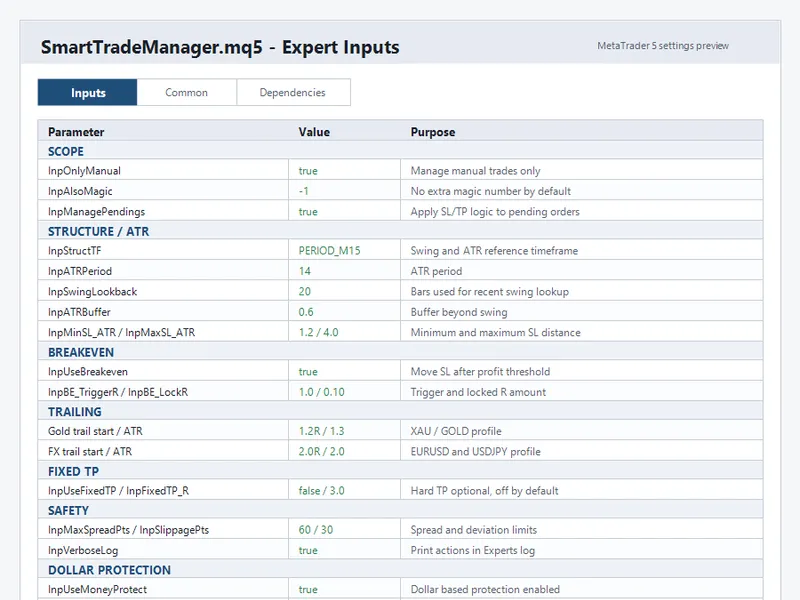
The EA watches supported symbols, assigns a structure-based stop loss to unprotected manual positions or pending orders, then manages open trades with breakeven, ATR trailing, and dollar-based profit protection.
Main idea
For a buy trade, the EA looks for the recent swing low on the selected structure timeframe. For a sell trade, it looks for the recent swing high. It adds an ATR buffer beyond that structure level, then clamps the stop loss between the configured minimum and maximum ATR distance. The swing and ATR logic uses closed-bar data.
Key features
Manages manual trades by default, using magic number 0.
Optional input to also manage one specific EA magic number.
Optional pending order protection for buy limit, sell limit, buy stop, and sell stop orders.
Structure based stop loss using swing highs/lows and ATR buffer.
Minimum and maximum SL distance limits based on ATR.
Breakeven management with configurable R trigger and lock amount.
Separate trailing profiles for Gold symbols and selected FX pairs.
Optional fixed take profit in R multiples, disabled by default.
Dollar based protection that can lock a minimum profit and close after a configurable giveback from peak net profit.
Spread filter to avoid modifications during wide-spread conditions.
Broker stop level compliance before modifying SL or TP.
Timer based management so the EA can monitor supported symbols from one chart.
Cached ATR handles for lighter repeated processing.
Supported symbol scope
Gold profile:
symbols containing XAU or GOLD.
FX profile:
EURUSD and USDJPY.
Other symbols are ignored by the default symbol filter in the source code.
Important inputs
Scope
InpOnlyManual: manage only manual trades when true.
InpAlsoMagic: optional additional magic number to manage.
InpManagePendings: enable or disable pending order protection.
Structure and ATR
InpStructTF: timeframe used for swing and ATR calculations.
InpATRPeriod: ATR period.
InpSwingLookback: number of closed bars scanned for recent structure.
InpATRBuffer: ATR buffer added beyond the swing level.
InpMinSL ATR and InpMaxSL ATR: minimum and maximum SL distance limits.
Breakeven and trailing
InpUseBreakeven: enable breakeven logic.
InpBE TriggerR and InpBE LockR: breakeven trigger and lock amount in R.
InpGold TrailStartR and InpGold TrailATR: Gold trailing profile.
InpFX TrailStartR and InpFX TrailATR: FX trailing profile.
Dollar protection
InpUseMoneyProtect: enable dollar based protection.
InpCommissionPerLot: commission estimate used for net profit calculation.
InpMoneySecureTrig: net profit level that activates dollar protection.
InpMoneySecureLock: minimum dollar amount to protect through SL.
InpMoneyGiveback: allowed drop from peak net profit before closing at market.
How to use
Compile SmartTradeManager.mq5 in MetaEditor.
Attach the EA to any MT5 chart.
Enable Algo Trading and allow automated trading for the EA.
Open a manual trade or pending order on a supported symbol.
The EA will apply protection according to the configured inputs.
Recommended starting point
Use a demo account first. Check the broker's symbol names, spread, stop level, freeze level, commission, and execution behavior before using the EA on a live account.
Risk note
This is a trade management utility, not a profitable strategy by itself. It does not predict market direction and does not guarantee profit, win rate, drawdown reduction, or account recovery. Results depend on the trader's entries, broker conditions, market volatility, and chosen inputs.
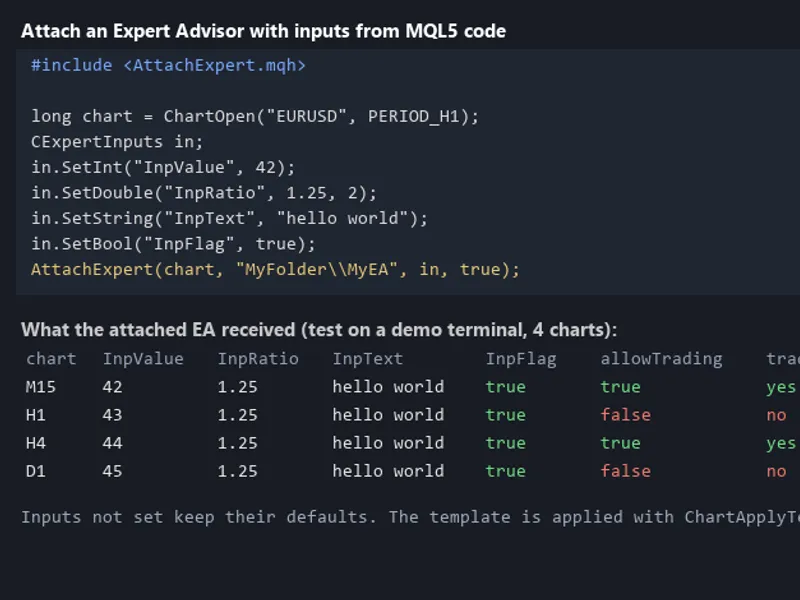
You may also like: Programmatically Attach Expert Advisors with Custom Inputs to MetaTrader 5 Charts - excellent alternative for expert users on MetaTrader 5.
Source Code
#property copyright "RobotFX"
#property version   "1.00"
#property description "This code is educational. Feel free to use, modify and upgrade as you wish. Visit ROBOTFX.ORG for professional trading tools"
#include <Trade/Trade.mqh>
CTrade trade;
string g_atrSym[];
int    g_atrHandle[];
int GetATRHandle(const string sym)
{
   for(int i=0;i<ArraySize(g_atrSym);i++)
.......
⚠ Limitations & Risk Warning
- This tool is provided for educational and testing purposes only.
- Past performance does not guarantee future results.
- Trading involves substantial risk of loss. Use on a demo account first.
- Results may vary depending on market conditions, broker, and settings.
- We recommend thorough backtesting and forward testing before using with real funds.