

Real-Time Market Intelligence for Informed Trading Decisions
Info
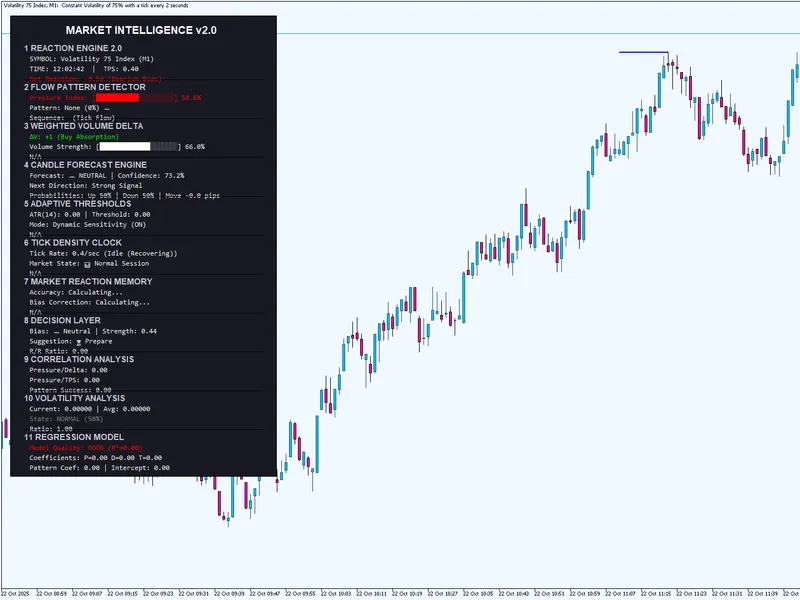
The Real-Time Market Intelligence for Informed Trading Decisions is a Expert Advisor for MetaTrader 5 that understanding the ea's core components the master intelligence ea analyzes market data through 8+ modules, each providing unique insights. Here's how to interpret and use each component for trading: - Reaction Engine 2.
Usage
This tool is typically used for automated trading on major forex pairs and gold.
Platform
This Expert Advisor works exclusively on MetaTrader 5 (both build 600+ and newer versions).
Setup
Place the downloaded file in MQL5/Experts folder via File ? Open Data Folder in MetaTrader 5.
How to Install and Use Real-Time Market Intelligence for Informed Trading Decisions
1. Installation: Open the "File" menu, select "Open Data Folder," navigate to MQL/Experts, paste your file, and restart the terminal.
2. Activation: Drag the EA from the Navigator onto a chart, ensure "Allow live trading" is checked in the Common tab, and verify the AutoTrading button is green.
3. Optimization: Right-click your chart, choose "Expert List," click "Properties" to adjust inputs, and save your preferred setup as a set file for future use.
4. Maintenance: Regularly check the "Experts" tab in the terminal window to monitor trade logs and potential execution errors.
Frequently Asked Questions
Q: Why is my EA not opening trades? A: Check the "AutoTrading" button, ensure "Allow live trading" is enabled, and verify your broker allows automated trading on your account type.
Q: Can I run multiple EAs on one chart? A: No, each chart can only host one active EA; however, you can open multiple charts for different currency pairs to run several EAs.
Q: What does the "smiley face" icon mean? A: A smiley face in the top-right corner of the chart indicates the EA is successfully running; a frowny face means it is disabled.
What this tool does
Understanding the EA's Core Components The Master Intelligence EA analyzes market data through 8+ modules, each providing unique insights.
Typical Use Case
This Expert Advisor excels in automated trading and technical analysis on MetaTrader 5.
Compatible Platform & Setup
This Expert Advisor works on MetaTrader 5. Place the file in the MQL5/Experts folder and restart the terminal.
Description & Settings
Related: Regime HMM: Identifying Market Regimes with Hidden Markov Models - another powerful expert for MetaTrader 5 traders.
Understanding the EA's Core Components The Master Intelligence EA analyzes market data through 8+ modules, each providing unique insights. Here's how to interpret and use each component for trading: - Reaction Engine 2.0 What it measures: Market pressure based on price movements, volume, and tick velocity How to interpret: Pressure Index (-1 to +1) Above 0.6: Strong bullish pressure 0.2 to 0.6: Moderate bullish pressure -0.2 to 0.2: Neutral pressure -0.6 to -0.2: Moderate bearish pressure Below -0.6: Strong bearish pressure Trading strategy: Look for entry opportunities when pressure exceeds ±0.6 Consider scaling positions when pressure moves from moderate to strong Use pressure reversals as potential exit signalsAlso recommended: Smart Money Concept Expert Advisor: Market Structure, FVG, and Pullback Trading - similar expert with strong performance on MetaTrader 5.
- Flow Pattern Detector What it measures: Recurring tick patterns that historically precede price movements Key patterns and their implications: Buyer Re-entry, Seller Exhaustion, Spike-Bounce, Seller Re-entry, Buyer Exhaustion Trading strategy: High confidence patterns offer the best trade opportunities Combine pattern direction with pressure index for confirmation Patterns with historical success rates above 65% are most reliable Wait for pattern completion before entering- Weighted Volume Delta What it measures: The balance between buying and selling volume, with weighting applied How to interpret: Positive values: More buying volume than selling Negative values: More selling volume than buying Extreme readings suggest strong momentum Trading strategy: Use delta to confirm pressure readings Divergence between price and delta can signal potential reversals Sudden delta spikes often precede significant price movements Combine with pattern recognition for high-probability setups
- Candle Forecast Engine What it measures: Predicts next candle direction and magnitude using multiple factors Key metrics: Forecast Score, Direction, Confidence, Probabilities, Expected Move Trading strategy: Only consider trades with confidence above 70% Higher expected moves offer better risk/reward ratios Use probability differentials to determine position sizing Combine forecast with current market state
- Adaptive Thresholds What it measures: Dynamic entry/exit levels based on market volatility How to interpret: Adjusts automatically based on ATR and tick density Higher in volatile markets, lower in quiet markets Scales with market conditions to maintain consistent risk Trading strategy: Use dynamic thresholds for stop-loss placement Adjust position sizes based on threshold width Wider thresholds in volatile markets require smaller positions Tighter thresholds in quiet markets allow for larger positions
- Tick Density Clock What it measures: Market activity level through tick frequency analysis States: High, Active, Idle Trading strategy: High activity periods offer better trading opportunities Avoid entering new positions during idle periods Use transitions between states as timing indicators High activity with directional bias is particularly powerful
- Market Reaction Memory What it measures: Historical accuracy of forecasts and patterns Key metrics: Accuracy, Bias Correction Trading strategy: Higher accuracy indicates the EA is performing well for current conditions Use bias correction to adjust expectations Track accuracy over time to identify optimal market conditions for this EA Consider reducing position size during periods of declining accuracy
- Decision Layer What it measures: Final trading recommendation based on all modules Outputs: Bias, Strength, Action, Risk/Reward Ratio Trading strategy: Follow Enter Long/Short signals when confidence is high Use Prepare signals to get ready for potential entries Wait signals suggest avoiding new positions Only take trades with risk/reward ratios above 1.5
Practical Trading Approach 1. Setup and Configuration For optimal performance: Use on major currency pairs Best timeframes: M15, M30, H1 Ensure sufficient tick data Enable data persistence for learning capabilities
2. Pre-Trade Analysis Before entering any trade: Check overall market bias from Decision Layer Verify confidence is above 70% Confirm risk/reward ratio exceeds 1.5 Look for confluence between at least 3 modules Check market state
3. Entry Criteria Enter long positions when: Decision Layer: Enter Long Pressure Index > 0.2 Forecast Direction: UP with confidence > 70% Pattern: Buyer Re-entry or Seller Exhaustion Weighted Delta: Positive or turning positive Risk/Reward Ratio > 1.5 Enter short positions when: Decision Layer: Enter Short Pressure Index < -0.2 Forecast Direction: DOWN with confidence > 70% Pattern: Seller Re-entry or Buyer Exhaustion Weighted Delta: Negative or turning negative Risk/Reward Ratio > 1.5
4. Exit Strategy Take profit when: Forecast confidence drops below 50% Pressure Index reverses direction significantly Pattern completion occurs Risk/Reward ratio target reached Stop loss placement: Use dynamic threshold as baseline Adjust based on volatility Consider recent swing highs/lows Never risk more than 2% per trade
5. Position Sizing Conservative approach: 1% of account per trade Reduce to 0.5% during high volatility Increase to 1.5% only when confidence > 80% and multiple confirmations Normal approach: 2% of account per trade Adjust based on risk/reward ratio Scale in when multiple signals align Aggressive approach: 3% of account per trade Only when confidence > 85% and all modules align Use trailing stops to protect profits
6. Advanced Strategies Confluence Trading: Look for alignment between Pressure Index, Delta, and Forecast Divergence Trading: Price making new highs but Pressure Index declining = potential reversal Volatility Scaling: In high volatility periods, focus on breakout strategies In low volatility periods, focus on range-bound strategies Adjust position sizes according to volatility metrics
7. Performance Monitoring Track these metrics: Overall accuracy rate Average risk/reward ratio Win/loss ratio Maximum drawdown Profit factor Optimization routine: Review performance weekly Adjust parameters based on market conditions Focus on patterns with highest success rates Consider time-of-day performance patterns
Common Mistakes to Avoid Overtrading: Don't take every signal—wait for high-quality setups Ignoring risk management: Always use stop-losses and proper position sizing Fighting the trend: Use the EA to identify trend direction, don't trade against it Confirmation bias: Don't cherry-pick signals that agree with your opinion Poor timing: Wait for pattern completion before entering Ignoring volatility: Adjust approach based on current market conditions Over-optimizing: Don't constantly change parameters based on short-term results
Conclusion The Master Intelligence EA provides comprehensive market analysis, but success ultimately depends on proper interpretation and disciplined execution. Focus on high-confidence setups with multiple confirmations, maintain strict risk management, and continuously monitor performance. Remember that no system is perfect—losses are normal, but with this EA's analytical capabilities and proper application, you can achieve consistent trading results over time.
You may also like: Telegram Trade Notifier: Real-time Alerts and Daily Summaries - excellent alternative for expert users on MetaTrader 5.
Source Code
яю
#property copyright "RobotFX"
#property link "https://robotfx.org"
#property version   "2.00"
#property description "This code is educational. Feel free to use, modify and upgrade as you wish. Visit ROBOTFX.ORG for professional trading tools"
#property strict
#include <Trade\Trade.mqh>
#include <Arrays\ArrayObj.mqh>
input group "Data Management"
input bool   EnableDataPersistence = true;
.......
⚠ Limitations & Risk Warning
- This tool is provided for educational and testing purposes only.
- Past performance does not guarantee future results.
- Trading involves substantial risk of loss. Use on a demo account first.
- Results may vary depending on market conditions, broker, and settings.
- We recommend thorough backtesting and forward testing before using with real funds.