


Daily Loss Guard
Info
The Daily Loss Guard is a Expert Advisor for MetaTrader 5 that daily loss guard closes all trades when your daily loss reaches your limit. Attach it to any one chart of the account: it does not open trades itself and works alongside manual trading and other Expert Advisors.
Usage
This tool is typically used for automated trading on major forex pairs and gold.
Platform
This Expert Advisor works exclusively on MetaTrader 5 (both build 600+ and newer versions).
Setup
Place the downloaded file in MQL5/Experts folder via File ? Open Data Folder in MetaTrader 5.
How to Install and Use Daily Loss Guard
1. Installation: Open the "File" menu, select "Open Data Folder," navigate to MQL/Experts, paste your file, and restart the terminal.
2. Activation: Drag the EA from the Navigator onto a chart, ensure "Allow live trading" is checked in the Common tab, and verify the AutoTrading button is green.
3. Optimization: Right-click your chart, choose "Expert List," click "Properties" to adjust inputs, and save your preferred setup as a set file for future use.
4. Maintenance: Regularly check the "Experts" tab in the terminal window to monitor trade logs and potential execution errors.
Frequently Asked Questions
Q: Why is my EA not opening trades? A: Check the "AutoTrading" button, ensure "Allow live trading" is enabled, and verify your broker allows automated trading on your account type.
Q: Can I run multiple EAs on one chart? A: No, each chart can only host one active EA; however, you can open multiple charts for different currency pairs to run several EAs.
Q: What does the "smiley face" icon mean? A: A smiley face in the top-right corner of the chart indicates the EA is successfully running; a frowny face means it is disabled.
What this tool does
Daily Loss Guard closes all trades when your daily loss reaches your limit.
Typical Use Case
This Expert Advisor excels in automated trading and technical analysis on MetaTrader 5.
Compatible Platform & Setup
This Expert Advisor works on MetaTrader 5. Place the file in the MQL5/Experts folder and restart the terminal.
Description & Settings
Related: Prop Guard Lite: Daily and Max Loss Protection for Prop Firm Accounts - another powerful expert for MetaTrader 5 traders.
Also recommended: Prop Firm Guard: Daily Loss and Max Drawdown Protection - similar expert with strong performance on MetaTrader 5.
Daily Loss Guard closes all trades when your daily loss reaches your limit. Attach it to any one chart of the account: it does not open trades itself and works alongside manual trading and other Expert Advisors. It also runs on a timer, so a quiet chart is fine, and any symbol and timeframe can host it, for example EURUSD M15.
How it works.
It counts today's closed trades and the change in open trades since the day started. Deposits and withdrawals are not trades, so they never count as a loss. When this total loss reaches your limit, it closes all positions and deletes pending orders, and until the next trading day it closes any new trade that opens.
The trading day starts at the server hour you choose. The start balance and the limit-hit state are kept in the terminal's global variables, so a terminal restart or a re-attach in the middle of the day keeps them, and a new day starts fresh automatically.
The panel
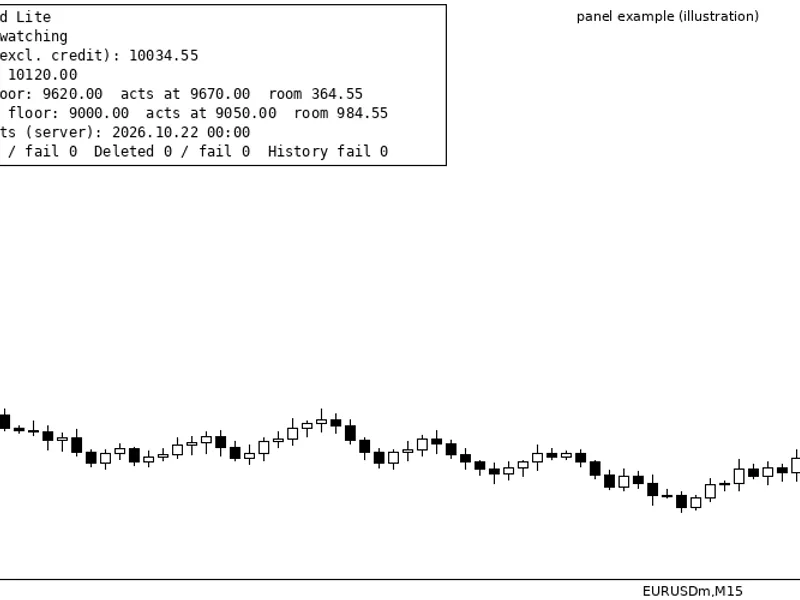
shows the start of the trading day, the start balance, the limit in money, today's result split into closed and open, how much of the limit is used, and the status: ACTIVE, WARNING when 75 percent of the limit is used, or LIMIT HIT with the time. If algo trading is switched off, the panel says so, because the guard cannot close trades then.
Inputs
Limit type: percent of the day's start balance, or a fixed amount in the account currency.
Limit, %: default 2.0. Limit, account currency: default 100.
New day starts at (server hour, 0-23): default 0.
Close positions, Delete pending orders, Close new trades until the next day: all on by default.
Max slippage, points: default 20.
Symbols: empty watches all symbols, or give a list such as EURUSD,XAUUSD. Magic number: -1 watches all, 0 means manual trades only; one magic number can be set.
Pop-up alert, Push notification, Show panel, Panel X and Panel Y position.
Important:
it closes at market price, so on fast news the loss can go a little past the limit. Always use stop losses as well. This tool does not give signals and does not promise profit.
You may also like: Equity Guard: Daily Loss, Max Drawdown, and Profit Target Protection for MT5 - excellent alternative for expert users on MetaTrader 5.
Source Code
#property version   "1.00"
#property description "This code is educational. Feel free to use, modify and upgrade as you wish. Visit ROBOTFX.ORG for professional trading tools"
#include <DailyLossGuard\DailyLossGuard.mqh>
input group "Limit"
input ENUM_DLG_LIMIT InpLimitType      = DLG_LIMIT_PERCENT;
input double         InpLimitPercent   = 2.0;
input double         InpLimitMoney     = 100.0;
input int            InpResetHour      = 0;
input group "Action when the limit is hit"
input bool           InpClosePositions = true;
.......
⚠ Limitations & Risk Warning
- This tool is provided for educational and testing purposes only.
- Past performance does not guarantee future results.
- Trading involves substantial risk of loss. Use on a demo account first.
- Results may vary depending on market conditions, broker, and settings.
- We recommend thorough backtesting and forward testing before using with real funds.