
ma cross alert mt4 indicator
Info
The ma cross alert mt4 indicator is a Indicator for MetaTrader 4 that what is ma cross alert. ma cross alertis a custom mt4 indicator that solves one key problem: metatrader’s built-in moving average shows the line but has no way to alert you when price crosses it.
Usage
This tool is typically used for enhancing chart analysis and decision making.
Platform
This Indicator works exclusively on MetaTrader 4 (both build 600+ and newer versions).
Setup
Place the downloaded file in MQL4/Indicators folder via File ? Open Data Folder in MetaTrader 4.
How to Install and Use ma cross alert mt4 indicator
1. Installation: Place your file in the MQL/Indicators folder via "Open Data Folder" and restart your terminal.
2. Loading: Find the indicator in the Navigator, drag it onto your chart, and configure the input parameters in the popup window.
3. Customization: Press Ctrl+I to open the indicator list, select your tool, and click "Properties" to change colors, levels, or visual styles.
4. Updating: Replace the old file in the Indicators folder with the new version and restart the platform to apply changes.
Frequently Asked Questions
Q: Why is my indicator not showing? A: Verify the file is in the MQL/Indicators folder, or try right-clicking the "Indicators" tree in the Navigator and clicking "Refresh."
Q: Do custom indicators slow down the platform? A: Too many complex indicators can impact performance; remove unused ones via the "Indicator List" (Ctrl+I).
Q: Can I use MT4 indicators on MT5? A: No, MQL4 and MQL5 are distinct languages; ensure the indicator is compiled specifically for your platform version.
What this tool does
what is ma cross alert.
Typical Use Case
This Indicator excels in automated trading and technical analysis on MetaTrader 4.
Compatible Platform & Setup
This Indicator works on MetaTrader 4. Place the file in the MQL4/Indicators folder and restart the terminal.
Description & Settings
Related: control points at ma crossovers - another powerful indicator for MetaTrader 4 traders.
what is ma cross alert?ma cross alert
is a custom mt4 indicator that solves one key problem: metatrader’s built-in moving average shows the line but has no way to
Also recommended: cross indicator - similar indicator with strong performance on MetaTrader 4.
alert you when price crosses it.
this tool adds the missing feature by giving
instant notifications
whenever price moves
above or below the ma line
. it works for both
trend-following strategies
(trading with the trend) and
reversal strategies
(spotting breakouts against the trend).
why is it useful?
with
ma cross alert
, you don’t have to sit in front of charts waiting for price to cross a moving average.
it alerts you the moment it happens.
it can draw
arrows on the chart
showing buy/sell signals at each crossover.
it supports all major ma types:
simple (sma), exponential (ema), smoothed (smma), linear weighted (lwma)
.
this makes it a flexible tool for both beginners and advanced traders who rely on mas.
alerts & notifications
you can choose how you want to be notified:
on-screen alerts
– pop-up messages in mt4.
mobile push notifications
– alerts sent directly to the mt4 mobile app.
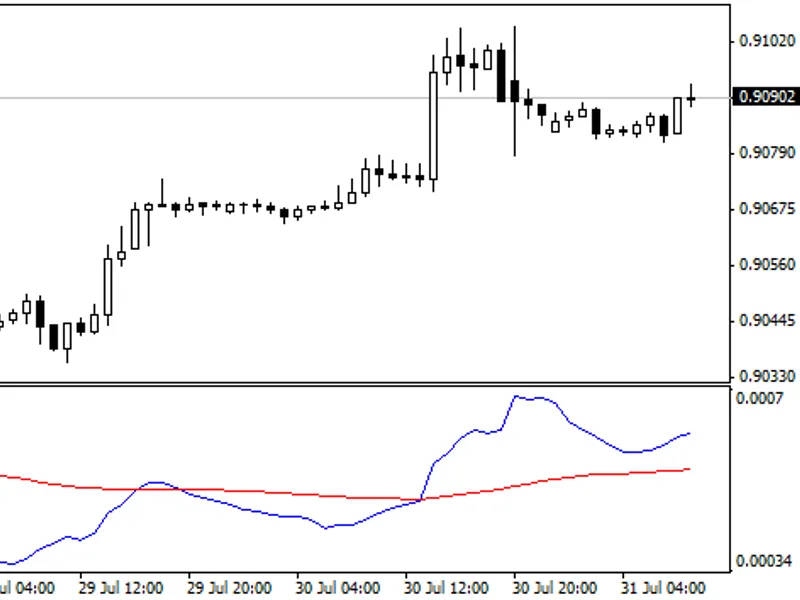
signals on chart
in addition to alerts, the indicator can mark signals visually:
buy arrow
→ when price crosses
above
the ma.
sell arrow
→ when price crosses
below
the ma.
optional labels for reviewing past signals.
this makes it easy to back-check signals and understand how often crosses happen.
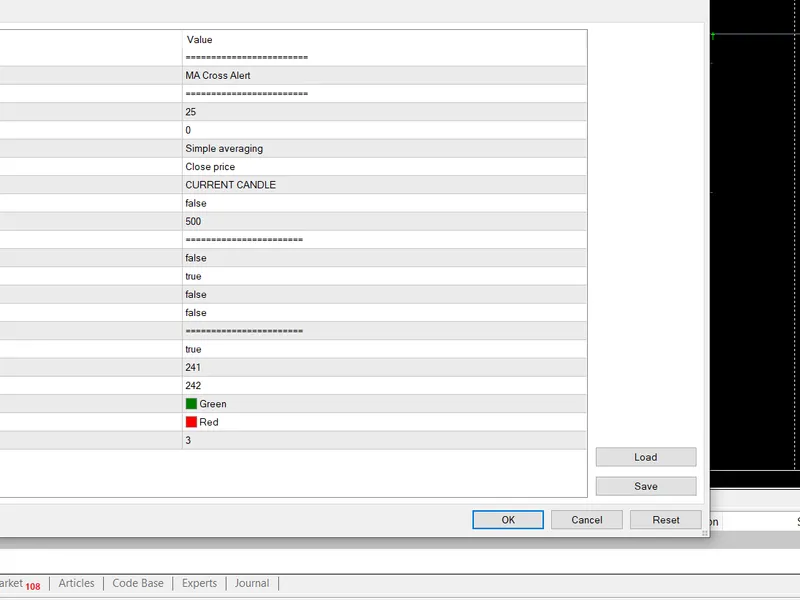
input parameters moving average settings
ma method
– choose from sma, ema, smma, lwma, or hull ma.
ma period
– number of candles to calculate the average.
applied price
– close, open, high, low, median, typical, or weighted price.
signal settings
candle to use for analysis
–
current candle:
triggers as soon as price touches/crosses the ma. (fast but may repaint)
previous candle:
confirms only after a candle closes across the ma. (safer, fewer false signals)
ignore same candle crosses
– filter out whipsaw signals caused by candles that open on one side and close on the other.
number of candles to analyze
– limit checks to the most recent n candles for faster performance.
notifications
enable notifications feature
– master switch.
send alert notification
– on-screen alerts.
send notification to mobile
– push notifications to your mt4 app.
display options
show arrows on cross
– draw buy/sell arrows.
show signal labels
– display labels with crossover info.
example use cases
1. trend following strategy
a trader sets the 50 ema as the base line.
when price closes
above
the ema, ma cross alert shows a
buy arrow
and sends an alert.
when price closes
below
the ema, it shows a
sell arrow
.✅ useful for staying with the bigger trend.
2. reversal strategy
a trader uses the 200 sma.
when price crosses back
below
the 200 sma, it signals a possible reversal.
alerts are sent instantly so the trader doesn’t miss the move.✅ helps spot turning points at key levels.
3. multi-timeframe trading
set alerts on both the
15m chart
(short-term moves) and the
h4 chart
(big trend).✅ aligning signals across timeframes gives stronger confirmation.
You may also like: camarilla alert with fibs - excellent alternative for indicator users on MetaTrader 4.
Source Code
#property link "https://robotfx.org"
#property version       "1.041"
#property strict
#property copyright "robotfx"
#property description "this code is educational. feel free to use, modify and upgrade as you wish. visit robotfx.org for professional trading tools"
#property description "this code is educational. feel free to use, modify and upgrade as you wish. visit robotfx.org for professional trading tools"
#property description "this code is educational. feel free to use, modify and upgrade as you wish. visit robotfx.org for professional trading tools"
#property description "this code is educational. feel free to use, modify and upgrade as you wish. visit robotfx.org for professional trading tools"
#property description "this code is educational. feel free to use, modify and upgrade as you wish. visit robotfx.org for professional trading tools"
#property description "this code is educational. feel free to use, modify and upgrade as you wish. visit robotfx.org for professional trading tools"
.......
⚠ Limitations & Risk Warning
- This tool is provided for educational and testing purposes only.
- Past performance does not guarantee future results.
- Trading involves substantial risk of loss. Use on a demo account first.
- Results may vary depending on market conditions, broker, and settings.
- We recommend thorough backtesting and forward testing before using with real funds.