




Figurelli RSI Auto
Info
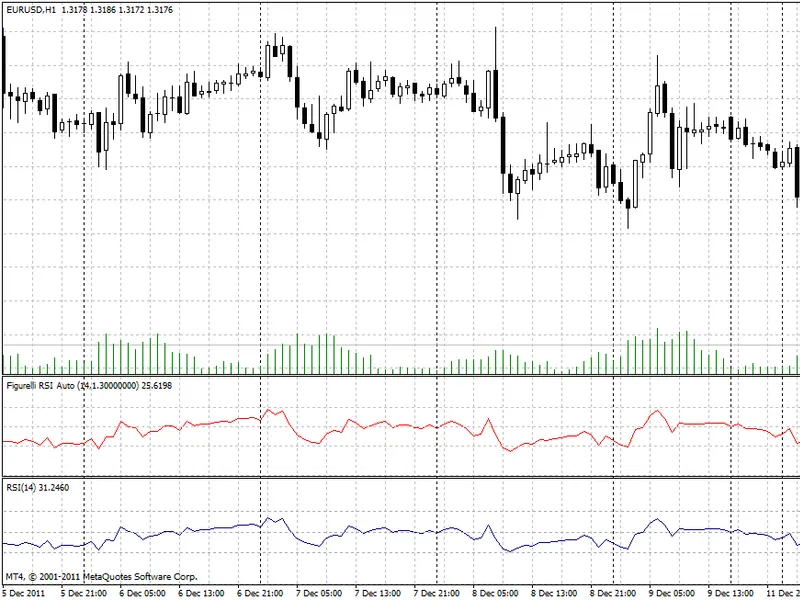
The Figurelli RSI Auto is a Indicator for MetaTrader 4 that description the indicator calculates the gain value based on minimal and maximal values inside the sample and period programmed. below are two pictures for better understanding of the adjustment and the indicator using period 14 and period 30.
Usage
This tool is typically used for enhancing chart analysis and decision making.
Platform
This Indicator works exclusively on MetaTrader 4 (both build 600+ and newer versions).
Setup
Place the downloaded file in MQL4/Indicators folder via File ? Open Data Folder in MetaTrader 4.
How to Install and Use Figurelli RSI Auto
1. Installation: Place your file in the MQL/Indicators folder via "Open Data Folder" and restart your terminal.
2. Loading: Find the indicator in the Navigator, drag it onto your chart, and configure the input parameters in the popup window.
3. Customization: Press Ctrl+I to open the indicator list, select your tool, and click "Properties" to change colors, levels, or visual styles.
4. Updating: Replace the old file in the Indicators folder with the new version and restart the platform to apply changes.
Frequently Asked Questions
Q: Why is my indicator not showing? A: Verify the file is in the MQL/Indicators folder, or try right-clicking the "Indicators" tree in the Navigator and clicking "Refresh."
Q: Do custom indicators slow down the platform? A: Too many complex indicators can impact performance; remove unused ones via the "Indicator List" (Ctrl+I).
Q: Can I use MT4 indicators on MT5? A: No, MQL4 and MQL5 are distinct languages; ensure the indicator is compiled specifically for your platform version.
What this tool does
Description the indicator calculates the gain value based on minimal and maximal values inside the sample and period programmed.
Typical Use Case
This Indicator excels in automated trading and technical analysis on MetaTrader 4.
Compatible Platform & Setup
This Indicator works on MetaTrader 4. Place the file in the MQL4/Indicators folder and restart the terminal.
Description & Settings
Related: prop firm risk monitor and auto-lot calculator for metatrader 4 - another powerful indicator for MetaTrader 4 traders.
Description the indicator calculates the gain value based on minimal and maximal values inside the sample and period programmed.Also recommended: auto fibonacci retracement levels for mt4 - similar indicator with strong performance on MetaTrader 4.
below are two pictures for better understanding of the adjustment and the indicator using period 14 and period 30. original welles wilder rsi (blue) is compared with figurelli rsi (red) using the same periods.image 1: example for period 14
for period 14, the automatic adjustment for gain parameter was 1.4 (for eur/usd h1). note that figurelli rsi (red) automatic gain adjustment indicates small differences in 30 or 70 reach points, so the gain is relevant even in small periods.
image 2: example for period 300
for period 300, the automatic adjustment for gain parameter was 6.7 (for eur/usd h1). note that welles wilder rsi (blue) will never reach levels 30 or 70 in long periods, compared with figurelli rsi (red) using the same periods.
note that the indicator name has the period and gain values. for example, figurelli rsi auto (300, 6.7) indicates period 300 and gain 6.7 for picture above.
You may also like: automatic parabolic support and resistance levels indicator - excellent alternative for indicator users on MetaTrader 4.
Source Code
#property copyright "robotfx"
#property link "https://robotfx.org"
#property indicator_separate_window
#property indicator_minimum 0
#property indicator_maximum 100
#property indicator_buffers 1
#property indicator_color1 red
#property indicator_level1  70
#property indicator_level2  50
#property indicator_level3  30
.......
⚠ Limitations & Risk Warning
- This tool is provided for educational and testing purposes only.
- Past performance does not guarantee future results.
- Trading involves substantial risk of loss. Use on a demo account first.
- Results may vary depending on market conditions, broker, and settings.
- We recommend thorough backtesting and forward testing before using with real funds.