





Elliott Wave Auto Counter: Automatic Wave Labeling for MT4/MT5
Info
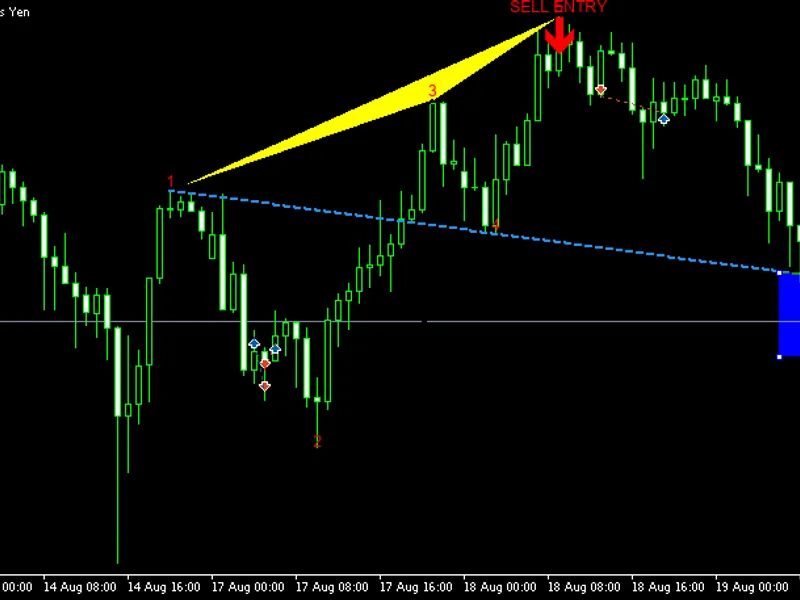
The Elliott Wave Auto Counter: Automatic Wave Labeling for MT4/MT5 is a Indicator for MetaTrader 5 that this indicator automates the initial phase of elliott wave analysis by identifying swing points and assessing if the recent sequence aligns with a valid elliott impulse wave (1-2-3-5) followed by a corrective wave (a-b-c). ConceptThe indicator employs a fractal-based method to detect swing highs and lows.
Usage
This tool is typically used for enhancing chart analysis and decision making.
Platform
This Indicator works exclusively on MetaTrader 5 (both build 600+ and newer versions).
Setup
Place the downloaded file in MQL5/Indicators folder via File ? Open Data Folder in MetaTrader 5.
How to Install and Use Elliott Wave Auto Counter: Automatic Wave Labeling for MT4/MT5
1. Installation: Place your file in the MQL/Indicators folder via "Open Data Folder" and restart your terminal.
2. Loading: Find the indicator in the Navigator, drag it onto your chart, and configure the input parameters in the popup window.
3. Customization: Press Ctrl+I to open the indicator list, select your tool, and click "Properties" to change colors, levels, or visual styles.
4. Updating: Replace the old file in the Indicators folder with the new version and restart the platform to apply changes.
Frequently Asked Questions
Q: Why is my indicator not showing? A: Verify the file is in the MQL/Indicators folder, or try right-clicking the "Indicators" tree in the Navigator and clicking "Refresh."
Q: Do custom indicators slow down the platform? A: Too many complex indicators can impact performance; remove unused ones via the "Indicator List" (Ctrl+I).
Q: Can I use MT4 indicators on MT5? A: No, MQL4 and MQL5 are distinct languages; ensure the indicator is compiled specifically for your platform version.
What this tool does
This indicator automates the initial phase of Elliott Wave analysis by identifying swing points and assessing if the recent sequence aligns with a valid Elliott impulse wave (1-2-3-5) followed by a corrective wave (A-B-C).
Typical Use Case
This Indicator excels in automated trading and technical analysis on MetaTrader 5.
Compatible Platform & Setup
This Indicator works on MetaTrader 5. Place the file in the MQL5/Indicators folder and restart the terminal.
Description & Settings
Related: Wolfe Wave Dashboard MT5 Indicator - another powerful indicator for MetaTrader 5 traders.
This indicator automates the initial phase of Elliott Wave analysis by identifying swing points and assessing if the recent sequence aligns with a valid Elliott impulse wave (1-2-3-5) followed by a corrective wave (A-B-C).Also recommended: Sine Wave Indicator - similar indicator with strong performance on MetaTrader 5.
Concept
The indicator employs a fractal-based method to detect swing highs and lows. Consecutive swings of the same type are merged, and only those exceeding a minimum price distance and bar separation are retained, filtering out minor fluctuations to focus on significant market turns.
Working backward from the most recent pivots, the indicator searches for a six-point sequence that adheres to three fundamental Elliott impulse rules:
- Wave 2 must not retrace beyond the start of Wave 1.
- Wave 3 cannot be the shortest among waves 1, 3, and 5.
- Wave 4 must not overlap the price range of Wave 1.
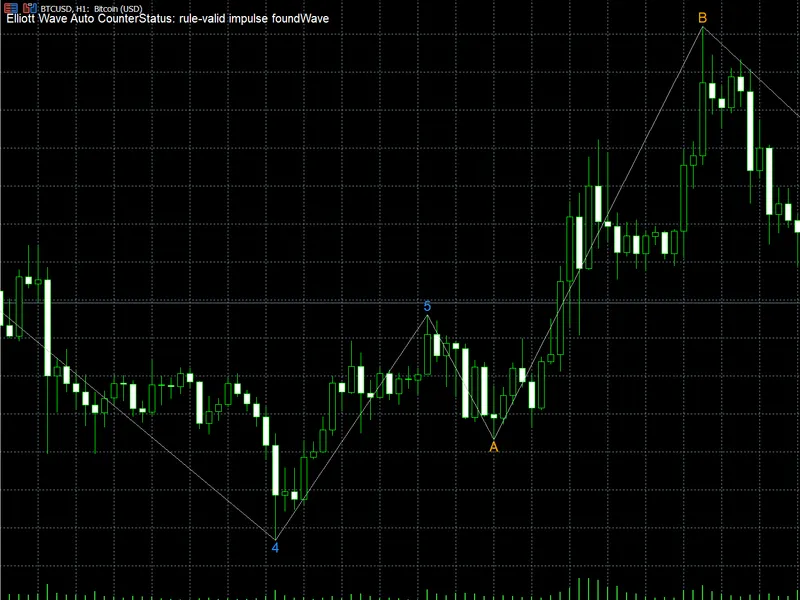
If a sequence meets these criteria, it is labeled as 1-2-3-4-5. The subsequent three swings, if present, are labeled A-B-C as the corrective wave. If no valid sequence is found among the visible pivots, the indicator defaults to labeling recent swings sequentially with a question mark suffix (e.g., "3?"), indicating an unconfirmed, low-confidence count.
Interpreting the Labels
- Blue numbers (1-5): Represents a rule-validated impulse wave following the identified sequence of highs/lows.
- Orange letters (A-B-C): Denotes the corrective wave that follows a confirmed impulse wave.
- Gray numbers with "?": Signifies that no valid impulse wave was detected; these are sequential placeholders, not confirmed counts.
An information panel (top-left corner) displays the retracement percentages for waves 2 and 4, and the length of wave 3 relative to wave 1. This allows for quick assessment of alignment with typical Fibonacci relationships (e.g., 38%, 50%, 62% retracements; 162%, 262% extensions).
This tool serves as a decision-support and visualization aid, not a trading signal generator. Elliott Wave counting is inherently subjective, and these labels should be used as a starting point for your own analysis.
Input Parameters
- InpDepth: Specifies the number of bars on each side used to confirm a swing high/low. A larger value results in fewer, more significant pivots.
- InpDeviationPts: The minimum price movement in points required for a new swing to be accepted.
- InpBackstep: The minimum number of bars required between two swings of the same type.
- InpMaxPivots: The maximum number of recent pivots the indicator considers for wave counting.
- InpHistoryBars: The number of historical bars to scan. Setting to 0 scans all available bars; reducing this value on extensive historical data can improve performance.
- InpShowPanel: Toggles the visibility of the information panel.
- InpImpulseColor, InpCorrectiveColor, InpUnconfirmedColor: Define the colors for confirmed impulse, confirmed correction, and unconfirmed fallback labels, respectively.
- InpTextColor, InpFontSize, InpFontName: Control the appearance (color, size, font) of the information panel and labels.
- InpPrefix: A prefix for all chart objects created by the indicator. Change this if it conflicts with other tools.
Recommended Symbol and Timeframe
This indicator is compatible with any symbol and timeframe. The default settings are optimized for swing trading on major forex pairs and metals (e.g., XAUUSD, EURUSD) on H1-H4 timeframes. For lower timeframes or less volatile instruments, consider reducing InpDeviationPts. Conversely, for higher timeframes or more volatile instruments, consider increasing it.
You may also like: Composite Binary Wave Indicator - excellent alternative for indicator users on MetaTrader 5.
Source Code
#property copyright "RobotFX"
#property link "https://robotfx.org"
#property version   "1.00"
#property description "This code is educational. Feel free to use, modify and upgrade as you wish. Visit ROBOTFX.ORG for professional trading tools"
#property indicator_chart_window
#property indicator_buffers 1
#property indicator_plots   1
#property indicator_type1   DRAW_SECTION
#property indicator_color1  clrSilver
#property indicator_width1  1
.......
⚠ Limitations & Risk Warning
- This tool is provided for educational and testing purposes only.
- Past performance does not guarantee future results.
- Trading involves substantial risk of loss. Use on a demo account first.
- Results may vary depending on market conditions, broker, and settings.
- We recommend thorough backtesting and forward testing before using with real funds.