
energy market 01 indicator
Info
The energy market 01 indicator is a Indicator for MetaTrader 4 that the energy market 01 indicator is based on a simple concept: measuring the speed of tick generation relative to the previous one. the speed at which a new price appears can potentially impact the future trend, whether short-term or long-term.
Usage
This tool is typically used for enhancing chart analysis and decision making.
Platform
This Indicator works exclusively on MetaTrader 4 (both build 600+ and newer versions).
Setup
Place the downloaded file in MQL4/Indicators folder via File ? Open Data Folder in MetaTrader 4.
How to Install and Use energy market 01 indicator
1. Installation: Place your file in the MQL/Indicators folder via "Open Data Folder" and restart your terminal.
2. Loading: Find the indicator in the Navigator, drag it onto your chart, and configure the input parameters in the popup window.
3. Customization: Press Ctrl+I to open the indicator list, select your tool, and click "Properties" to change colors, levels, or visual styles.
4. Updating: Replace the old file in the Indicators folder with the new version and restart the platform to apply changes.
Frequently Asked Questions
Q: Why is my indicator not showing? A: Verify the file is in the MQL/Indicators folder, or try right-clicking the "Indicators" tree in the Navigator and clicking "Refresh."
Q: Do custom indicators slow down the platform? A: Too many complex indicators can impact performance; remove unused ones via the "Indicator List" (Ctrl+I).
Q: Can I use MT4 indicators on MT5? A: No, MQL4 and MQL5 are distinct languages; ensure the indicator is compiled specifically for your platform version.
What this tool does
the energy market 01 indicator is based on a simple concept: measuring the speed of tick generation relative to the previous one.
Typical Use Case
This Indicator excels in automated trading and technical analysis on MetaTrader 4.
Compatible Platform & Setup
This Indicator works on MetaTrader 4. Place the file in the MQL4/Indicators folder and restart the terminal.
Description & Settings
Related: External Range Liquidity (ERL) Indicator: Advanced Market Structure and Liquidity Analysis - another powerful indicator for MetaTrader 4 traders.
the energy market 01 indicator is based on a simple concept: measuring the speed of tick generation relative to the previous one.Also recommended: i market price 2.1 - real-time price information indicator - similar indicator with strong performance on MetaTrader 4.
the speed at which a new price appears can potentially impact the future trend, whether short-term or long-term. if there are consecutive high-speed ticks, such as during news releases, it might indicate the start of a long-term trend. in either case, understanding the market behavior at that time can aid in making informed trading decisions.
i have reviewed several indicators with a similar concept, but unfortunately, they lacked precision in their measurements. therefore, i present this indicator, which i recently developed, and while i cannot predict its long-term performance, i have been trading with it for some time with promising results.
the indicator's accuracy is enhanced by utilizing the gettickcount() function, providing measurement precision down to 1 millisecond.
here are the external parameters:
- n_bar_sum: integer, default 5, specifies the number of bars for averaging.
- porog_sum: double, default 20.0, sets the threshold for average speeds.
- porog_one: double, default 60.0, defines the threshold for single-impulse speed.
- sdvig_strel_up: integer, default 5.0, controls the shift of the first upward arrow.
- sdvig_strel_dw: integer, default 15.0, controls the shift of the first downward arrow.
- sdvig_strel_step: integer, default 8.0, determines the step for subsequent arrows and digits.
- ust_strel: boolean, default true, enables or disables arrow display.
- sound: boolean, default true, enables or disables sound alerts for arrows.
- razm_mas: integer, default 100, sets the chart length.
- color_txt: color, default black, specifies the text color.
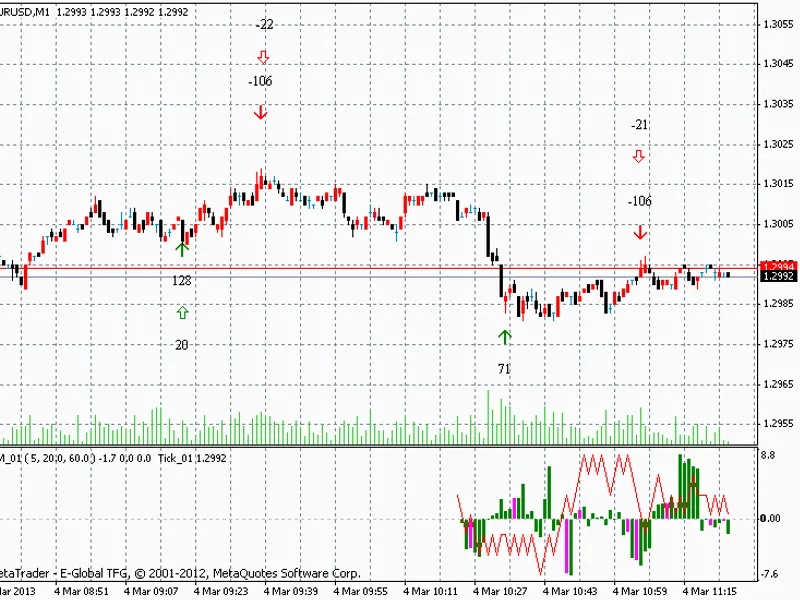
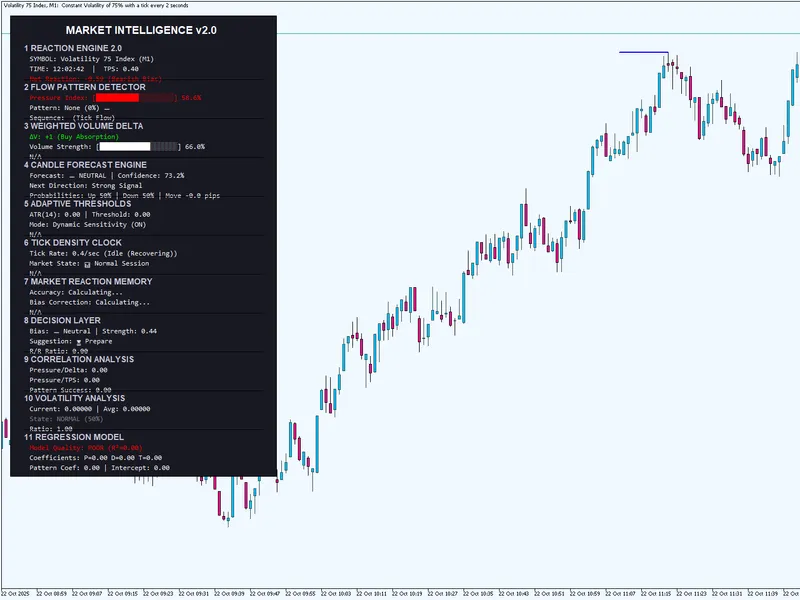
the indicator consists of two files: the main indicator file energy_market_01 and the tick file tick_01. the image at the bottom of the main screen is not linked to the upper chart; it merely demonstrates that the indicator is functioning. the arrows drawn on the chart are the actual output and should be the focus of attention.
the lower chart displays ticks (red line) and their speed histogram. the histogram represents the average speed over n ticks (defined by n_bar_sum). if the average speed exceeds the porog_sum threshold in either direction, a double arrow appears, accompanied by an audio alert.
the indicator also features a detector for sudden single impulses, with a dedicated threshold (porog_one). when a single-impulse speed surpasses this threshold, a single arrow appears on the main screen. single impulses are highlighted in red on the lower histogram, while purple indicates the start of a new minute.
the speeds of these arrows are displayed alongside them in digits. higher speeds suggest a stronger likelihood of a trend in that direction. the presence of two arrows simultaneously indicates a more significant potential trend (in my opinion).
to replicate the indicator's appearance as shown here, follow these steps:
- drag and drop the energy_market_01 indicator onto the main screen.
- drag and drop the tick_01 indicator into the lower indicator window that appears (not the main screen).
the thresholds are calibrated for eurusd; performance on other currency pairs may vary.
note: the indicator's files are provided separately.
You may also like: market mood indicator - excellent alternative for indicator users on MetaTrader 4.
Source Code
#property copyright "robotfx"
#property link "https://robotfx.org"
#define    max_razm_mas      10000
#property  indicator_separate_window
#property  indicator_buffers 3
#property  indicator_color1  green
#property  indicator_width1  2
#property  indicator_color2  magenta
#property  indicator_width2  2
#property  indicator_color3  red
.......
⚠ Limitations & Risk Warning
- This tool is provided for educational and testing purposes only.
- Past performance does not guarantee future results.
- Trading involves substantial risk of loss. Use on a demo account first.
- Results may vary depending on market conditions, broker, and settings.
- We recommend thorough backtesting and forward testing before using with real funds.