
Profit Concentration Analyzer
Info
The Profit Concentration Analyzer is a Script for MetaTrader 5 that net profit and win rate tell you how much a strategy made, not where that profit came from. A system can show a strong net result while a few lucky trades, or one explosive day, carry almost the entire profit.
Usage
This tool is typically used for enhancing chart analysis and decision making.
Platform
This Script works exclusively on MetaTrader 5 (both build 600+ and newer versions).
Setup
Place the downloaded file in MQL5/Scripts folder via File ? Open Data Folder in MetaTrader 5.
How to Install and Use Profit Concentration Analyzer
1. Installation: Move your script file into the MQL/Scripts directory and restart the platform.
2. Execution: Drag the script onto a chart; it will perform a one-time action, such as closing all open orders or clearing chart objects.
3. Editing: Use MetaEditor (F4) to modify code, click "Compile," and verify no errors appear in the terminal before running.
4. Removing: Scripts stop automatically, but you can remove them manually by right-clicking the chart and choosing "Remove Script."
Frequently Asked Questions
Q: How are scripts different from EAs? A: Scripts execute a single action and then stop; EAs monitor the market and trade continuously.
Q: Can I assign a hotkey to a script? A: Yes, right-click the script in the Navigator, select "Set Hotkey," and define your preferred keyboard shortcut.
Q: Why did my script stop? A: Scripts are designed to stop immediately after finishing their programmed command; this is normal behavior.
What this tool does
Net profit and win rate tell you how much a strategy made, not where that profit came from.
Typical Use Case
This Script excels in automated trading and technical analysis on MetaTrader 5.
Compatible Platform & Setup
This Script works on MetaTrader 5. Place the file in the MQL5/Scripts folder and restart the terminal.
Description & Settings
Related: Edge Meter: Does Your Entry Signal Profit After Costs? - another powerful script for MetaTrader 5 traders.
Net profit and win rate tell you how much a strategy made, not where that profit came from. A system can show a strong net result while a few lucky trades, or one explosive day, carry almost the entire profit. Profit Concentration Analyzer reads your closed trades and measures exactly that: how broad and repeatable the profit really is.Also recommended: close profit positions: instant exposure management - similar script with strong performance on MetaTrader 5.
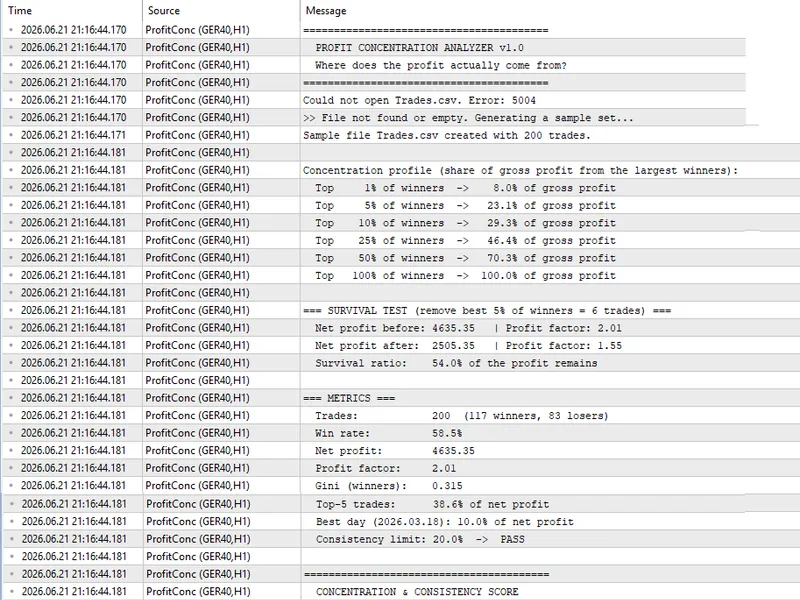
The script reads a CSV file with one row per closed trade and two columns, Date and Profit, and prints a full report in the Experts tab:
Concentration profile - how much of the gross profit comes from the top 1%, 5%, 10%, 25% and 50% of the winning trades.
Top-N share - the share of the net profit produced by the N largest trades.
Gini coefficient of the winning trades: a single 0-to-1 number for how unequal the gains are.
Survival test - removes the best few winners (a configurable percentage) and recomputes the net profit and profit factor, to show whether the edge survives without its outliers.
Day consistency - aggregates trades by day and compares the most profitable day against a prop-firm-style consistency limit (PASS/FAIL).
A composite score combining concentration, consistency and survival, with written recommendations that point at the specific weakness.
Input. Place a CSV named in the input parameter (default Trades.csv) in the terminal MQL5\Files folder, with a header line Date,Profit and one row per closed trade. On the first run, if no file is found, the script generates a sample set and analyzes it, so you can see the output immediately. The included helper ExportTrades.mq5 writes that file from your trade history: copy its function into your Expert Advisor and call it from OnTester(), or run it as a standalone script on an account that already has trades.
Parameters. InpFileName (the CSV file), InpConsistencyLimit (largest-day limit as a percent of total profit), InpTopN (how many top trades the concentration figure uses), InpRemovePct (percentage of best winners removed in the survival test), and three weights InpWeightConc, InpWeightConsist and InpWeightSurv for the composite score.
You may also like: price action dynamic exit strategy - profit shield pro - excellent alternative for script users on MetaTrader 5.
Source Code
#property copyright "RobotFX"
#property version   "1.00"
#property script_show_inputs
#property description "This code is educational. Feel free to use, modify and upgrade as you wish. Visit ROBOTFX.ORG for professional trading tools"
input string InpFileName        = "Trades.csv";
input double InpConsistencyLimit = 20.0;
input int    InpTopN            = 5;
input double InpRemovePct        = 5.0;
input double InpWeightConc        = 0.40;
input double InpWeightConsist     = 0.35;
.......
⚠ Limitations & Risk Warning
- This tool is provided for educational and testing purposes only.
- Past performance does not guarantee future results.
- Trading involves substantial risk of loss. Use on a demo account first.
- Results may vary depending on market conditions, broker, and settings.
- We recommend thorough backtesting and forward testing before using with real funds.