




GARCH Volatility Models: GARCH, GJR-GARCH, and EGARCH with Forecasts
Info
The GARCH Volatility Models: GARCH, GJR-GARCH, and EGARCH with Forecasts is a Script for MetaTrader 5 that garch. mqh implements GARCH volatility models for a series of returns using maximum likelihood estimation and provides forecasts for future variances.
Usage
This tool is typically used for enhancing chart analysis and decision making.
Platform
This Script works exclusively on MetaTrader 5 (both build 600+ and newer versions).
Setup
Place the downloaded file in MQL5/Scripts folder via File ? Open Data Folder in MetaTrader 5.
How to Install and Use GARCH Volatility Models: GARCH, GJR-GARCH, and EGARCH with Forecasts
1. Installation: Move your script file into the MQL/Scripts directory and restart the platform.
2. Execution: Drag the script onto a chart; it will perform a one-time action, such as closing all open orders or clearing chart objects.
3. Editing: Use MetaEditor (F4) to modify code, click "Compile," and verify no errors appear in the terminal before running.
4. Removing: Scripts stop automatically, but you can remove them manually by right-clicking the chart and choosing "Remove Script."
Frequently Asked Questions
Q: How are scripts different from EAs? A: Scripts execute a single action and then stop; EAs monitor the market and trade continuously.
Q: Can I assign a hotkey to a script? A: Yes, right-click the script in the Navigator, select "Set Hotkey," and define your preferred keyboard shortcut.
Q: Why did my script stop? A: Scripts are designed to stop immediately after finishing their programmed command; this is normal behavior.
What this tool does
Garch.
Typical Use Case
This Script excels in automated trading and technical analysis on MetaTrader 5.
Compatible Platform & Setup
This Script works on MetaTrader 5. Place the file in the MQL5/Scripts folder and restart the terminal.
Description & Settings
Related: Realized Volatility: Range Volatility Estimators, Realized Variance, and HAR Forecasts - another powerful script for MetaTrader 5 traders.
Garch.mqh implements GARCH volatility models for a series of returns using maximum likelihood estimation and provides forecasts for future variances.Also recommended: Gold Hour Profile: Analyzing Trading Session Volatility and Spread Costs - similar script with strong performance on MetaTrader 5.
Key features include:
- Model parameters with classic and robust standard errors.
- Log-likelihood values, AIC, and BIC for model comparison.
- Conditional variance for each period.
- Estimation of volatility persistence and shock half-life.
- No external DLLs required; utilizes MQL5's matrix capabilities for covariances.
Usage
Include the header file:
#include
Define your return series (e.g., 100 * log(close[i] / close[i-1])):
double y[];
// ... fill y with return data ...
Instantiate the CGarch class:
CGarch g;
Configure the model:
g.Model(GARCH_MEAN_CONSTANT, GARCH_VOL_GJR, GARCH_DIST_T); // Example: Constant mean, GJR variance, Student's t distribution
Fit the model to the data:
if(g.Fit(y))
{
// Print model parameters and standard errors
for(int i = 0; i < g.Parameters(); i++)
PrintFormat("%s %.5f (%.5f)", g.Name(i), g.Parameter(i), g.StdError(i)); // Robust standard error shown
// Forecast future variances
double variance[];
g.Forecast(20, variance); // Forecast variance for the next 20 periods
// Get shock half-life
double half = g.HalfLife(); // Periods for a shock's effect to reduce by half
}
Available Models
Mean Specification:
- Zero mean
- Constant mean
Variance Models:
- GARCH(1,1): Standard Generalized Autoregressive Conditional Heteroskedasticity.
- GJR-GARCH(1,1,1): Glosten-Jagannathan-Runkle GARCH, includes an additional term (gamma) for negative shocks.
- EGARCH(1,1,1): Exponential GARCH, models the log variance with a sign term.
Shock Distributions:
- Normal distribution
- Student's t distribution (standardized), with shape estimated.
- Generalized Error Distribution (GED), with shape estimated.
Operational Details
The recursive estimation initiates with an exponentially weighted variance of the first 75 residuals. Variance is maintained within bounds derived from an EWMA variance, ensuring consistency with the Python arch package.
Optimization involves a three-step process:
1. Quasi-Newton (BFGS) on free parameters where each point constitutes a valid model.
2. Nelder-Mead search incorporating parameter bounds.
3. BFGS re-application with bounds that were reached held constant.
Steps 2 and 3 are crucial when the optimum lies on a bound (e.g., persistence of 1, shape at its limit) or when the GED shape is near 1, leading to likelihood function kinks.
Standard errors are computed using numerical derivatives:
- Classic standard errors from the inverse Hessian.
- Robust (Bollerslev-Wooldridge) standard errors from the sandwich estimator using period scores.
Forecasts are exact for GARCH and GJR models. For EGARCH, the first-period forecast is exact, while subsequent forecasts are generated via simulation using a random seed (ForecastSimulated function is also available for all models).
Important Considerations
1. EGARCH with Student's t shocks: This combination may result in non-finite conditional variances beyond one period because the exponential of a t-distributed variable does not possess a finite expectation. Consequently, simulated forecasts might not stabilize. For reliable forecasts with EGARCH, consider using normal or GED shock distributions.
2. GED shape near 1: When the GED shape parameter is close to 1, the fitted mean might align with a kink in the likelihood function. This can lead to an erroneously small numerical standard error for the mean parameter. The Python arch package exhibits similar behavior.
Example Usage
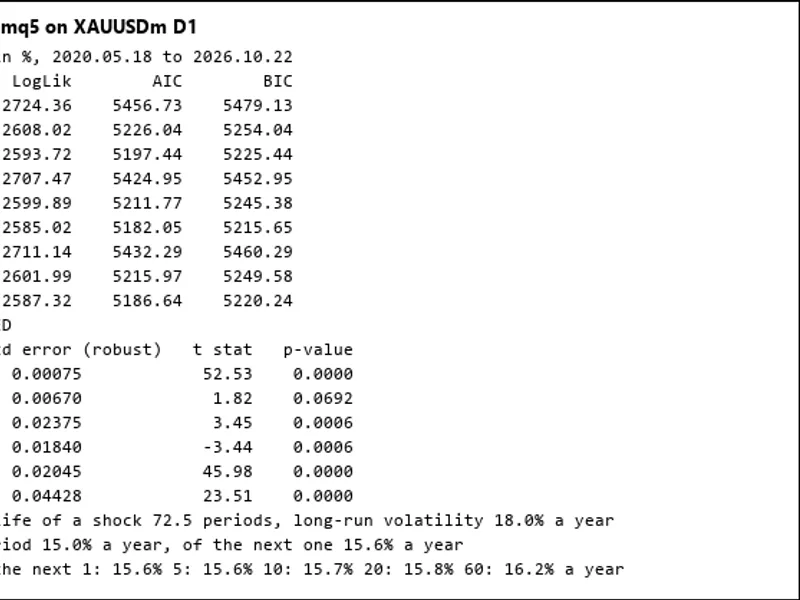
The included script GarchExample.mq5 demonstrates fitting nine models (all combinations of mean, variance, and distribution) to symbol returns. It selects the best model based on the BIC criterion and outputs its parameters, current volatility, long-run volatility, and forecasted volatility for the next 1 to 60 periods, expressed in annual percentages. The script can also export returns and fitted volatility data to a CSV file.
Verification and Performance
The implementation has been validated against 108 fits across six datasets (three simulated, BTCUSDT daily, XAUUSD hourly, and daily trading portfolio results), compared with the Python arch 8.0 package.
Results indicate:
- Log-likelihood, conditional variances, and forecasts were consistent within 1e-12 for identical parameters.
- Standard errors showed agreement within 3e-4, attributed to the precision of numerical second derivatives.
- The log-likelihood achieved by Garch.mqh was never lower than that of the arch package. In 6 instances, arch stopped prematurely, while Garch.mqh found improvements up to 0.21. In 4 cases with a persistence of 1, arch slightly exceeded its own constraint.
Performance:
- Fitting 2,000 returns typically takes 10 to 100 milliseconds.
- The slowest fits, involving shape parameters approaching bounds, take approximately 1.5 seconds.
File Placement
- Garch.mqh should be placed in the MQL5\Include\Garch directory.
- GarchExample.mq5 should be placed in the MQL5\Scripts\Garch directory.
You may also like: Volatility Measure (VM) - excellent alternative for script users on MetaTrader 5.
Source Code
#property copyright "RobotFX"
#property version     "1.00"
#property script_show_inputs
#include <Garch\Garch.mqh>
input string          InpSymbol  = "";
input ENUM_TIMEFRAMES InpPeriod  = PERIOD_D1;
input int             InpBars    = 2000;
input double          InpPerYear = 252;
input int             InpHorizon = 60;
input string          InpCsv     = "";
.......
⚠ Limitations & Risk Warning
- This tool is provided for educational and testing purposes only.
- Past performance does not guarantee future results.
- Trading involves substantial risk of loss. Use on a demo account first.
- Results may vary depending on market conditions, broker, and settings.
- We recommend thorough backtesting and forward testing before using with real funds.