






Volatility-Adjusted Momentum Decay Line (VAMD)
Info
The Volatility-Adjusted Momentum Decay Line (VAMD) is a Indicator for MetaTrader 5 that the core concept behind the volatility-adjusted momentum decay line (vamd) is to address the limitations of standard momentum indicators that use fixed lookback periods and smoothing constants. These traditional indicators react uniformly regardless of market volatility.
Usage
This tool is typically used for enhancing chart analysis and decision making.
Platform
This Indicator works exclusively on MetaTrader 5 (both build 600+ and newer versions).
Setup
Place the downloaded file in MQL5/Indicators folder via File ? Open Data Folder in MetaTrader 5.
How to Install and Use Volatility-Adjusted Momentum Decay Line (VAMD)
1. Installation: Place your file in the MQL/Indicators folder via "Open Data Folder" and restart your terminal.
2. Loading: Find the indicator in the Navigator, drag it onto your chart, and configure the input parameters in the popup window.
3. Customization: Press Ctrl+I to open the indicator list, select your tool, and click "Properties" to change colors, levels, or visual styles.
4. Updating: Replace the old file in the Indicators folder with the new version and restart the platform to apply changes.
Frequently Asked Questions
Q: Why is my indicator not showing? A: Verify the file is in the MQL/Indicators folder, or try right-clicking the "Indicators" tree in the Navigator and clicking "Refresh."
Q: Do custom indicators slow down the platform? A: Too many complex indicators can impact performance; remove unused ones via the "Indicator List" (Ctrl+I).
Q: Can I use MT4 indicators on MT5? A: No, MQL4 and MQL5 are distinct languages; ensure the indicator is compiled specifically for your platform version.
What this tool does
The core concept behind the Volatility-Adjusted Momentum Decay Line (VAMD) is to address the limitations of standard momentum indicators that use fixed lookback periods and smoothing constants.
Typical Use Case
This Indicator excels in automated trading and technical analysis on MetaTrader 5.
Compatible Platform & Setup
This Indicator works on MetaTrader 5. Place the file in the MQL5/Indicators folder and restart the terminal.
Description & Settings
Related: Momentum VWAP Barrier Breakout Indicator - another powerful indicator for MetaTrader 5 traders.
The core concept behind the Volatility-Adjusted Momentum Decay Line (VAMD) is to address the limitations of standard momentum indicators that use fixed lookback periods and smoothing constants. These traditional indicators react uniformly regardless of market volatility.Also recommended: Impulse Candle Indicator: Identify Momentum Bars with ATR and Volume - similar indicator with strong performance on MetaTrader 5.
The VAMD begins with a raw momentum calculation, which is the change in closing price over a specified period (InpMomentumPeriod). This raw momentum is then normalized by dividing it by the current Average True Range (ATR). This normalization expresses the momentum reading in units of volatility rather than price units.
This volatility-normalized momentum is then subjected to a recursive decay filter. In this filter, the line moves a fraction of the way towards the new normalized momentum on each bar. The crucial aspect is that this 'decay rate' is not fixed. Instead, it is dynamically adjusted based on the ratio of the current ATR to its moving average over a defined period (InpATRAvgPeriod).
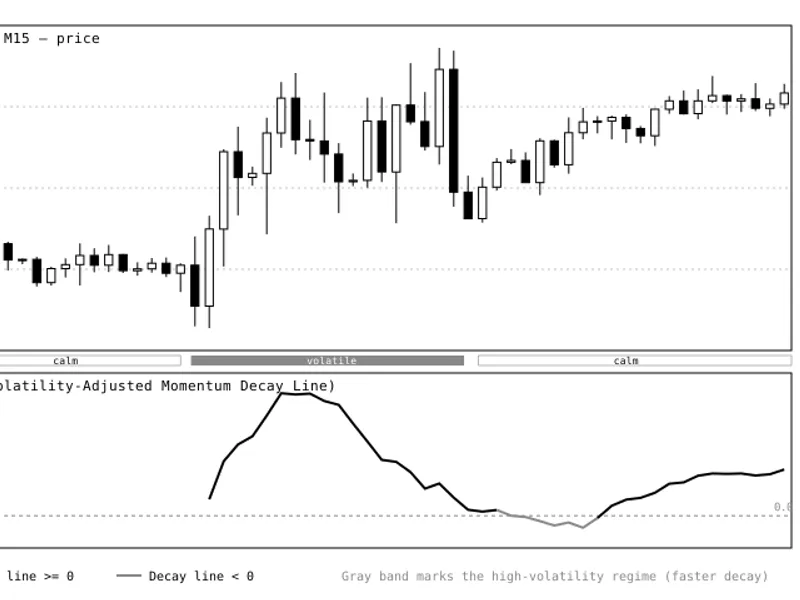
When market volatility is high compared to its recent average, the decay rate accelerates, causing the VAMD line to react quickly to new momentum readings. Conversely, when volatility decreases and returns to its baseline, the decay rate slows down. This causes the line to hold its position for longer, effectively retaining a memory of the prior price movement.
The outcome is an indicator that behaves less like a typical oscillator and more like a momentum reading that dissipates faster during periods of increased volatility and persists longer during calmer market conditions. It is particularly suited for instruments and trading timeframes where volatility regimes frequently change within a trading session, such as EURUSD or GBPUSD on an M15 chart, where distinct volatility patterns are common between sessions.
A dedicated indicator subwindow is used to display the VAMD, keeping it visually separate from the price action.
Interpreting the VAMD
Decay Line (main plot)
— This is the primary colored line displayed in the subwindow. It fluctuates around a zero level. Persistent deviations from zero suggest momentum that is not being counteracted by volatility changes. A line that stays close to zero indicates that momentum has diminished or that the market lacks a clear directional drive.
ATR-relative decay rate
— This is the underlying mechanism that determines the speed at which the Decay Line reacts. While not directly plotted, it is responsible for the line's faster movements and quicker crossings of the zero level during volatile periods, and its slower, more stable movements during calmer periods.
Color / sign state
— The line is displayed in one color when its value is at or above zero, and a different, lighter color when it falls below zero. This visual cue immediately highlights shifts in momentum regimes (e.g., bullish momentum decaying into bearish, or vice versa) without requiring close observation of exact numerical values.
Practical application
— For trend-following strategies, a Decay Line that remains consistently on one side of zero during a period of increasing volatility suggests strong trend continuation. This is because a weaker momentum reading would have been pulled back towards zero by the accelerated decay rate.
For mean-reversion strategies, a sharp spike of the Decay Line away from zero followed by a rapid decay back across the zero line during a volatile period can signal the exhaustion of a short-term price push. This is because the adaptive decay mechanism is actively counteracting the extended momentum reading.
External Variables (Inputs)
Input
Default
Purpose
InpMomentumPeriod
10
The lookback period, in bars, used to calculate the initial raw price momentum before volatility normalization.
InpATRPeriod
14
The period used for calculating the Average True Range (ATR), which serves as the volatility unit to normalize raw momentum into a dimensionless value.
InpATRAvgPeriod
50
The period for the moving average of the ATR. This defines the volatility baseline against which the current ATR is compared to determine the decay rate.
InpBaseDecay
0.15
The base decay coefficient applied when the current ATR is equal to its baseline. This value influences how quickly the line relaxes towards zero under normal volatility conditions.
InpMaxDecay
0.90
The maximum allowed decay rate, acting as a ceiling to prevent the line from becoming overly reactive or unstable during extreme volatility spikes.
Recommended Usage
It is recommended to load the VAMD indicator in its own subwindow below the main price chart. Observe it in conjunction with a recognized volatility reference, such as the ATR indicator, as their signals can reinforce each other. For instance, a VAMD reading that remains extended while the ATR is concurrently increasing may represent a stronger signal than the same extended reading occurring during a period of flat ATR.
On lower timeframes (e.g., M5 to M15), the default settings provide responsiveness within a single trading session. For higher timeframes (H1 and above), increasing InpATRAvgPeriod to values between 80 and 100 allows the volatility baseline more time to stabilize, which can lead to a more effective adjustment of the decay rate.
It is advisable to combine the VAMD indicator with basic price-action filters, such as support and resistance levels or a simple moving average trend filter, rather than relying solely on its zero-line crosses for entry signals. The adaptive decay feature is designed to describe the fading of momentum, not to generate independent trading entries.
Figure 1. EURUSD M15 chart with the VAMD indicator displayed below the price action. The gray shaded area below the price panel indicates a period of increased volatility. Observe how the Decay Line accelerates its movements and crosses the zero level (dotted line) more rapidly within this band. Subsequently, as volatility decreases and the gray band ends, the line settles into slower, more sustained readings. The line is plotted in black when above zero and gray when below zero.
You may also like: Titan TrendPulse AI: Advanced Trend and Momentum Indicator - excellent alternative for indicator users on MetaTrader 5.
Source Code
#property copyright "RobotFX"
#property link "https://robotfx.org"
#property version   "1.00"
#property description "This code is educational. Feel free to use, modify and upgrade as you wish. Visit ROBOTFX.ORG for professional trading tools"
#property indicator_separate_window
#property indicator_buffers 3
#property indicator_plots   1
#property indicator_level1  0.0
#property indicator_levelstyle STYLE_DOT
#property indicator_levelcolor clrGray
.......
⚠ Limitations & Risk Warning
- This tool is provided for educational and testing purposes only.
- Past performance does not guarantee future results.
- Trading involves substantial risk of loss. Use on a demo account first.
- Results may vary depending on market conditions, broker, and settings.
- We recommend thorough backtesting and forward testing before using with real funds.