



trend momentum ea: a powerful mt5 trading tool
Info
The trend momentum ea: a powerful mt5 trading tool is a Expert Advisor for MetaTrader 5 that the trendmomentumea is a sophisticated expert advisor for metatrader 5, engineered to capitalize on trending and momentum market conditions through a synergistic blend of ema, rsi, and stochastic indicators. key featurestrend detection: the ea initiates trades when the price aligns above ema50 and ema200 for buys, and below these emas for sells, ensuring a clear trend.
Usage
This tool is typically used for trend following strategies across multiple currency pairs.
Platform
This Expert Advisor works exclusively on MetaTrader 5 (both build 600+ and newer versions).
Setup
Place the downloaded file in MQL5/Experts folder via File ? Open Data Folder in MetaTrader 5.
How to Install and Use trend momentum ea: a powerful mt5 trading tool
1. Installation: Open the "File" menu, select "Open Data Folder," navigate to MQL/Experts, paste your file, and restart the terminal.
2. Activation: Drag the EA from the Navigator onto a chart, ensure "Allow live trading" is checked in the Common tab, and verify the AutoTrading button is green.
3. Optimization: Right-click your chart, choose "Expert List," click "Properties" to adjust inputs, and save your preferred setup as a set file for future use.
4. Maintenance: Regularly check the "Experts" tab in the terminal window to monitor trade logs and potential execution errors.
Frequently Asked Questions
Q: Why is my EA not opening trades? A: Check the "AutoTrading" button, ensure "Allow live trading" is enabled, and verify your broker allows automated trading on your account type.
Q: Can I run multiple EAs on one chart? A: No, each chart can only host one active EA; however, you can open multiple charts for different currency pairs to run several EAs.
Q: What does the "smiley face" icon mean? A: A smiley face in the top-right corner of the chart indicates the EA is successfully running; a frowny face means it is disabled.
What this tool does
the trendmomentumea is a sophisticated expert advisor for metatrader 5, engineered to capitalize on trending and momentum market conditions through a synergistic blend of ema, rsi, and stochastic indicators.
Typical Use Case
This Expert Advisor excels in trend following on MetaTrader 5.
Compatible Platform & Setup
This Expert Advisor works on MetaTrader 5. Place the file in the MQL5/Experts folder and restart the terminal.
Description & Settings
Related: Steep MA Trend EA - another powerful expert for MetaTrader 5 traders.
the trendmomentumea is a sophisticated expert advisor for metatrader 5, engineered to capitalize on trending and momentum market conditions through a synergistic blend of ema, rsi, and stochastic indicators.Also recommended: Super Trend Trading EA - similar expert with strong performance on MetaTrader 5.
key features
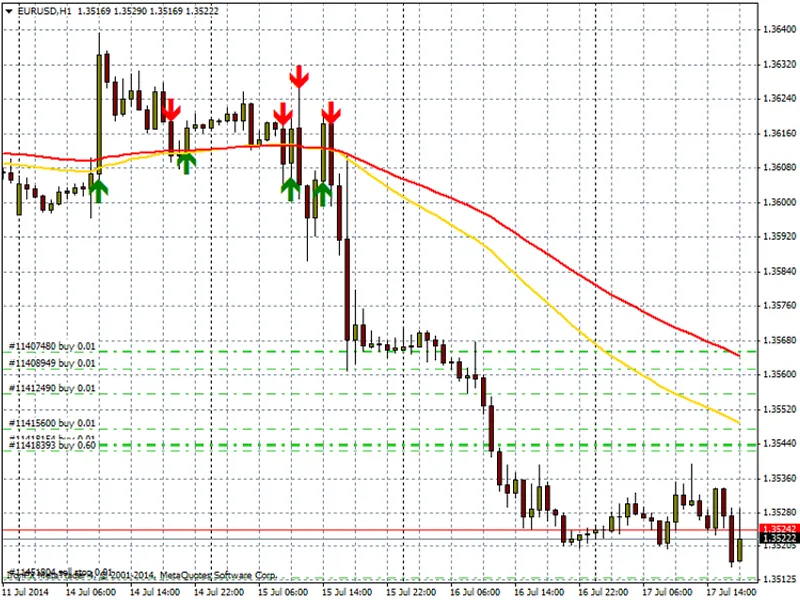
trend detection: the ea initiates trades when the price aligns above ema50 and ema200 for buys, and below these emas for sells, ensuring a clear trend.
momentum confirmation: rsi and stochastic %k/%d crossovers validate entry signals, confirming momentum.
candle confirmation: trades are executed only after the preceding candle satisfies trend and momentum conditions, ensuring a robust entry.
session filter: the ea automatically trades during the london and new york sessions, enhancing liquidity and reducing risk.
position management: designed for safety, the ea opens one trade per symbol and magic number, preventing conflicts.
risk management: customizable lot size, stop loss, and take profit allow for tailored risk management.
functionality
the ea scrutinizes the last closed candle to ascertain the prevailing trend using ema50 and ema200. if a trend is identified, it verifies momentum through rsi levels and stochastic crossover. upon meeting all criteria, it opens a trade with predefined stop loss and take profit. the session filter ensures trades occur during optimal market liquidity.
recommended settings
symbols: major forex pairs (eurusd, gbpusd, usdjpy), indices, and commodities are suitable.
timeframes: m15 and h1 are optimal, but it adapts to other timeframes.
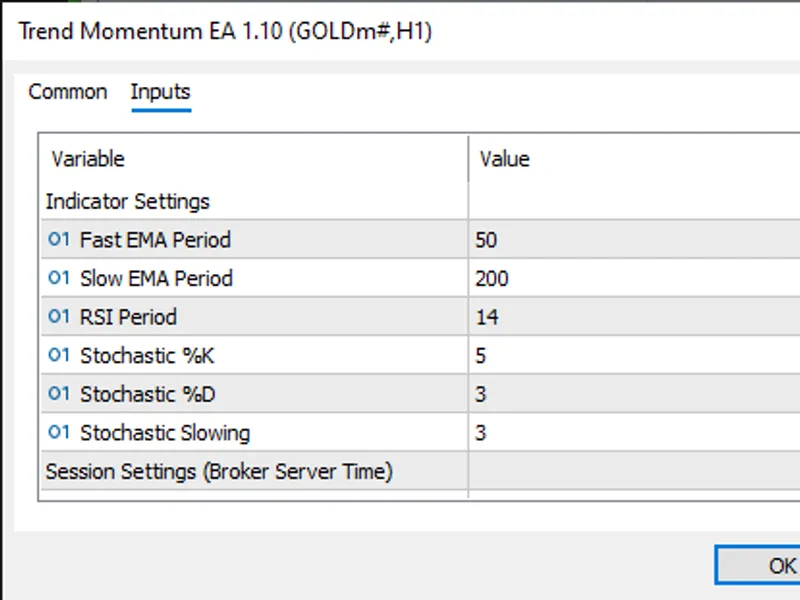
input parameters:
ema50 and ema200 periods
rsi period and thresholds
stochastic %k, %d, and slowing
stop loss and take profit in points
london and new york session times
benefits
by integrating trend and momentum filters, the ea sidesteps sideways markets, enhancing trade precision.
risk mitigation is achieved through magic number filtering and single-position logic.
versatility is ensured with compatibility across mt5 brokers and various quote formats.
disclaimer
align broker server time with session inputs for accuracy.
thorough testing on a demo account is recommended before live trading.
designed for trend-following and swing trades, not scalping.
past performance is not indicative of future results.
You may also like: adx trend pullback ea: trend strength and volatility-based trading - excellent alternative for expert users on MetaTrader 5.
Source Code
#property copyright "robotfx"
#property link "https://robotfx.org"
#property version   "1.10"
#property strict
#include <trade\trade.mqh>
input group "indicator settings"
input int      inpema50          = 50;
input int      inpema200         = 200;
input int      inprsi            = 14;
input int      inpstochk         = 5;
.......
⚠ Limitations & Risk Warning
- This tool is provided for educational and testing purposes only.
- Past performance does not guarantee future results.
- Trading involves substantial risk of loss. Use on a demo account first.
- Results may vary depending on market conditions, broker, and settings.
- We recommend thorough backtesting and forward testing before using with real funds.