
Drawdown Meter: Analyzing Depth, Duration, and Frequency
Info
The Drawdown Meter: Analyzing Depth, Duration, and Frequency is a Script for MetaTrader 5 that most traders are familiar with a single drawdown number: the maximum achieved. While this is commonly quoted, it is often the least informative.
Usage
This tool is typically used for enhancing chart analysis and decision making.
Platform
This Script works exclusively on MetaTrader 5 (both build 600+ and newer versions).
Setup
Place the downloaded file in MQL5/Scripts folder via File ? Open Data Folder in MetaTrader 5.
How to Install and Use Drawdown Meter: Analyzing Depth, Duration, and Frequency
1. Installation: Move your script file into the MQL/Scripts directory and restart the platform.
2. Execution: Drag the script onto a chart; it will perform a one-time action, such as closing all open orders or clearing chart objects.
3. Editing: Use MetaEditor (F4) to modify code, click "Compile," and verify no errors appear in the terminal before running.
4. Removing: Scripts stop automatically, but you can remove them manually by right-clicking the chart and choosing "Remove Script."
Frequently Asked Questions
Q: How are scripts different from EAs? A: Scripts execute a single action and then stop; EAs monitor the market and trade continuously.
Q: Can I assign a hotkey to a script? A: Yes, right-click the script in the Navigator, select "Set Hotkey," and define your preferred keyboard shortcut.
Q: Why did my script stop? A: Scripts are designed to stop immediately after finishing their programmed command; this is normal behavior.
What this tool does
Most traders are familiar with a single drawdown number: the maximum achieved.
Typical Use Case
This Script excels in automated trading and technical analysis on MetaTrader 5.
Compatible Platform & Setup
This Script works on MetaTrader 5. Place the file in the MQL5/Scripts folder and restart the terminal.
Description & Settings
Related: Drawdown Bootstrap: Monte Carlo Simulation of Maximal Drawdown - another powerful script for MetaTrader 5 traders.
Most traders are familiar with a single drawdown number: the maximum achieved. While this is commonly quoted, it is often the least informative. The more critical questions for traders are typically related to the duration and frequency of drawdowns, rather than just their maximum depth.Also recommended: Drawdown Contribution Analyzer for Multi-Configuration Portfolios - similar script with strong performance on MetaTrader 5.
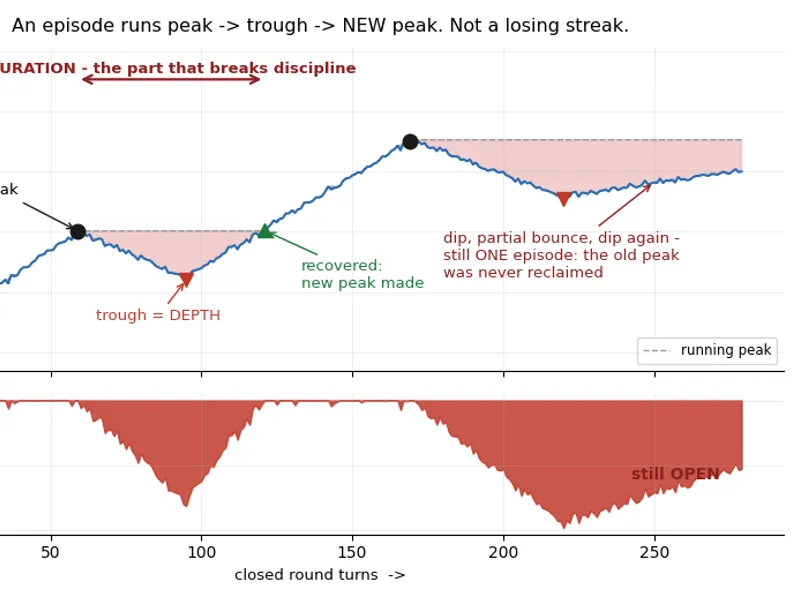
A drawdown is best understood by considering its three key dimensions: Depth, Duration, and Frequency. Depth refers to the percentage or monetary loss from a peak. Duration is the time elapsed from an old equity peak to the point where a new peak is established. Frequency relates to how often these drawdown periods occur.
This script analyzes all three dimensions using your closed trading history. Simply load it onto any chart. The script reads historical data only and does not open, modify, or close any trades. Algorithmic trading does not need to be enabled.
What It Prints
=== Drawdown Meter ===
Window:
2018.01
.03
..
2026.08
.21
| Closed round turns:
6763
| Net realized P/L:
11688.42
USD
Max drawdown:
412.55
USD (
3.41
% of the equity peak
12100.18
) peak
2024.03
.11
-> trough
2024.05
.02
-> recovered
2024.07
.19
Longest underwater period:
133
days CURRENT status:
277.40
USD below the last peak, underwater for
133
days
--- Deepest Episodes ---
Depth
412.55
| Peak
2024.03
.11
| Trough
2024.05
.02
| Recovered
2024.07
.19
| Length(d)
130
388.10
| Peak
2025.09
.02
| Trough
2025.10
.14
| Recovered
2025.12
.01
| Length(d)
90
301.75
| Peak
2023.06
.05
| Trough
2023.07
.21
| Recovered
2023.08
.30
| Length(d)
86
277.40
| Peak
2026.04
.13
| Trough
2026.06
.02
| OPEN
| Length(d)
133
245.90
| Peak
2022.11
.07
| Trough
2022.12
.19
| Recovered
2023.01
.24
| Length(d)
78
Configuration Options:
Set InpStartBalance to use percentage figures against the equity peak; leave it at zero for monetary values. InpTopN determines the number of episodes listed. InpExportCSV will save the drawdown episodes to a file named DrawdownEpisodes.csv in the MQL5\Files directory.
The CURRENT status line is the most important to read first. It provides a concise summary of your current trading performance, indicating whether you are at a new equity high or in an open drawdown episode, and how it compares to historical episodes.
Two Implementation Details Affecting Calculations:
Both factors discussed below tend to result in a reported drawdown that is shallower than the actual drawdown experienced.
1. Entry commissions are accounted for. For brokers that charge commissions, half is often debited on the entry trade when DEAL_PROFIT is zero. A script that only reads closing deals would not reflect the full cost. This script includes every market deal, booked at the moment the funds moved, aligning with how the account balance actually behaved.
2. A partial close counts as one round turn. When positions are closed in parts, multiple exit deals are generated. While the funds are correctly accounted for per deal, the trade counter aggregates by DEAL_POSITION_ID. This prevents a scaling-out strategy from appearing twice as active as it truly is.
An Episode Is Not Merely a Losing Streak
This script does not tally losing trades. It analyzes the realized P/L curve and identifies peaks. A drawdown episode begins when the curve falls below its running high and concludes only when a new high is achieved. A recovery that falls just short of the previous peak does not end the episode; it remains open, and a subsequent decline deepens the same episode rather than initiating a new one.
This deliberate approach makes the duration metric meaningful. An account's performance is judged by when equity is recovered, not simply when a losing streak technically ends.
How to Interpret the Output
It is best to use this tool before going live, rather than during a challenging period. The episode table provides a benchmark for future comparisons: the depths you have navigated, the typical recovery times, and the longest recovery times. A system performing within all these historical parameters is experiencing a normal drawdown. A system that surpasses any of these benchmarks warrants a thorough review, focusing on whether the underlying trading edge remains valid.
Duration warrants its own consideration. Understand your expected recovery time before trading. A 60-day drawdown that is exited at day 30, for example, is not risk management but rather an impatient response to a stop-loss.
Compare performance per system, not just per account. Run the script on a backtest of a single Expert Advisor (EA) to determine that system's specific drawdown envelope. Then, run it on your live account to assess the combined performance. The discrepancies between the two are a strong argument for employing multiple trading systems.
Notes:
Deposits and withdrawals are excluded. This analysis focuses on the drawdown of your trading activity, not your overall balance.
Figures are derived from realized P/L, meaning intraday floating fluctuations are not captured. An episode that appears to have closed at breakeven on paper might have experienced deeper intraday losses.
Only data held within the terminal is analyzed. If your History tab is set to a limited period, ensure you load "All history" before running the script.
An episode that has not yet recovered is marked as OPEN, and its length is calculated up to the last closed trade.
You may also like: Overnight Cost Meter: Understand and Monitor Swap Costs - excellent alternative for script users on MetaTrader 5.
Source Code
#property copyright "RobotFX"
#property version   "1.10"
#property script_show_inputs
input double InpStartBalance = 0.0;
input int    InpTopN         = 5;
input bool   InpExportCSV    = false;
double eDepth[]; long ePeakT[], eTroughT[], eEndT[];
void AddEpisode(const double depth, const long pt, const long tt, const long et)
  {
   int n = ArraySize(eDepth);
.......
⚠ Limitations & Risk Warning
- This tool is provided for educational and testing purposes only.
- Past performance does not guarantee future results.
- Trading involves substantial risk of loss. Use on a demo account first.
- Results may vary depending on market conditions, broker, and settings.
- We recommend thorough backtesting and forward testing before using with real funds.