
Drawdown Contribution Analyzer for Multi-Configuration Portfolios
Info
The Drawdown Contribution Analyzer for Multi-Configuration Portfolios is a Script for MetaTrader 5 that this script analyzes the contribution of each configuration in a multi-configuration portfolio to its overall drawdown. It provides insights into which configurations deepen the portfolio's drawdown, aiding in risk management and optimization.
Usage
This tool is typically used for enhancing chart analysis and decision making.
Platform
This Script works exclusively on MetaTrader 5 (both build 600+ and newer versions).
Setup
Place the downloaded file in MQL5/Scripts folder via File ? Open Data Folder in MetaTrader 5.
How to Install and Use Drawdown Contribution Analyzer for Multi-Configuration Portfolios
1. Installation: Move your script file into the MQL/Scripts directory and restart the platform.
2. Execution: Drag the script onto a chart; it will perform a one-time action, such as closing all open orders or clearing chart objects.
3. Editing: Use MetaEditor (F4) to modify code, click "Compile," and verify no errors appear in the terminal before running.
4. Removing: Scripts stop automatically, but you can remove them manually by right-clicking the chart and choosing "Remove Script."
Frequently Asked Questions
Q: How are scripts different from EAs? A: Scripts execute a single action and then stop; EAs monitor the market and trade continuously.
Q: Can I assign a hotkey to a script? A: Yes, right-click the script in the Navigator, select "Set Hotkey," and define your preferred keyboard shortcut.
Q: Why did my script stop? A: Scripts are designed to stop immediately after finishing their programmed command; this is normal behavior.
What this tool does
This script analyzes the contribution of each configuration in a multi-configuration portfolio to its overall drawdown.
Typical Use Case
This Script excels in automated trading and technical analysis on MetaTrader 5.
Compatible Platform & Setup
This Script works on MetaTrader 5. Place the file in the MQL5/Scripts folder and restart the terminal.
Description & Settings
Related: Drawdown Bootstrap: Monte Carlo Simulation of Maximal Drawdown - another powerful script for MetaTrader 5 traders.
This script analyzes the contribution of each configuration in a multi-configuration portfolio to its overall drawdown. It provides insights into which configurations deepen the portfolio's drawdown, aiding in risk management and optimization.Also recommended: Drawdown Meter: Analyzing Depth, Duration, and Frequency - similar script with strong performance on MetaTrader 5.
Report Details
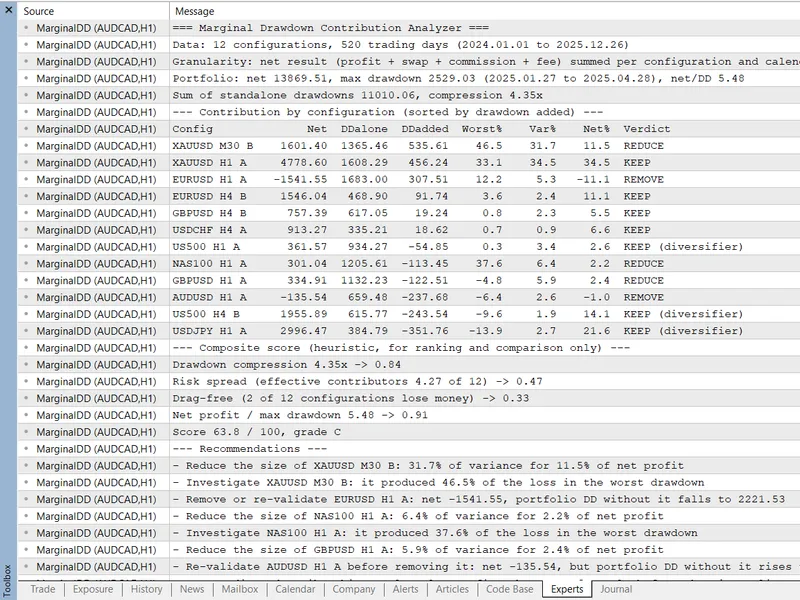
The script generates a comprehensive report, including:
- Drawdown Added: Calculates the additional drawdown when excluding each configuration from the portfolio.
- Share of Worst Drawdown: Measures each configuration's contribution to the portfolio's worst drawdown.
- Euler Variance Share: Assesses the configuration's variance contribution relative to the portfolio's variance.
- Composite Score: Assigns a grade (A+ to F) based on drawdown compression, risk spread, drag-free share, and net profit to drawdown, with recommendations for keeping, reducing, or removing configurations.
Data Sources
- Demonstration Source: A reproducible portfolio with 12 configurations over 520 trading days for instant output.
- Account Source: Reads trading deals from the current account, grouping by magic number or magic number and symbol. Deals with magic 0 are assigned to the opening deal's magic.
- CSV Source: Imports a CSV file from MQL5\Files with columns Date, Config, and Profit, accommodating various separators and number formats.
Parameters
- InpMinDays: Sets the minimum sample size.
- InpReduceRatio and InpImproveMin: Control the REDUCE verdict.
- InpMaxWindowShare: Manages the worst-drawdown alert.
- InpCompTarget, InpNeffTarget, InpDragTol, and InpRetDDTarget: Scale the composite score dimensions.
- Weights and grade boundaries: Customizable inputs for fine-tuning the analysis.
You may also like: Drawdown DNA Analyzer - excellent alternative for script users on MetaTrader 5.
Source Code
#property copyright "RobotFX"
#property link "https://robotfx.org"
#property version   "1.00"
#property description "This code is educational. Feel free to use, modify and upgrade as you wish. Visit ROBOTFX.ORG for professional trading tools"
#property script_show_inputs
enum ENUM_MDD_SOURCE
  {
   SOURCE_DEMO=0,
   SOURCE_ACCOUNT=1,
   SOURCE_CSV=2
.......
⚠ Limitations & Risk Warning
- This tool is provided for educational and testing purposes only.
- Past performance does not guarantee future results.
- Trading involves substantial risk of loss. Use on a demo account first.
- Results may vary depending on market conditions, broker, and settings.
- We recommend thorough backtesting and forward testing before using with real funds.