
Drawdown Bootstrap: Monte Carlo Simulation of Maximal Drawdown
Info
The Drawdown Bootstrap: Monte Carlo Simulation of Maximal Drawdown is a Script for MetaTrader 5 that drawdownbootstrap. mqh estimates the potential account or strategy drawdown over the next months based on historical daily results.
Usage
This tool is typically used for enhancing chart analysis and decision making.
Platform
This Script works exclusively on MetaTrader 5 (both build 600+ and newer versions).
Setup
Place the downloaded file in MQL5/Scripts folder via File ? Open Data Folder in MetaTrader 5.
How to Install and Use Drawdown Bootstrap: Monte Carlo Simulation of Maximal Drawdown
1. Installation: Move your script file into the MQL/Scripts directory and restart the platform.
2. Execution: Drag the script onto a chart; it will perform a one-time action, such as closing all open orders or clearing chart objects.
3. Editing: Use MetaEditor (F4) to modify code, click "Compile," and verify no errors appear in the terminal before running.
4. Removing: Scripts stop automatically, but you can remove them manually by right-clicking the chart and choosing "Remove Script."
Frequently Asked Questions
Q: How are scripts different from EAs? A: Scripts execute a single action and then stop; EAs monitor the market and trade continuously.
Q: Can I assign a hotkey to a script? A: Yes, right-click the script in the Navigator, select "Set Hotkey," and define your preferred keyboard shortcut.
Q: Why did my script stop? A: Scripts are designed to stop immediately after finishing their programmed command; this is normal behavior.
What this tool does
DrawdownBootstrap.
Typical Use Case
This Script excels in automated trading and technical analysis on MetaTrader 5.
Compatible Platform & Setup
This Script works on MetaTrader 5. Place the file in the MQL5/Scripts folder and restart the terminal.
Description & Settings
Related: Drawdown Contribution Analyzer for Multi-Configuration Portfolios - another powerful script for MetaTrader 5 traders.
DrawdownBootstrap.mqh estimates the potential account or strategy drawdown over the next months based on historical daily results.Also recommended: Drawdown Meter: Analyzing Depth, Duration, and Frequency - similar script with strong performance on MetaTrader 5.
While the worst drawdown in a backtest occurs once due to a specific sequence of events, a Monte Carlo simulation using these same results in different sequences reveals the expected range of drawdowns and the likelihood of exceeding historical worst-case scenarios.Usage
Include the library: #include <DrawdownBootstrap\DrawdownBootstrap.mqh>
Declare an array for daily results: double days[];
// ... populate the days array with daily results (in money or percent) ...
Declare an array for simulated drawdowns: double dd[];
Run the simulation: CDrawdownBootstrap::Run(days, 252, 10000, 10.0, 12345, dd); // Parameters: horizon, paths, mean block size, seed, output array
Calculate a specific percentile: double p95 = CDrawdownBootstrap::Quantile(dd, 0.95); // e.g., 95th percentile
Determine historical worst drawdown: double worst = CDrawdownBootstrap::MaxDrawdown(days); // Drawdown from historical data
How it Works
The method employs a stationary bootstrap (Politis and Romano, 1994). A simulated path begins on a random historical day and progresses chronologically. It jumps to a new random day with a probability determined by 1 / meanBlock. This approach preserves contiguous sequences of days, ensuring that losing streaks and periods with multiple losing trades are maintained within the simulation. Sampling individual days independently would underestimate potential drawdowns.
For each simulated path, the maximum decline of cumulative results from their peak is recorded. The Quantile() function provides any specified percentile of these drawdowns, using linear interpolation.
CSeededRandom, a mulberry32 generator, ensures reproducible simulations: using the same seed generates identical results across different computers, allowing for verification.
Daily results are processed as they occur. Results specified in currency assume fixed trade sizes. For trade sizes that adjust with the account balance, provide daily results as a percentage of the balance.
Example
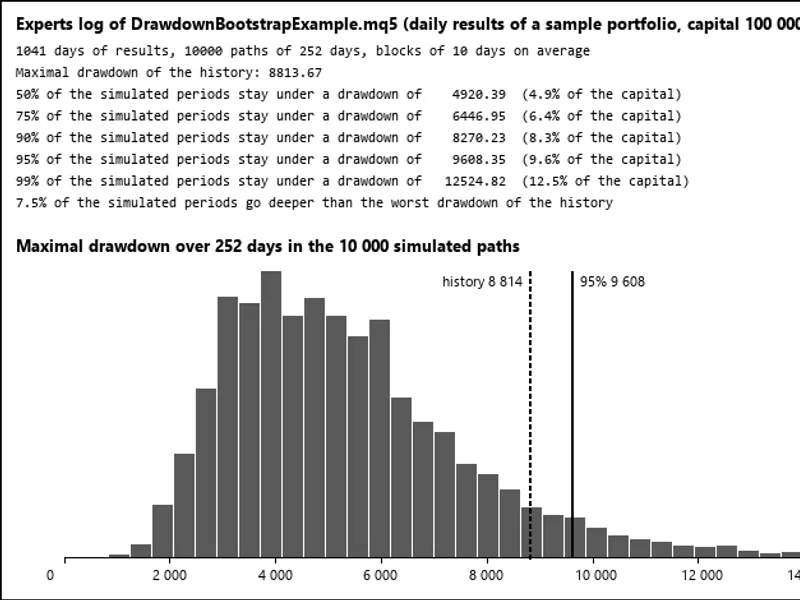
The DrawdownBootstrapExample.mq5 script processes daily closed results from an account (either all trades or filtered by magic number) or from a CSV file. It simulates 10,000 one-year paths and outputs the percentiles of drawdowns in both currency and as a percentage of capital. It also indicates the proportion of paths that exceed the historical worst drawdown (refer to picture 1).
Verification
On a dataset of 1,041 days of results, three independent runs were conducted: 2,000 paths of 252 days with 10-day blocks, 500 paths of 63 days with single-day blocks, and 300 paths of 500 days with 25-day blocks. Using three different seeds, these simulations produced drawdowns for every path that matched an independent Python implementation of the same algorithm, with a maximum deviation of 2e-11.
Files
Place DrawdownBootstrap.mqh in the MQL5\Include\DrawdownBootstrap directory.
Place DrawdownBootstrapExample.mq5 in the MQL5\Scripts\DrawdownBootstrap directory.
This tool is designed for use with MetaTrader 5 and was updated in 2026.
You may also like: Drawdown DNA Analyzer - excellent alternative for script users on MetaTrader 5.
Source Code
#property copyright "RobotFX"
#property version     "1.00"
#property script_show_inputs
#include <DrawdownBootstrap\DrawdownBootstrap.mqh>
input string InpCsv     = "";
input long   InpMagic   = -1;
input int    InpHorizon = 252;
input int    InpPaths   = 10000;
input double InpBlock   = 10.0;
input uint   InpSeed    = 12345;
.......
⚠ Limitations & Risk Warning
- This tool is provided for educational and testing purposes only.
- Past performance does not guarantee future results.
- Trading involves substantial risk of loss. Use on a demo account first.
- Results may vary depending on market conditions, broker, and settings.
- We recommend thorough backtesting and forward testing before using with real funds.