

Volume Profile Levels Indicator Analysis
Info
The Volume Profile Levels Indicator Analysis is a Indicator for MetaTrader 5 that volume profile levelsthe idea behind ita standard chart displays price movement; a volume profile illustrates where the market has been most active. This indicator divides a recent lookback period into equal price segments, calculates the volume traded within each segment, and presents this as a horizontal histogram alongside the price action.
Usage
This tool is typically used for enhancing chart analysis and decision making.
Platform
This Indicator works exclusively on MetaTrader 5 (both build 600+ and newer versions).
Setup
Place the downloaded file in MQL5/Indicators folder via File ? Open Data Folder in MetaTrader 5.
How to Install and Use Volume Profile Levels Indicator Analysis
1. Installation: Place your file in the MQL/Indicators folder via "Open Data Folder" and restart your terminal.
2. Loading: Find the indicator in the Navigator, drag it onto your chart, and configure the input parameters in the popup window.
3. Customization: Press Ctrl+I to open the indicator list, select your tool, and click "Properties" to change colors, levels, or visual styles.
4. Updating: Replace the old file in the Indicators folder with the new version and restart the platform to apply changes.
Frequently Asked Questions
Q: Why is my indicator not showing? A: Verify the file is in the MQL/Indicators folder, or try right-clicking the "Indicators" tree in the Navigator and clicking "Refresh."
Q: Do custom indicators slow down the platform? A: Too many complex indicators can impact performance; remove unused ones via the "Indicator List" (Ctrl+I).
Q: Can I use MT4 indicators on MT5? A: No, MQL4 and MQL5 are distinct languages; ensure the indicator is compiled specifically for your platform version.
What this tool does
Volume Profile LevelsThe idea behind itA standard chart displays price movement; a volume profile illustrates where the market has been most active.
Typical Use Case
This Indicator excels in automated trading and technical analysis on MetaTrader 5.
Compatible Platform & Setup
This Indicator works on MetaTrader 5. Place the file in the MQL5/Indicators folder and restart the terminal.
Description & Settings
Related: Compression Breakout Channels with Buy and Sell Volume Analysis - another powerful indicator for MetaTrader 5 traders.
Volume Profile LevelsAlso recommended: Simple Anchored VWAP - Institutional Volume Benchmark - similar indicator with strong performance on MetaTrader 5.
The idea behind it
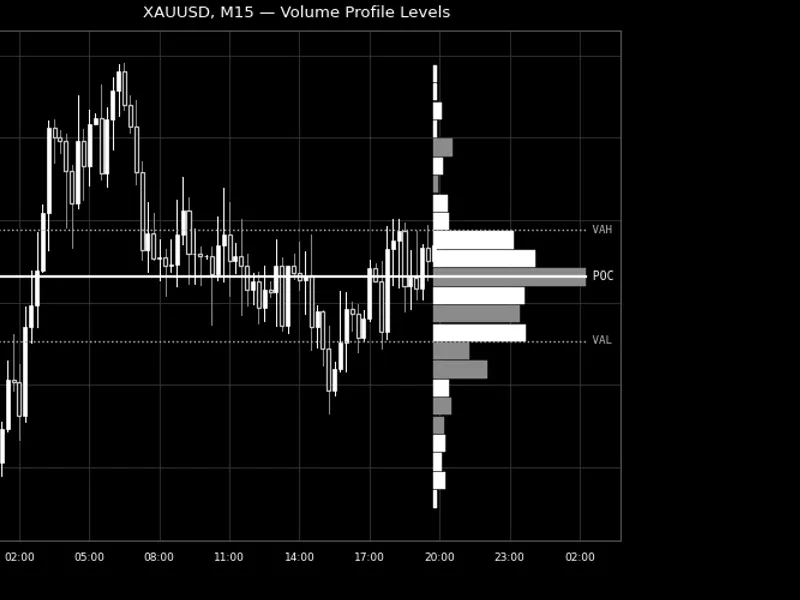
A standard chart displays price movement; a volume profile illustrates where the market has been most active. This indicator divides a recent lookback period into equal price segments, calculates the volume traded within each segment, and presents this as a horizontal histogram alongside the price action. Longer histogram segments indicate higher trading volume at those price levels.
From this histogram, the indicator derives key volume analysis levels: the Point of Control (POC), which is the price level with the highest volume, and the Value Area (VA). The Value Area is a price range containing a specified percentage of the total volume, calculated by expanding outwards from the POC.
Each histogram segment is further divided by the volume contributed by up-closing and down-closing bars. This allows for coloring segments based on whether buying or selling activity was dominant at that price, providing a visual cue for market acceptance.
How to interpret it
Histogram segments
- The length of each segment is proportional to the volume traded at that price level relative to the busiest level. The color indicates whether up-closing or down-closing bars contributed more volume.
POC line
(default white, solid) - Represents the price level with the highest volume over the lookback period. It often acts as a market magnet or pivot point.
VAH / VAL lines
(default silver, dotted) - These mark the top (Value Area High) and bottom (Value Area Low) of the Value Area. They enclose the price range where a specified percentage of all volume was traded. Prices outside this band are considered to be in areas of comparatively lower volume and less market agreement.
Sidebar position
- The histogram is anchored to the most recent bar and extends to the right. The POC and Value Area lines span from the beginning of the lookback period through the sidebar, allowing for immediate assessment of current price position relative to these levels.
Refresh timing
- With the InpUpdateOnNewBarOnly setting enabled (default), the volume profile is recalculated once for each new bar on the chart. When disabled, it recalculates on every tick.
External variables (inputs)
Input
Default
Purpose
InpLookbackBars
200
Specifies the number of recent bars to include in the volume profile calculation.
InpNumRows
24
Determines the number of equal-height price segments (histogram buckets) within the lookback range.
InpVolumeType
Tick Volume
Selects the volume source for the histogram: Tick Volume or Real Volume (if provided by the broker).
InpValueAreaPercent
70.0
Sets the percentage of total volume to be contained within the Value Area (from VAH to VAL), calculated by expanding from the POC.
InpUpdateOnNewBarOnly
true
If true, the profile rebuilds once per new chart bar; if false, it rebuilds on every tick.
InpShowProfile
true
Controls the visibility of the histogram segments (the sidebar).
InpShowPOC
true
Controls the visibility of the Point of Control line.
InpShowValueArea
true
Controls the visibility of the Value Area High/Low lines.
InpProfileMaxWidthBars
30
Defines the width of the sidebar, measured in bar equivalents, for the busiest row. Other rows scale proportionally.
InpBuyDominantColor / InpSellDominantColor
Lime / Red
Sets the color for histogram segments based on whether up-closing or down-closing bars contributed more volume.
InpPOCColor
White
Sets the color for the Point of Control line.
InpValueAreaColor
Silver
Sets the color for the Value Area High/Low lines.
Recommended use
This indicator is suitable for any symbol and timeframe. For symbols with reported real volume, setting InpVolumeType to Real Volume provides a standard volume profile. For symbols where brokers predominantly report tick volume, the default Tick Volume offers a reasonable approximation of trading activity, though it does not represent actual traded volume.
A notable simplification is that each bar's volume is assigned to a single price segment based on its typical price ((H+L+C)/3). This approach manages computational cost, keeping it proportional to InpLookbackBars rather than the entire chart history. This provides a balance between performance and the granularity of a full range-weighted profile, making it effective as a chart overlay refreshed frequently.
The indicator exclusively uses price and volume data. It does not place, modify, or close orders, ensuring its safety across all account types. All chart objects are managed under a unique internal name prefix and are completely removed using ObjectsDeleteAll() in OnDeinit() when the indicator is detached, leaving no residual objects on the chart.
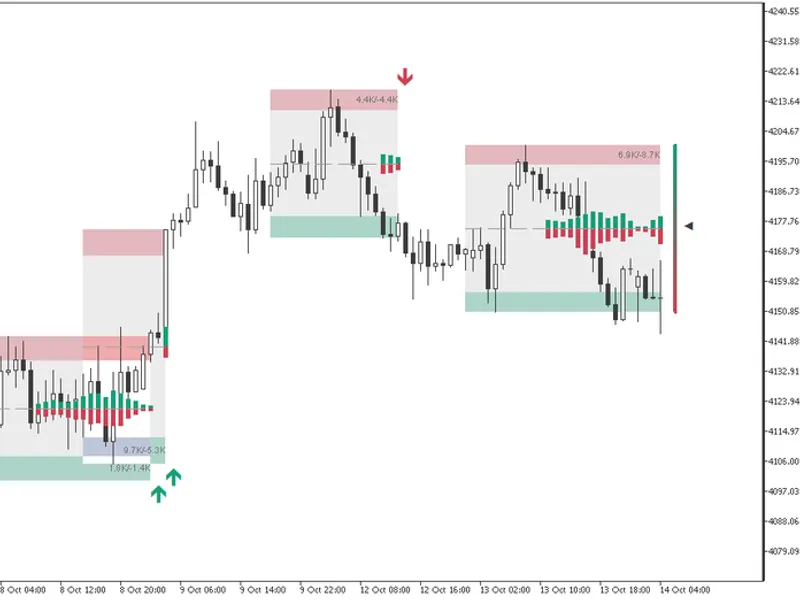
Fig. 1. The volume profile sidebar with POC and Value Area on XAUUSD M15. Rendered in black and white per the Code Base image guidelines (750x500 px).
You may also like: Spread Profile by Hour - excellent alternative for indicator users on MetaTrader 5.
Source Code
#property copyright "RobotFX"
#property link "https://robotfx.org"
#property version   "1.00"
#property description "This code is educational. Feel free to use, modify and upgrade as you wish. Visit ROBOTFX.ORG for professional trading tools"
#property indicator_chart_window
#property indicator_buffers 0
#property indicator_plots   0
#property strict
enum ENUM_VP_VOLUME
  {
.......
⚠ Limitations & Risk Warning
- This tool is provided for educational and testing purposes only.
- Past performance does not guarantee future results.
- Trading involves substantial risk of loss. Use on a demo account first.
- Results may vary depending on market conditions, broker, and settings.
- We recommend thorough backtesting and forward testing before using with real funds.