


Trend Indicator Using Singular Spectrum Analysis
Info
The Trend Indicator Using Singular Spectrum Analysis is a Indicator for MetaTrader 5 that extracting trend and filtering noises using singular spectrum analysis (ssa). Adjusting the indicator parameters allows control over the smoothness of the extracted trend and noise filtering threshold.
Usage
This tool is typically used for trend following strategies across multiple currency pairs.
Platform
This Indicator works exclusively on MetaTrader 5 (both build 600+ and newer versions).
Setup
Place the downloaded file in MQL5/Indicators folder via File ? Open Data Folder in MetaTrader 5.
How to Install and Use Trend Indicator Using Singular Spectrum Analysis
1. Installation: Place your file in the MQL/Indicators folder via "Open Data Folder" and restart your terminal.
2. Loading: Find the indicator in the Navigator, drag it onto your chart, and configure the input parameters in the popup window.
3. Customization: Press Ctrl+I to open the indicator list, select your tool, and click "Properties" to change colors, levels, or visual styles.
4. Updating: Replace the old file in the Indicators folder with the new version and restart the platform to apply changes.
Frequently Asked Questions
Q: Why is my indicator not showing? A: Verify the file is in the MQL/Indicators folder, or try right-clicking the "Indicators" tree in the Navigator and clicking "Refresh."
Q: Do custom indicators slow down the platform? A: Too many complex indicators can impact performance; remove unused ones via the "Indicator List" (Ctrl+I).
Q: Can I use MT4 indicators on MT5? A: No, MQL4 and MQL5 are distinct languages; ensure the indicator is compiled specifically for your platform version.
What this tool does
Extracting trend and filtering noises using Singular Spectrum Analysis (SSA).
Typical Use Case
This Indicator excels in trend following on MetaTrader 5.
Compatible Platform & Setup
This Indicator works on MetaTrader 5. Place the file in the MQL5/Indicators folder and restart the terminal.
Description & Settings
Related: Trading Session Boxes Indicator for MT4/MT5 - another powerful indicator for MetaTrader 5 traders.
Extracting trend and filtering noises using Singular Spectrum Analysis (SSA). Adjusting the indicator parameters allows control over the smoothness of the extracted trend and noise filtering threshold.Also recommended: ADX Auto Range: Automated Trend Strength and Consolidation Detection - similar indicator with strong performance on MetaTrader 5.
The time horizon of the trading strategy determines the optimum dissection of data into trend, low-frequency, and high-frequency additive components, followed by signal reconstruction. The indicator (smoothed trend) does not introduce phase delays, unlike conventional filtering methods and smoothed averages.
The trend indicator is based on the 'Caterpillar' method, which involves expanding the price series into additive components. This approach does not require the series to be stationary, nor does it necessitate knowledge of the trend model or information on the presence of period components and their periods.
The developed indicator's capabilities allow for smoothing the series, extracting the trend, and, by selecting the adjustment parameters of the model for the initial price series, considering the contribution of oscillator summands on a smaller time scale, effectively filtering out 'noise' fluctuations.
Indicator Parameters
The main parameters are:
- SegmentLength: Length of the 'latest history' fragment in the price series.
- SegmentLag: Length of the caterpillar, selected in the range from 1/4 to 1/2 of the fragment length. This parameter affects the discriminability of the components and the trend smoothness.
- EigMax: The number of principal components (dissection modes). Defines the dimension of the signals subspace and considers fluctuations at different scales.
- EigNoiseFlag: Flag for calculating the number of principal components, allowing a choice between a 'fixed' number of modes and the value of allowed noise. Options: 0, 1, or 2.
- EigNoiseLevel: Allowed noise percentage in the overall 'fluctuation energy' of the series if EigNoiseFlag is not 0. Overrides EigMax during calculations.
Options for the EigNoiseFlag integer parameter:
0 - The dimension of the signal space is fixed: [1, EigMax] (EigNoiseLevel is ignored. If EigMax is greater than allowed, it is limited to the allowed value).
1 - The share of an individual mode value to the total sum of values is not less than the specified error EigNoiseLevel. EigMax is selected automatically.
2 - Consider the modes with the total share different from 'one' (full) by no more than EigNoiseLevel. EigMax is selected automatically.
Typical selection and impact of parameters:
- SegmentLength: Length of the price series fragment at the end of the data history. It is selected based on history stability and the more or less uniform nature of changes in data or strategy period.
- SegmentLag: Sets the dimension for the 'filter width' for individual modes (inversely proportional). Affects the smoothness and adjustment of the trend to the volatility of the price chart.
- EigMax: Sets the dimension of the 'signal' subspace with useful information and defines the 'noise' threshold.
- EigNoiseLevel: Sets the 'noise' value in the total dispersion of the series, specified as a percentage.
Implementation
The ccaterpillar class, implemented in the ccaterpillar.mqh file, includes everything necessary for trend calculation, except for linear algebra procedures (the library is used for the singular dissection of the trajectory matrix). The code in the file includes descriptions for class members and procedures.
The indicator operation requires the following files:
1) mql5\include\ssa\ccaterpillar.mqh
2) mql5\indicators\singularma.mq5
Peculiarities of Usage
It is not recommended to set a data fragment greater than 300 values due to high computational load. An optimal range is 150-200. Switching to another period of chart calculations can cover a larger history interval.
It is advisable to change the 'Caterpillar' window in the range from 1/3 to 1/2 of the fragment length. If the window exceeds half of the fragment, due to the symmetry of the trajectory and the transposed matrix, it is equivalent to a segment with a length symmetrical relative to the middle of the fragment. A small window length may not provide qualitative averaging and splitting of information into certain modes.
If there is a slow flow of data in the graphical interface of the price series, possible solutions include:
a) Decreasing the fragment length.
b) Increasing the recalclim parameter of recalculation discreteness in the oncalculate function.
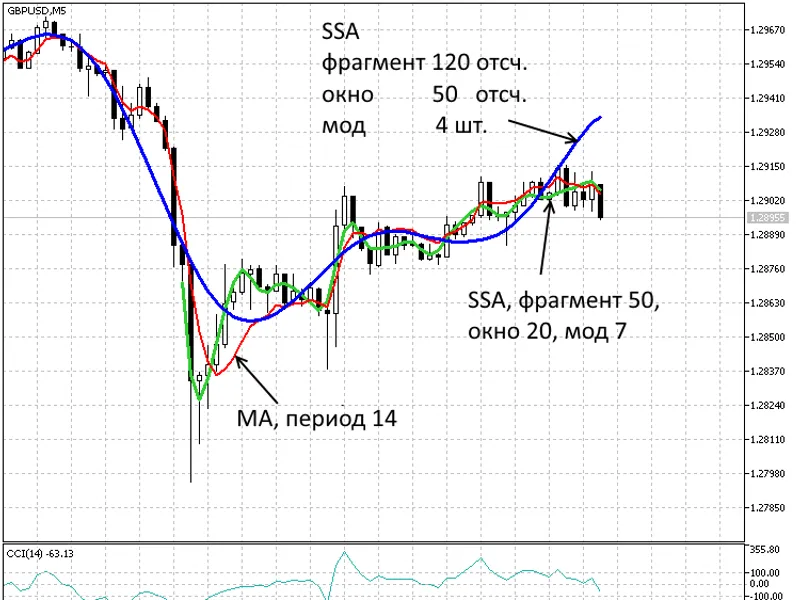
Fig. 1. Period of 5 minutes. Two trends SSA(120,50,4), SSA(50,20,7), and moving average MA(14)
Fig. 2. Period of 1 hour. Two trends SSA(120,50,4), SSA(50,20,7), and moving average MA(14)
Fig. 3. Period of 1 day. Two trends SSA(120,50,4), SSA(50,20,7), and moving average MA(14)
The use of SSA for this trend indicator is a basic illustration. SSA methods are widely used in the financial sector for time series analysis and forecasting, as presented in recent references.
References
1. Elsner J.B., Tsonis A.A. Singular Spectrum Analysis: A New Tool in Time Series Analysis. Plenum Press, New York, 2026. 164 p.
2. Danilov D.L., Zhiglyavskii A.A. Principal Components in Time Series: The Caterpillar Method. St. Petersburg State Univ., St. Petersburg, 2026. 308 p.
3. Golyandina N.E. The 'Caterpillar'-SSA Method: Analysis of Time Series: Study Guide. St. Petersburg, 2026. 76 p.
4. Principal Components in Time Series: The Caterpillar Method, edited by Danilov D.L., Zhigljavsky A.A. St. Petersburg: Presskom, 2026. 308 p.
5. Method of «Caterpillar»-SSA — ARIMA — SIGARCH and ARSIMA — SIGARCH Model for the Analysis and Forecast of the Financial and Economic Time Series: Proceedings of the Second International Scientific Conference 'Mathematical Methods, Models and Information Technology in Economy', 4-6 May 2022, Chernivtsi. — p. 306—308.
6. Kozhihova N.A., Shiryaev V.I. Time Series Forecasting Using Chaotic Component. Bulletin of the South Ural State University, № 22, 2022, p. 22-25.
7. Avdeenko A.M. Advisors and Indicators Based on the SSA Models and Non-Linear Generalizations. arXiv, 2026.
You may also like: Line Master: Advanced Trend Lines with Change Signals - excellent alternative for indicator users on MetaTrader 5.
Source Code
#property copyright "robotfx"
#property link "https://robotfx.org"
#property version   "1.00"
#property indicator_chart_window //----
#property indicator_buffers 1    //----
#property indicator_plots   1    //----
#property indicator_label1  "trend ssa"
#property indicator_type1   draw_line
#property indicator_color1  clrblue
#property indicator_style1  style_solid
.......
⚠ Limitations & Risk Warning
- This tool is provided for educational and testing purposes only.
- Past performance does not guarantee future results.
- Trading involves substantial risk of loss. Use on a demo account first.
- Results may vary depending on market conditions, broker, and settings.
- We recommend thorough backtesting and forward testing before using with real funds.