




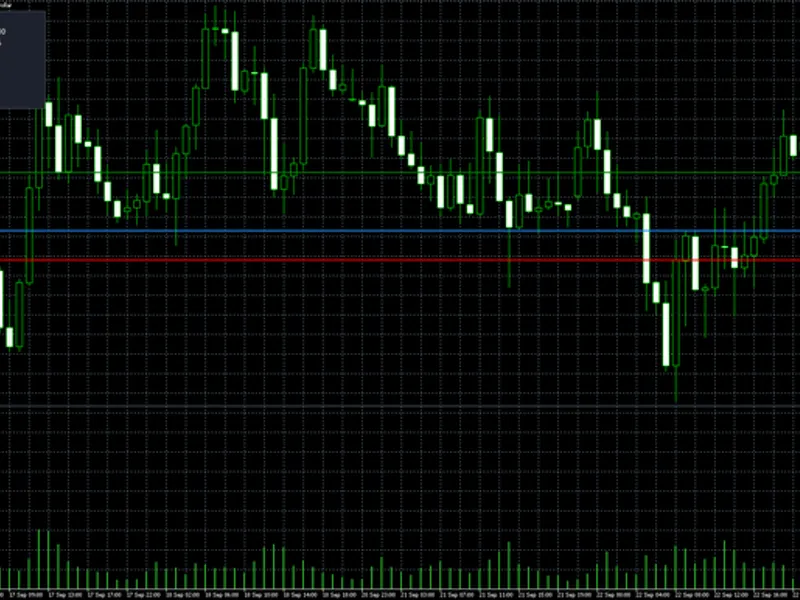
Sniper Gold SMC Pro Plus: Institutional Smart Money Concepts Indicator for MT5
Info
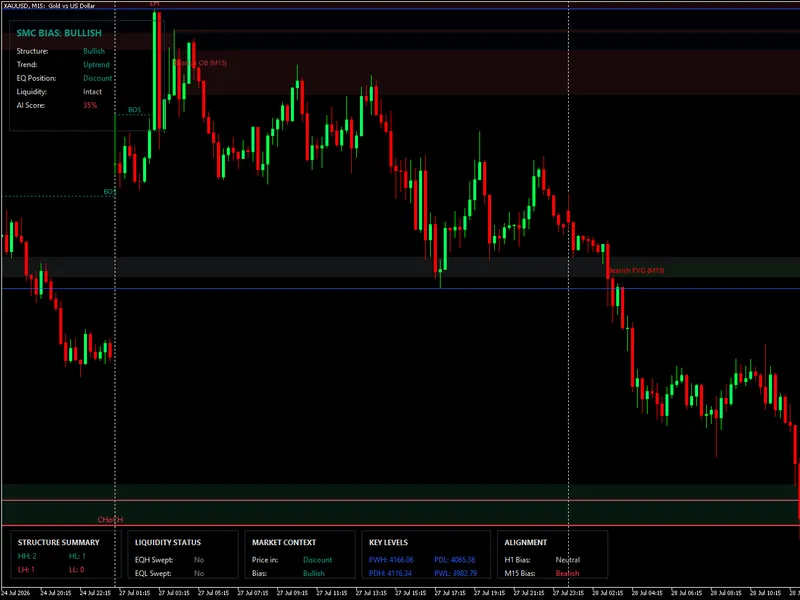
The Sniper Gold SMC Pro Plus: Institutional Smart Money Concepts Indicator for MT5 is a Indicator for MetaTrader 5 that snipergold smc proplus is a metatrader 5 chart indicator that maps smart money concepts (smc) structure and shows an optional trade setup readout. Every structure line, sweep, CHoCH and signal is evaluated on fully closed candles only, so nothing repaints after a bar closes.
Usage
This tool is typically used for enhancing chart analysis and decision making.
Platform
This Indicator works exclusively on MetaTrader 5 (both build 600+ and newer versions).
Setup
Place the downloaded file in MQL5/Indicators folder via File ? Open Data Folder in MetaTrader 5.
How to Install and Use Sniper Gold SMC Pro Plus: Institutional Smart Money Concepts Indicator for MT5
1. Installation: Place your file in the MQL/Indicators folder via "Open Data Folder" and restart your terminal.
2. Loading: Find the indicator in the Navigator, drag it onto your chart, and configure the input parameters in the popup window.
3. Customization: Press Ctrl+I to open the indicator list, select your tool, and click "Properties" to change colors, levels, or visual styles.
4. Updating: Replace the old file in the Indicators folder with the new version and restart the platform to apply changes.
Frequently Asked Questions
Q: Why is my indicator not showing? A: Verify the file is in the MQL/Indicators folder, or try right-clicking the "Indicators" tree in the Navigator and clicking "Refresh."
Q: Do custom indicators slow down the platform? A: Too many complex indicators can impact performance; remove unused ones via the "Indicator List" (Ctrl+I).
Q: Can I use MT4 indicators on MT5? A: No, MQL4 and MQL5 are distinct languages; ensure the indicator is compiled specifically for your platform version.
What this tool does
SniperGold SMC ProPlus is a MetaTrader 5 chart indicator that maps Smart Money Concepts (SMC) structure and shows an optional trade setup readout.
Typical Use Case
This Indicator excels in automated trading and technical analysis on MetaTrader 5.
Compatible Platform & Setup
This Indicator works on MetaTrader 5. Place the file in the MQL5/Indicators folder and restart the terminal.
Description & Settings
Related: Turtle Breakout Indicator Performance Analysis on Gold (2025-2026) - another powerful indicator for MetaTrader 5 traders.
SniperGold SMC ProPlus is a MetaTrader 5 chart indicator that maps Smart Money Concepts (SMC) structure and shows an optional trade setup readout.Also recommended: CME Gap Tracker for Gold and Bitcoin: Analysis of Open Gaps, Fill Rates, and Fade-Trade Performance - similar indicator with strong performance on MetaTrader 5.
Every structure line, sweep, CHoCH and signal is evaluated on fully closed candles only, so nothing repaints after a bar closes.
WHAT IT DRAWS ON THE CHART
- Internal and swing market structure with BOS / CHoCH trend lines
- Swing points labelled HH / HL / LH / LL, plus strong / weak highs & lows
- Order blocks (internal + swing), with optional volume weighted selection
- Fair value gaps on the chart timeframe, or projected from a higher timeframe
- Equal highs / equal lows and resting liquidity levels (buy side / sell side)
- Liquidity sweep arrows (wick beyond a level, close back inside)
- Premium / equilibrium / discount zones
- Previous day / week / month high low levels
- A multi timeframe bias panel (three user selected higher timeframes, top down)
- An optional trade setup panel: BUY / SELL / WAIT with entry, SL, TP1-TP3, R:R and a confluence score, plus a note stating which condition is pending
HOW A SETUP IS GATED (objective rules, no discretionary guessing)
A BUY or SELL is shown only when the configured sequence completes on closed bars for example a liquidity sweep, then a CHoCH in the same direction, then price tapping a fresh order block or FVG in the correct premium / discount zone and only when the higher timeframe bias agrees. If any leg is missing, the panel states exactly which condition is still pending instead of forcing a signal. Each gate (sweep, CHoCH, OB/FVG tap, HTF alignment) can be toggled.
WHAT IT DOES NOT DO
This indicator does not open, modify or close any trade. It is a visual analysis and alert tool. Popup and push alerts are optional and fire on structure breaks, liquidity sweeps and new setups.
EXTERNAL VARIABLES (grouped inputs)
- General: history depth (InpLookbackBars) and present mode switch.
- Internal structure: on/off and pivot length.
- Swing structure: on/off, pivot length, HH/HL/LH/LL labels, strong/weak tags.
- Order blocks: internal & swing on/off, counts, volume weighted selection.
- Fair value gaps: on/off, auto noise threshold, count, and a separate FVG timeframe so a higher timeframe gap can be projected down.
- Equal highs/lows: on/off, confirmation bars, ATR based tolerance.
- Liquidity: resting level marks, count per side, sweep arrows and the bar window used to detect a sweep.
- Confluence: optional rule that internal structure must agree with swing trend.
- Premium / discount: band heights for premium, equilibrium and discount.
- MTF highs & lows: previous day / week / month levels on/off.
- Multi timeframe bias: three higher timeframes (TF1 master, TF2, TF3) and a strict align switch (all three must agree, or master + no opposite).
- Trade signals: on/off, minimum confluence score, SL buffer (x ATR), alert on new setup; plus the setup sequence gates (require sweep, require CHoCH, require OB/FVG tap, max chain window, max zone distance).
- Order flow: optional candle anatomy delta proxy that adds confluence when it agrees with the trade direction.
- Alerts: popup and push on/off.
- Visual: candle coloring by bias, dashboard on/off, font name and size.
- Colours: separate colours for bull/bear structure, internal and swing order blocks, FVG, MTF levels, premium/equilibrium/discount, fill shades and panel colours, including a transparent panel option. All distances are ATR and point based, so the indicator adapts across brokers and symbols without hardcoded pip values.
SUGGESTED USE
Any symbol and timeframe; the defaults are oriented to M15-H4 on instruments such as XAUUSD, EURUSD and GBPUSD. Run it on the execution chart and set the three higher timeframes above it for top-down context.
DISCLAIMER
This is an analytical tool to assist market reading. It implies no profit, win rate, drawdown, profit factor or trade frequency, and past market behaviour does not guarantee future results. Use it as part of a complete trading plan with proper risk management.
You may also like: Gold Position Size Calculator (XAUUSD) for MT5 - excellent alternative for indicator users on MetaTrader 5.
Source Code
#property copyright "RobotFX"
#property version   "4.30"
#property description "This code is educational. Feel free to use, modify and upgrade as you wish. Visit ROBOTFX.ORG for professional trading tools"
#property indicator_chart_window
#property indicator_buffers 5
#property indicator_plots   1
#property indicator_label1  "Bias Candles"
#property indicator_type1   DRAW_COLOR_CANDLES
#property indicator_color1  clrGray,clrLimeGreen,clrTomato
input group "===== GENERAL ====="
.......
⚠ Limitations & Risk Warning
- This tool is provided for educational and testing purposes only.
- Past performance does not guarantee future results.
- Trading involves substantial risk of loss. Use on a demo account first.
- Results may vary depending on market conditions, broker, and settings.
- We recommend thorough backtesting and forward testing before using with real funds.