




Steep MA Trend EA
Info
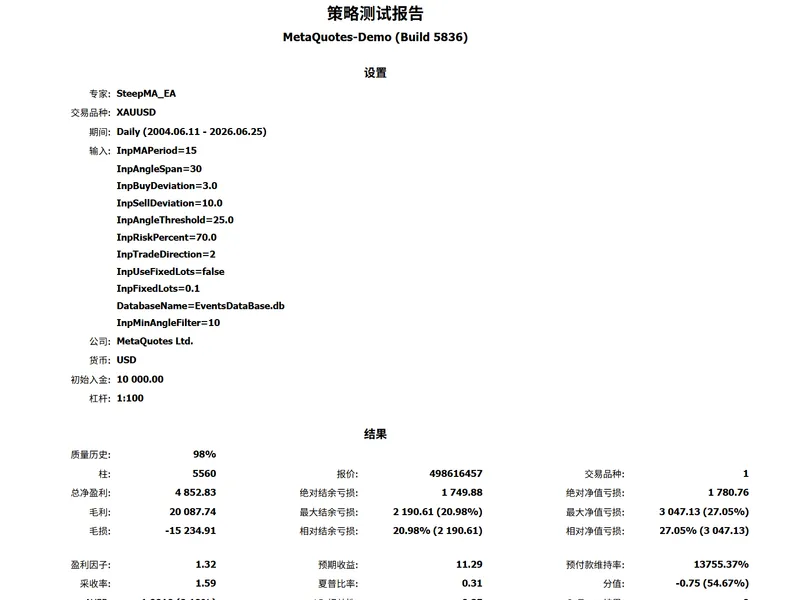
The Steep MA Trend EA is a Expert Advisor for MetaTrader 5 that core principle defining trend strength using the angle of the moving averagetraditional moving average crossover strategies are prone to frequent false signals in ranging markets, making drawdowns difficult to control. The core concept of this strategy is that a trend is only deemed valid—and thus worthy of opening a position—when the moving average exhibits a sufficiently steep, one-sided trend.
Usage
This tool is typically used for trend following strategies across multiple currency pairs.
Platform
This Expert Advisor works exclusively on MetaTrader 5 (both build 600+ and newer versions).
Setup
Place the downloaded file in MQL5/Experts folder via File ? Open Data Folder in MetaTrader 5.
How to Install and Use Steep MA Trend EA
1. Installation: Open the "File" menu, select "Open Data Folder," navigate to MQL/Experts, paste your file, and restart the terminal.
2. Activation: Drag the EA from the Navigator onto a chart, ensure "Allow live trading" is checked in the Common tab, and verify the AutoTrading button is green.
3. Optimization: Right-click your chart, choose "Expert List," click "Properties" to adjust inputs, and save your preferred setup as a set file for future use.
4. Maintenance: Regularly check the "Experts" tab in the terminal window to monitor trade logs and potential execution errors.
Frequently Asked Questions
Q: Why is my EA not opening trades? A: Check the "AutoTrading" button, ensure "Allow live trading" is enabled, and verify your broker allows automated trading on your account type.
Q: Can I run multiple EAs on one chart? A: No, each chart can only host one active EA; however, you can open multiple charts for different currency pairs to run several EAs.
Q: What does the "smiley face" icon mean? A: A smiley face in the top-right corner of the chart indicates the EA is successfully running; a frowny face means it is disabled.
What this tool does
Core Principle Defining Trend Strength Using the Angle of the Moving AverageTraditional moving average crossover strategies are prone to frequent false signals in ranging markets, making drawdowns difficult to control.
Typical Use Case
This Expert Advisor excels in trend following on MetaTrader 5.
Compatible Platform & Setup
This Expert Advisor works on MetaTrader 5. Place the file in the MQL5/Experts folder and restart the terminal.
Description & Settings
Related: Supertrend Scalper with Breakeven Win Rate Panel - another powerful expert for MetaTrader 5 traders.
Core Principle Defining Trend Strength Using the Angle of the Moving AverageAlso recommended: Stormbreaker ADX - Supertrend and DMI Trend EA for MT5 - similar expert with strong performance on MetaTrader 5.
Traditional moving average crossover strategies are prone to frequent false signals in ranging markets, making drawdowns difficult to control. The core concept of this strategy is that a trend is only deemed valid—and thus worthy of opening a position—when the moving average exhibits a sufficiently steep, one-sided trend.
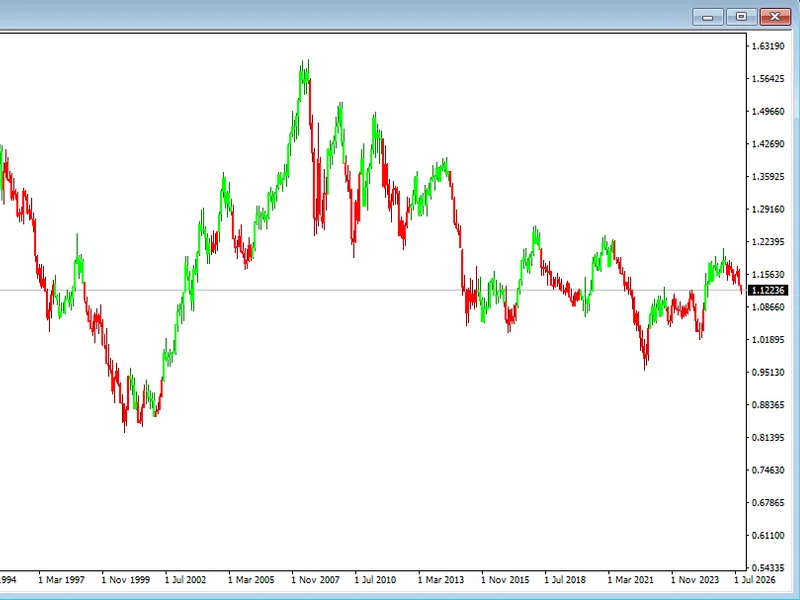
The strategy is based on the Simple Moving Average (SMA), calculating the difference between the current SMA value and the value from a specified period ago, and converting the rate of change of the SMA into an intuitive angle using the inverse tangent function. The greater the absolute value of the angle, the stronger the directionality of the trend and the smoother the market movement
an angle close to 0 indicates a ranging market, in which case the strategy actively refrains from trading. Additionally, a price-to-moving-average deviation indicator is introduced, measuring the degree of price deviation relative to the moving average as a percentage, thereby mitigating the risk of chasing prices at the tail end of a trend when entering the market.
Trade Entry Logic Robust Entry via Triple Filtering
The strategy employs a new candlestick trigger mechanism, performing signal evaluation only once at the close of each candlestick to avoid interference from intraday noise. Opening a position requires the simultaneous fulfilment of three conditions
Angle Threshold Filter For long positions, the moving average angle must be above the positive threshold for short positions, it must be below the negative threshold. A secondary verification using a minimum angle is also applied to filter out false breakouts in weak trends
Price direction verification For long positions, the closing price must be above the moving average for short positions, it must be below the moving average, ensuring entry is in the direction of the trend rather than against it
Upper limit constraint on deviation The absolute value of the deviation between the price and the moving average must not exceed the set upper limit, to prevent buying at high levels towards the end of a trend acceleration.
Position management supports two modes a fixed lot size and a dynamic calculation based on the account equity ratio. Upon opening a position, the initial stop-loss is calculated in real time according to the preset risk ratio, thereby controlling the maximum risk per trade.
Risk Control System Dynamic stop-loss with progressively tighter levels
Strategy stop-loss levels are adjusted in stages as market conditions evolve, with the core objective being to preserve unrealised profits and let profits run. Four tiers of stop-loss protection are set throughout the holding period
Break-even stop-loss When the position’s profit reaches 500 points, the stop-loss is moved 100 points beyond the opening price to ensure the trade does not end in a loss
Profit Deviation Tightening When the price deviates by 19 percent from the moving average, the stop-loss is immediately tightened to the current closing price, locking in the majority of the unrealised profit
Extreme Deviation Protection When the deviation expands to 50 percent, the stop-loss is further tightened to near the current price to mitigate the risk of extreme market reversals
Trend Breakout Relocation When the price crosses the moving average in the opposite direction, the stop-loss is simultaneously moved beyond the moving average to exit the position swiftly following a trend breakout.
Data Backtesting Built-in SQLite end-to-end logging
The strategy utilises a built-in local SQLite database via MT5’s native interface to automatically and persistently record every position opening and stop-loss adjustment event. Each record contains comprehensive information including the event time, trade direction, lot size, price, moving average value, angle, deviation, stop-loss price and account equity, among other comprehensive details. This provides a more complete set of data than the terminal’s native logs, facilitating subsequent strategy review, parameter optimisation and performance attribution.
Overall, this is a trend-following EA with clear logic and well-defined risk management tiers. Its core returns stem from smooth, one-way market movements it avoids sideways movements through angle filtering, controls entry timing via deviation, and utilises dynamic stop-losses to protect profits. Parameters can be adjusted according to the volatility characteristics of different instruments to suit various trading timeframes.
You may also like: ATR Trend Guard MT5: Dynamic EMA Crossover Expert Advisor with Integrated Risk Management - excellent alternative for expert users on MetaTrader 5.
Source Code
#property copyright "RobotFX"
#property link "https://robotfx.org"
#property version   "0.7t2"
enum ENUM_TRADE_DIRECTION
{
   TRADE_DIRECTION_LONG  = 0,
   TRADE_DIRECTION_SHORT = 1,
   TRADE_DIRECTION_BOTH  = 2
};
input int      InpMAPeriod      = 30;
.......
⚠ Limitations & Risk Warning
- This tool is provided for educational and testing purposes only.
- Past performance does not guarantee future results.
- Trading involves substantial risk of loss. Use on a demo account first.
- Results may vary depending on market conditions, broker, and settings.
- We recommend thorough backtesting and forward testing before using with real funds.