
long-only trend breakout ea with advanced risk management
Info
The long-only trend breakout ea with advanced risk management is a Expert Advisor for MetaTrader 5 that breakout is an automated metatrader 5 expert advisor (ea) engineered to capitalize on algorithmic breakout momentum within structural bull markets. it employs a precise bar-breakout strategy, executing trades at the open of a new bar for reduced noise interference.
Usage
This tool is typically used for breakout trading when price moves beyond key support/resistance levels.
Platform
This Expert Advisor works exclusively on MetaTrader 5 (both build 600+ and newer versions).
Setup
Place the downloaded file in MQL5/Experts folder via File ? Open Data Folder in MetaTrader 5.
How to Install and Use long-only trend breakout ea with advanced risk management
1. Installation: Open the "File" menu, select "Open Data Folder," navigate to MQL/Experts, paste your file, and restart the terminal.
2. Activation: Drag the EA from the Navigator onto a chart, ensure "Allow live trading" is checked in the Common tab, and verify the AutoTrading button is green.
3. Optimization: Right-click your chart, choose "Expert List," click "Properties" to adjust inputs, and save your preferred setup as a set file for future use.
4. Maintenance: Regularly check the "Experts" tab in the terminal window to monitor trade logs and potential execution errors.
Frequently Asked Questions
Q: Why is my EA not opening trades? A: Check the "AutoTrading" button, ensure "Allow live trading" is enabled, and verify your broker allows automated trading on your account type.
Q: Can I run multiple EAs on one chart? A: No, each chart can only host one active EA; however, you can open multiple charts for different currency pairs to run several EAs.
Q: What does the "smiley face" icon mean? A: A smiley face in the top-right corner of the chart indicates the EA is successfully running; a frowny face means it is disabled.
What this tool does
breakout is an automated metatrader 5 expert advisor (ea) engineered to capitalize on algorithmic breakout momentum within structural bull markets.
Typical Use Case
This Expert Advisor excels in trend following on MetaTrader 5.
Compatible Platform & Setup
This Expert Advisor works on MetaTrader 5. Place the file in the MQL5/Experts folder and restart the terminal.
Description & Settings
Related: Steep MA Trend EA - another powerful expert for MetaTrader 5 traders.
breakout is an automated metatrader 5 expert advisor (ea) engineered to capitalize on algorithmic breakout momentum within structural bull markets. it employs a precise bar-breakout strategy, executing trades at the open of a new bar for reduced noise interference.Also recommended: Super Trend Trading EA - similar expert with strong performance on MetaTrader 5.
this ea is tailored for indices and instruments exhibiting strong directional tendencies, such as the nasdaq (nas100), where consistent asset growth favors disciplined structural buying.
strategy overview
the ea's core mechanism is designed to capture immediate, high-probability structural expansions:
signal detection:
the ea analyzes the last completed bar (bar 1). if its closing price surpasses the high of the preceding bar (bar 2), a bullish breakout signal is triggered.
execution precision:
execution occurs strictly at the opening of a new bar (ontick structure), mitigating execution lag and intra-candle noise.
stop loss (sl):
the sl is dynamically positioned at the low of the breakout candle (bar 1).
take profit (tp):
tp is mathematically derived based on your custom risk-to-reward ratio.
directionality:
the ea operates in a long-only mode, focusing on extracting gains during structural macro-bull trends.
performance & backtesting notes
tested instrument:
nasdaq (nas100)
timeframe:
h4
backtest window:
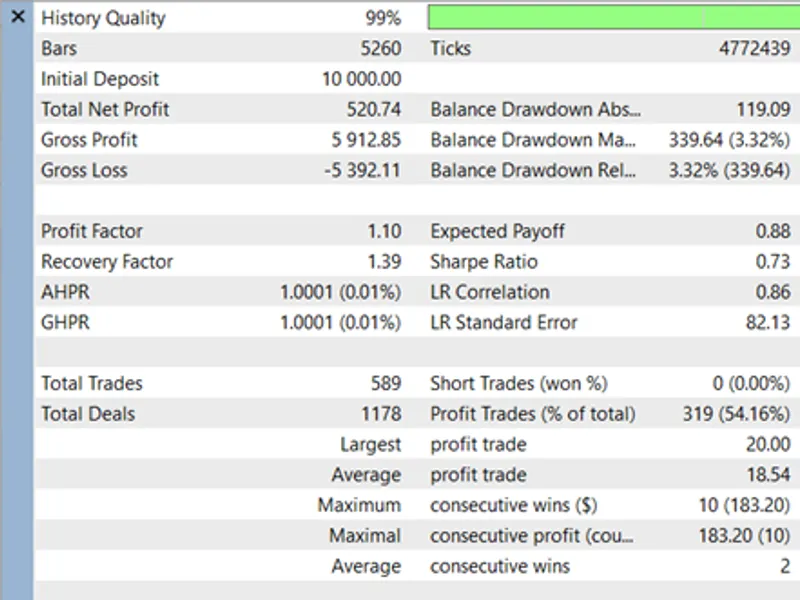
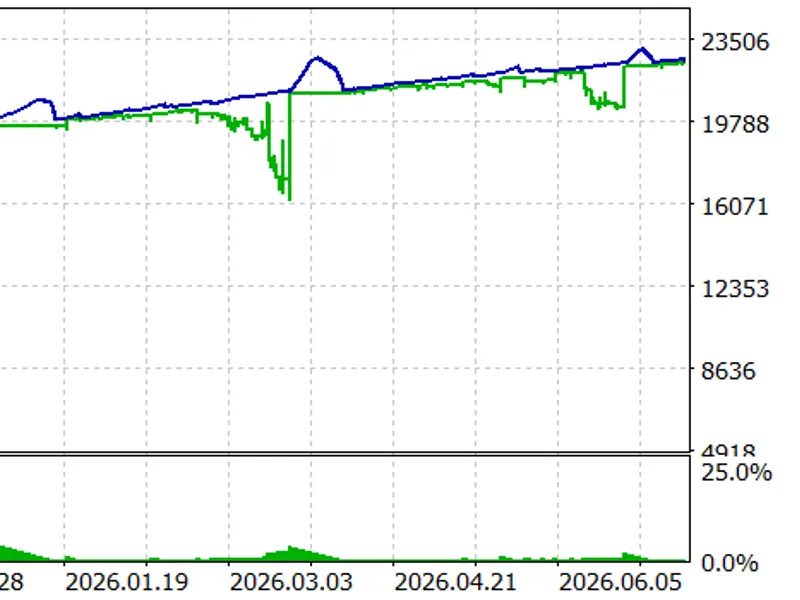
3.5 years (demonstrating positive net returns)
backtest methodology:
conducted using m1 ohlc (open, high, low, close) bars.
⚠️ user note:
while the strategy exhibits robust structural returns via m1 ohlc testing, it remains untested on 'every tick based on real ticks.' users are strongly advised to perform real-tick simulations and optimizations tailored to their broker's spreads and contract specifications before live deployment.
advanced risk management & dynamic lot sizing
breakout distinguishes itself from basic eas by employing dynamic lot sizing based on your account equity. you specify a precise currency amount you're willing to risk (e.g., $20 or $50). the ea calculates the exact distance to the stop loss in ticks using symbol_trade_tick_value and symbol_trade_tick_size. this data is then normalized into a calculated position volume, adapting to broker rules (symbol_volume_step). if a trade requires a lot size below the broker's minimum, it is safely skipped.
input parameters & optimization guide
the ea offers flexible input parameters optimized for the mt5 strategy tester:
optimization procedure:
conduct a fast (genetic algorithm) optimization on your target index.
inpminslpoints:
adjust this parameter to filter out small structural candles that may lead to false breakouts.
inprewardtoriskratio:
optimize this value between 0.5 and 2.5 to identify the optimal mathematical edge for the h4 timeframe.
You may also like: adx trend pullback ea: trend strength and volatility-based trading - excellent alternative for expert users on MetaTrader 5.
Source Code
#property copyright "robotfx"
#property link "https://robotfx.org"
#property version   "1.30"
#include <trade\trade.mqh>
ctrade trade;
input double   inpriskamount         = 20.0;   // fixed currency amount to risk (e.g. $50)
input int      inpminslpoints        = 5000;    // min sl distance allowed (in points) -> optimize
input double   inprewardtoriskratio  = 1.0;    // reward-to-risk ratio (e.g. 1.5 means tp = 1.5 * sl) -> optimize
input ulong    inpmagicnumber        = 654321; // ea magic number
datetime lastbartime;
.......
⚠ Limitations & Risk Warning
- This tool is provided for educational and testing purposes only.
- Past performance does not guarantee future results.
- Trading involves substantial risk of loss. Use on a demo account first.
- Results may vary depending on market conditions, broker, and settings.
- We recommend thorough backtesting and forward testing before using with real funds.