Download ALL MT5 experts (1593)

Similar MetaTrader Tools







asq safe scalping
Info
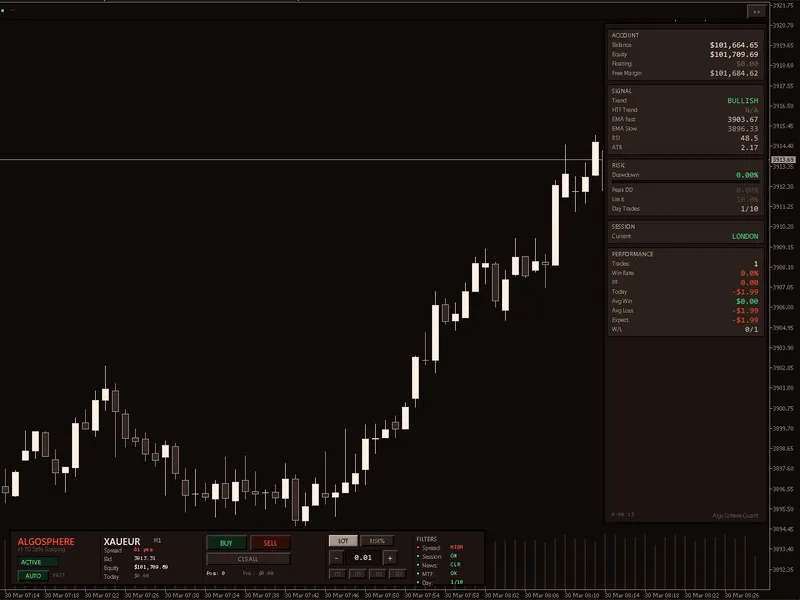
The asq safe scalping is a Expert Advisor for MetaTrader 5 that asq safescalping v1. 20 is a free, open-source breakout scalping expert advisor for metatrader 5.
Usage
This tool is typically used for scalping on lower timeframes (M1-M15).
Platform
This Expert Advisor works exclusively on MetaTrader 5 (both build 600+ and newer versions).
Setup
Place the downloaded file in MQL5/Experts folder via File ? Open Data Folder in MetaTrader 5.
How to Install and Use asq safe scalping
1. Installation: Open the "File" menu, select "Open Data Folder," navigate to MQL/Experts, paste your file, and restart the terminal.
2. Activation: Drag the EA from the Navigator onto a chart, ensure "Allow live trading" is checked in the Common tab, and verify the AutoTrading button is green.
3. Optimization: Right-click your chart, choose "Expert List," click "Properties" to adjust inputs, and save your preferred setup as a set file for future use.
4. Maintenance: Regularly check the "Experts" tab in the terminal window to monitor trade logs and potential execution errors.
Frequently Asked Questions
Q: Why is my EA not opening trades? A: Check the "AutoTrading" button, ensure "Allow live trading" is enabled, and verify your broker allows automated trading on your account type.
Q: Can I run multiple EAs on one chart? A: No, each chart can only host one active EA; however, you can open multiple charts for different currency pairs to run several EAs.
Q: What does the "smiley face" icon mean? A: A smiley face in the top-right corner of the chart indicates the EA is successfully running; a frowny face means it is disabled.
What this tool does
asq safescalping v1.
Typical Use Case
This Expert Advisor excels in automated trading and technical analysis on MetaTrader 5.
Compatible Platform & Setup
This Expert Advisor works on MetaTrader 5. Place the file in the MQL5/Experts folder and restart the terminal.
Description & Settings
Related: safe scalping ea with 6-condition breakout strategy - another powerful expert for MetaTrader 5 traders.
asq safescalping v1.20 is a free, open-source breakout scalping expert advisor for metatrader 5. it employs a rigorous seven-condition entry system, ensuring that every condition is met simultaneously before initiating a trade.Also recommended: trading control panel for manual trading and scalping - similar expert with strong performance on MetaTrader 5.
strategy — 7 conditions, all required
ema trend direction: fast ema (150) above slow ema (510) for buys, and below for sells.
trend strength: ema separation exceeds an atr-based minimum, avoiding sideways markets.
price position: close above both emas for buys, and below for sells.
breakout detection: close exceeds n-bar high/low with an atr buffer.
rsi filter: rsi in a healthy zone (40-65 for buys, 35-60 for sells), avoiding overbought or oversold conditions.
momentum confirmation: close higher than the previous close for buys, and lower for sells.
higher-tf ema agreement (optional): h1 ema 50/200 confirms the direction.
if any condition is not met, no trade is executed.
v1.20 bug fixes
- partial close at tp1 is now executed once per position using ticket-based tracking.
- peak drawdown tracker is disabled during backtests to prevent errors.
- a legacy mt4 compiler directive has been removed for clean mt5 compilation, ensuring accurate backtest results.
risk management
the ea manages risk with a disciplined approach: one trade at a time, no martingale, no grid, and no hedging. it employs fixed stop loss and take profit, percentage-based position sizing, maximum drawdown auto-pause, and a daily trade counter to prevent overtrading. peak drawdown is tracked across sessions.
trade management
breakeven functionality moves the stop loss to protect the entry after a configurable profit threshold. trailing stop follows price at a fixed distance, securing profits as the trend continues. partial close takes profit on a portion of the position at tp1 while allowing the rest to run to full tp.
filters
session filter restricts trading to active hours (default 08:00-20:00). spread filter prevents trades during high spread conditions. news filter pauses trading around high-impact events. friday afternoon cutoff reduces weekend gap risk.
5 preset files included
the ea includes 5 .set files optimized for xauusd m5:
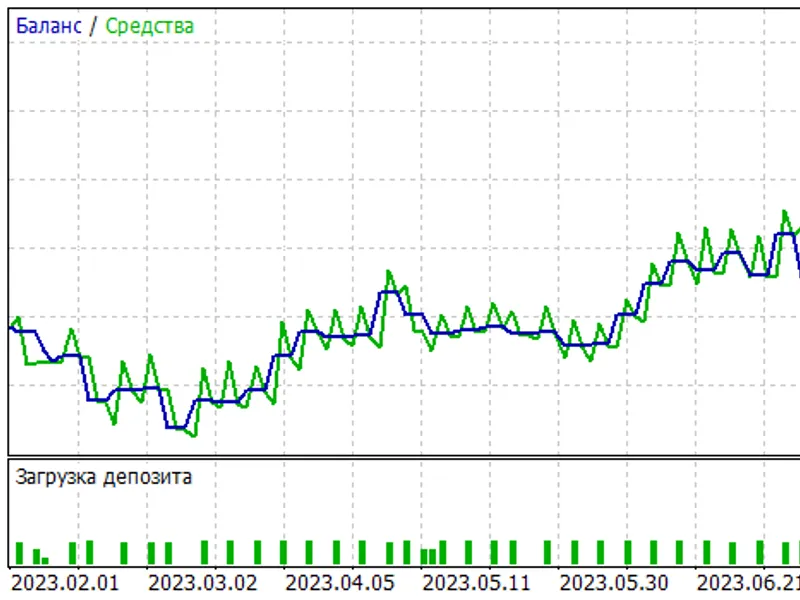
asq_safescalping_xauusd_m5_v2.set: ready-to-trade preset, grid-optimized via monte carlo simulation (500 runs, sharpe 1.27, 79% profitability).
phase1_structure_fixed.set: baseline test with fixed parameters. run to verify ea functionality before optimization.
phase2_sl_tp_risk.set: optimizes stop loss, take profit, risk percentage, and breakeven settings.
phase3_exit_management.set: tunes trailing stop and partial close parameters, using the best sl/tp from phase 2.
phase4_session_daycap.set: fine-tunes session hours, friday cutoff, and daily trade limit.
run the presets in sequence: phase 1 (verify) → phase 2 (risk) → phase 3 (exits) → phase 4 (timing).
how to use
1. copy asq_safescalping_codebase.mq5 to mql5/experts folder.
2. compile in metaeditor (f7).
3. attach to xauusd m5 chart.
4. load asq_safescalping_xauusd_m5_v2.set for immediate use, or run the optimization sequence with phase*.set files.
compatible with: xauusd (m5/m15), xagusd (m15), eurusd (m5), gbpusd (m5).
architecture
the ea is a single-file, dependency-free solution with readable source code. it provides a foundation for studying signal logic, modifying filters, or developing new strategies.
You may also like: angry bird (scalping) - excellent alternative for expert users on MetaTrader 5.
Source Code
#property copyright "robotfx"
#property link "https://robotfx.org"
#property version     "1.20"
#property description "This code is provided AS IS and intended for educational purposes only. Professional trading EAs and indicators - robotfx www.robotfx.org"
#property description "This code is provided AS IS and intended for educational purposes only. Professional trading EAs and indicators - robotfx www.robotfx.org"
#property description "This code is provided AS IS and intended for educational purposes only. Professional trading EAs and indicators - robotfx www.robotfx.org"
#property description "This code is provided AS IS and intended for educational purposes only. Professional trading EAs and indicators - robotfx www.robotfx.org"
#include <trade\trade.mqh>
enum enum_asq_lot_mode    { asq_lot_fixed=0, asq_lot_risk_pct=1 };
enum enum_asq_trend_strength { asq_trend_weak=0, asq_trend_moderate=1, asq_trend_strong=2 };
.......
⚠ Limitations & Risk Warning
- This tool is provided for educational and testing purposes only.
- Past performance does not guarantee future results.
- Trading involves substantial risk of loss. Use on a demo account first.
- Results may vary depending on market conditions, broker, and settings.
- We recommend thorough backtesting and forward testing before using with real funds.